Image2Studio

Prompt category

AI Ad Image Prompts for Social Campaigns

Generate social ad image prompts for product launches, paid media creatives, creator posts, and platform-ready campaign visuals.

AI ad image promptssocial media ad promptAI advertising prompt

Prompt structure

Audience and offer, Visual hook, Product or message, Platform ratio, Text-safe area are the core details to include. A strong prompt tells GPT Image 2 what the image is for, what should be visible, and how the output should be composed.

Search intent

This page targets users looking for AI ad image prompts and social media ad prompt. It pairs examples with copyable prompt text and a direct route into the Image2Studio workbench.

Best used for

  • Paid social ads
  • Launch graphics
  • Creator posts
  • Campaign variants

Prompt structure

  • Audience and offer
  • Visual hook
  • Product or message
  • Platform ratio
  • Text-safe area

Prompt examples

Copy-ready examples

Browse all prompts
Copy this GPT Image 2 prompt for social media post and logo branding with Photorealistic, Minimal styling. Use it in Image2Studio to generate, edit, and.
Photography

日本新闻广播模拟

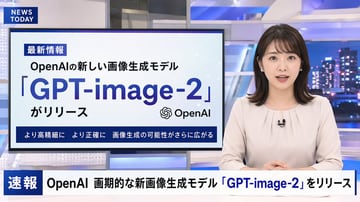
A photorealistic television news broadcast scene featuring a {argument name="anchor appearance" default="young Japanese female with shoulder-length dark hair wearing a light beige blouse"} and a small black lapel microphone, sitting at a news desk and speaking directly to the camera. The studio background is modern with blue and white lighting and a blurred nighttime city skyline on the right. In the top left corner, there is a dark blue graphic with the white text "{argument name="channel logo text" default="NEWS TODAY"}". To the anchor's left is a large presentation monitor displaying a news graphic with a white background and light blue network nodes. The monitor features a dark blue "最新情報" tag, the text "{argument name="subheadline" default="OpenAIの新しい画像生成モデル"}", a large prominent headline "{argument name="main headline" default="「GPT-image-2」"}", the text "がリリース", an OpenAI logo, and a dark blue bottom banner reading "より高精細に より正確に 画像生成の可能性がさらに広がる". Across the bottom of the entire screen is a news ticker lower third with a dark blue "速報" box and the scrolling text "{argument name="ticker text" default="OpenAI 画期的な新画像生成モデル「GPT-image-2」をリリース"}".

Copy this GPT Image 2 prompt for social media post and character design with Photorealistic, Cinematic, Editorial styling. Use it in Image2Studio to.
Photography

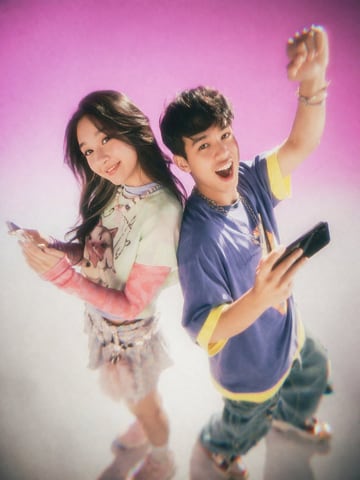
Y2K 青少年杂志风格摄影棚肖像

A studio portrait of two young East Asian adults standing back-to-back against a {argument name="background color" default="bright pink to white gradient"} backdrop. The photo features a {argument name="photography style" default="Y2K nostalgic 90s teen magazine aesthetic with soft focus, film grain, and a glowing bloom effect"}. On the left, a young woman with long dark hair smiles gently at the camera. She wears a layered outfit featuring a {argument name="woman's outfit" default="light green graphic t-shirt over pink long sleeves, a short skirt, and chunky sneakers"}, and holds a smartphone in her hand. On the right, a young man with short dark hair looks {argument name="man's expression" default="excited with his mouth open"}, raising one fist in the air. He wears a {argument name="man's outfit" default="baggy purple t-shirt with yellow trim, loose blue jeans, and a silver chain necklace"}, and also holds a smartphone. The camera angle is slightly high, looking down at the subjects.

Copy this GPT Image 2 prompt for social media post and character design with Cinematic, Anime, Watercolor styling. Use it in Image2Studio to generate,.
Portrait selfie

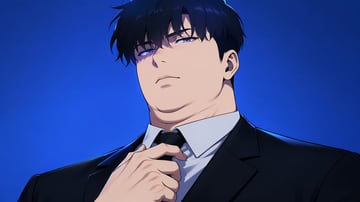
韩漫风格老板肖像

An anime manhwa style illustration of a heavily built, chubby man with a thick neck and a double chin, looking down at the viewer with an intense, arrogant expression. He has messy {argument name="hair color" default="black"} hair and glowing {argument name="eye color" default="piercing blue"} eyes. He is wearing a crisp white dress shirt under a {argument name="suit color" default="black"} suit jacket, and his right hand is reaching up to adjust his black tie. The lighting is dramatic with sharp shadows, set against a solid {argument name="background color" default="vibrant blue"} gradient background.

Copy this GPT Image 2 prompt for social media post and ui mockups with Photorealistic styling. Use it in Image2Studio to generate, edit, and save.
Photography

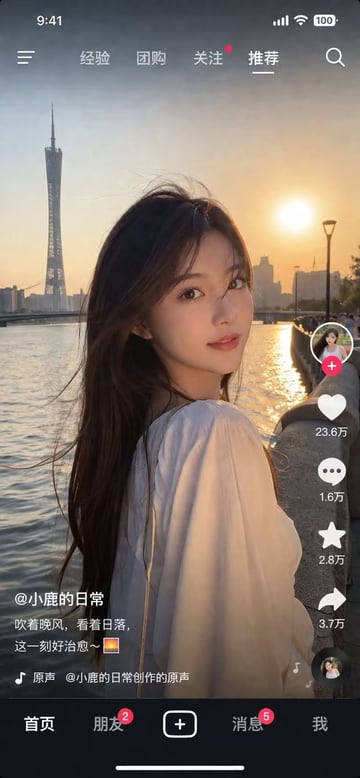
社交媒体视频 App UI 模型

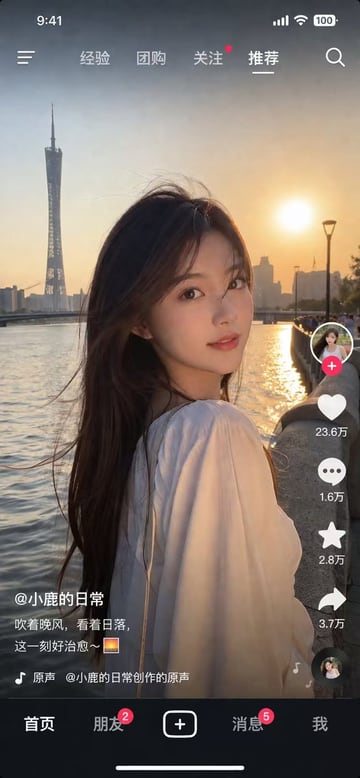
{ "type": "social media short video app interface mockup", "main_image": { "subject": "{argument name=\"subject description\" default=\"young Asian woman with long dark hair wearing a white off-the-shoulder top\"}", "pose": "looking back over her shoulder at the camera, gentle smile, hair blowing slightly in the wind", "setting": "{argument name=\"background location\" default=\"riverside promenade at sunset with a tall modern tower and city skyline\"}", "lighting": "golden hour, warm sunlight reflecting on the river" }, "ui_layout": { "top_bar": { "status_icons": ["time 9:41", "cellular signal", "wifi", "battery 100"], "navigation": { "left": "menu icon", "center_tabs": ["经验", "团购", "关注", "{argument name=\"active top tab\" default=\"推荐\"}"], "right": "search icon" } }, "right_sidebar": { "count": 6, "elements": [ "profile picture with pink plus button", "heart icon with text '23.6万'", "chat bubble icon with text '1.6万'", "star icon with text '2.8万'", "share arrow icon with text '3.7万'", "spinning music record icon" ] }, "bottom_left_overlay": { "username": "{argument name=\"username\" default=\"@小鹿的日常\"}", "caption": "{argument name=\"caption text\" default=\"吹着晚风,看着日落,这一刻好治愈~ 🌅\"}", "audio_track": "🎵 原声 @小鹿的日常创作的原声" }, "bottom_navigation_bar": { "count": 5, "tabs": [ "首页", "朋友 (with red badge '2')", "central plus button in rounded square", "消息 (with red badge '5')", "我" ] } } }

Copy this GPT Image 2 prompt for social media post and character design with Photorealistic styling. Use it in Image2Studio to generate, edit, and save.
Photography

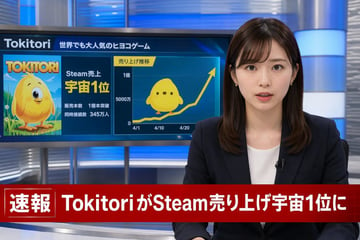
日本突发新闻播报生成器

A photorealistic television news broadcast scene. On the right, a young Japanese female news anchor with shoulder-length dark brown hair and bangs looks directly at the camera with a professional expression. She wears a dark navy blazer over a white top, small earrings, and a lavalier microphone. The studio background features modern blue and silver illuminated panels. On the left, a large monitor displays a news graphic. The top of the monitor reads "{argument name="game name" default="Tokitori"}" followed by "{argument name="monitor top text" default="世界でも大人気のヒヨコゲーム"}". The left side of the monitor shows game cover art featuring a {argument name="character description" default="round, yellow chick character with big eyes"} on a green field, with the title "{argument name="game name" default="Tokitori"}" and text reading "{argument name="monitor achievement text" default="Steam売上 宇宙1位"}", "販売本数 1億本突破", and "同時接続数 345万人". The right side of the monitor displays a line graph titled "売り上げ推移" with an upward-trending yellow arrow, y-axis labels "0", "5000万", and "1億", and 3 x-axis dates "4/1", "4/10", and "4/20". A flat 2D version of the yellow chick sits on the graph line. Across the bottom of the screen is a prominent red lower-thirds breaking news banner. The left side of the banner has a box reading "速報" and the main text reads "{argument name="breaking news headline" default="TokitoriがSteam売り上げ宇宙1位に"}".

Copy this GPT Image 2 prompt for social media post and character design with Photorealistic styling. Use it in Image2Studio to generate, edit, and save.
Photography

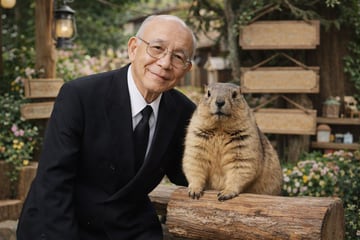
老人与土拨鼠肖像

A photorealistic portrait of an {argument name="man description" default="elderly Asian man with thin wire-rimmed glasses"} wearing a {argument name="man attire" default="black double-breasted suit with a white shirt and black tie"}. He has a gentle, warm smile and is standing closely next to a {argument name="animal" default="large fluffy marmot"}. The animal is standing upright, resting its front paws on a textured wooden log. The background features a {argument name="setting" default="rustic outdoor garden with blank wooden signs, a vintage lantern on a post, lush greenery, and small colorful flowers"}. The image features {argument name="lighting and style" default="soft natural lighting, high-quality photographic details, and a shallow depth of field creating a smooth bokeh effect in the background"}.

Copy this GPT Image 2 prompt for social media post and youtube thumbnails with Photorealistic, Cyberpunk styling. Use it in Image2Studio to generate,.
Photography

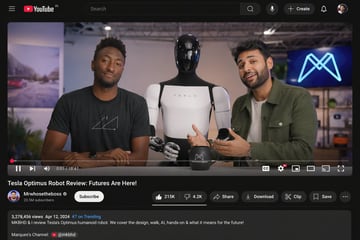
YouTube 视频界面模型

{ "type": "desktop video platform UI mockup", "theme": "dark mode", "header": { "logo": "YouTube IN", "search_bar": "centered, with magnifying glass icon", "right_icons": { "count": 4, "items": ["microphone", "+ Create button", "notifications bell", "user profile picture"] } }, "video_player": { "scene": "Studio setting with two tech reviewers at a desk.", "subjects": [ "{argument name=\"left person\" default=\"Marques Brownlee (MKBHD)\"} in black t-shirt", "{argument name=\"right person\" default=\"Arun Maini (Mrwhosetheboss)\"} in green overshirt", "{argument name=\"robot model\" default=\"Tesla Optimus humanoid robot\"} standing between them" ], "props": ["black mug with logo", "background screen with glowing blue neon M logo"], "controls_bar": { "progress_bar": "red, near the beginning", "timestamp": "0:01 / 18:47", "left_icons": { "count": 3, "items": ["play/pause", "next track", "volume"] }, "right_icons": { "count": 6, "items": ["CC", "settings with 4K badge", "miniplayer", "theater mode", "cast", "fullscreen"] } } }, "video_details": { "title": "{argument name=\"video title\" default=\"Tesla Optimus Robot Review: Futures Are Here!\"}", "channel_info": { "name": "{argument name=\"channel name\" default=\"Mrwhosetheboss\"}", "badges": ["verified checkmark"], "subscribers": "20.5M subscribers", "button": "white Subscribe button" }, "action_buttons": { "count": 6, "items": ["Like (215K) / Dislike (4.2K) pill", "Share", "Download", "Clip", "Save", "More (...)"] } }, "description_box": { "metadata": "3,278,456 views Apr 12, 2024 #7 on Trending", "text": "MKBHD & I review Tesla's Optimus humanoid robot. We cover the design, walk, AI, hands-on & what it means for the future!", "links": ["Marques's Channel: @mkbhd"] } }
Copy this GPT Image 2 prompt for social media post and social ads with Watercolor styling. Use it in Image2Studio to generate, edit, and save.
Social post

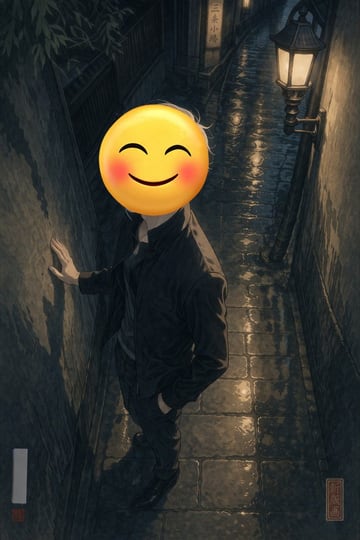
雨夜巷弄中的表情包人物

A full-body portrait of a person standing in a {argument name="setting" default="narrow wet cobblestone alleyway at night"}. The person is wearing a {argument name="clothing" default="dark jacket and dark trousers"}, with one hand resting against the rough, textured wall on the left and the other hand casually tucked into their pocket. Their face is completely obscured by a {argument name="face replacement" default="large yellow smiling emoji with blushing cheeks"}. The scene is illuminated by a single vintage street lamp mounted on the right wall, casting warm yellow light that reflects beautifully off the wet paving stones, creating deep, moody shadows. In the background, a small illuminated sign reads "{argument name="background sign text" default="三条小路"}". The artwork is a {argument name="art style" default="modern digital illustration with high contrast lighting and subtle shin-hanga influences"}, featuring a red square seal in the bottom right corner with the text "新版画" and a blank white vertical signature box with a tiny red seal in the bottom left.

Copy this GPT Image 2 prompt for social media post and social ads with Photorealistic styling. Use it in Image2Studio to generate, edit, and save.
Photography

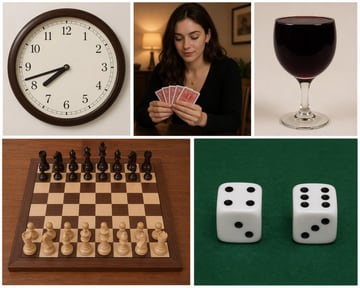
五面板基准测试挑战

Create an image consisting of {argument name="panel count" default="five"} sub-images, each with a different style: 1) An analogue clock showing {argument name="time" default="7:42"}. 2) A woman holding cards in her hands. 3) A glass of wine filled to the brim. 4) Real photography of a physical chessboard, fully visible, with all the pieces in their standard starting positions. 5) Two dice, with the numbers clearly visible.

Copy this GPT Image 2 prompt for social media post and social ads with Photorealistic, Cyberpunk styling. Use it in Image2Studio to generate, edit, and.
Photography

照片级写实风格霓虹东京街景

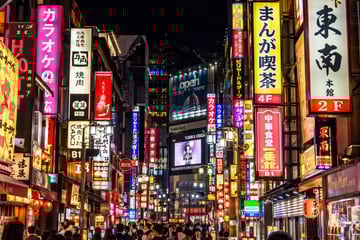
A photorealistic night street photography shot of a bustling {argument name="city location" default="Tokyo"} street, heavily illuminated by densely packed vertical neon signs and billboards. On the left, a bright pink sign prominently reads "{argument name="pink sign text" default="カラオケ"}" next to a white sign reading "牛角 焼肉". On the right, prominent signs include a yellow one reading "{argument name="yellow sign text" default="まんが喫茶 4F"}", a white one reading "東南 本館 2F", and a red one reading "{argument name="red sign text" default="中華食堂 一番館 B1"}". In the center distance, a large blue billboard displays "{argument name="billboard text" default="open TOKYO"}" above a digital screen showing a person with the text "YUNIKA VISION". The street level is crowded with the backs of pedestrians' heads walking through the vibrant, glowing urban canyon. The lighting is high contrast with rich neon colors reflecting off the surroundings.

Copy this GPT Image 2 prompt for social media post and character design with Photorealistic styling. Use it in Image2Studio to generate, edit, and save.
Photography

逼真的英雄联盟 Cosplay

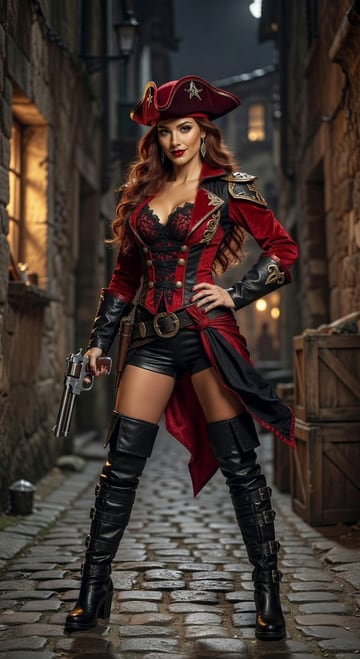
英雄联盟Cosplayer,这次Cos的对象是{argument name="角色" default="MF赏金猎人莎拉"}。{argument name="面部特征" default="法国女人脸蛋"}。比例{argument name="比例" default="9:16"}

Copy this GPT Image 2 prompt for social media post and social ads with Photorealistic styling. Use it in Image2Studio to generate, edit, and save.
Photography

逼真的手写学习笔记

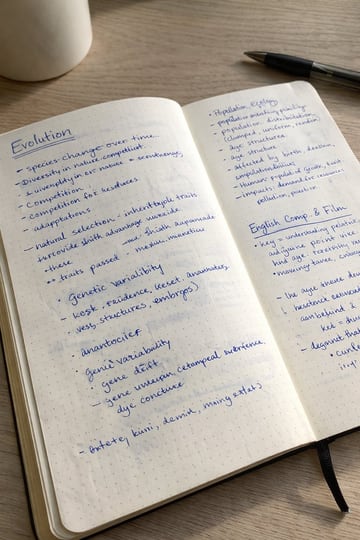
A realistic photo of an open dotted notebook lying flat, filled with dense handwritten notes in {argument name="ink color" default="blue"} ballpoint pen. The handwriting is casual and slightly messy, like study notes, natural imperfections, crossed out words, underlined headings. Shot from slightly above, natural daylight from a window, no flash. {argument name="setting" default="Casual desk setting"}, shot on iPhone.

Copy this GPT Image 2 prompt for social media post and ui mockups with Photorealistic styling. Use it in Image2Studio to generate, edit, and save.
Photography

社交媒体应用界面模型

{ "type": "social media video app interface screenshot", "main_visual": { "subject": "young Asian woman, long dark hair blowing in wind, white top, looking over shoulder at camera", "setting": "{argument name=\"background location\" default=\"Guangzhou Canton Tower by the river at sunset\"}", "lighting": "golden hour, warm sunset glow" }, "ui_layout": { "top_status_bar": { "elements": 4, "labels": ["9:41", "signal", "wifi", "100 battery"] }, "top_navigation": { "elements": 6, "labels": ["menu icon", "经验", "团购", "关注", "{argument name=\"active tab\" default=\"推荐\"}", "search icon"] }, "right_interaction_bar": { "elements": 6, "labels": ["profile photo with red plus", "heart icon with {argument name=\"like count\" default=\"23.6万\"}", "comment icon with 1.6万", "star icon with 2.8万", "share icon with 3.7万", "spinning music record"] }, "bottom_left_text": { "elements": 3, "labels": ["{argument name=\"username\" default=\"@小鹿的日常\"}", "{argument name=\"caption\" default=\"吹着晚风,看着日落,这一刻好治愈~ 🌅\"}", "music note icon with 原声 @小鹿的日常创作的原声"] }, "bottom_navigation": { "elements": 5, "labels": ["首页", "朋友 with red badge 2", "square plus button", "消息 with red badge 5", "我"] } } }

Copy this GPT Image 2 prompt for social media post and social ads with Photorealistic styling. Use it in Image2Studio to generate, edit, and save.
Photography

超写实变色龙微距摄影

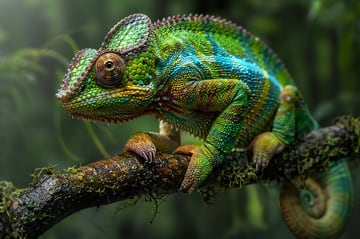
A {argument name="photography style" default="hyper-realistic macro photograph"} of a vibrant {argument name="animal" default="chameleon"} resting on a {argument name="setting" default="mossy branch in a lush jungle"}. The reptile features intricate, textured scales in shades of {argument name="primary colors" default="bright green, electric blue, and warm yellow"}, with a prominent, highly detailed eye. Its clawed feet tightly grip the wet, textured wood, and its tail is curled beneath. The background is a smooth, out-of-focus bokeh of deep green foliage, highlighting the sharp focus and vivid colors of the subject.

Copy this GPT Image 2 prompt for social media post and social ads with Photorealistic styling. Use it in Image2Studio to generate, edit, and save.
Photography

Y2K 复古科技风青年肖像

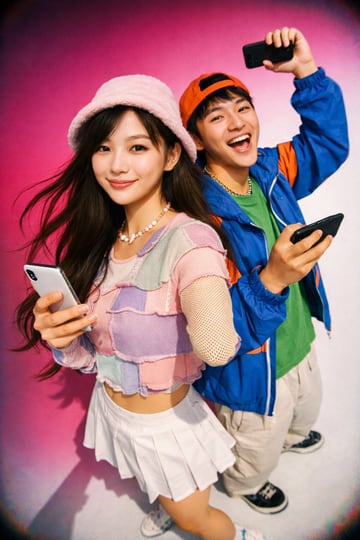
A vibrant, high-contrast Y2K fashion photography shot of two young East Asian adults. In the foreground, a young woman smiles softly at the camera, wearing a {argument name="female headwear" default="fuzzy pink bucket hat"}, a pastel patchwork crop top, a white pleated mini skirt, and a beaded necklace, while holding a white smartphone. Her long dark hair is blowing slightly. Behind her to the right, a young man laughs excitedly with his mouth open, wearing a {argument name="male headwear" default="backward orange baseball cap"}, a bright blue windbreaker over a green t-shirt, light khaki pants, and a silver chain. He is holding two black smartphones, one in each hand, with one raised high in the air. The image features bright flash lighting, a slight wide-angle lens distortion, and a smooth gradient background transitioning from {argument name="background color" default="hot pink"} to white.

Copy this GPT Image 2 prompt for social media post and social ads. Use it in Image2Studio to generate, edit, and save production-ready images.
Social Ads

第一人称奇幻 RPG 游戏截图

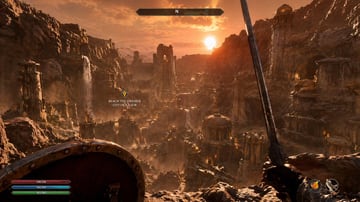
{ "type": "first-person RPG video game screenshot", "scene": { "environment": "{argument name=\"city style\" default=\"ancient ruined Dwemer city in a deep rocky canyon\"}", "lighting": "{argument name=\"lighting and atmosphere\" default=\"golden hour sunset, hazy, warm orange glow, dusty atmosphere\"}", "details": "cascading waterfalls, towering stone pillars, domed structures with brass accents, rugged cliffs" }, "first_person_view": { "left_hand": "{argument name=\"left hand equipment\" default=\"round wooden and metal shield\"}", "right_hand": "{argument name=\"right hand equipment\" default=\"long steel sword\"}" }, "ui_overlay": { "count": 4, "components": [ { "position": "top center", "description": "horizontal compass bar with 'N' and a marker" }, { "position": "middle left", "description": "floating quest marker with text", "text": "{argument name=\"quest objective\" default=\"REACH THE DWEMER CITY OF KALJOR\"}" }, { "position": "bottom left", "description": "3 stacked resource bars (red 236/236, blue 142/142, green 183/183)" }, { "position": "bottom right", "description": "2 circular quick-slot icons showing a fire spell and a bow" } ] } }

Copy this GPT Image 2 prompt for social media post and social ads. Use it in Image2Studio to generate, edit, and save production-ready images.
Social Ads

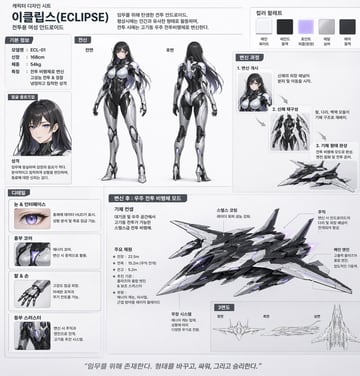
机甲少女角色设计图

날렵한 {argument name="기체 종류" default="우주 전투비행체"}로 변신이 가능한, {argument name="성별" default="여성"} {argument name="캐릭터 유형" default="안드로이드"} 캐릭터에 대한 캐릭터 디자인 시트. 한국어로.

Copy this GPT Image 2 prompt for social media post and logo branding with Photorealistic styling. Use it in Image2Studio to generate, edit, and save.
Photography

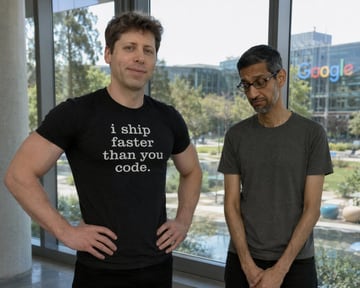
科技公司 CEO 对决梗图

A photorealistic image of {argument name="confident person" default="Sam Altman"} standing confidently on the left with his hands on his hips, wearing a black t-shirt with white text that reads "{argument name="shirt text" default="i ship faster than you code."}". Next to him on the right is {argument name="dejected person" default="Sundar Pichai"}, looking dejected and sad with his head bowed and hands clasped, wearing a plain dark grey t-shirt. They are standing indoors in front of a large glass window. Outside the window is a sunny corporate campus with trees, a small pond, and a modern glass building with the {argument name="background company logo" default="Google"} logo prominently displayed on it.

Copy this GPT Image 2 prompt for social media post and anime with Anime, Cinematic, Watercolor styling. Use it in Image2Studio to generate, edit, and save.
Social post

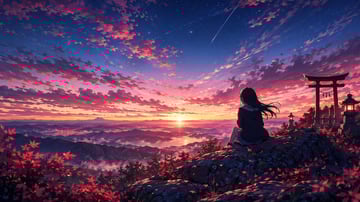
动漫风格秋日山间日落

An anime-style illustration of a {argument name="character description" default="young woman with long dark hair wearing a dark jacket"} sitting on a rocky cliff edge, facing away to admire a vibrant {argument name="time of day" default="sunset"}. To the right stands a {argument name="architectural element" default="red torii gate and two glowing stone lanterns"}. The foreground features scattered {argument name="foliage" default="red maple leaves"}. Below stretches a vast mountainous landscape with a distant lake and a peak resembling Mt. Fuji. The sky is a breathtaking gradient of deep blue, purple, pink, and orange, detailed with clouds, stars, and {argument name="sky detail" default="two shooting stars"}. Highly detailed, cinematic anime background art.

Copy this GPT Image 2 prompt for social media post and character design with Photorealistic, Cinematic styling. Use it in Image2Studio to generate, edit,.
Photography

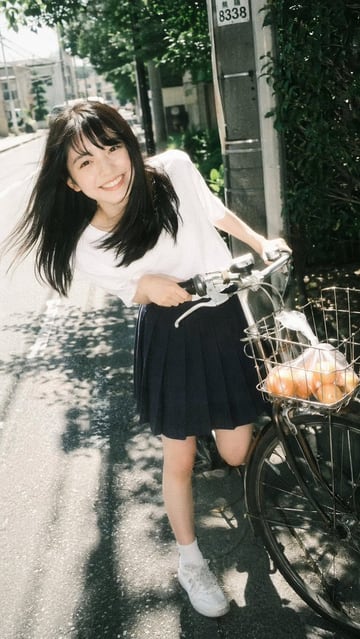
骑自行车的女孩复古胶片肖像

A {argument name="photography style" default="vintage film photography"} portrait of a {argument name="subject description" default="young Asian woman"} smiling broadly at the camera. She is leaning forward playfully while holding the handlebars of a bicycle on a sunny neighborhood street. She wears a {argument name="top clothing" default="white short-sleeved t-shirt"}, a {argument name="bottom clothing" default="dark blue pleated skirt"}, white socks, and white sneakers. Her long dark hair blows slightly in the breeze. The bicycle has a front wire basket containing a {argument name="basket contents" default="clear plastic bag of oranges"}. The background features a paved road, dappled sunlight through trees, and a utility pole, capturing a nostalgic, bright summer day aesthetic.

Copy this GPT Image 2 prompt for social media post and social ads. Use it in Image2Studio to generate, edit, and save production-ready images.
Portrait selfie

历史社交媒体动态模拟

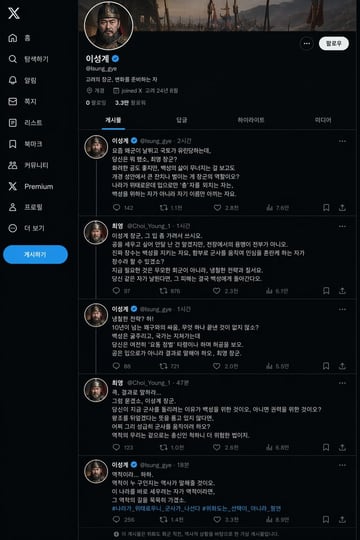
{argument name="인물" default="태조 이성계"}의 X 페이지({argument name="상황" default="위화도 회군을 벌이기 직전"}- {argument name="상대" default="최영 장군"}과 서로 디스하는 내용이 담긴 게시글들)을 만들어 주세요.

Copy this GPT Image 2 prompt for social media post and social ads with Photorealistic styling. Use it in Image2Studio to generate, edit, and save.
Photography

社交媒体演唱会 Story 样机

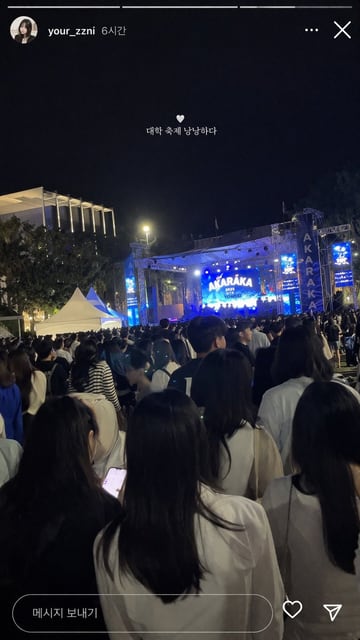
{ "type": "social media story screenshot", "background_photo": { "setting": "nighttime outdoor college festival", "perspective": "first-person view from the back of a dense crowd looking toward a brightly lit stage", "crowd": "dense gathering of young adults seen from behind, wearing casual clothing", "stage": "large outdoor concert stage emitting bright blue light, main LED screen displaying '{argument name=\"stage main text\" default=\"AKARAKA\"}' and '{argument name=\"stage sub text\" default=\"2025 YONSEI\"}', flanked by vertical banners reading 'AKARAKA'", "environment": "dark night sky, trees, a modern building with vertical illuminated slats on the left, two white event tents on the mid-left" }, "ui_overlay": { "top_header": "circular profile picture of a young woman, username '{argument name=\"username\" default=\"your_zzni\"}', timestamp '6시간', with standard three-dot menu and 'X' close icons on the right", "center_text": "small white heart icon followed by the text '{argument name=\"overlay text\" default=\"대학 축제 낭낭하다\"}' floating in the middle of the screen", "bottom_bar": "pill-shaped message input box containing the text '메시지 보내기', accompanied by a heart outline icon and a paper airplane icon on the right" } }

FAQ

Common questions

What should a ai ad image prompts for social campaigns prompt include?

Start with Audience and offer, Visual hook, Product or message, then add style, lighting, output ratio, and where the image will be used.

Can I generate from these prompts directly?

Yes. Open any prompt in Image2Studio, adjust the text, choose ratio and resolution, then generate and save the result.

Start generating from this direction

Copy an example, open the studio, then adjust product, scene, style, and frame details.

Open studio