Prompt structure
Product category, Screen type, Layout density, Device/frame, UI style are the core details to include. A strong prompt tells GPT Image 2 what the image is for, what should be visible, and how the output should be composed.
Prompt category
Prompt examples for app UI mockups, SaaS dashboards, interface previews, landing screens, and product demos.
Product category, Screen type, Layout density, Device/frame, UI style are the core details to include. A strong prompt tells GPT Image 2 what the image is for, what should be visible, and how the output should be composed.
This page targets users looking for AI UI mockup prompts and app UI prompt. It pairs examples with copyable prompt text and a direct route into the Image2Studio workbench.
Prompt examples
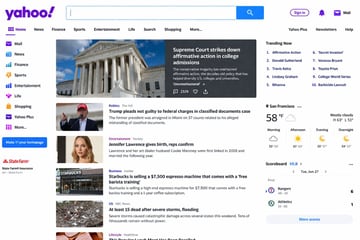
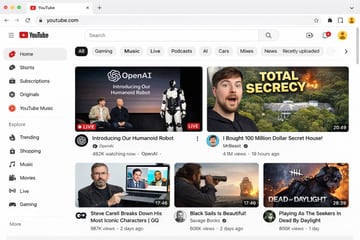
{ "type": "web browser UI mockup", "platform": "{argument name=\"platform name\" default=\"YouTube\"}", "browser_window": { "style": "macOS light mode", "tab": "YouTube", "url_bar": "youtube.com" }, "layout": { "header": { "components": ["hamburger menu", "platform logo", "search bar", "create video icon", "notifications bell", "user profile avatar"] }, "sidebar": { "position": "left", "item_count": 11, "sections": [ { "name": "Main", "items": ["Home", "Shorts", "Subscriptions", "Originals", "YouTube Music"] }, { "name": "Explore", "items": ["Trending", "Shopping", "Music", "Movies", "Live", "Gaming"] } ] }, "main_content": { "category_tags": { "count": 10, "labels": ["All", "Gaming", "Music", "Live", "Podcasts", "AI", "Cars", "Mixes", "News", "Recently uploaded"] }, "video_grid": { "card_count": 5, "cards": [ { "position": "top left", "size": "large", "thumbnail_description": "Sam Altman and Greg Brockman sitting on a stage next to a standing humanoid robot, text overlay 'OpenAI Introducing Our Humanoid Robot', LIVE badge", "video_title": "{argument name=\"featured live stream title\" default=\"Introducing Our Humanoid Robot\"}", "channel_name": "{argument name=\"featured live stream channel\" default=\"OpenAI\"}", "metadata": "482K watching now" }, { "position": "top right", "size": "large", "thumbnail_description": "surprised man's face on the left, a large mansion hidden in a forest with an explosion on the right, bold yellow text overlay '{argument name=\"top right thumbnail text\" default=\"TOTAL SECRECY\"}'", "video_title": "{argument name=\"top right video title\" default=\"I Bought 100 Million Dollar Secret House!\"}", "channel_name": "MrBeast", "metadata": "4.1M views, 19 hours ago, 20:49 duration" }, { "position": "bottom left", "size": "small", "thumbnail_description": "Steve Carell holding a laptop showing a scene from The Office", "video_title": "Steve Carell Breaks Down His Most Iconic Characters | GQ", "channel_name": "GQ", "metadata": "987K views, 2 days ago, 17:46 duration" }, { "position": "bottom middle", "size": "small", "thumbnail_description": "man looking through a spyglass at a sailing ship on the ocean at sunset", "video_title": "Black Sails Is Beautiful!", "channel_name": "Savage Books", "metadata": "606K views, 2 days ago, 17:46 duration" }, { "position": "bottom right", "size": "small", "thumbnail_description": "creepy masked killer character from a video game with text overlay 'DEAD OF DAYLIGHT'", "video_title": "Playing As The Seekers In Dead By Daylight", "channel_name": "Unknown", "metadata": "806K views, 1 day ago, 28:39 duration" } ] } } } }

A photorealistic television news broadcast scene featuring a {argument name="anchor appearance" default="young Japanese female with shoulder-length dark hair wearing a light beige blouse"} and a small black lapel microphone, sitting at a news desk and speaking directly to the camera. The studio background is modern with blue and white lighting and a blurred nighttime city skyline on the right. In the top left corner, there is a dark blue graphic with the white text "{argument name="channel logo text" default="NEWS TODAY"}". To the anchor's left is a large presentation monitor displaying a news graphic with a white background and light blue network nodes. The monitor features a dark blue "最新情報" tag, the text "{argument name="subheadline" default="OpenAIの新しい画像生成モデル"}", a large prominent headline "{argument name="main headline" default="「GPT-image-2」"}", the text "がリリース", an OpenAI logo, and a dark blue bottom banner reading "より高精細に より正確に 画像生成の可能性がさらに広がる". Across the bottom of the entire screen is a news ticker lower third with a dark blue "速報" box and the scrolling text "{argument name="ticker text" default="OpenAI 画期的な新画像生成モデル「GPT-image-2」をリリース"}".

{ "type": "app promotional infographic poster", "style": "clean, modern, glassmorphism, soft shadows, 3D icons", "theme": "{argument name=\"primary color theme\" default=\"blue and white\"}", "header": { "title": "{argument name=\"app name\" default=\"CodePilot\"}", "subtitle": "{argument name=\"subtitle\" default=\"你的 AI 编程副驾驶\"}", "features_list": "智能补全 · 代码生成 · 问答调试 · 代码解析", "main_icon": "glossy 3D rounded square, blue gradient, white {argument name=\"main icon symbol\" default=\"</>\"} and sparkles" }, "layout": { "sections": [ { "title": "feature_cards", "position": "middle grid", "count": 4, "items": [ { "label": "智能代码补全", "icon": "blue lightning bolt", "description": "上下文感知, 精准补全 让编码更快一步", "ui_element": "macOS style code window with Python calculate_total function" }, { "label": "AI 代码生成", "icon": "purple magic wand", "description": "根据自然语言描述 一键生成函数 & 脚本", "ui_element": "chat prompt bubble and code window with Python quick_sort function" }, { "label": "对话 & 调试助手", "icon": "green chat bubble", "description": "自然语言提问、定位 Bug 边聊边改, 高效解决问题", "ui_element": "chat interface with user question and green AI resolution bubble" }, { "label": "代码解析 & 注释", "icon": "orange document with magnifying glass", "description": "快速理解复杂代码 自动生成注释与说明", "ui_element": "code window with JS fetchData function and 3 floating action tags: 自动注释, 逻辑解析, 一键复制" } ] }, { "title": "为什么选择 CodePilot?", "position": "bottom left", "count": 4, "labels": ["提升效率", "精准可靠", "隐私安全", "易于集成"], "icons": ["clock", "checkmark", "shield", "puzzle piece"] }, { "title": "立即体验", "position": "bottom right", "count": 1, "elements": ["GitHub 开源项目", "{argument name=\"github link\" default=\"github.com/op7418/CodePilot\"}", "QR code"] } ] } }
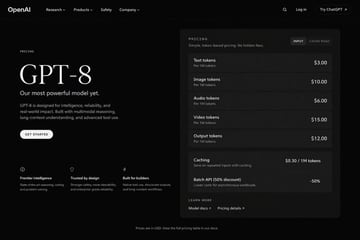
{ "type": "dark mode web page UI mockup", "theme": "sleek, modern, dark theme with white and light grey text", "header": { "logo": "{argument name=\"company name\" default=\"OpenAI\"}", "navigation": ["Research", "Products", "Safety", "Company"], "actions": ["Search icon", "Log in", "Try ChatGPT button"] }, "layout": { "left_column": { "label": "PRICING", "headline": "{argument name=\"model name\" default=\"GPT-8\"}", "subheading": "{argument name=\"main tagline\" default=\"Our most powerful model yet.\"}", "description": "GPT-8 is designed for intelligence, reliability, and real-world impact. Built with multimodal reasoning, long-context understanding, and advanced tool use.", "button": "GET STARTED", "features": { "count": 3, "items": [ {"icon": "brain", "title": "Frontier intelligence", "desc": "State-of-the-art reasoning, coding, and problem solving."}, {"icon": "shield", "title": "Trusted by design", "desc": "Stronger safety, more steerability, and enterprise-grade reliability."}, {"icon": "lightning bolt", "title": "Built for builders", "desc": "Native tool use, structured outputs, and long-context workflows."} ] } }, "right_column": { "type": "pricing card", "header": "PRICING - Simple, token-based pricing. No hidden fees.", "toggle": ["INPUT", "CACHE READ"], "token_pricing": { "count": 5, "rows": [ {"name": "Text tokens", "unit": "Per 1M tokens", "price": "{argument name=\"text token price\" default=\"$3.00\"}"}, {"name": "Image tokens", "unit": "Per 1M tokens", "price": "$10.00"}, {"name": "Audio tokens", "unit": "Per 1M tokens", "price": "$6.00"}, {"name": "Video tokens", "unit": "Per 1M tokens", "price": "$15.00"}, {"name": "Output tokens", "unit": "Per 1M tokens", "price": "{argument name=\"output token price\" default=\"$12.00\"}"} ] }, "additional_features": { "count": 2, "rows": [ {"name": "Caching", "desc": "Save on repeated inputs with caching.", "price": "$0.30 / 1M tokens"}, {"name": "Batch API (50% discount)", "desc": "Lower costs for asynchronous workloads.", "price": "-50%"} ] }, "footer_links": ["LEARN MORE", "Model docs", "Pricing details"] } }, "footer": "Prices are in USD. View the full pricing table in our docs." }
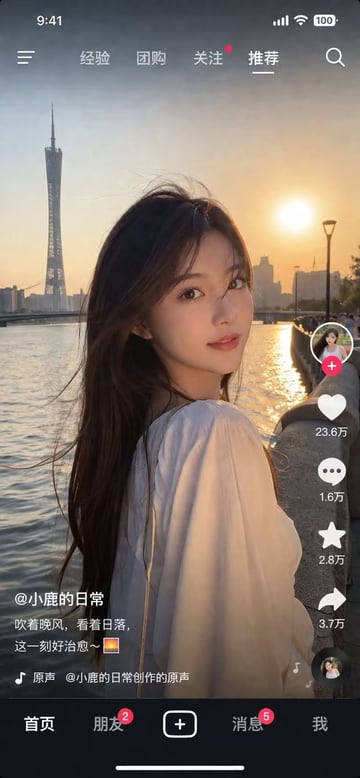
{ "type": "social media short video app interface mockup", "main_image": { "subject": "{argument name=\"subject description\" default=\"young Asian woman with long dark hair wearing a white off-the-shoulder top\"}", "pose": "looking back over her shoulder at the camera, gentle smile, hair blowing slightly in the wind", "setting": "{argument name=\"background location\" default=\"riverside promenade at sunset with a tall modern tower and city skyline\"}", "lighting": "golden hour, warm sunlight reflecting on the river" }, "ui_layout": { "top_bar": { "status_icons": ["time 9:41", "cellular signal", "wifi", "battery 100"], "navigation": { "left": "menu icon", "center_tabs": ["经验", "团购", "关注", "{argument name=\"active top tab\" default=\"推荐\"}"], "right": "search icon" } }, "right_sidebar": { "count": 6, "elements": [ "profile picture with pink plus button", "heart icon with text '23.6万'", "chat bubble icon with text '1.6万'", "star icon with text '2.8万'", "share arrow icon with text '3.7万'", "spinning music record icon" ] }, "bottom_left_overlay": { "username": "{argument name=\"username\" default=\"@小鹿的日常\"}", "caption": "{argument name=\"caption text\" default=\"吹着晚风,看着日落,这一刻好治愈~ 🌅\"}", "audio_track": "🎵 原声 @小鹿的日常创作的原声" }, "bottom_navigation_bar": { "count": 5, "tabs": [ "首页", "朋友 (with red badge '2')", "central plus button in rounded square", "消息 (with red badge '5')", "我" ] } } }
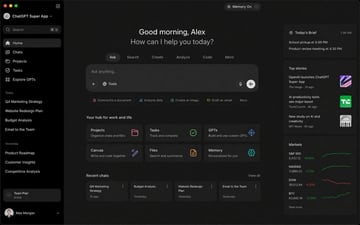
Computer Screenshot of {argument name="subject" default="ChatGPT’s Super App"}
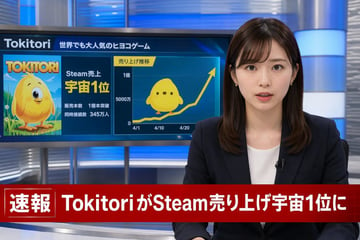
A photorealistic television news broadcast scene. On the right, a young Japanese female news anchor with shoulder-length dark brown hair and bangs looks directly at the camera with a professional expression. She wears a dark navy blazer over a white top, small earrings, and a lavalier microphone. The studio background features modern blue and silver illuminated panels. On the left, a large monitor displays a news graphic. The top of the monitor reads "{argument name="game name" default="Tokitori"}" followed by "{argument name="monitor top text" default="世界でも大人気のヒヨコゲーム"}". The left side of the monitor shows game cover art featuring a {argument name="character description" default="round, yellow chick character with big eyes"} on a green field, with the title "{argument name="game name" default="Tokitori"}" and text reading "{argument name="monitor achievement text" default="Steam売上 宇宙1位"}", "販売本数 1億本突破", and "同時接続数 345万人". The right side of the monitor displays a line graph titled "売り上げ推移" with an upward-trending yellow arrow, y-axis labels "0", "5000万", and "1億", and 3 x-axis dates "4/1", "4/10", and "4/20". A flat 2D version of the yellow chick sits on the graph line. Across the bottom of the screen is a prominent red lower-thirds breaking news banner. The left side of the banner has a box reading "速報" and the main text reads "{argument name="breaking news headline" default="TokitoriがSteam売り上げ宇宙1位に"}".
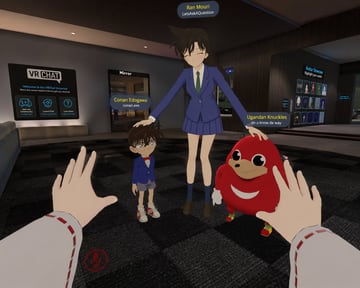
A first-person POV screenshot inside a {argument name="game environment" default="VRChat lobby"} featuring a dark checkered floor, a "VR CHAT" welcome sign on the left, a "Mirror" doorway, and an "Avatar Showcase" on the right. The viewer's hands are visible in the foreground, wearing white sleeves with red dashed stitching, reaching forward. A red muted microphone UI icon sits in the bottom left corner. In the center stands {argument name="tall character" default="Ran Mouri from Detective Conan in her blue school uniform"}, smiling with closed eyes and {argument name="action" default="patting the heads of the two smaller characters"}. On her left is {argument name="small character 1" default="Conan Edogawa in his blue suit and red bowtie"}. On her right is {argument name="small character 2" default="the Ugandan Knuckles meme character"}. Each character has a floating nameplate above them: the tall girl's reads "Ran Mouri" in yellow over "LetsAskAQuestion" in white, the boy's reads "Conan Edogawa" over "conan.exe", and the red creature's reads "Ugandan Knuckles" over "do u know de way".
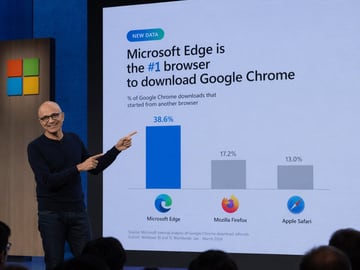
A photograph of a tech keynote presentation. A bald man with glasses, wearing a dark blue sweater and jeans, stands on a stage to the left, smiling and pointing with both index fingers at a large presentation screen behind him. The screen displays a slide with a light blue background. At the top left is a small teal pill-shaped badge reading "NEW DATA". Below it, the main headline reads "{argument name="headline" default="Microsoft Edge is the #1 browser to download Google Chrome"}", with "#1" highlighted in blue. A subheadline reads "% of Google Chrome downloads that started from another browser". Below this is a bar chart with three bars. The first bar is tall and blue, labeled "38.6%" above it, with the Microsoft Edge logo and text "Microsoft Edge" below it. The second bar is shorter and gray, labeled "17.2%" above it, with the Mozilla Firefox logo and text "Mozilla Firefox" below it. The third bar is the shortest and gray, labeled "13.0%" above it, with the Apple Safari logo and text "Apple Safari" below it. At the bottom left of the slide, small text reads "Source: Microsoft internal analysis of Google Chrome download referrals Cohort: Windows 10 and 11, Worldwide, Jan - March 2024". To the left of the screen, a wooden panel features the Microsoft logo (four colored squares). The backs of audience members' heads are visible in the foreground at the bottom.
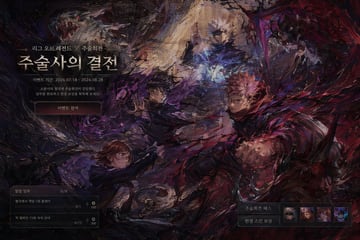
{ "type": "game event landing page UI mockup", "art_style": "{argument name=\"art style\" default=\"heavy impasto oil painting, dark fantasy\"}", "background_artwork": { "description": "dynamic combat scene with swirling dark and red energy", "character_count": 4, "characters": [ "top: white-haired man casting blue spell", "middle-left: dark-haired man summoning shadow energy", "right: pink-haired man throwing red energy punch", "bottom-left: brown-haired woman wielding hammer" ] }, "ui_layout": { "top_left": { "type": "event header", "elements": [ {"small_text": "{argument name=\"subtitle\" default=\"리그 오브 레전드 X 주술회전\"}"}, {"large_title": "{argument name=\"main title\" default=\"주술사의 결전\"}"}, {"date_text": "{argument name=\"event date\" default=\"이벤트 기간: 2024.07.18 - 2024.08.28\"}"}, {"description": "소환사의 협곡에 주술회전이 강림했다. 임무를 완료하고 한정 보상을 획득해 보세요!"}, {"button": "{argument name=\"button text\" default=\"이벤트 참여\"}"} ] }, "bottom_left": { "type": "mission panel", "header": "일일 임무 0/8", "mission_count": 2, "missions": [ {"text": "협곡에서 게임 1회 플레이", "progress": "0/1", "reward": "100"}, {"text": "적 챔피언 15회 처치 관여", "progress": "0/15", "reward": "200"} ] }, "bottom_right": { "type": "rewards panel", "labels": ["주술회전 패스", "한정 스킨 보상"], "icon_count": 4, "icons": [ "blindfolded man", "pink-haired boy", "brown-haired girl", "dark monster" ] } } }
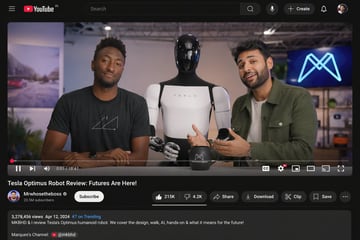
{ "type": "desktop video platform UI mockup", "theme": "dark mode", "header": { "logo": "YouTube IN", "search_bar": "centered, with magnifying glass icon", "right_icons": { "count": 4, "items": ["microphone", "+ Create button", "notifications bell", "user profile picture"] } }, "video_player": { "scene": "Studio setting with two tech reviewers at a desk.", "subjects": [ "{argument name=\"left person\" default=\"Marques Brownlee (MKBHD)\"} in black t-shirt", "{argument name=\"right person\" default=\"Arun Maini (Mrwhosetheboss)\"} in green overshirt", "{argument name=\"robot model\" default=\"Tesla Optimus humanoid robot\"} standing between them" ], "props": ["black mug with logo", "background screen with glowing blue neon M logo"], "controls_bar": { "progress_bar": "red, near the beginning", "timestamp": "0:01 / 18:47", "left_icons": { "count": 3, "items": ["play/pause", "next track", "volume"] }, "right_icons": { "count": 6, "items": ["CC", "settings with 4K badge", "miniplayer", "theater mode", "cast", "fullscreen"] } } }, "video_details": { "title": "{argument name=\"video title\" default=\"Tesla Optimus Robot Review: Futures Are Here!\"}", "channel_info": { "name": "{argument name=\"channel name\" default=\"Mrwhosetheboss\"}", "badges": ["verified checkmark"], "subscribers": "20.5M subscribers", "button": "white Subscribe button" }, "action_buttons": { "count": 6, "items": ["Like (215K) / Dislike (4.2K) pill", "Share", "Download", "Clip", "Save", "More (...)"] } }, "description_box": { "metadata": "3,278,456 views Apr 12, 2024 #7 on Trending", "text": "MKBHD & I review Tesla's Optimus humanoid robot. We cover the design, walk, AI, hands-on & what it means for the future!", "links": ["Marques's Channel: @mkbhd"] } }
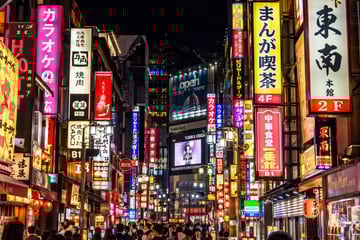
A photorealistic night street photography shot of a bustling {argument name="city location" default="Tokyo"} street, heavily illuminated by densely packed vertical neon signs and billboards. On the left, a bright pink sign prominently reads "{argument name="pink sign text" default="カラオケ"}" next to a white sign reading "牛角 焼肉". On the right, prominent signs include a yellow one reading "{argument name="yellow sign text" default="まんが喫茶 4F"}", a white one reading "東南 本館 2F", and a red one reading "{argument name="red sign text" default="中華食堂 一番館 B1"}". In the center distance, a large blue billboard displays "{argument name="billboard text" default="open TOKYO"}" above a digital screen showing a person with the text "YUNIKA VISION". The street level is crowded with the backs of pedestrians' heads walking through the vibrant, glowing urban canyon. The lighting is high contrast with rich neon colors reflecting off the surroundings.
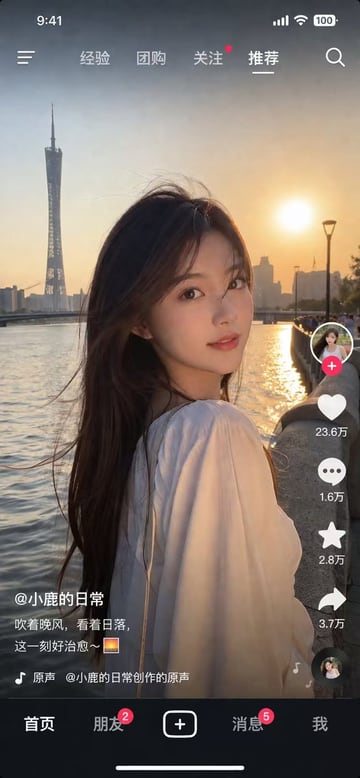
{ "type": "social media video app interface screenshot", "main_visual": { "subject": "young Asian woman, long dark hair blowing in wind, white top, looking over shoulder at camera", "setting": "{argument name=\"background location\" default=\"Guangzhou Canton Tower by the river at sunset\"}", "lighting": "golden hour, warm sunset glow" }, "ui_layout": { "top_status_bar": { "elements": 4, "labels": ["9:41", "signal", "wifi", "100 battery"] }, "top_navigation": { "elements": 6, "labels": ["menu icon", "经验", "团购", "关注", "{argument name=\"active tab\" default=\"推荐\"}", "search icon"] }, "right_interaction_bar": { "elements": 6, "labels": ["profile photo with red plus", "heart icon with {argument name=\"like count\" default=\"23.6万\"}", "comment icon with 1.6万", "star icon with 2.8万", "share icon with 3.7万", "spinning music record"] }, "bottom_left_text": { "elements": 3, "labels": ["{argument name=\"username\" default=\"@小鹿的日常\"}", "{argument name=\"caption\" default=\"吹着晚风,看着日落,这一刻好治愈~ 🌅\"}", "music note icon with 原声 @小鹿的日常创作的原声"] }, "bottom_navigation": { "elements": 5, "labels": ["首页", "朋友 with red badge 2", "square plus button", "消息 with red badge 5", "我"] } } }
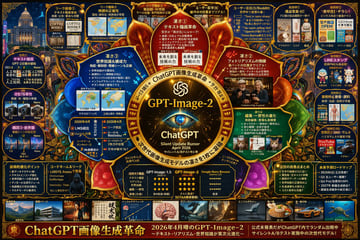
{ "type": "highly dense futuristic infographic poster", "style": "dark background with {argument name=\"theme color\" default=\"gold and dark blue\"} neon accents, highly structured grid and radial layout, tech-focused UI aesthetics", "centerpiece": { "visual": "{argument name=\"centerpiece icon\" default=\"glowing cybernetic eye lens\"} surrounded by a golden ornate circular frame with glowing nodes", "text": ["{argument name=\"model name\" default=\"GPT-Image-2\"}", "ChatGPT", "Silent Update Rumor {argument name=\"release date\" default=\"April 2026\"}"] }, "layout": { "inner_circle_panels": { "count": 4, "description": "Four wedge-shaped panels surrounding the center detailing core features", "labels": ["凄さ① テキスト描画革命", "凄さ② フォトラリアズムの飛躍", "凄さ③ 世界知識&構成力", "凄さ④ 編集・一貫性の進化"] }, "top_row": { "count": 5, "description": "Rectangular panels showing leak images, map accuracy, anatomical diagrams, and user reactions", "labels": ["リーク画像①", "リーク画像②", "リーク画像③", "ユーザー反応(X)", "ユーザー反応(X/Reddit)"] }, "left_column": { "count": 3, "description": "Vertical stack of comparison panels showing version 1.5 vs 2 vs Nano with small image grids", "labels": ["比較① テキスト描画", "比較② 写実性", "構図③・世界観"] }, "right_column": { "count": 5, "description": "Vertical stack of practical use cases with small example images", "labels": ["実用例① 商品写真・EC", "実用例② 実務・チラシ", "実用例③ LINEスタンプ", "実用例④ 教育・資料", "実用例⑤ SNS・サムネ"] }, "bottom_data_section": { "count": 5, "description": "Data tables, bulleted lists, and hacker imagery", "labels": ["技術的進化ポイント", "コードネーム&リーク", "性能比較表 (GPT-Image-1.5 vs GPT-Image-2 vs Google Nano Banana)", "注目の改善点まとめ", "未来予測ロードマップ"] }, "bottom_thumbnail_strip": { "count": 10, "description": "A horizontal row of small square images demonstrating different generation styles", "labels": ["建築", "ポスター", "日本語テキスト", "インフォグラフィック", "ファンタジー", "スチームパンク", "ミニマルデザイン", "食べ物", "車", "水中"] } }, "footer": { "text": "{argument name=\"main title\" default=\"ChatGPT画像生成革命\"}", "subtext": "2026年4月噂のGPT-Image-2" } }
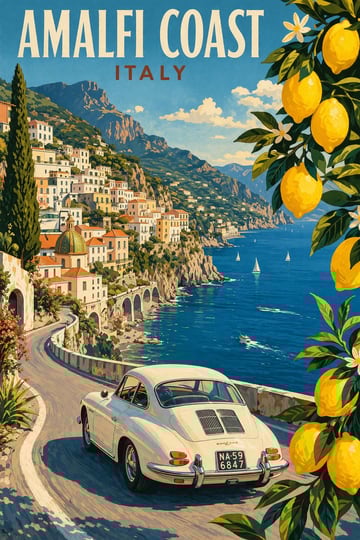
Modern pencil illustration of {argument name="location" default="Vintage travel poster illustration of the Amalfi Coast, Italy"}, panoramic coastal cliff road scene, classic 1960s white car driving along a curved seaside road, deep blue Mediterranean sea with small sailboats, colorful pastel hillside village, bright blue sky with soft clouds, lemon tree branches with vibrant yellow lemons framing the foreground, warm summer sunlight, bold vibrant colors, {argument name="style" default="retro 1950s travel poster"} style, cinematic composition, high detail, screen print texture, graphic illustration. Hand-drawn style, illustration with loose strokes and defined contours. High-contrast color palette, maintaining chromatic harmony between background and elements. Contemporary and decorative aesthetic.
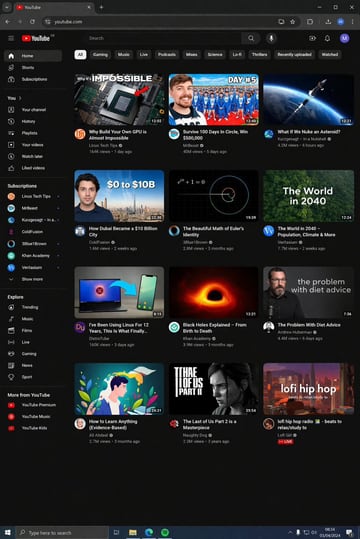
{ "type": "desktop web browser UI screenshot", "environment": "{argument name=\"os environment\" default=\"Windows 11 desktop\"}", "theme": "{argument name=\"ui theme\" default=\"dark mode\"}", "browser_window": { "tabs": ["YouTube", "New Tab"], "url_bar": "youtube.com", "profile_icon": "{argument name=\"profile initial\" default=\"M\"}" }, "app_interface": { "header": { "logo": "{argument name=\"website name\" default=\"YouTube\"} GB", "search_bar": "Search", "icons": ["mic", "create", "notifications", "profile"] }, "filter_bar": { "active_filter": "{argument name=\"active filter\" default=\"All\"}", "count": 11, "labels": ["All", "Gaming", "Music", "Live", "Podcasts", "Mixes", "Science", "Lo-fi", "Thrillers", "Recently uploaded", "Watched"] }, "sidebar": { "sections": [ { "title": "Main", "count": 3, "labels": ["Home", "Shorts", "Subscriptions"] }, { "title": "You", "count": 6, "labels": ["Your channel", "History", "Playlists", "Your videos", "Watch later", "Liked videos"] }, { "title": "Subscriptions", "count": 8, "labels": ["Linus Tech Tips", "MrBeast", "Kurzgesagt - In a Nutshell", "ColdFusion", "3Blue1Brown", "Khan Academy", "Veritasium", "Show more"] }, { "title": "Explore", "count": 7, "labels": ["Trending", "Music", "Films", "Live", "Gaming", "News", "Sport"] }, { "title": "More from YouTube", "count": 3, "labels": ["YouTube Premium", "YouTube Music", "YouTube Kids"] } ] }, "main_content": { "layout": "3 columns by 4 rows grid", "count": 12, "video_cards": [ { "title": "Why Build Your Own GPU is Almost Impossible", "channel": "Linus Tech Tips", "stats": "164K views • 1 day ago", "thumbnail": "CPU/GPU chip" }, { "title": "Survive 100 Days In Circle, Win $500,000", "channel": "MrBeast", "stats": "40M views • 5 days ago", "thumbnail": "MrBeast with crowd in blue tracksuits" }, { "title": "What If We Nuke an Asteroid?", "channel": "Kurzgesagt - In a Nutshell", "stats": "4.2M views • 6 hours ago", "thumbnail": "Missile hitting asteroid in space" }, { "title": "How Dubai Became a $10 Billion City", "channel": "ColdFusion", "stats": "1.6M views • 2 weeks ago", "thumbnail": "Man and Dubai skyline" }, { "title": "The Beautiful Math of Euler's Identity", "channel": "3Blue1Brown", "stats": "2.8M views • 3 months ago", "thumbnail": "Math equation and spiral graph" }, { "title": "The World in 2040 - Population, Climate & More", "channel": "Veritasium", "stats": "7.7M views • 2 weeks ago", "thumbnail": "Lush green forest aerial view" }, { "title": "I've Been Using Linux For 12 Years, This Is What Finally...", "channel": "DistroTube", "stats": "160K views • 3 days ago", "thumbnail": "Laptop and smartphone with Linux logo" }, { "title": "Black Holes Explained - From Birth to Death", "channel": "Khan Academy", "stats": "3.9M views • 3 months ago", "thumbnail": "Glowing black hole accretion disk" }, { "title": "The Problem With Diet Advice", "channel": "Andrew Huberman", "stats": "4.4M views • 6 days ago", "thumbnail": "Man with glasses speaking" }, { "title": "How to Learn Anything (Evidence-Based)", "channel": "Ali Abdaal", "stats": "2.7M views • 3 months ago", "thumbnail": "Vector illustration of man reading a book" }, { "title": "The Last of Us Part 2 is a Masterpiece", "channel": "Naughty Dog", "stats": "2.3M views • 3 years ago", "thumbnail": "Ellie from The Last of Us" }, { "title": "lofi hip hop radio - beats to relax/study to", "channel": "Lofi Girl", "stats": "LIVE", "thumbnail": "Lofi girl studying at desk" } ] } }, "taskbar": { "os": "Windows", "icons": ["Start", "Search", "Task View", "File Explorer", "Edge", "Spotify"], "system_tray": "08:34 03/04/2024" } }
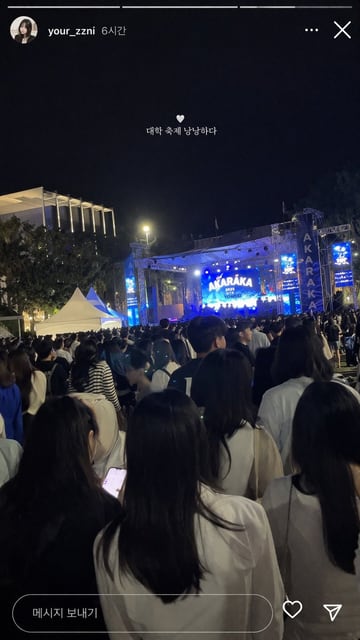
{ "type": "social media story screenshot", "background_photo": { "setting": "nighttime outdoor college festival", "perspective": "first-person view from the back of a dense crowd looking toward a brightly lit stage", "crowd": "dense gathering of young adults seen from behind, wearing casual clothing", "stage": "large outdoor concert stage emitting bright blue light, main LED screen displaying '{argument name=\"stage main text\" default=\"AKARAKA\"}' and '{argument name=\"stage sub text\" default=\"2025 YONSEI\"}', flanked by vertical banners reading 'AKARAKA'", "environment": "dark night sky, trees, a modern building with vertical illuminated slats on the left, two white event tents on the mid-left" }, "ui_overlay": { "top_header": "circular profile picture of a young woman, username '{argument name=\"username\" default=\"your_zzni\"}', timestamp '6시간', with standard three-dot menu and 'X' close icons on the right", "center_text": "small white heart icon followed by the text '{argument name=\"overlay text\" default=\"대학 축제 낭낭하다\"}' floating in the middle of the screen", "bottom_bar": "pill-shaped message input box containing the text '메시지 보내기', accompanied by a heart outline icon and a paper airplane icon on the right" } }
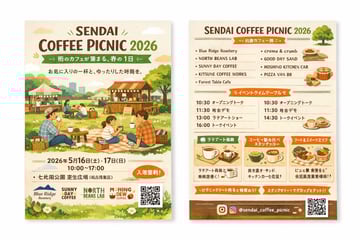
{ "type": "two-sided event flyer mockup", "style": "watercolor illustration, warm earthy tones, cozy, inviting, rustic", "left_side_front": { "header": { "title": "{argument name=\"event name\" default=\"SENDAI COFFEE PICNIC 2026\"}", "subtitle": "{argument name=\"subtitle\" default=\"街のカフェが集まる、春の1日\"}", "tagline": "A relaxing time with your favorite cup" }, "main_illustration": "People enjoying a picnic on a grassy field. A family sitting on a checkered blanket drinking coffee. Background features wooden coffee stalls, tents, trees, and a distant city skyline.", "event_info": { "date": "{argument name=\"event date\" default=\"2026年5月16日(土) - 17日(日)\"}", "time": "10:00 - 17:00", "location": "{argument name=\"location\" default=\"七北田公園 芝生広場\"}", "badge": "Orange oval badge with text for free entry" }, "footer": { "sponsor_logos": 4, "elements": ["QR code", "grass and white flowers border"] } }, "right_side_back": { "header": { "title": "{argument name=\"event name\" default=\"SENDAI COFFEE PICNIC 2026\"}", "illustration": "small green tree" }, "sections": [ { "title": "Vendor List", "layout": "2 columns", "count": 9, "labels": ["Blue Ridge Roastery", "NORTH BEANS LAB", "SUNNY DAY COFFEE", "KITSUNE COFFEE WORKS", "Forest Table Cafe", "creme & crumb", "GOOD DAY SAND", "HOSHINO KITCHEN CAR", "PIZZA VAN 88"], "illustrations": ["sandwiches", "pizza", "coffee cups"] }, { "title": "Event Timetable", "layout": "2 columns", "count": 7, "description": "Schedule with times like 10:30, 11:30, 13:00, 14:30, 16:00 and event names" }, { "title": "Feature Highlights", "layout": "3 horizontal boxes", "count": 3, "labels": ["Latte Art Experience", "Coffee Tasting Stamp Rally", "Food & Sweets Area"], "illustrations": ["single coffee cup", "multiple coffee cups", "food basket"] } ], "footer": { "social_media": "{argument name=\"social handle\" default=\"@sendai_coffee_picnic\"}", "icons": ["Instagram logo"], "elements": ["QR code", "brown background strip"] } } }
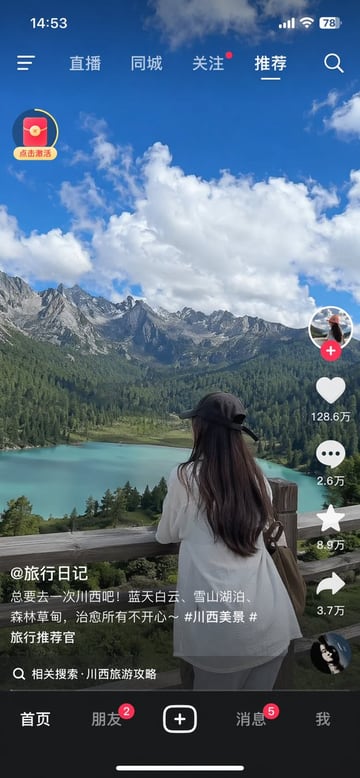
{ "type": "mobile short-video app interface screenshot", "main_content": { "scene": "{argument name=\"scenic background\" default=\"turquoise alpine lake, green pine forests, jagged snow-capped mountains, blue sky with fluffy white clouds\"}", "subject": "{argument name=\"main subject\" default=\"woman with long dark hair wearing a black baseball cap backwards and a white shirt, leaning on a wooden fence looking at the view\"}" }, "ui_elements": { "status_bar": { "time": "14:53", "icons": ["signal bars", "wifi", "battery 78"] }, "top_navigation": { "left_icon": "hamburger menu", "tabs": ["直播", "同城", "关注", "推荐"], "active_tab": "推荐", "right_icon": "search magnifying glass" }, "floating_widget": { "position": "top left", "icon": "red envelope with yellow circular progress bar", "text": "点击激活" }, "right_action_bar": { "count": 6, "items": [ {"icon": "profile picture with red plus button"}, {"icon": "heart", "text": "{argument name=\"like count\" default=\"128.6万\"}"}, {"icon": "speech bubble", "text": "2.6万"}, {"icon": "star", "text": "8.9万"}, {"icon": "share arrow", "text": "3.7万"}, {"icon": "spinning record album"} ] }, "bottom_left_info": { "username": "{argument name=\"username\" default=\"@旅行日记\"}", "caption": "{argument name=\"video caption\" default=\"总要去一次川西吧!蓝天白云、雪山湖泊、森林草甸,治愈所有不开心~ #川西美景 #旅行推荐官\"}", "search_prompt": "相关搜索 · 川西旅游攻略" }, "bottom_navigation": { "count": 5, "tabs": [ {"label": "首页"}, {"label": "朋友", "badge": "2"}, {"label": "plus button in rounded rectangle"}, {"label": "消息", "badge": "5"}, {"label": "我"} ] }, "system_ui": "iOS home indicator line at the bottom" } }
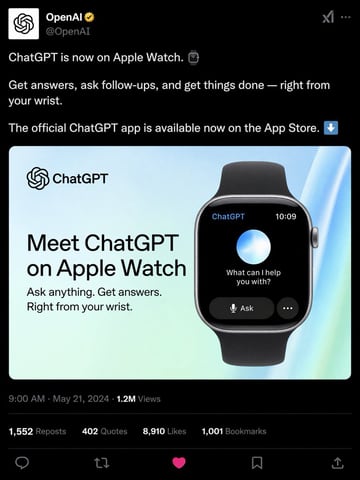
{ "type": "social media post mockup", "theme": "dark mode", "header": { "avatar": "OpenAI logo", "account_name": "{argument name=\"account name\" default=\"OpenAI\"}", "badge": "gold checkmark", "handle": "@OpenAI" }, "post_text": [ "{argument name=\"post text\" default=\"ChatGPT is now on Apple Watch.\"}", "Get answers, ask follow-ups, and get things done — right from your wrist.", "The official ChatGPT app is available now on the App Store." ], "embedded_card": { "background": "light blue and green gradient", "left_column": { "logo": "ChatGPT", "headline": "{argument name=\"card headline\" default=\"Meet ChatGPT on Apple Watch\"}", "subheadline": "Ask anything. Get answers. Right from your wrist." }, "right_column": { "device": "smartwatch with black band", "screen_elements": { "top_bar": 2, "top_bar_labels": ["ChatGPT", "10:09"], "center": "glowing blue and white orb", "text": "{argument name=\"watch screen text\" default=\"What can I help you with?\"}", "buttons": 2, "button_labels": ["Ask", "..."] } } }, "footer": { "metadata": "9:00 AM · May 21, 2024 · 1.2M Views", "engagement_stats": { "count": 4, "labels": ["1,552 Reposts", "402 Quotes", "{argument name=\"likes count\" default=\"8,910\"} Likes", "1,001 Bookmarks"] }, "action_icons": { "count": 5, "types": ["reply", "repost", "like", "bookmark", "share"] } } }
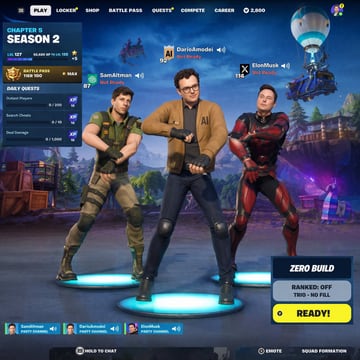
{ "type": "battle royale lobby UI", "characters": [ { "name": "{argument name=\"left character name\" default=\"SamAltman\"}", "outfit": "tactical green shirt, khaki pants", "pose": "dancing with crossed arms on blue platform", "ui": "Level 87, OpenAI icon, Not Ready" }, { "name": "{argument name=\"center character name\" default=\"DarioAmodei\"}", "outfit": "brown jacket with AI text, glasses, jeans", "pose": "dancing with crossed arms on blue platform", "ui": "Level 92, AI shield icon, Not Ready" }, { "name": "{argument name=\"right character name\" default=\"ElonMusk\"}", "outfit": "red and black futuristic armor", "pose": "dancing with crossed arms on blue platform", "ui": "Level 114, X icon, Not Ready" } ], "background": "stylized landscape, flying battle bus, purple llama piñata", "ui": { "top_nav": ["PLAY", "LOCKER", "SHOP", "BATTLE PASS", "QUESTS", "COMPETE", "CAREER"], "left_panel": { "title": "{argument name=\"season text\" default=\"CHAPTER 5 SEASON 2\"}", "stats": "LVL 127, BATTLE PASS TIER 100", "daily_quests": 3 }, "bottom_right": { "mode": "{argument name=\"game mode\" default=\"ZERO BUILD\"}", "status": "RANKED: OFF, TRIO - NO FILL", "button": "READY!" }, "bottom_bar": { "party_channels": 3, "prompts": ["HOLD TO CHAT", "EMOTE", "SQUAD FORMATION"] } } }
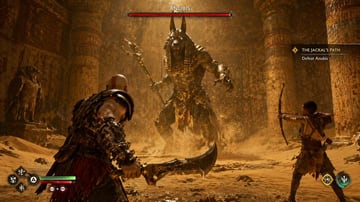
A highly realistic AAA video game screenshot depicting a boss fight inside a dusty, golden-lit {argument name="setting" default="ancient Egyptian temple"}. In the center background, a massive {argument name="boss name" default="ANUBIS"} boss monster with a jackal head, glowing eyes, and ornate gold armor roars while wielding a staff, kicking up swirling sand. In the left foreground, a muscular, bald warrior with red body tattoos faces the boss, holding a {argument name="weapon" default="curved blade"}. In the right midground, a young boy aims a bow at the boss. The image features 4 distinct UI components: a top-center red boss health bar labeled '{argument name="boss name" default="ANUBIS"}', a right-aligned quest tracker labeled '{argument name="quest name" default="THE JACKAL'S PATH"}' with the subtext 'Defeat Anubis', a bottom-left player status HUD showing health and rage bars alongside 4 diamond-shaped skill icons with button prompts, and a bottom-right companion HUD showing 2 circular skill icons.
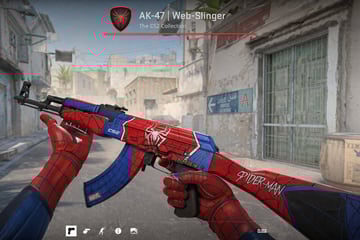
First-person perspective video game screenshot showing hands wearing {argument name="glove style" default="Spider-Man suit"} gloves holding an AK-47 assault rifle. The weapon features a custom {argument name="weapon theme" default="Spider-Man"} skin with a red and blue color scheme, black webbing patterns, a white spider emblem on the receiver, "CS2" on the handguard, "MARVEL" on the magazine, and "SPIDER-MAN" on the stock. The background is a dusty Middle Eastern town street resembling a tactical shooter map, featuring a sign reading "HOTEL AURORE" with an arrow pointing to "A". The top center UI displays a red shield with a black spider, the text "{argument name="weapon title" default="AK-47 | Web-Slinger"}", and "The CS2 Collection" above a red line. The bottom UI features exactly 5 minimalist white icons on the left and the word "CLOSE" on the right.
FAQ
Start with Product category, Screen type, Layout density, then add style, lighting, output ratio, and where the image will be used.
Yes. Open any prompt in Image2Studio, adjust the text, choose ratio and resolution, then generate and save the result.
Copy an example, open the studio, then adjust product, scene, style, and frame details.