Infographics{
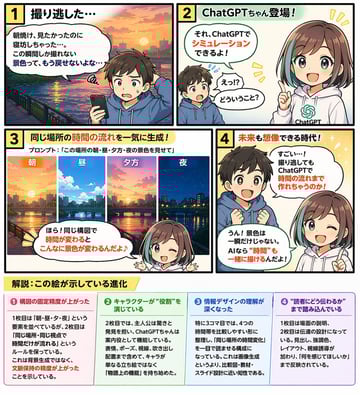
"type": "4-panel educational manga with infographic footer",
"theme": "{argument name=\"comic theme\" default=\"ChatGPT image generation capabilities\"}",
"characters": {
"boy": "{argument name=\"boy character\" default=\"young boy with brown hair wearing a blue hoodie\"}",
"girl": "anime girl with brown hair and teal streaks, wearing a white hoodie with a green logo, representing {argument name=\"girl character name\" default=\"ChatGPTちゃん\"}"
},
"layout": {
"panels": [
{
"number": 1,
"title": "1 撮り逃した…",
"scene": "Boy looking disappointed at his smartphone. Background is a sunrise over a city river.",
"dialogue": ["朝焼け、見たかったのに寝坊しちゃった…。この瞬間しか撮れない景色って、もう戻せないよな…"]
},
{
"number": 2,
"title": "2 ChatGPTちゃん登場!",
"scene": "Girl appears smiling confidently. Boy looks surprised.",
"dialogue": ["それ、ChatGPTでシミュレーションできるよ!", "えっ!?どういうこと?"]
},
{
"number": 3,
"title": "3 同じ場所の時間の流れを一気に生成!",
"subtitle": "プロンプト:「{argument name=\"example prompt\" default=\"この場所の朝・昼・夕方・夜の景色を見せて\"}」",
"visuals": {
"count": 4,
"labels": ["朝", "昼", "夕方", "夜"],
"description": "Four vertical slices showing the exact same city river scene transitioning from morning to noon, evening, and night."
},
"scene": "Girl winking and pointing at the images.",
"dialogue": ["ほら!同じ構図で時間が変わるとこんなに景色が変わるんだよ♪"]
},
{
"number": 4,
"title": "4 未来も想像できる時代!",
"scene": "Boy looks amazed with sparkling eyes. Girl winks and points upwards.",
"dialogue": ["すごい…!撮り逃してもChatGPTで時間の流れまで作れちゃうのか!", "うん!景色は一瞬だけじゃない。AIなら“時間”も一緒に描けるんだよ!"]
}
],
"footer": {
"title": "{argument name=\"footer title\" default=\"解説:この絵が示している進化\"}",
"columns": {
"count": 4,
"items": [
{
"title": "❶ 構図の固定精度が上がった",
"content": "Text explaining improved composition consistency."
},
{
"title": "❷ キャラクターが“役割”を演じている",
"content": "Text explaining characters playing specific roles."
},
{
"title": "❸ 情報デザインの理解が深くなった",
"content": "Text explaining deeper understanding of information design."
},
{
"title": "❹ “読者にどう伝わるか”まで踏み込んでいる",
"content": "Text explaining focus on reader comprehension."
}
]
}
}
}
}