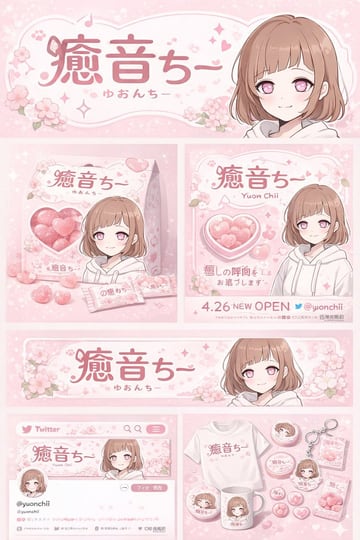
Anime Character Brand Identity & Merch Board
{ "type": "brand identity and merchandise design board", "theme": { "color_palette": "{argument name=\"theme color\" default=\"pastel pink\"} and white", "motif": "{argument name=\"motif\" default=\"cherry blossoms\"} and pink hearts" }, "character": { "description": "anime girl with short brown bob hair, pink eyes, wearing a white hoodie, gentle smile" }, "branding": { "main_logo": "{argument name=\"character name\" default=\"癒音ちー\"}", "sub_logo": "{argument name=\"character subtext\" default=\"ゆおんちー\"}" }, "layout": { "sections": [ { "type": "header banner", "position": "top", "elements": ["large main logo", "sub logo", "cherry blossom graphics", "character portrait on the right"] }, { "type": "product packaging", "position": "middle left", "elements": ["1 square box with heart-shaped transparent window showing pink heart candies", "character illustration on box", "2 individual candy wrappers", "5 scattered heart candies"] }, { "type": "promotional poster", "position": "middle right", "elements": ["character portrait", "heart-shaped candy bowl", "main logo", "text '4.26 NEW OPEN'", "text '{argument name=\"social handle\" default=\"@yuonchii\"}'"] }, { "type": "horizontal web banner", "position": "lower middle", "elements": ["main logo", "cherry blossoms", "character portrait on the right"] }, { "type": "social media profile mockup", "position": "bottom left", "elements": ["header image with logo", "1 circular profile picture", "handle '{argument name=\"social handle\" default=\"@yuonchii\"}'", "1 follow button", "mock bio text"] }, { "type": "merchandise collection", "position": "bottom right", "count": 9, "items": ["1 white t-shirt with logo", "1 white mug with character", "4 round pin badges", "1 acrylic keychain", "2 candy packets"] } ] } }