
Image2Studio
案例

gpt-image-2

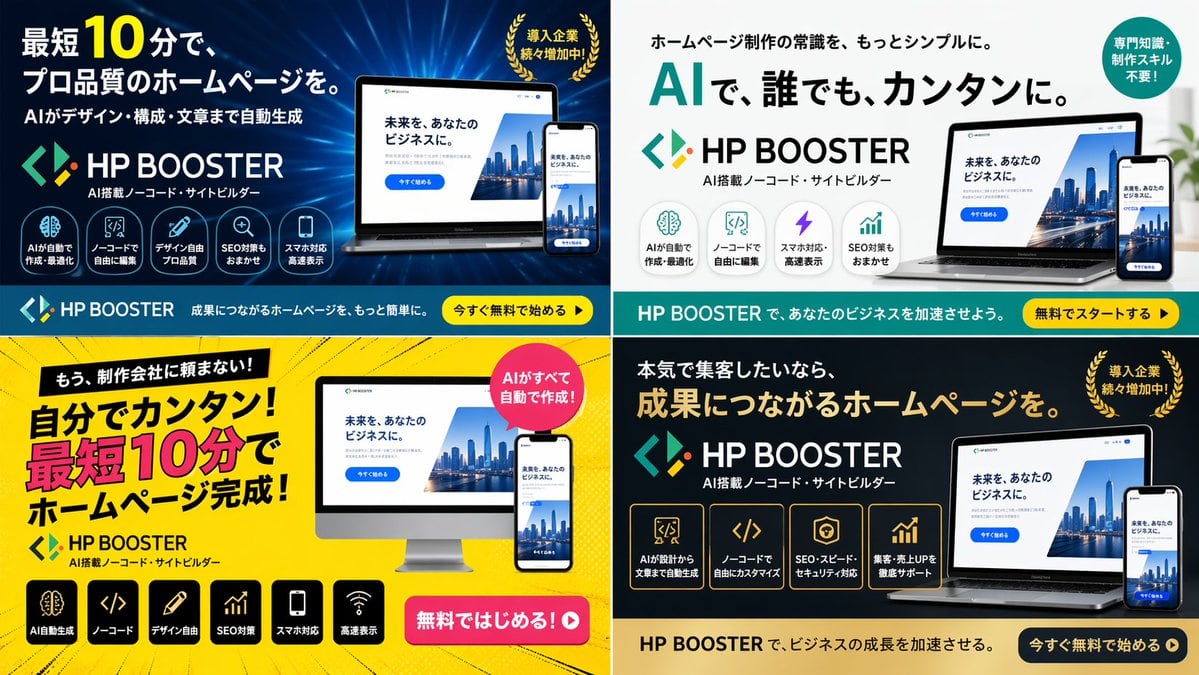
4-Panel SaaS Ad Banner Variations

Generates a 2x2 grid of digital advertising banners for a software product, featuring different color themes, layouts, and marketing copy variations.

Generates a 2x2 grid of digital advertising banners for a software product, featuring different color themes, layouts, and marketing copy variations.
提示词

{ "type": "4-panel ad banner variation grid", "product": { "name": "{argument name=\"product name\" default=\"HP BOOSTER\"}", "subtitle": "AI搭載ノーコード・サイトビルダー", "logo": "blue and green angle brackets with a diamond" }, "common_elements": { "device_mockups": "laptop and smartphone (desktop monitor in bottom-left panel) displaying a website with a city skyline, text '未来を、あなたのビジネスに。', and a blue '今すぐ始める' button" }, "layout": { "grid": "2x2", "panels": [ { "position": "top-left", "theme": "dark blue gradient with tech lines", "headline": "{argument name=\"main headline 1\" default=\"最短10分で、プロ品質のホームページを。\"}", "sub_headline": "AIがデザイン・構成・文章まで自動生成", "badge": "gold laurel wreath with text '導入企業続々増加中!'", "icon_count": 5, "icon_labels": ["AIが自動で作成・最適化", "ノーコードで自由に編集", "デザイン自由プロ品質", "SEO対策もおまかせ", "スマホ対応高速表示"], "bottom_bar": "teal background, yellow button '今すぐ無料で始める ▶'" }, { "position": "top-right", "theme": "white and light gray", "headline": "{argument name=\"main headline 2\" default=\"AIで、誰でも、カンタンに。\"}", "pre_headline": "ホームページ制作の常識を、もっとシンプルに。", "badge": "teal circle with text '専門知識・制作スキル不要!'", "icon_count": 4, "icon_labels": ["AIが自動で作成・最適化", "ノーコードで自由に編集", "スマホ対応・高速表示", "SEO対策もおまかせ"], "bottom_bar": "teal background, yellow button '無料でスタートする ▶'" }, { "position": "bottom-left", "theme": "bright yellow with comic-book action lines", "headline": "{argument name=\"main headline 3\" default=\"自分でカンタン!最短10分でホームページ完成!\"}", "pre_headline": "もう、制作会社に頼まない!", "badge": "pink circle with text 'AIがすべて自動で作成!'", "icon_count": 6, "icon_labels": ["AI自動生成", "ノーコード", "デザイン自由", "SEO対策", "スマホ対応", "高速表示"], "call_to_action": "pink pill button '無料ではじめる!▶'" }, { "position": "bottom-right", "theme": "dark gray and black", "headline": "{argument name=\"main headline 4\" default=\"成果につながるホームページを。\"}", "pre_headline": "本気で集客したいなら、", "badge": "gold laurel wreath with text '導入企業続々増加中!'", "icon_count": 4, "icon_labels": ["AIが設計から文章まで自動生成", "ノーコードで自由にカスタマイズ", "SEO・スピード・セキュリティ対応", "集客・売上UPを徹底サポート"], "bottom_bar": "gold background, dark blue button '今すぐ無料で始める ▶'" } ] } }

提示词结构
  • 模型gpt-image-2
  • 用途brand-identity
  • 风格luxury, editorial
  • 画幅Flexible
适用场景
  • 用途brand-identity
  • 风格luxury, editorial
  • 推荐规格1:1, 4:5, 16:9, or 9:16
  • 模型GPT Image 2
如何修改

把这个 4-Panel SaaS Ad Banner Variations 提示词当作起点。替换主体、产品细节、场景、光线、品牌颜色和输出画幅,同时保留 brand-identity 的用途和 luxury, editorial 的视觉方向。

可替换变量
  • 主体替换成你的产品、人物、场景或界面对象。
  • 用途保留或改写为 brand identity、广告图、封面、海报或电商主图。
  • 画幅按投放位置选择 1:1、4:5、16:9 或 9:16。
  • 品牌线索补充颜色、材质、道具、文案安全区和最终使用平台。
推荐规格

先按目标平台选择画幅,再根据用途选择 1K、2K 或 4K。产品图和海报通常适合更高清晰度。

生成前检查
  • 检查主体、光线、构图和画幅都足够明确。
  • 检查如果图片要承载标题或广告文案,已经预留文字安全区。
  • 检查生成前确认分辨率、额度成本和最终使用位置。
为什么有效

4-Panel SaaS Ad Banner Variations 的重点是先固定图片用途,再用主体、构图、光线、风格和画幅控制生成结果。它适合 brand identity,并保留 luxury, editorial 的视觉方向。

常见问题
  • 能直接用吗?可以。先替换主体、品牌线索和画幅,再进入 Image2Studio 生成。
  • 适合什么比例?按平台选择 1:1、4:5、16:9 或 9:16。




