
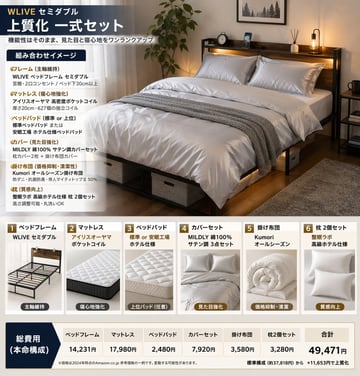
床上用品套装信息图
{ "type": "产品套装信息图", "header": { "title": "{argument name=\"main title\" default=\"WLIVE 半双人床高品质套装\"}", "subtitle": "{argument name=\"subtitle\" default=\"在保持功能性的同时,全面提升外观与睡眠体验\"}" }, "hero_section": { "layout": "左右分栏布局,左侧为文字面板,右侧为大型生活方式摄影图", "text_panel": { "heading": "组合示意", "bullet_points_count": 6, "bullet_labels": [ "床架 (保留核心)", "床垫 (强化睡眠体验)", "床垫保护垫 (标准或高级)", "床品套件 (提升外观)", "被子 (控制成本与清洁)", "枕头 (提升质感)" ] }, "lifestyle_photo": { "subject": "带有带架和插座的木质床头板的半双人床", "bedding": "{argument name=\"bedding color\" default=\"银灰色和白色\"} 床单、被子和枕头,搭配有纹理的灰色盖毯", "environment": "{argument name=\"room aesthetic\" default=\"现代舒适卧室,配有暖色灯光\"},盆栽植物,带台灯的床头柜,床下储物箱" } }, "product_gallery": { "layout": "6 张产品卡片横向排列", "cards_count": 6, "cards": [ { "number": 1, "title": "床架", "image": "木质床架", "tag": "保留核心" }, { "number": 2, "title": "床垫", "image": "独立袋装弹簧床垫", "tag": "强化睡眠体验" }, { "number": 3, "title": "床垫保护垫", "image": "绗缝床垫保护垫", "tag": "高级保护垫 (可选)" }, { "number": 4, "title": "床品套件", "image": "折叠好的银灰色床罩和枕套", "tag": "提升外观" }, { "number": 5, "title": "被子", "image": "卷起的白色被子", "tag": "控制成本与清洁" }, { "number": 6, "title": "枕头 2 件套", "image": "两个白色枕头", "tag": "提升质感" } ] }, "pricing_table": { "layout": "底部横向表格", "row_header": "总费用 (推荐配置)", "columns_count": 7, "columns": [ "床架", "床垫", "床垫保护垫", "床品套件", "被子", "枕头 2 件套", "合计" ], "total_price": "{argument name=\"total price\" default=\"49,471 日元\"}", "footer_note": "※价格为 2024 年 Amazon.co.jp 参考价格示例,实际价格可能会有变动。" } }