Image2Studio
提示词

gpt-image-2

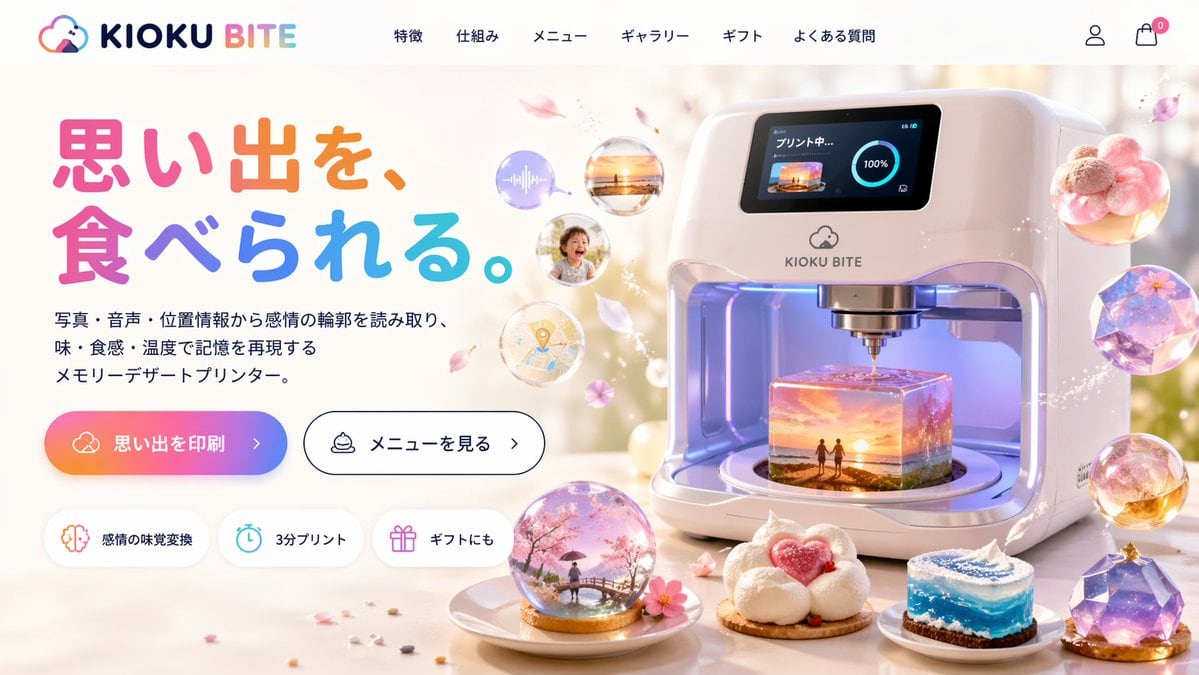
Futuristic 3D Food Printer Landing Page

Generates a website mockup for a sci-fi appliance that prints memories as magical desserts, featuring UI elements and detailed product visuals.

Generates a website mockup for a sci-fi appliance that prints memories as magical desserts, featuring UI elements and detailed product visuals.
提示词

{ "type": "website landing page mockup", "theme": "futuristic memory-to-food 3D printer", "header": { "logo": "{argument name=\"brand name\" default=\"KIOKU BITE\"} with a cloud and bite mark icon", "navigation_links": { "count": 6, "labels": ["特徴", "仕組み", "メニュー", "ギャラリー", "ギフト", "よくある質問"] }, "icons": ["user profile", "shopping cart with a zero badge"] }, "layout": { "left_column": { "headline": "{argument name=\"headline text\" default=\"思い出を、食べられる。\"}", "headline_style": "large, colorful, rounded font", "subheadline": "{argument name=\"product description\" default=\"写真・音声・位置情報から感情の輪郭を読み取り、味・食感・温度で記憶を再現するメモリーデザートプリンター。\"}", "call_to_action_buttons": { "count": 2, "primary": "gradient background with text '{argument name=\"primary button text\" default=\"思い出を印刷\"} >'", "secondary": "white background, black border, text 'メニューを見る >'" }, "feature_badges": { "count": 3, "style": "pill-shaped with icons", "labels": ["感情の味覚変換 (brain icon)", "3分プリント (clock icon)", "ギフトにも (gift icon)"] } }, "right_column": { "main_product": "sleek, white, futuristic 3D food printer appliance", "printer_screen": "digital display showing 'プリント中...' (Printing...), a 100% progress circle, and a thumbnail of a {argument name=\"printing scene\" default=\"sunset beach with two figures\"}", "printer_interior": "glowing, translucent cube-shaped dessert being printed, containing a miniature 3D diorama of the {argument name=\"printing scene\" default=\"sunset beach with two figures\"}", "floating_elements": { "count": 4, "description": "translucent memory bubbles containing an audio wave, a sunset photo, a smiling child, and a map pin, surrounded by floating pink flower petals" } }, "foreground": { "plated_desserts": { "count": 4, "descriptions": [ "snow globe dome containing a cherry blossom scene with a person on a bridge", "cloud-like white dessert with a pink heart center", "cylindrical cake resembling a swirling blue ocean wave", "faceted, gem-like purple galaxy dessert" ] } } } }

提示词结构
  • 模型gpt-image-2
  • 用途product-hero-shot
  • 风格3d-render, cyberpunk, minimal, photorealistic
  • 画幅Flexible
适用场景
  • 用途product-hero-shot
  • 风格3d-render, cyberpunk, minimal, photorealistic
  • 推荐规格1:1, 4:5, 16:9, or 9:16
  • 模型GPT Image 2
如何修改

把这个 Futuristic 3D Food Printer Landing Page 提示词当作起点。替换主体、产品细节、场景、光线、品牌颜色和输出画幅,同时保留 product-hero-shot 的用途和 3d-render, cyberpunk, minimal, photorealistic 的视觉方向。

可替换变量
  • 主体替换成你的产品、人物、场景或界面对象。
  • 用途保留或改写为 product hero shot、广告图、封面、海报或电商主图。
  • 画幅按投放位置选择 1:1、4:5、16:9 或 9:16。
  • 品牌线索补充颜色、材质、道具、文案安全区和最终使用平台。
推荐规格

先按目标平台选择画幅,再根据用途选择 1K、2K 或 4K。产品图和海报通常适合更高清晰度。

生成前检查
  • 检查主体、光线、构图和画幅都足够明确。
  • 检查如果图片要承载标题或广告文案,已经预留文字安全区。
  • 检查生成前确认分辨率、额度成本和最终使用位置。
为什么有效

Futuristic 3D Food Printer Landing Page 的重点是先固定图片用途,再用主体、构图、光线、风格和画幅控制生成结果。它适合 product hero shot,并保留 3d-render, cyberpunk, minimal, photorealistic 的视觉方向。

常见问题
  • 能直接用吗?可以。先替换主体、品牌线索和画幅,再进入 Image2Studio 生成。
  • 适合什么比例?按平台选择 1:1、4:5、16:9 或 9:16。