Infographics{
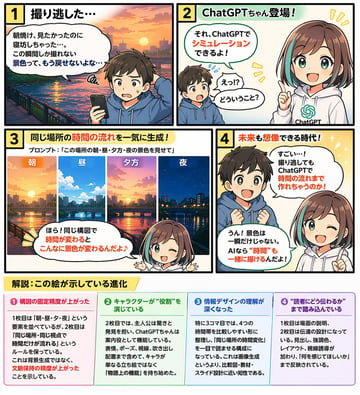
"type": "带底部信息图表的 4 格教育漫画",
"characters": {
"boy": {
"description": "小男孩,棕色头发",
"outfit": "{argument name=\"boy outfit\" default=\"蓝色连帽衫\"}"
},
"girl": {
"name": "{argument name=\"main character name\" default=\"ChatGPT 酱\"}",
"description": "动漫女孩",
"hair": "{argument name=\"girl hair style\" default=\"棕色波波头,带青色挑染\"}",
"outfit": "带有绿色 AI 标志的白色连帽衫"
}
},
"layout": {
"comic_panels": [
{
"panel_number": 1,
"title": "1 错过了拍摄时机……",
"scene": "男孩拿着智能手机显得很失望,背景是河流与城市的日出",
"speech_bubble": "明明想看朝霞的,结果睡过头了……这种瞬间才能捕捉到的景色,再也回不来了吧……"
},
{
"panel_number": 2,
"title": "2 ChatGPT 酱登场!",
"scene": "男孩感到惊讶,女孩指着前方微笑着",
"speech_bubbles": [
"诶!?什么意思?",
"那个,用 ChatGPT 就能模拟出来哦!"
]
},
{
"panel_number": 3,
"title": "3 一次性生成同一地点的时间流转!",
"sub_text": "提示词:{argument name=\"panel 3 prompt text\" default=\"“展示这个地方早、中、晚、夜的景色”\"}",
"sub_images": {
"count": 4,
"description": "同一城市景观在不同时间段的景象",
"labels": ["早", "中", "晚", "夜"]
},
"scene": "女孩在下方指着上方的子图像",
"speech_bubble": "看!在构图不变的情况下,时间改变后景色会发生这么大的变化♪"
},
{
"panel_number": 4,
"title": "4 连未来都能想象的时代!",
"scene": "男孩眼神闪烁,感到惊叹,女孩眨眼并指着前方",
"speech_bubbles": [
"好厉害……!就算错过了拍摄,用 ChatGPT 也能把时间流转制作出来吗!",
"嗯!景色不只是一瞬间。有了 AI,连“时间”也能一起描绘出来哦!"
]
}
],
"infographic_section": {
"position": "底部",
"title": "{argument name=\"infographic main title\" default=\"解析:这张图所展示的进化\"}",
"columns": {
"count": 4,
"headers": [
"❶ 构图的固定精度提升了",
"❷ 角色正在扮演“角色”",
"❸ 对信息设计的理解加深了",
"❹ 深入到了“如何传达给读者”的层面"
],
"content_description": "每个标题下方的详细说明文字"
}
}
}
}