
Image2Studio
提示词

gpt-image-2

日本突发新闻播报生成器

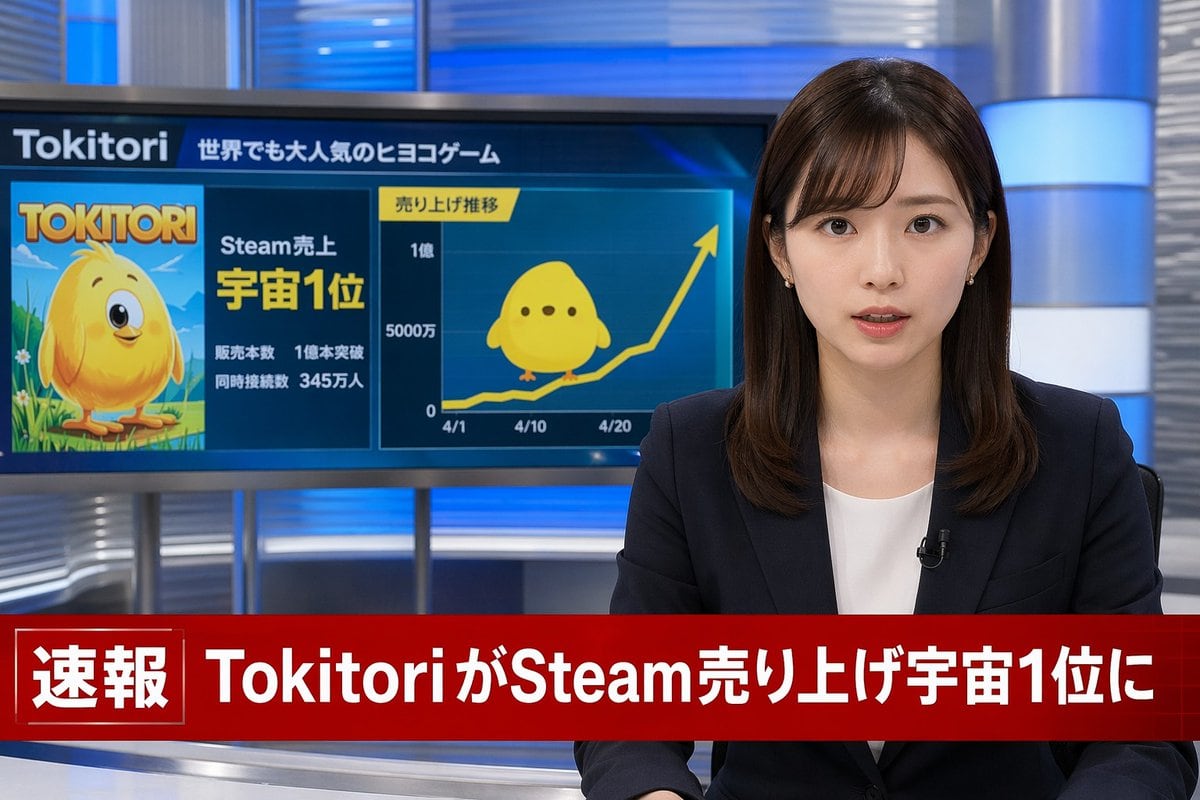
生成一个照片级真实的电视新闻播报场景,包含一位主播、可自定义的背景显示器图形以及下方的突发新闻横幅。

Copy this GPT Image 2 prompt for social media post and character design with Photorealistic styling. Use it in Image2Studio to generate, edit, and save.
提示词

A photorealistic television news broadcast scene. On the right, a young Japanese female news anchor with shoulder-length dark brown hair and bangs looks directly at the camera with a professional expression. She wears a dark navy blazer over a white top, small earrings, and a lavalier microphone. The studio background features modern blue and silver illuminated panels. On the left, a large monitor displays a news graphic. The top of the monitor reads "{argument name="game name" default="Tokitori"}" followed by "{argument name="monitor top text" default="世界でも大人気のヒヨコゲーム"}". The left side of the monitor shows game cover art featuring a {argument name="character description" default="round, yellow chick character with big eyes"} on a green field, with the title "{argument name="game name" default="Tokitori"}" and text reading "{argument name="monitor achievement text" default="Steam売上 宇宙1位"}", "販売本数 1億本突破", and "同時接続数 345万人". The right side of the monitor displays a line graph titled "売り上げ推移" with an upward-trending yellow arrow, y-axis labels "0", "5000万", and "1億", and 3 x-axis dates "4/1", "4/10", and "4/20". A flat 2D version of the yellow chick sits on the graph line. Across the bottom of the screen is a prominent red lower-thirds breaking news banner. The left side of the banner has a box reading "速報" and the main text reads "{argument name="breaking news headline" default="TokitoriがSteam売り上げ宇宙1位に"}".

提示词结构
  • 模型gpt-image-2
  • 用途social-media-post
  • 风格photorealistic
  • 画幅Flexible
适用场景
  • 用途social-media-post
  • 风格photorealistic
  • 推荐规格1:1, 4:5, 16:9, or 9:16
  • 模型GPT Image 2
如何修改

把这个 日本突发新闻播报生成器 提示词当作起点。替换主体、产品细节、场景、光线、品牌颜色和输出画幅,同时保留 social-media-post 的用途和 photorealistic 的视觉方向。

可替换变量
  • 主体替换成你的产品、人物、场景或界面对象。
  • 用途保留或改写为 social media post、广告图、封面、海报或电商主图。
  • 画幅按投放位置选择 1:1、4:5、16:9 或 9:16。
  • 品牌线索补充颜色、材质、道具、文案安全区和最终使用平台。
推荐规格

先按目标平台选择画幅,再根据用途选择 1K、2K 或 4K。产品图和海报通常适合更高清晰度。

生成前检查
  • 检查主体、光线、构图和画幅都足够明确。
  • 检查如果图片要承载标题或广告文案,已经预留文字安全区。
  • 检查生成前确认分辨率、额度成本和最终使用位置。
为什么有效

日本突发新闻播报生成器 的重点是先固定图片用途,再用主体、构图、光线、风格和画幅控制生成结果。它适合 social media post,并保留 photorealistic 的视觉方向。

常见问题
  • 能直接用吗?可以。先替换主体、品牌线索和画幅,再进入 Image2Studio 生成。
  • 适合什么比例?按平台选择 1:1、4:5、16:9 或 9:16。