Image2Studio
提示词

gpt-image-2

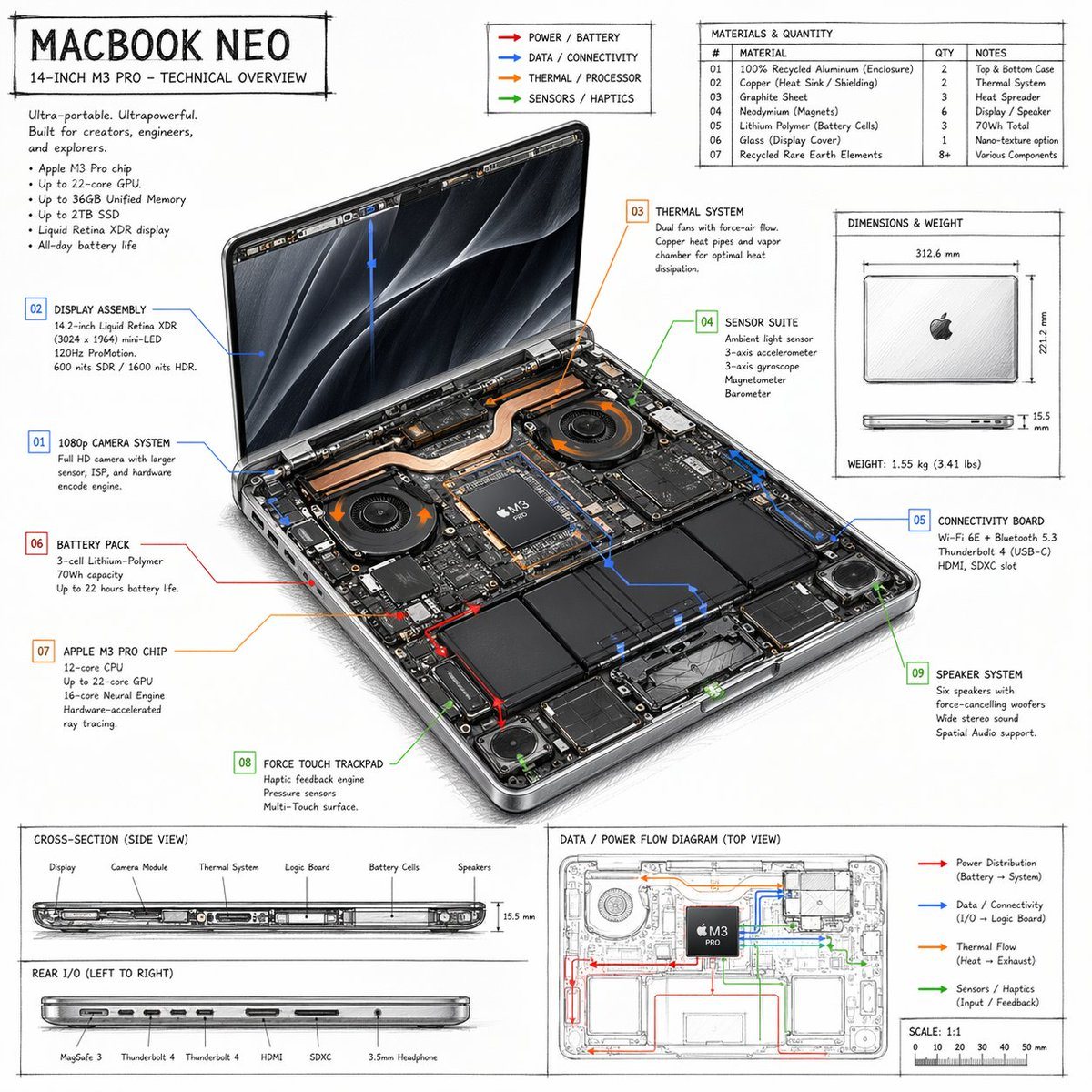
Laptop Technical Overview Infographic

A detailed, hand-drawn style technical spec sheet for a laptop, featuring internal component callouts, material tables, and flow diagrams.

A detailed, hand-drawn style technical spec sheet for a laptop, featuring internal component callouts, material tables, and flow diagrams.
提示词

{ "type": "technical overview infographic", "style": "{argument name=\"visual style\" default=\"hand-drawn technical sketch with clean typography\"}", "product": { "name": "{argument name=\"product name\" default=\"MACBOOK NEO\"}", "subtitle": "14-INCH {argument name=\"processor model\" default=\"M3 PRO\"} - TECHNICAL OVERVIEW" }, "layout": { "centerpiece": { "description": "isometric view of an opened laptop revealing internal hardware components like dual fans, copper heat pipes, battery cells, and logic board", "callouts_count": 9, "callout_labels": [ "01 1080p CAMERA SYSTEM", "02 DISPLAY ASSEMBLY", "03 THERMAL SYSTEM", "04 SENSOR SUITE", "05 CONNECTIVITY BOARD", "06 BATTERY PACK", "07 {argument name=\"main component\" default=\"APPLE M3 PRO CHIP\"}", "08 FORCE TOUCH TRACKPAD", "09 SPEAKER SYSTEM" ] }, "sections": [ { "title": "Header Text", "position": "top-left", "content": "Marketing blurb and 5-bullet specification list" }, { "title": "Legend", "position": "top-center", "content": "4 color-coded arrows indicating {argument name=\"accent colors\" default=\"red, blue, orange, green\"} flow lines for Power, Data, Thermal, and Sensors" }, { "title": "MATERIALS & QUANTITY", "position": "top-right", "type": "table", "rows_count": 7, "columns": ["#", "MATERIAL", "QTY", "NOTES"] }, { "title": "DIMENSIONS & WEIGHT", "position": "mid-right", "content": "Top and side views of closed laptop with measurements" }, { "title": "CROSS-SECTION (SIDE VIEW)", "position": "bottom-left (top half)", "content": "Side profile showing internal component layout with 6 labels" }, { "title": "REAR I/O (LEFT TO RIGHT)", "position": "bottom-left (bottom half)", "content": "Side profile showing 6 ports" }, { "title": "DATA / POWER FLOW DIAGRAM (TOP VIEW)", "position": "bottom-right", "content": "Wireframe top-down view with colored flow lines, legend, and scale bar" } ] } }

提示词结构
  • 模型gpt-image-2
  • 用途social-media-post
  • 风格editorial, photorealistic, 3d-render, minimal
  • 画幅Flexible
适用场景
  • 用途social-media-post
  • 风格editorial, photorealistic, 3d-render, minimal
  • 推荐规格1:1, 4:5, 16:9, or 9:16
  • 模型GPT Image 2
如何修改

把这个 Laptop Technical Overview Infographic 提示词当作起点。替换主体、产品细节、场景、光线、品牌颜色和输出画幅,同时保留 social-media-post 的用途和 editorial, photorealistic, 3d-render, minimal 的视觉方向。

可替换变量
  • 主体替换成你的产品、人物、场景或界面对象。
  • 用途保留或改写为 social media post、广告图、封面、海报或电商主图。
  • 画幅按投放位置选择 1:1、4:5、16:9 或 9:16。
  • 品牌线索补充颜色、材质、道具、文案安全区和最终使用平台。
推荐规格

先按目标平台选择画幅,再根据用途选择 1K、2K 或 4K。产品图和海报通常适合更高清晰度。

生成前检查
  • 检查主体、光线、构图和画幅都足够明确。
  • 检查如果图片要承载标题或广告文案,已经预留文字安全区。
  • 检查生成前确认分辨率、额度成本和最终使用位置。
为什么有效

Laptop Technical Overview Infographic 的重点是先固定图片用途,再用主体、构图、光线、风格和画幅控制生成结果。它适合 social media post,并保留 editorial, photorealistic, 3d-render, minimal 的视觉方向。

常见问题
  • 能直接用吗?可以。先替换主体、品牌线索和画幅,再进入 Image2Studio 生成。
  • 适合什么比例?按平台选择 1:1、4:5、16:9 或 9:16。