提示词
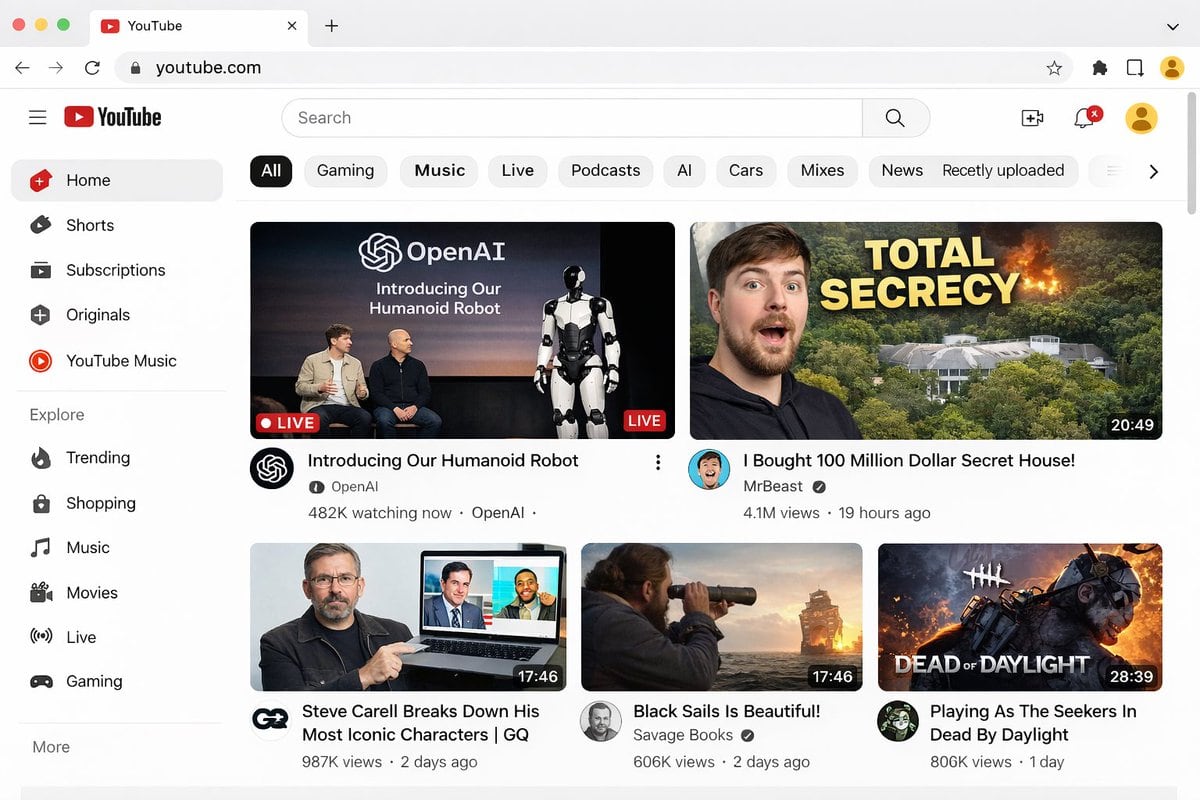
{ "type": "网页浏览器 UI 模型", "platform": "{argument name=\"platform name\" default=\"YouTube\"}", "browser_window": { "style": "macOS 浅色模式", "tab": "YouTube", "url_bar": "youtube.com" }, "layout": { "header": { "components": ["汉堡菜单", "平台 Logo", "搜索栏", "创建视频图标", "通知铃铛", "用户头像"] }, "sidebar": { "position": "左侧", "item_count": 11, "sections": [ { "name": "主要", "items": ["首页", "Shorts", "订阅", "原创内容", "YouTube Music"] }, { "name": "探索", "items": ["热门", "购物", "音乐", "电影", "直播", "游戏"] } ] }, "main_content": { "category_tags": { "count": 10, "labels": ["全部", "游戏", "音乐", "直播", "播客", "AI", "汽车", "合辑", "新闻", "最近上传"] }, "video_grid": { "card_count": 5, "cards": [ { "position": "左上", "size": "大", "thumbnail_description": "Sam Altman 和 Greg Brockman 坐在舞台上,旁边是一个站立的人形机器人,文字覆盖 'OpenAI Introducing Our Humanoid Robot',带有 LIVE 徽章", "video_title": "{argument name=\"featured live stream title\" default=\"Introducing Our Humanoid Robot\"}", "channel_name": "{argument name=\"featured live stream channel\" default=\"OpenAI\"}", "metadata": "48.2 万人正在观看" }, { "position": "右上", "size": "大", "thumbnail_description": "左侧是惊讶的男人脸,右侧是隐藏在森林中的巨大豪宅并伴有爆炸效果,粗体黄色文字覆盖 '{argument name=\"top right thumbnail text\" default=\"TOTAL SECRECY\"}'", "video_title": "{argument name=\"top right video title\" default=\"I Bought 100 Million Dollar Secret House!\"}", "channel_name": "MrBeast", "metadata": "410 万次观看,19 小时前,时长 20:49" }, { "position": "左下", "size": "小", "thumbnail_description": "Steve Carell 手持一台显示《办公室》场景的笔记本电脑", "video_title": "Steve Carell 深度解析他最标志性的角色 | GQ", "channel_name": "GQ", "metadata": "98.7 万次观看,2 天前,时长 17:46" }, { "position": "中下", "size": "小", "thumbnail_description": "男人在日落时分透过望远镜观察海面上的帆船", "video_title": "Black Sails Is Beautiful!", "channel_name": "Savage Books", "metadata": "60.6 万次观看,2 天前,时长 17:46" }, { "position": "右下", "size": "小", "thumbnail_description": "来自电子游戏的恐怖面具杀手角色,文字覆盖 'DEAD OF DAYLIGHT'", "video_title": "Playing As The Seekers In Dead By Daylight", "channel_name": "Unknown", "metadata": "80.6 万次观看,1 天前,时长 28:39" } ] } } } }
提示词结构
- 模型gpt-image-2
- 用途app-ui-mockup
- 风格editorial
- 画幅Flexible
适用场景
- 用途app-ui-mockup
- 风格editorial
- 推荐规格1:1, 4:5, 16:9, or 9:16
- 模型GPT Image 2
如何修改
把这个 视频流媒体平台主页 UI 提示词当作起点。替换主体、产品细节、场景、光线、品牌颜色和输出画幅,同时保留 app-ui-mockup 的用途和 editorial 的视觉方向。
可替换变量
- 主体替换成你的产品、人物、场景或界面对象。
- 用途保留或改写为 app ui mockup、广告图、封面、海报或电商主图。
- 画幅按投放位置选择 1:1、4:5、16:9 或 9:16。
- 品牌线索补充颜色、材质、道具、文案安全区和最终使用平台。
推荐规格
先按目标平台选择画幅,再根据用途选择 1K、2K 或 4K。产品图和海报通常适合更高清晰度。
生成前检查
- 检查主体、光线、构图和画幅都足够明确。
- 检查如果图片要承载标题或广告文案,已经预留文字安全区。
- 检查生成前确认分辨率、额度成本和最终使用位置。
为什么有效
视频流媒体平台主页 UI 的重点是先固定图片用途,再用主体、构图、光线、风格和画幅控制生成结果。它适合 app ui mockup,并保留 editorial 的视觉方向。
常见问题
- 能直接用吗?可以。先替换主体、品牌线索和画幅,再进入 Image2Studio 生成。
- 适合什么比例?按平台选择 1:1、4:5、16:9 或 9:16。
相关提示词
继续查看相似方向

摄影
日本新闻广播模拟
{ "type": "电视新闻广播布局", "anchor": { "appearance": "{argument name=\"anchor appearance\" default=\"年轻的日本女性新闻主播,留着齐肩深色短发\"}", "attire": "浅米色衬衫,佩戴小型翻领麦克风", "pose": "坐在桌前,双手交叠,面向前方" }, "studio_environment": "现代新闻演播室,配有蓝色发光面板,背景为夜间城市天际线", "graphics": { "top_left_bug": { "style": "深蓝色矩形", "text": "{argument name=\"channel logo\" default=\"NEWS TODAY\"}" }, "presentation_monitor": { "location": "主播后方左侧", "badge": "最新情報", "subtitle": "{argument name=\"subheadline\" default=\"OpenAIの新しい画像生成モデル\"}", "title": "{argument name=\"main headline\" default=\"「GPT-image-2」\"}", "suffix": "がリリース", "icon": "OpenAI logo", "bottom_bar": "より高精細に より正確に 画像生成の可能性がさらに広がる" }, "lower_thirds_ticker": { "badge": "速報", "headline": "{argument name=\"ticker text\" default=\"OpenAI 画期的な新画像生成モデル「GPT-image-2」をリリース\"}" } } }

海报
AI 编程助手宣传信息图
{ "type": "应用宣传信息图海报", "style": "简洁、现代、磨砂玻璃风格、柔和阴影、3D 图标", "theme": "{argument name=\"primary color theme\" default=\"蓝白配色\"}", "header": { "title": "{argument name=\"app name\" default=\"CodePilot\"}", "subtitle": "{argument name=\"subtitle\" default=\"你的 AI 编程副驾驶\"}", "features_list": "智能补全 · 代码生成 · 问答调试 · 代码解析", "main_icon": "光泽感 3D 圆角正方形,蓝色渐变,白色 {argument name=\"main icon symbol\" default=\"</>\"} 及闪光效果" }, "layout": { "sections": [ { "title": "feature_cards", "position": "中间网格", "count": 4, "items": [ { "label": "智能代码补全", "icon": "蓝色闪电", "description": "上下文感知,精准补全,让编码快人一步", "ui_element": "macOS 风格代码窗口,展示 Python calculate_total 函数" }, { "label": "AI 代码生成", "icon": "紫色魔法棒", "description": "根据自然语言描述,一键生成函数与脚本", "ui_element": "聊天提示气泡和展示 Python quick_sort 函数的代码窗口" }, { "label": "对话 & 调试助手", "icon": "绿色聊天气泡", "description": "通过自然语言提问定位 Bug,边聊边改,高效解决问题", "ui_element": "包含用户提问和绿色 AI 解决方案气泡的聊天界面" }, { "label": "代码解析 & 注释", "icon": "带有放大镜的橙色文档", "description": "快速理解复杂代码,自动生成注释与说明", "ui_element": "展示 JS fetchData 函数的代码窗口,带有 3 个浮动操作标签:自动注释、逻辑解析、一键复制" } ] }, { "title": "为什么选择 CodePilot?", "position": "左下角", "count": 4, "labels": ["提升效率", "精准可靠", "隐私安全", "易于集成"], "icons": ["时钟", "对勾", "盾牌", "拼图块"] }, { "title": "立即体验", "position": "右下角", "count": 1, "elements": ["GitHub 开源项目", "{argument name=\"github link\" default=\"github.com/op7418/CodePilot\"}", "二维码"] } ] } }
UI Mockups
深色模式 AI API 定价页面模型
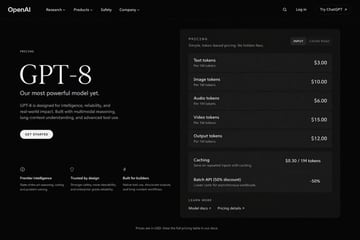
{ "type": "深色模式网页 UI 模型", "theme": "时尚、现代的深色主题,配有白色和浅灰色文字", "header": { "logo": "{argument name=\"company name\" default=\"OpenAI\"}", "navigation": ["研究", "产品", "安全", "公司"], "actions": ["搜索图标", "登录", "试用 ChatGPT 按钮"] }, "layout": { "left_column": { "label": "定价", "headline": "{argument name=\"model name\" default=\"GPT-8\"}", "subheading": "{argument name=\"main tagline\" default=\"Our most powerful model yet.\"}", "description": "GPT-8 专为智能、可靠性和实际应用而设计。具备多模态推理、长上下文理解和高级工具使用能力。", "button": "开始使用", "features": { "count": 3, "items": [ {"icon": "brain", "title": "前沿智能", "desc": "最先进的推理、编码和问题解决能力。"}, {"icon": "shield", "title": "值得信赖的设计", "desc": "更强的安全性、更高的可控性以及企业级的可靠性。"}, {"icon": "lightning bolt", "title": "为开发者而生", "desc": "原生工具使用、结构化输出和长上下文工作流。"} ] } }, "right_column": { "type": "定价卡片", "header": "定价 - 简单、基于 Token 的定价。无隐藏费用。", "toggle": ["输入", "缓存读取"], "token_pricing": { "count": 5, "rows": [ {"name": "文本 Token", "unit": "每 100 万 Token", "price": "{argument name=\"text token price\" default=\"$3.00\"}"}, {"name": "图像 Token", "unit": "每 100 万 Token", "price": "$10.00"}, {"name": "音频 Token", "unit": "每 100 万 Token", "price": "$6.00"}, {"name": "视频 Token", "unit": "每 100 万 Token", "price": "$15.00"}, {"name": "输出 Token", "unit": "每 100 万 Token", "price": "{argument name=\"output token price\" default=\"$12.00\"}"} ] }, "additional_features": { "count": 2, "rows": [ {"name": "缓存", "desc": "通过缓存节省重复输入费用。", "price": "$0.30 / 100 万 Token"}, {"name": "批量 API (5 折优惠)", "desc": "降低异步工作负载的成本。", "price": "-50%"} ] }, "footer_links": ["了解更多", "模型文档", "定价详情"] } }, "footer": "价格以美元计算。请在我们的文档中查看完整定价表。" }

摄影
社交媒体视频 App UI 模型
{ "type": "社交媒体短视频 App 界面模型", "main_image": { "subject": "{argument name=\"subject description\" default=\"一位留着深色长发、身穿白色露肩上衣的年轻亚裔女性\"}", "pose": "回头看向镜头,面带温柔微笑,头发在微风中轻轻飘动", "setting": "{argument name=\"background location\" default=\"日落时分的滨江步道,背景有高大的现代塔楼和城市天际线\"}", "lighting": "黄金时刻,温暖的阳光映照在河面上" }, "ui_layout": { "top_bar": { "status_icons": ["时间 9:41", "蜂窝信号", "Wi-Fi", "电池 100"], "navigation": { "left": "菜单图标", "center_tabs": ["经验", "团购", "关注", "{argument name=\"active top tab\" default=\"推荐\"}"], "right": "搜索图标" } }, "right_sidebar": { "count": 6, "elements": [ "带有粉色加号按钮的头像", "带有“23.6万”文本的心形图标", "带有“1.6万”文本的聊天气泡图标", "带有“2.8万”文本的星形图标", "带有“3.7万”文本的分享箭头图标", "旋转的音乐唱片图标" ] }, "bottom_left_overlay": { "username": "{argument name=\"username\" default=\"@小鹿的日常\"}", "caption": "{argument name=\"caption text\" default=\"吹着晚风,看着日落,这一刻好治愈~ 🌅\"}", "audio_track": "🎵 原声 @小鹿的日常创作的原声" }, "bottom_navigation_bar": { "count": 5, "tabs": [ "首页", "朋友 (带红色角标 '2')", "圆角方形中央加号按钮", "消息 (带红色角标 '5')", "我" ] } } }