Image2Studio
Examples

gpt-image-2

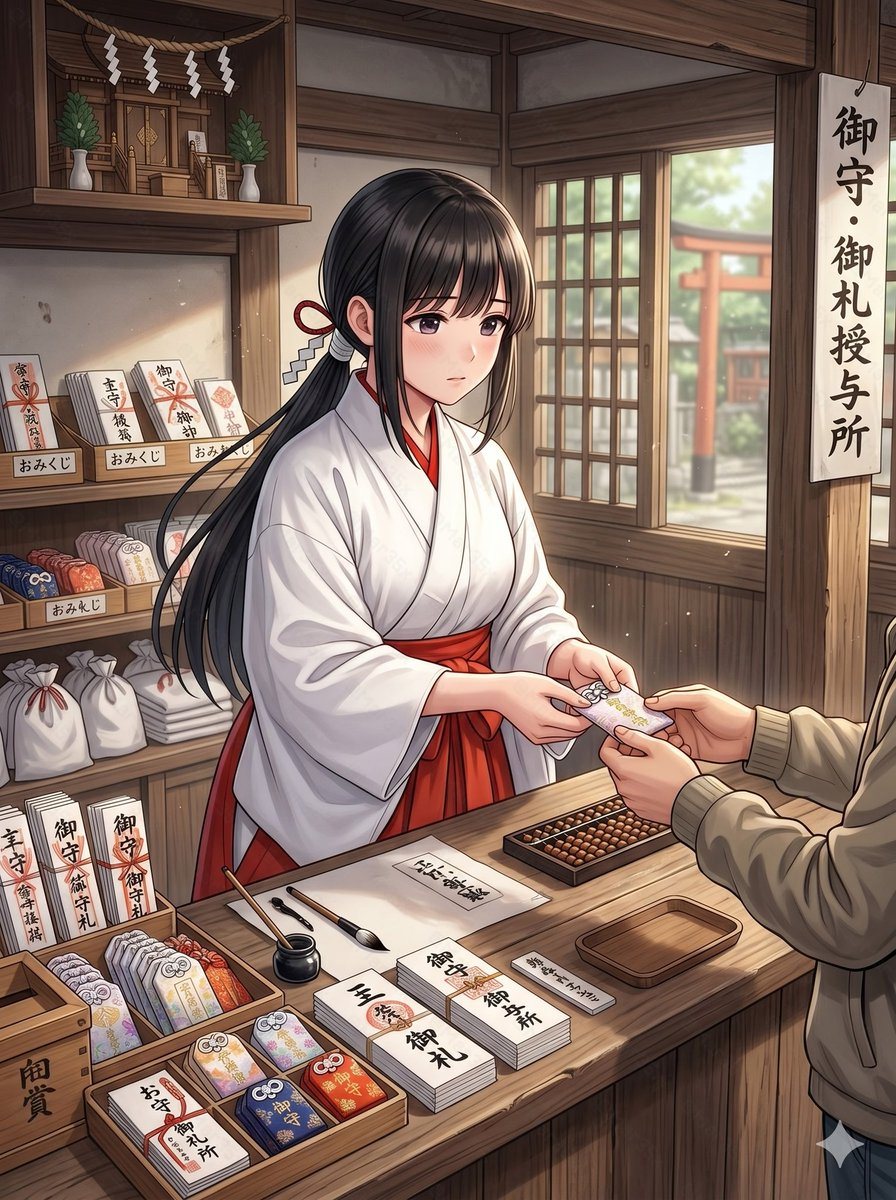
Anime Shrine Maiden Omamori Counter

This prompt generates a detailed anime illustration of a miko selling shrine charms at a wooden shrine counter, suitable for character scene art or atmospheric cultural setting visuals.

This prompt generates a detailed anime illustration of a miko selling shrine charms at a wooden shrine counter, suitable for character scene art or atmospheric cultural setting visuals.
Prompt

A clean anime-style illustration of a young shrine maiden working at a traditional Japanese shrine amulet counter inside a warm wooden building. She is a single female subject shown from about waist up behind the counter, with her face obscured by a soft rectangular blur, long straight {argument name="hair color" default="black"} hair tied back with a red cord and white paper zigzag shrine ornament, wearing a white kimono top and vivid {argument name="hakama color" default="red"} hakama. She is politely handing a protective charm to a visitor across the counter; only the visitor’s hands, torso, and beige jacket sleeves are visible in the foreground. The scene should feel calm, respectful, and softly lit by daylight coming through a wooden lattice window on the right, where a red torii gate and shrine grounds are visible outside in gentle blur. The interior is richly detailed with dark natural wood beams, shelves, and a small kamidana altar in the upper left decorated with 4 hanging white shide paper streamers and 2 green sakaki plants in white vases. On the right hangs a vertical sign with the Japanese text "御守・御札授与所". On the left shelves are shrine goods and signs: 3 small shelf labels reading "おみくじ", multiple stacks of paper fortunes and talismans, white drawstring bags, and upright placards including "御守", "御札", and "交通安全". The countertop is neatly arranged with 3 shallow wooden display trays of colorful omamori charms, 5 visible tabletop paper labels or stacks reading "厄除", "御守", "御札", "御朱印", and "御礼", plus a black ink pot, 2 writing brushes, a small empty wooden tray, a rectangular abacus, and bundled paper items. The charm being exchanged should be a delicate pastel omamori with floral decoration and a tied cord. Use a polished contemporary anime illustration style with fine linework, soft shading, realistic hand posing, subtle dust motes in the air, and strong emphasis on the subject and counter interaction rather than dramatic stylization.

Prompt structure
  • Modelgpt-image-2
  • Use caseavatar
  • Styleanime, watercolor, cinematic, photorealistic
  • Aspect ratioFlexible
Best used for
  • Use caseavatar
  • Styleanime, watercolor, cinematic, photorealistic
  • Recommended specs1:1, 4:5, 16:9, or 9:16
  • ModelGPT Image 2
How to customize

Use this Anime Shrine Maiden Omamori Counter prompt as a base. Replace the subject, product details, environment, lighting, brand colors, and output ratio while keeping the avatar intent and anime, watercolor, cinematic, photorealistic direction stable.

Editable variables
  • SubjectReplace the product, person, scene, interface, or object being generated.
  • Use caseKeep or rewrite the destination as avatar, ad creative, cover image, poster, or ecommerce hero.
  • FrameChoose 1:1, 4:5, 16:9, or 9:16 based on the final placement.
  • Brand cuesAdd colors, materials, props, text-safe space, and the platform where the image will be used.
Recommended specs

Choose the frame for the destination first, then use 1K, 2K, or 4K based on output quality needs. Product images and posters usually benefit from higher resolution.

Pre-generation checklist
  • CheckSubject, lighting, composition, and frame are specific enough to review.
  • CheckText-safe space is included when the image will carry a headline or ad copy.
  • CheckResolution, credit cost, and final destination are checked before generation.
Why this prompt works

Anime Shrine Maiden Omamori Counter works because it starts from the image job, then controls subject, composition, lighting, style, and frame. It is best for avatar while keeping the anime, watercolor, cinematic, photorealistic direction stable.

Common questions
  • Can I use it directly?Yes. Replace the subject, brand cues, and frame, then generate in Image2Studio.
  • Which ratio should I use?Choose 1:1, 4:5, 16:9, or 9:16 based on the destination.