Image2Studio
Examples

gpt-image-2

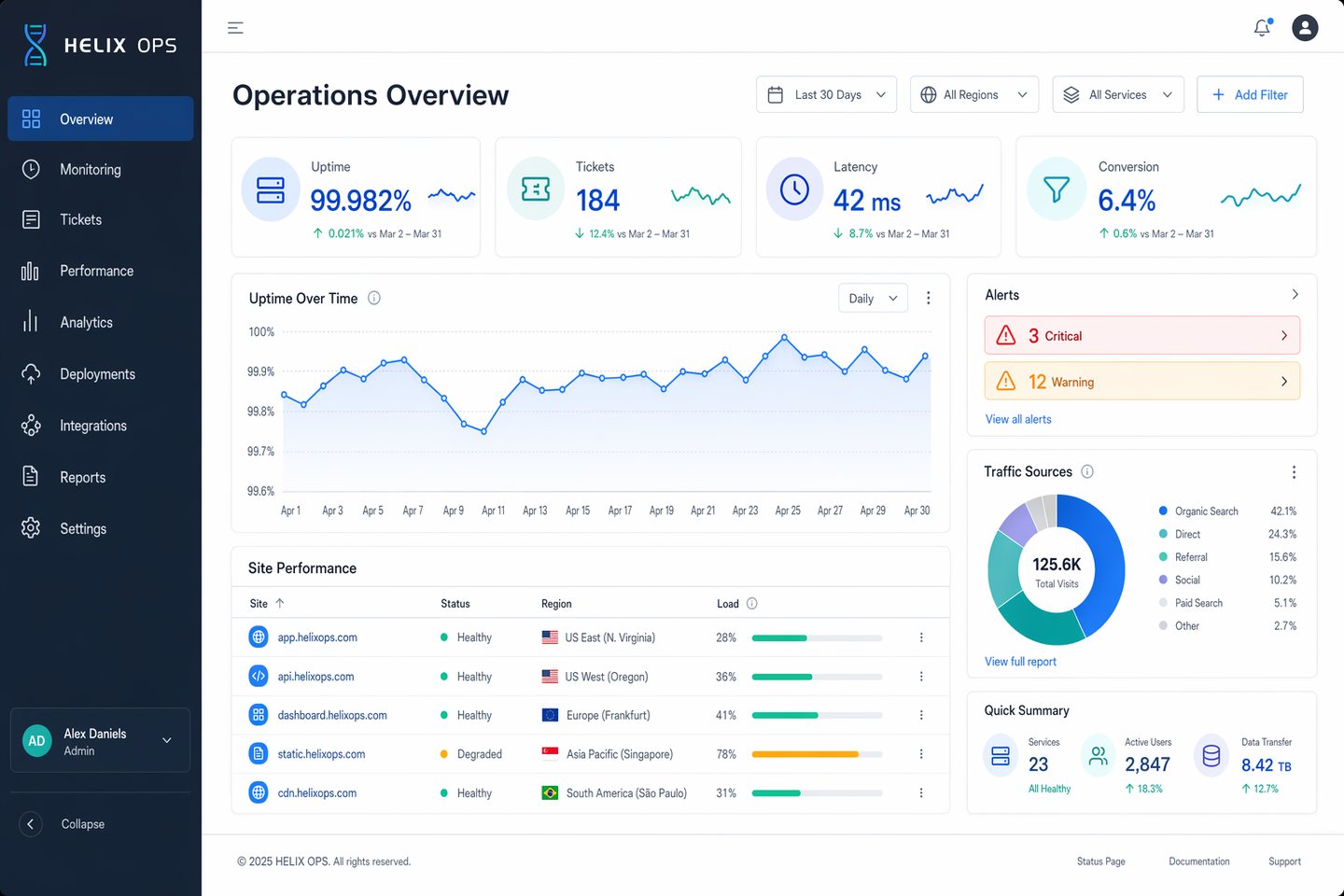
Desktop Operations Dashboard

App UI Mockup prompt for ui mockups, ready to edit and generate in Image2Studio.

App UI Mockup prompt for ui mockups, ready to edit and generate in Image2Studio.
Prompt

Create a high-end desktop SaaS analytics dashboard mockup for a fictional platform named HELIX OPS, displayed on a 16:10 monitor canvas at 1600x1000. Use a cool palette of slate, cobalt blue, teal, pale gray, and white, with subtle glass panels and tight grid alignment. The layout should include a left sidebar, top filter bar, KPI cards, line charts, data table, and alert panel. Use crisp typography and correct labels. Include in-image text: "HELIX OPS", "Operations Overview", "Last 30 Days", "Uptime 99.982%", "Tickets 184", "Latency 42 ms", and "Conversion 6.4%". Show a line chart labeled "Apr 1" through "Apr 30", a donut chart titled "Traffic Sources", and a table with columns "Site", "Status", "Region", and "Load". Add alert pills reading "3 Critical" and "12 Warning". Composition should feel realistic and presentation-ready, with clean hierarchy, precise spacing, balanced negative space, and ultra-sharp dashboard UI rendering.

Prompt structure
  • Modelgpt-image-2
  • Use caseapp-ui-mockup
  • Styleminimal, photorealistic, editorial, luxury
  • Aspect ratiolandscape
Best used for
  • Use caseapp-ui-mockup
  • Styleminimal, photorealistic, editorial, luxury
  • Recommended specslandscape
  • ModelGPT Image 2
How to customize

Use this Desktop Operations Dashboard prompt as a base. Replace the subject, product details, environment, lighting, brand colors, and output ratio while keeping the app-ui-mockup intent and minimal, photorealistic, editorial, luxury direction stable.

Editable variables
  • SubjectReplace the product, person, scene, interface, or object being generated.
  • Use caseKeep or rewrite the destination as app ui mockup, ad creative, cover image, poster, or ecommerce hero.
  • Framelandscape
  • Brand cuesAdd colors, materials, props, text-safe space, and the platform where the image will be used.
Recommended specs

Choose the frame for the destination first, then use 1K, 2K, or 4K based on output quality needs. Product images and posters usually benefit from higher resolution.

Pre-generation checklist
  • CheckSubject, lighting, composition, and frame are specific enough to review.
  • CheckText-safe space is included when the image will carry a headline or ad copy.
  • CheckResolution, credit cost, and final destination are checked before generation.
Why this prompt works

Desktop Operations Dashboard works because it starts from the image job, then controls subject, composition, lighting, style, and frame. It is best for app ui mockup while keeping the minimal, photorealistic, editorial, luxury direction stable.

Common questions
  • Can I use it directly?Yes. Replace the subject, brand cues, and frame, then generate in Image2Studio.
  • Which ratio should I use?landscape