Image2Studio
Examples

gpt-image-2

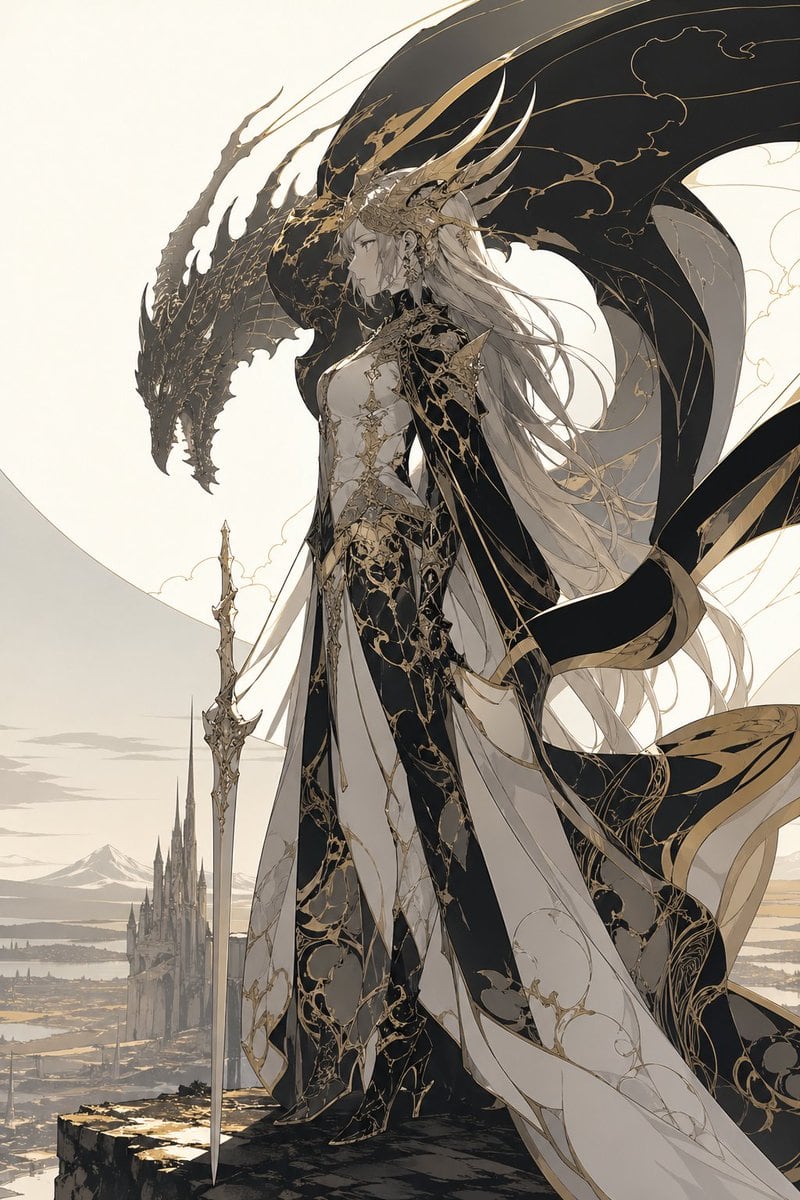
Dragon Queen in Black and Gold

This prompt generates a vertical fantasy character illustration of a regal dragon-themed queen with ornate black-and-gold attire, a ceremonial sword, and a giant dragon silhouette, ideal for epic AI art and character key visuals.

This prompt generates a vertical fantasy character illustration of a regal dragon-themed queen with ornate black-and-gold attire, a ceremonial sword, and a giant dragon silhouette, ideal for epic AI art and character key visuals.
Prompt

A majestic high-fantasy illustration of a regal dragon queen standing on the edge of a cliff, shown in full body and side profile facing left. She has {argument name="hair color" default="silver-white"} hair flowing in long layered strands far past her waist, a calm stern expression, and an elaborate crown-like headdress with multiple long horn-shaped golden spines sweeping backward. Her outfit is an ornate fusion of royal gown and armored bodysuit in {argument name="primary palette" default="black, ivory, and antique gold"}, covered with intricate filigree, vine-like gilded tracery, and elegant cracked-marble style patterns. The costume has 4 major visible garment elements: a fitted black-and-ivory armored torso, a long layered split skirt with flowing panels, a dark sweeping cape with gold trim, and thigh-high fitted leg armor or boots. She holds 1 long ceremonial sword planted vertically at her side, slim and highly decorative. Behind and around her rises the silhouette of 1 enormous black dragon with a long snarling head and vast arcing wings, its body framing her like a guardian shadow; the wings are detailed with subtle gold vein patterns. The background shows a pale, minimalist fantasy landscape with 1 distant gothic castle spire complex below, open plains, faint water or marshland, and far mountains under a soft cream sky. Composition is vertical, elegant, and cinematic, with the character centered slightly right, the dragon head to the upper left, and long ribbons and fabric streaming in the wind. Style is refined anime-inspired fantasy concept art with ultra-detailed linework, restrained colors, luminous ivory negative space, luxurious black-and-gold ornamentation, ethereal atmosphere, sharp silhouette design, and a noble sacred-draconic mood.

Prompt structure
  • Modelgpt-image-2
  • Use caseavatar
  • Styleluxury, minimal, watercolor, cinematic
  • Aspect ratioFlexible
Best used for
  • Use caseavatar
  • Styleluxury, minimal, watercolor, cinematic
  • Recommended specs1:1, 4:5, 16:9, or 9:16
  • ModelGPT Image 2
How to customize

Use this Dragon Queen in Black and Gold prompt as a base. Replace the subject, product details, environment, lighting, brand colors, and output ratio while keeping the avatar intent and luxury, minimal, watercolor, cinematic direction stable.

Editable variables
  • SubjectReplace the product, person, scene, interface, or object being generated.
  • Use caseKeep or rewrite the destination as avatar, ad creative, cover image, poster, or ecommerce hero.
  • FrameChoose 1:1, 4:5, 16:9, or 9:16 based on the final placement.
  • Brand cuesAdd colors, materials, props, text-safe space, and the platform where the image will be used.
Recommended specs

Choose the frame for the destination first, then use 1K, 2K, or 4K based on output quality needs. Product images and posters usually benefit from higher resolution.

Pre-generation checklist
  • CheckSubject, lighting, composition, and frame are specific enough to review.
  • CheckText-safe space is included when the image will carry a headline or ad copy.
  • CheckResolution, credit cost, and final destination are checked before generation.
Why this prompt works

Dragon Queen in Black and Gold works because it starts from the image job, then controls subject, composition, lighting, style, and frame. It is best for avatar while keeping the luxury, minimal, watercolor, cinematic direction stable.

Common questions
  • Can I use it directly?Yes. Replace the subject, brand cues, and frame, then generate in Image2Studio.
  • Which ratio should I use?Choose 1:1, 4:5, 16:9, or 9:16 based on the destination.