Image2Studio
Examples

gpt-image-2

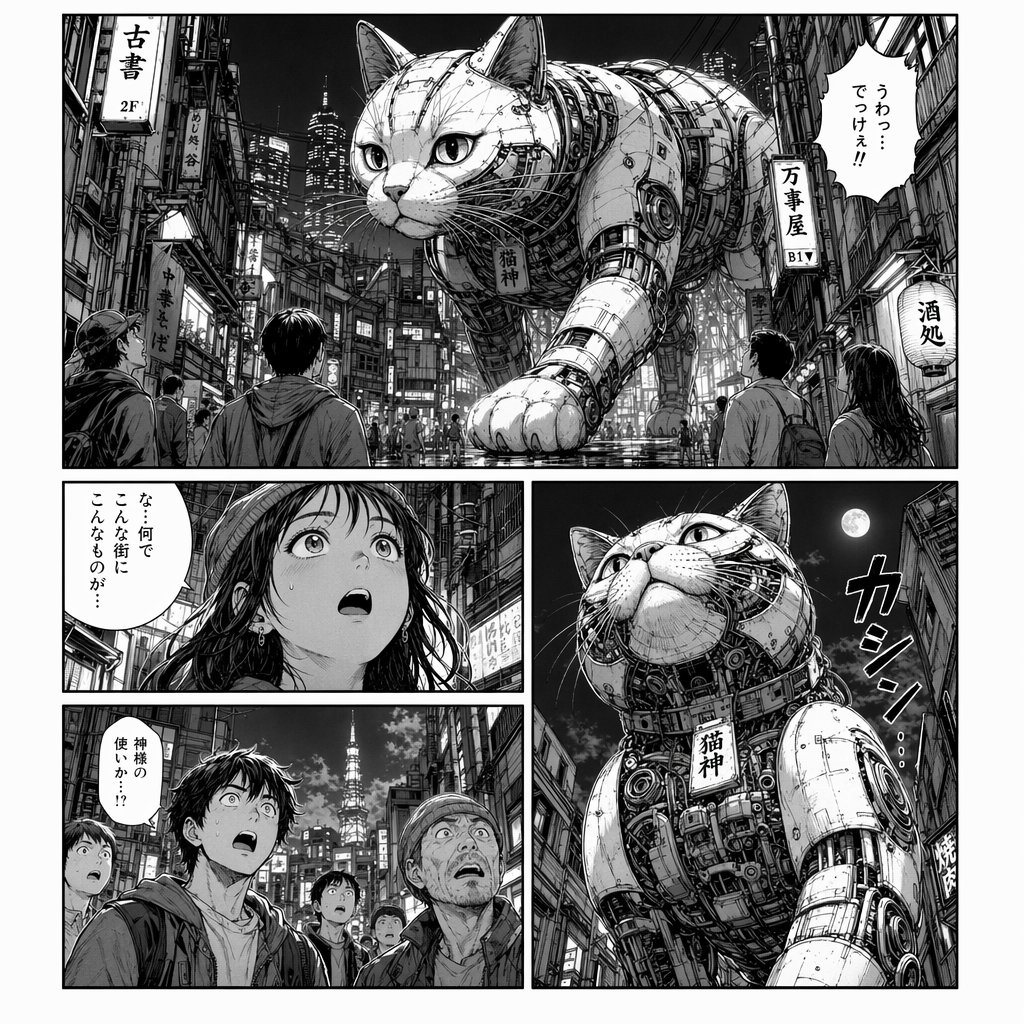
Highly Detailed Black-and-white Manga Page

A highly detailed black-and-white manga page showing a gigantic mechanical cat walking through a dense nighttime Japanese city street. The page has 4 panels total: 1 wide top panel spanni...

A highly detailed black-and-white manga page showing a gigantic mechanical cat walking through a dense nighttime Japanese city street. The page has 4 panels total: 1 wide top panel spanni...
Prompt

A highly detailed black-and-white manga page showing a gigantic mechanical cat walking through a dense nighttime Japanese city street. The page has 4 panels total: 1 wide top panel spanning the full width, 2 smaller stacked panels on the bottom left, and 1 tall large panel on the bottom right. In the top panel, a colossal robotic cat dominates a narrow neon-lit alley lined with tall buildings, tangled power lines, vertical shop signs, and tiny pedestrians staring upward in shock. The cat has realistic feline proportions but is built from exposed armor plates, rivets, pistons, cables, gears, segmented metal limbs, and intricate machine internals, with a tag hanging from its neck that reads "猫神". The wet street reflects city lights. Add multiple Japanese signs in the environment including "古書 2F", "万事屋 B1", and "酒処". Include a large manga speech bubble in Japanese in the upper right of the top panel reading "うわっ?でっけえ!!". In the upper bottom-left panel, show a close-up of a long-haired woman seen from behind and slightly to the side, looking toward the creature, with a vertical Japanese speech bubble reading "…何でこんな街にこんなものが…". In the lower bottom-left panel, show a group of startled onlookers from the front, including a young man in the foreground and other shocked pedestrians behind him, with a vertical Japanese speech bubble reading "神様の使いか!?". In the tall bottom-right panel, show a dramatic low-angle close-up of the mechanical cat towering between buildings under a bright moon, emphasizing its chest machinery, massive forelegs, whiskers, and regal face, with the neck tag "猫神" clearly visible. Add a large stylized Japanese sound effect near the cat reading "カシ…". Use classic seinen manga aesthetics, cinematic panel composition, fine ink crosshatching, heavy contrast, detailed urban textures, realistic crowd scale, and a sense of awe, mystery, and divine cyberpunk presence.

Prompt structure
  • Modelgpt-image-2
  • Use caseavatar
  • Styleanime, cinematic, photorealistic, cyberpunk
  • Aspect ratioFlexible
Best used for
  • Use caseavatar
  • Styleanime, cinematic, photorealistic, cyberpunk
  • Recommended specs1:1, 4:5, 16:9, or 9:16
  • ModelGPT Image 2
How to customize

Use this Highly Detailed Black-and-white Manga Page prompt as a base. Replace the subject, product details, environment, lighting, brand colors, and output ratio while keeping the avatar intent and anime, cinematic, photorealistic, cyberpunk direction stable.

Editable variables
  • SubjectReplace the product, person, scene, interface, or object being generated.
  • Use caseKeep or rewrite the destination as avatar, ad creative, cover image, poster, or ecommerce hero.
  • FrameChoose 1:1, 4:5, 16:9, or 9:16 based on the final placement.
  • Brand cuesAdd colors, materials, props, text-safe space, and the platform where the image will be used.
Recommended specs

Choose the frame for the destination first, then use 1K, 2K, or 4K based on output quality needs. Product images and posters usually benefit from higher resolution.

Pre-generation checklist
  • CheckSubject, lighting, composition, and frame are specific enough to review.
  • CheckText-safe space is included when the image will carry a headline or ad copy.
  • CheckResolution, credit cost, and final destination are checked before generation.
Why this prompt works

Highly Detailed Black-and-white Manga Page works because it starts from the image job, then controls subject, composition, lighting, style, and frame. It is best for avatar while keeping the anime, cinematic, photorealistic, cyberpunk direction stable.

Common questions
  • Can I use it directly?Yes. Replace the subject, brand cues, and frame, then generate in Image2Studio.
  • Which ratio should I use?Choose 1:1, 4:5, 16:9, or 9:16 based on the destination.