Image2Studio
Examples

gpt-image-2

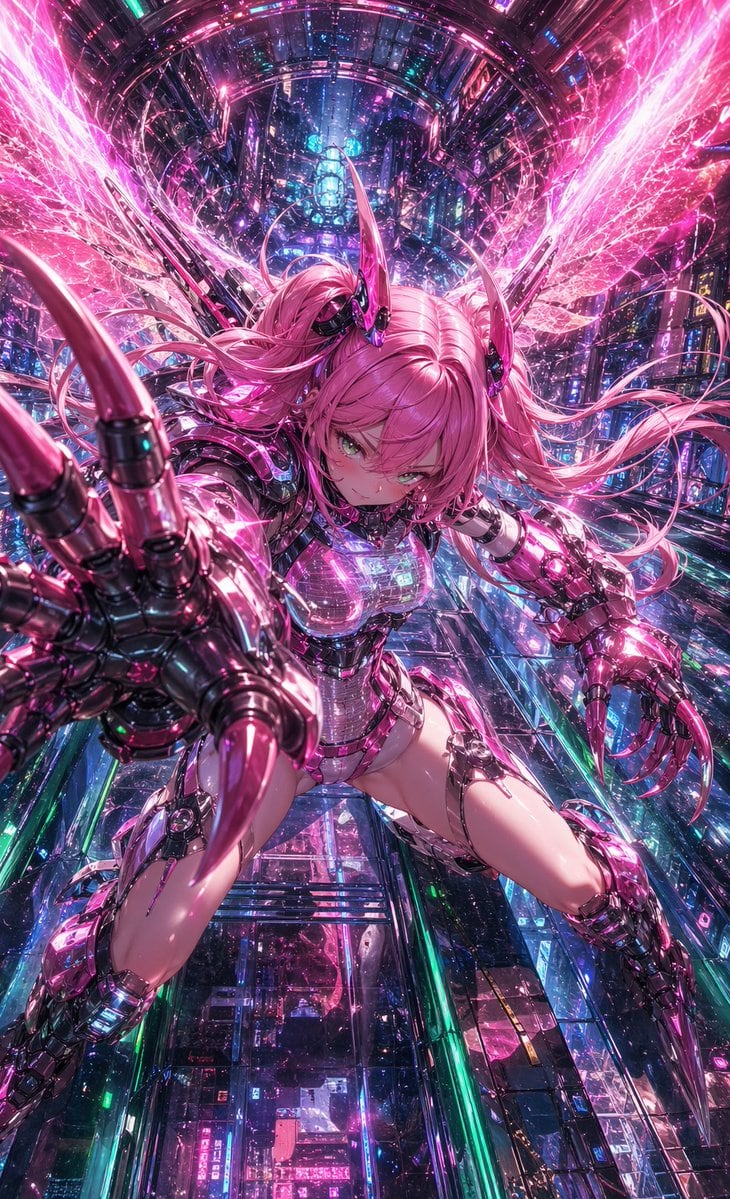
Dynamic Anime Cyberpunk Action Illustration Of A Young Female Cyborg

A dynamic anime cyberpunk action illustration of a young female cyborg with bright pink twin-tail hair, suspended in a vast futuristic neon city shaft filled with glowing circuitry, holog...

A dynamic anime cyberpunk action illustration of a young female cyborg with bright pink twin-tail hair, suspended in a vast futuristic neon city shaft filled with glowing circuitry, holog...
Prompt

A dynamic anime cyberpunk action illustration of a young female cyborg with {argument name="hair color" default="bright pink"} twin-tail hair, suspended in a vast futuristic neon city shaft filled with glowing circuitry, holographic reflections, and dense sci-fi architecture. She is viewed in an extreme foreshortened perspective, lunging directly toward the camera with one oversized mechanical hand thrust forward, fingers spread and tipped with long glossy claws, while the other cybernetic arm is bent back in attack posture. She has a fierce focused expression, luminous green eyes, small glossy black-and-magenta horn-like head implants, and long flowing hair whipping outward in all directions. Her body is encased in a high-detail reflective chrome-and-magenta cybernetic exosuit with translucent chest plating, segmented armored shoulders, mechanical gauntlets, exposed joint details, armored thighs, and blade-like lower leg armor. Behind her are 2 large radiant energy wings made of pink crystalline electricity and particle streaks, exploding outward symmetrically. The environment is a vertical futuristic corridor or megacity canyon with layered glass panels, glowing signage, metallic frameworks, blue and cyan lights mixed with dominant hot pink illumination, countless spark-like particles, lens glow, and high-density detail. Use a dramatic low-angle composition, centered character, aggressive attack pose, glossy surfaces, intense specular highlights, saturated magenta and cyan palette, cinematic sci-fi atmosphere, ultra-detailed anime rendering, sharp linework, and a sense of speed, power, and overwhelming visual density.

Prompt structure
  • Modelgpt-image-2
  • Use caseavatar
  • Stylecyberpunk, cinematic, photorealistic, anime
  • Aspect ratioFlexible
Best used for
  • Use caseavatar
  • Stylecyberpunk, cinematic, photorealistic, anime
  • Recommended specs1:1, 4:5, 16:9, or 9:16
  • ModelGPT Image 2
How to customize

Use this Dynamic Anime Cyberpunk Action Illustration Of A Young Female Cyborg prompt as a base. Replace the subject, product details, environment, lighting, brand colors, and output ratio while keeping the avatar intent and cyberpunk, cinematic, photorealistic, anime direction stable.

Editable variables
  • SubjectReplace the product, person, scene, interface, or object being generated.
  • Use caseKeep or rewrite the destination as avatar, ad creative, cover image, poster, or ecommerce hero.
  • FrameChoose 1:1, 4:5, 16:9, or 9:16 based on the final placement.
  • Brand cuesAdd colors, materials, props, text-safe space, and the platform where the image will be used.
Recommended specs

Choose the frame for the destination first, then use 1K, 2K, or 4K based on output quality needs. Product images and posters usually benefit from higher resolution.

Pre-generation checklist
  • CheckSubject, lighting, composition, and frame are specific enough to review.
  • CheckText-safe space is included when the image will carry a headline or ad copy.
  • CheckResolution, credit cost, and final destination are checked before generation.
Why this prompt works

Dynamic Anime Cyberpunk Action Illustration Of A Young Female Cyborg works because it starts from the image job, then controls subject, composition, lighting, style, and frame. It is best for avatar while keeping the cyberpunk, cinematic, photorealistic, anime direction stable.

Common questions
  • Can I use it directly?Yes. Replace the subject, brand cues, and frame, then generate in Image2Studio.
  • Which ratio should I use?Choose 1:1, 4:5, 16:9, or 9:16 based on the destination.