Image2Studio
Examples

gpt-image-2

Two-panel Comparison Graphic On A Black Background Demonstrating A Drama

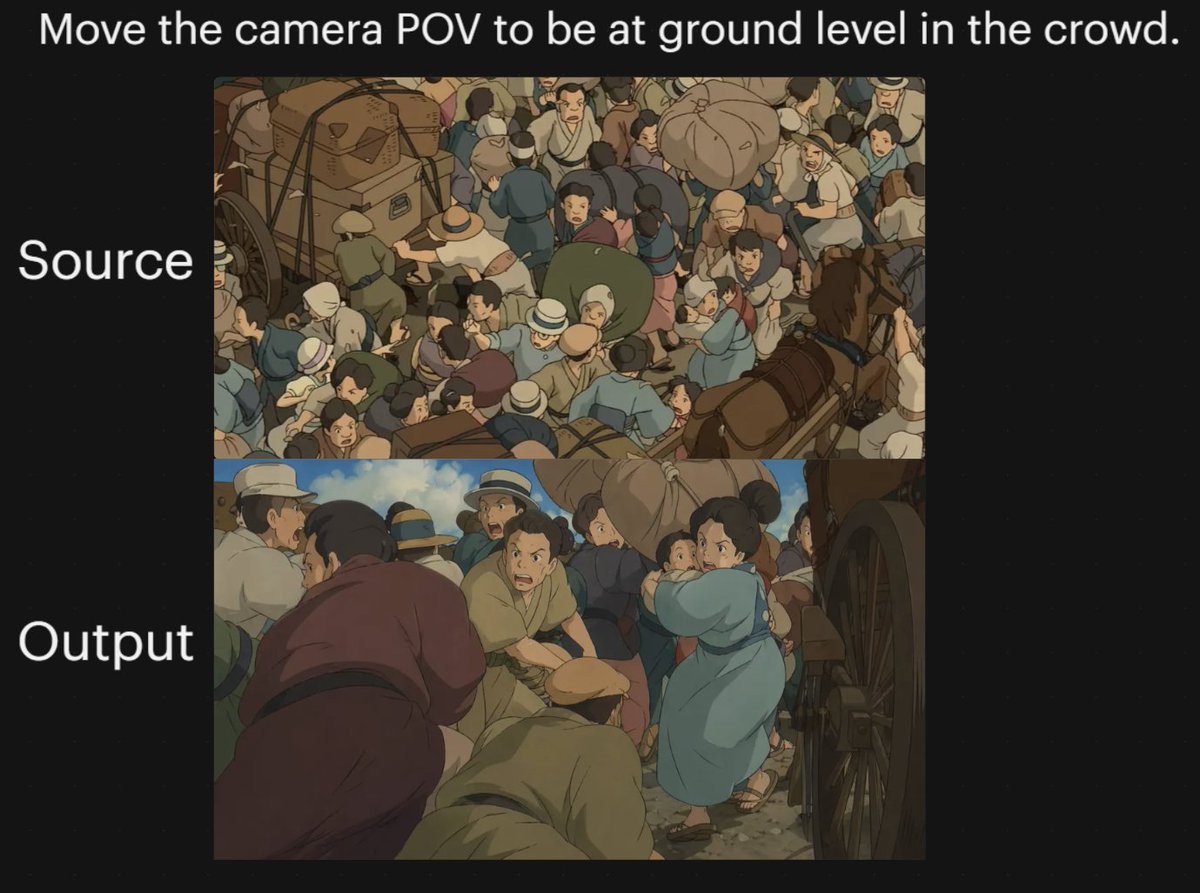
A two-panel comparison graphic on a black background demonstrating a dramatic camera-angle change in an anime-style crowded street scene. Place a large white sentence centered across the...

A two-panel comparison graphic on a black background demonstrating a dramatic camera-angle change in an anime-style crowded street scene. Place a large white sentence centered across the...
Prompt

A two-panel comparison graphic on a black background demonstrating a dramatic camera-angle change in an anime-style crowded street scene. Place a large white sentence centered across the top: "{argument name="headline text" default="Move the camera POV to be at ground level in the crowd."}". On the left side, add two large white labels aligned with the panels: "Source" beside the upper panel and "Output" beside the lower panel. Create exactly 2 stacked rectangular image panels centered on the canvas. In the top panel, show a high-angle overhead view of a densely packed historical street crowd in a hand-painted anime film style, with dozens of people pressed together around horse-drawn carts and wagon wheels; include bundled luggage, hats, muted earth-tone clothing, blue and tan garments, and a busy composition where figures overlap in every direction. In the bottom panel, recreate the same type of scene but shift the camera to a low, ground-level point of view inside the crowd, looking between bodies and beside a large wagon wheel on the right edge. The foreground should feel immersive and cramped, with several bent or crouched figures close to the camera, a person in a muted purple robe on the left foreground, a kneeling or hunched figure in tan near the center bottom, and a woman in a light blue dress or coat toward the right-middle turning through the crowd while holding a small child. Keep the environment as a chaotic old-world market or transit street with horses, carts, people in brimmed hats and simple period clothing, dusty ground, and warm subdued colors. Use soft cinematic anime lighting, painterly shading, and the visual feel of a classic Studio Ghibli crowd sequence. The overall image should read as a before-and-after camera experiment, with the upper panel as the original overhead composition and the lower panel as the transformed low-angle perspective.

Prompt structure
  • Modelgpt-image-2
  • Use caseavatar
  • Stylephotorealistic, cinematic, anime, minimal
  • Aspect ratioFlexible
Best used for
  • Use caseavatar
  • Stylephotorealistic, cinematic, anime, minimal
  • Recommended specs1:1, 4:5, 16:9, or 9:16
  • ModelGPT Image 2
How to customize

Use this Two-panel Comparison Graphic On A Black Background Demonstrating A Drama prompt as a base. Replace the subject, product details, environment, lighting, brand colors, and output ratio while keeping the avatar intent and photorealistic, cinematic, anime, minimal direction stable.

Editable variables
  • SubjectReplace the product, person, scene, interface, or object being generated.
  • Use caseKeep or rewrite the destination as avatar, ad creative, cover image, poster, or ecommerce hero.
  • FrameChoose 1:1, 4:5, 16:9, or 9:16 based on the final placement.
  • Brand cuesAdd colors, materials, props, text-safe space, and the platform where the image will be used.
Recommended specs

Choose the frame for the destination first, then use 1K, 2K, or 4K based on output quality needs. Product images and posters usually benefit from higher resolution.

Pre-generation checklist
  • CheckSubject, lighting, composition, and frame are specific enough to review.
  • CheckText-safe space is included when the image will carry a headline or ad copy.
  • CheckResolution, credit cost, and final destination are checked before generation.
Why this prompt works

Two-panel Comparison Graphic On A Black Background Demonstrating A Drama works because it starts from the image job, then controls subject, composition, lighting, style, and frame. It is best for avatar while keeping the photorealistic, cinematic, anime, minimal direction stable.

Common questions
  • Can I use it directly?Yes. Replace the subject, brand cues, and frame, then generate in Image2Studio.
  • Which ratio should I use?Choose 1:1, 4:5, 16:9, or 9:16 based on the destination.