Image2Studio
Examples

gpt-image-2

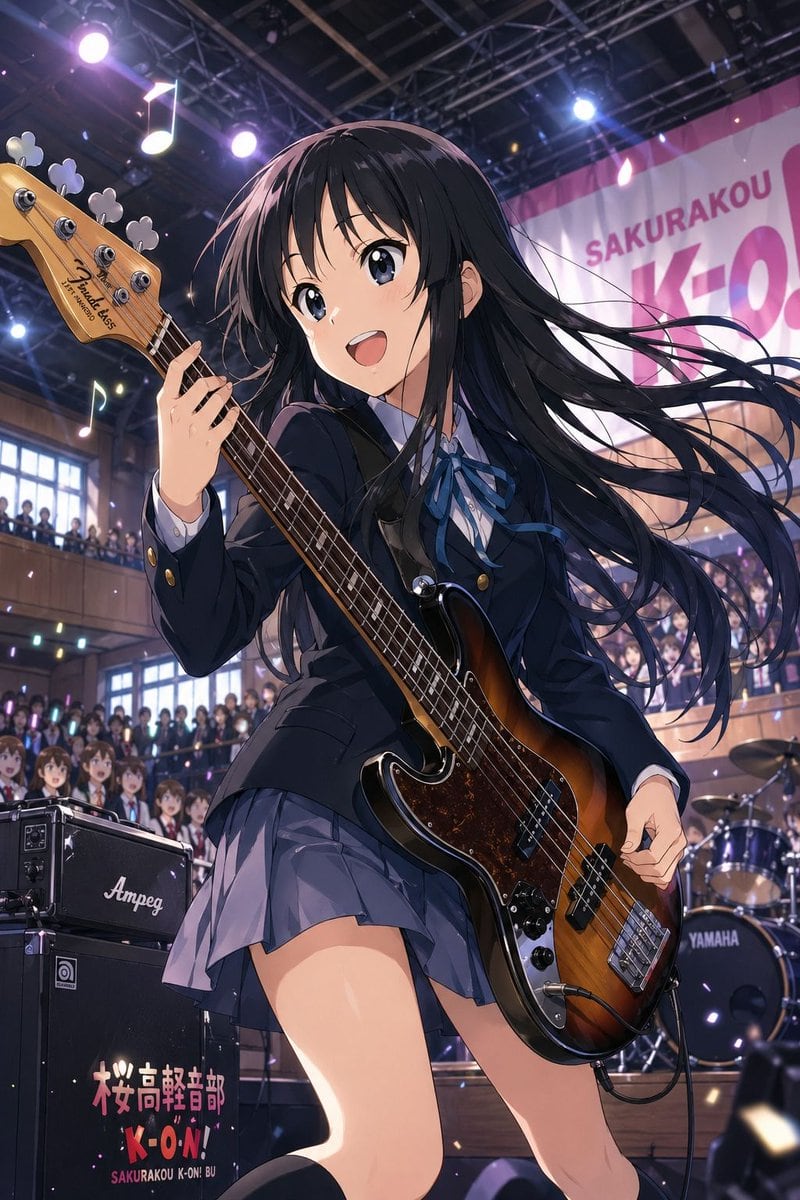
Dynamic Anime Concert Illustration Of Mio Akiyama-inspired High School B

A dynamic anime concert illustration of Mio Akiyama-inspired high school bassist performing onstage at a school festival, shown from a dramatic low angle in a full-body near-portrait comp...

A dynamic anime concert illustration of Mio Akiyama-inspired high school bassist performing onstage at a school festival, shown from a dramatic low angle in a full-body near-portrait comp...
Prompt

A dynamic anime concert illustration of {argument name="character" default="Mio Akiyama-inspired high school bassist"} performing onstage at a school festival, shown from a dramatic low angle in a full-body near-portrait composition. She is a beautiful teenage girl with very long straight {argument name="hair color" default="black"} hair whipping sideways in the motion of the performance, wearing a dark navy Japanese school uniform with a fitted blazer, white shirt, blue ribbon bow, and pleated gray-blue skirt. Her expression should be cool, serious, and focused. She is playing a sunburst electric bass guitar with a tortoiseshell pickguard, and it must be a true {argument name="instrument orientation" default="left-handed bass guitar"}, with the neck extending to the left side of the image and her fretting hand positioned accordingly. The stage setting is an indoor school auditorium packed with students on the ground floor and balcony, with bright concert spotlights, ceiling trusses, floating music-note decorations, and confetti-like glowing particles in the air. Behind her is a large banner reading {argument name="banner text" default="SAKURAKOU K-ON"}. At the left foreground is a black amplifier stack with the logo “Ampeg” and the text {argument name="amp text" default="桜高軽音部 K-ON! SAKURAKOU K-ON! BU"}, and in the right background a drum kit with visible “YAMAHA” branding. Emphasize energetic live-performance motion, glossy instrument reflections, detailed crowd depth, dramatic stage lighting in purple and white, and polished high-end anime illustration quality, SFW.

Prompt structure
  • Modelgpt-image-2
  • Use casebrand-identity
  • Stylecinematic, anime, watercolor, luxury
  • Aspect ratioFlexible
Best used for
  • Use casebrand-identity
  • Stylecinematic, anime, watercolor, luxury
  • Recommended specs1:1, 4:5, 16:9, or 9:16
  • ModelGPT Image 2
How to customize

Use this Dynamic Anime Concert Illustration Of Mio Akiyama-inspired High School B prompt as a base. Replace the subject, product details, environment, lighting, brand colors, and output ratio while keeping the brand-identity intent and cinematic, anime, watercolor, luxury direction stable.

Editable variables
  • SubjectReplace the product, person, scene, interface, or object being generated.
  • Use caseKeep or rewrite the destination as brand identity, ad creative, cover image, poster, or ecommerce hero.
  • FrameChoose 1:1, 4:5, 16:9, or 9:16 based on the final placement.
  • Brand cuesAdd colors, materials, props, text-safe space, and the platform where the image will be used.
Recommended specs

Choose the frame for the destination first, then use 1K, 2K, or 4K based on output quality needs. Product images and posters usually benefit from higher resolution.

Pre-generation checklist
  • CheckSubject, lighting, composition, and frame are specific enough to review.
  • CheckText-safe space is included when the image will carry a headline or ad copy.
  • CheckResolution, credit cost, and final destination are checked before generation.
Why this prompt works

Dynamic Anime Concert Illustration Of Mio Akiyama-inspired High School B works because it starts from the image job, then controls subject, composition, lighting, style, and frame. It is best for brand identity while keeping the cinematic, anime, watercolor, luxury direction stable.

Common questions
  • Can I use it directly?Yes. Replace the subject, brand cues, and frame, then generate in Image2Studio.
  • Which ratio should I use?Choose 1:1, 4:5, 16:9, or 9:16 based on the destination.