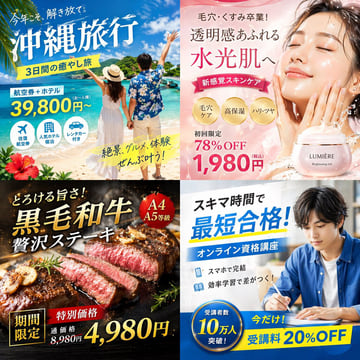
4-Panel Japanese Digital Ad Banner Grid
{ "type": "2x2 grid of Japanese digital advertisement banners", "layout": { "structure": "4 equal quadrants", "quadrants": [ { "position": "top-left", "theme": "Travel", "subject": "A couple holding hands on a white sand beach, looking out at turquoise ocean water under a bright blue sky.", "elements": ["red hibiscus flower in bottom left corner"], "text_labels": [ "今年こそ、解き放て。", "{argument name=\"travel destination\" default=\"沖縄旅行\"}", "3日間の癒やし旅", "航空券+ホテル", "39,800円〜", "絶景、グルメ、体験 ぜんぶ叶う!" ], "icons": { "count": 3, "descriptions": ["airplane", "hotel building", "car"] } }, { "position": "top-right", "theme": "Skincare", "subject": "Close-up portrait of a young woman with glowing, dewy skin, eyes closed, gently touching her cheeks.", "elements": [ "soft pink gradient background", "dynamic water splash effects", "pink cosmetic jar labeled '{argument name=\"skincare product name\" default=\"LUMIÈRE\"} Brightening Gel'" ], "text_labels": [ "毛穴・くすみ卒業!", "透明感あふれる", "水光肌へ", "新感覚スキンケア", "初回限定 78%OFF", "{argument name=\"discount price\" default=\"1,980円\"}" ], "badges": { "count": 3, "style": "gold circular", "labels": ["毛穴ケア", "高保湿", "ハリ・ツヤ"] } }, { "position": "bottom-left", "theme": "Gourmet Food", "subject": "Thick, sliced, medium-rare steak sizzling on a dark grill plate.", "elements": [ "garlic chips", "rosemary sprig", "dark background with smoke and glowing embers" ], "text_labels": [ "とろける旨さ!", "{argument name=\"food item\" default=\"黒毛和牛\"}", "贅沢ステーキ", "期間限定", "特別価格", "通常価格 8,980円", "4,980円" ], "badges": { "count": 1, "style": "red circular", "labels": ["A4 A5等級"] } }, { "position": "bottom-right", "theme": "Online Education", "subject": "Young man in a blue shirt studying at a desk, writing in a notebook next to an open laptop.", "elements": ["bright indoor lighting", "desk environment"], "text_labels": [ "スキマ時間で", "{argument name=\"education goal\" default=\"最短合格!\"}", "オンライン資格講座", "スマホで完結", "効率学習で差がつく!", "今だけ! 受講料 20%OFF" ], "badges": { "count": 1, "style": "blue circular", "labels": ["受講者数 10万人 突破!"] }, "icons": { "count": 2, "descriptions": ["smartphone", "open book"] } } ] } }