Image2Studio
Examples

gpt-image-2

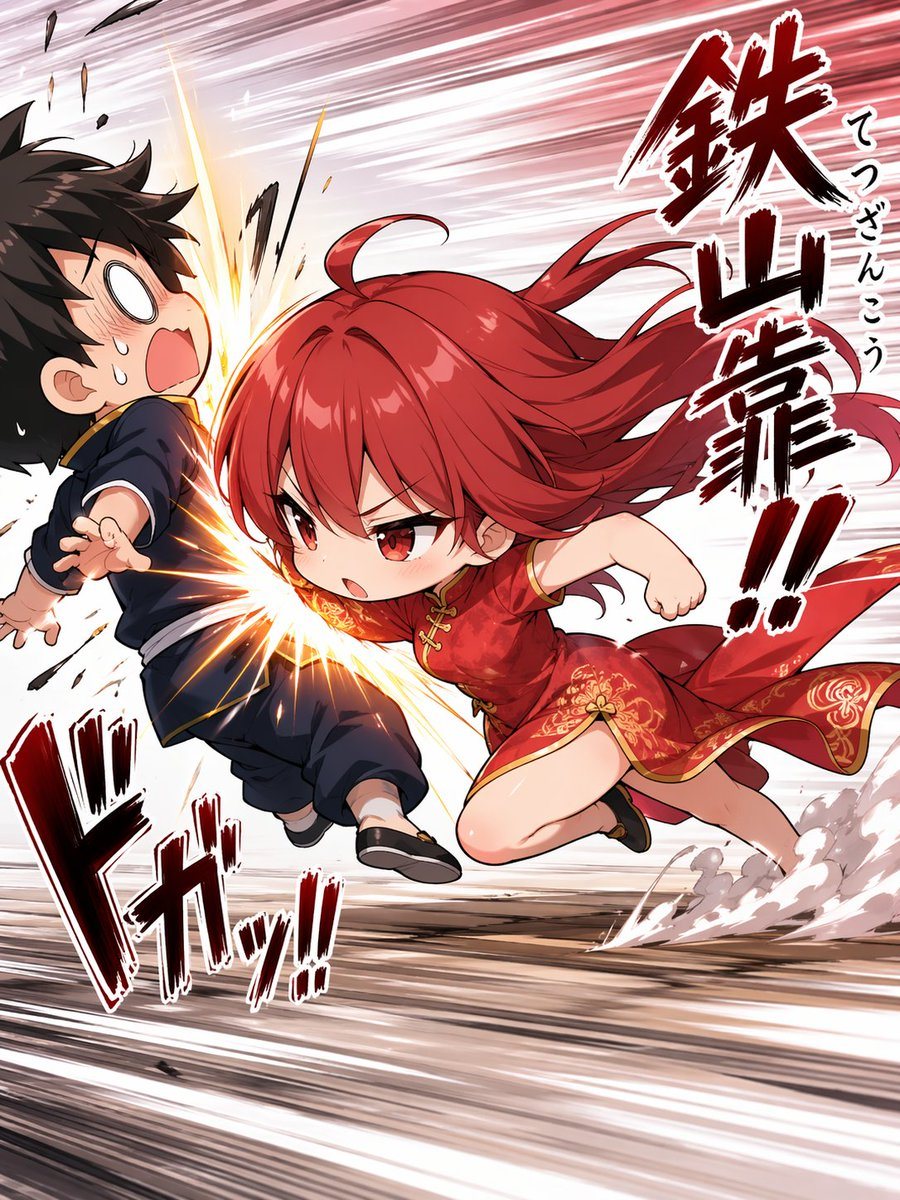
Dynamic Anime Action Illustration In A Comedic Chibi Style

A dynamic anime action illustration in a comedic chibi style, showing a tiny but fierce girl performing a powerful Chinese martial arts shoulder strike, tetsuzankou, into the side of a st...

A dynamic anime action illustration in a comedic chibi style, showing a tiny but fierce girl performing a powerful Chinese martial arts shoulder strike, tetsuzankou, into the side of a st...
Prompt

A dynamic anime action illustration in a comedic chibi style, showing a tiny but fierce girl performing a powerful Chinese martial arts shoulder strike, tetsuzankou, into the side of a startled boy. The girl is the main focus: {argument name="character name" default="red-haired martial artist girl"}, with long vivid {argument name="hair color" default="crimson red"} hair streaming violently backward, sharp red eyes, and a determined angry expression. She is lunging from right to left at extreme speed, body low and compact, one shoulder and upper back driving into the boy’s torso, one fist pulled back and the other arm tucked for balance, with one knee bent forward and one leg trailing behind. She wears a short red Chinese-style qipao dress with gold floral embroidery, gold trim, side slit, and black flat shoes. The boy is a chibi black-haired teenager in a dark navy Chinese kung fu outfit with gold piping and black shoes, recoiling from the impact with a shocked open mouth, blank white eyes, sweat drops, and his body thrown backward to the left. Emphasize the exact moment of collision with a bright explosive impact burst at his side, flying debris, sparks, and strong speed-line distortion across the entire background. Add dust clouds and ground streaks near the girl’s trailing foot to show explosive forward momentum. Use a manga-inspired composition with exaggerated motion, foreshortening, and a diagonal rush from lower right to upper left. Include 3 large Japanese sound-effect text elements integrated into the art: one vertical right-side callout reading "鉄山靠!!", one smaller vertical annotation beside it reading "てつざんこう", and one large lower-left impact sound effect reading "ドガッ!!". The overall mood is fast, funny, aggressive, and high-impact, with polished modern anime rendering, glossy hair highlights, crisp line art, and dramatic red-white-black contrast.

Prompt structure
  • Modelgpt-image-2
  • Use caseavatar
  • Styleanime, luxury, cinematic, watercolor
  • Aspect ratioFlexible
Best used for
  • Use caseavatar
  • Styleanime, luxury, cinematic, watercolor
  • Recommended specs1:1, 4:5, 16:9, or 9:16
  • ModelGPT Image 2
How to customize

Use this Dynamic Anime Action Illustration In A Comedic Chibi Style prompt as a base. Replace the subject, product details, environment, lighting, brand colors, and output ratio while keeping the avatar intent and anime, luxury, cinematic, watercolor direction stable.

Editable variables
  • SubjectReplace the product, person, scene, interface, or object being generated.
  • Use caseKeep or rewrite the destination as avatar, ad creative, cover image, poster, or ecommerce hero.
  • FrameChoose 1:1, 4:5, 16:9, or 9:16 based on the final placement.
  • Brand cuesAdd colors, materials, props, text-safe space, and the platform where the image will be used.
Recommended specs

Choose the frame for the destination first, then use 1K, 2K, or 4K based on output quality needs. Product images and posters usually benefit from higher resolution.

Pre-generation checklist
  • CheckSubject, lighting, composition, and frame are specific enough to review.
  • CheckText-safe space is included when the image will carry a headline or ad copy.
  • CheckResolution, credit cost, and final destination are checked before generation.
Why this prompt works

Dynamic Anime Action Illustration In A Comedic Chibi Style works because it starts from the image job, then controls subject, composition, lighting, style, and frame. It is best for avatar while keeping the anime, luxury, cinematic, watercolor direction stable.

Common questions
  • Can I use it directly?Yes. Replace the subject, brand cues, and frame, then generate in Image2Studio.
  • Which ratio should I use?Choose 1:1, 4:5, 16:9, or 9:16 based on the destination.