Image2Studio
Examples

gpt-image-2

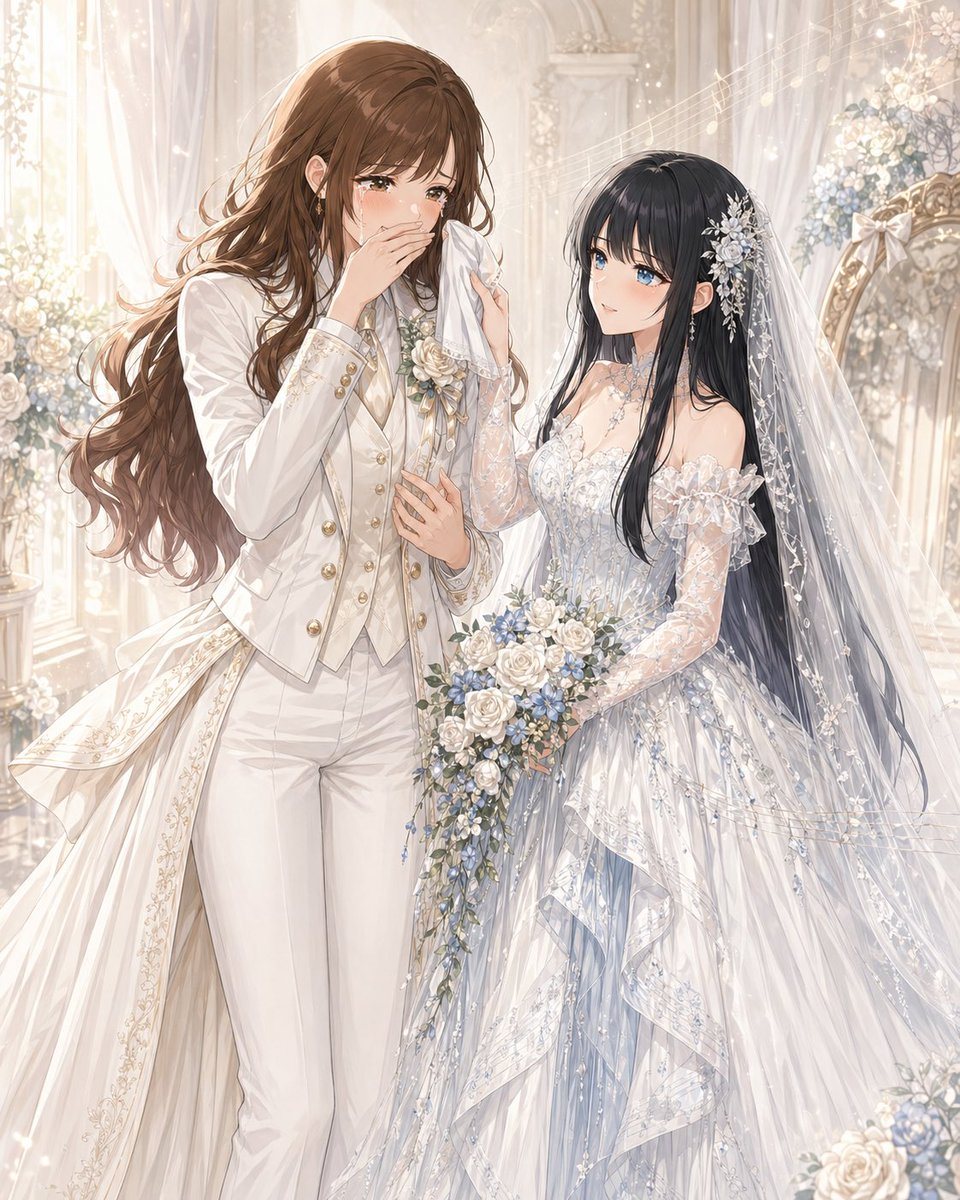
Romantic Yuri Wedding Chapel Portrait

This prompt generates a soft, ornate anime wedding illustration of two brides in contrasting bridal outfits, ideal for original character romance art or ceremonial key visuals.

This prompt generates a soft, ornate anime wedding illustration of two brides in contrasting bridal outfits, ideal for original character romance art or ceremonial key visuals.
Prompt

A luminous, ultra-detailed anime-style wedding portrait of two brides in a romantic white chapel filled with soft ivory light, sheer curtains, carved arches, pale floral arrangements, and sparkling bokeh. The composition is vertical and elegant, showing the pair from about thigh-up to full dress detail, standing close together in an intimate yuri moment. The taller bride on the left has {argument name="hair color" default="warm chestnut brown"} long wavy hair cascading over her shoulders and back, wearing a refined white bridal pantsuit with a fitted tailcoat, gold buttons, a cream vest, a silk cravat, subtle floral embroidery along the coat tails, and a white rose boutonniere with pale blue accents. She is visibly emotional, gently wiping tears with a handkerchief, her other hand resting near her chest, giving the feeling of being moved by the ceremony. The shorter bride on the right has {argument name="second bride hair color" default="long black hair"}, very long and glossy, and wears an ornate off-shoulder wedding gown in white with icy blue undertones, translucent lace sleeves, intricate beadwork, floral embroidery, layered ruffles, and a long veil decorated with tiny flowers and crystal-like details. A silver floral hair ornament with dangling pieces decorates the side of her head. She looks up at her partner tenderly while holding a cascading bouquet of white roses, blue flowers, and trailing greenery. Emphasize the contrast between the tailored princely suit and the delicate fairy-tale gown, with luxurious fabric textures, lace transparency, fine embroidery, soft glowing highlights, drifting sparkles, and a dreamy, emotional atmosphere. Make the scene feel like {argument name="relationship theme" default="an original yuri wedding between an older office lady-style bride and a younger nurse-style bride"}, painted in polished, high-end romantic illustration style, ethereal, graceful, and heartfelt.

Prompt structure
  • Modelgpt-image-2
  • Use caseavatar
  • Stylewatercolor, luxury, anime
  • Aspect ratioFlexible
Best used for
  • Use caseavatar
  • Stylewatercolor, luxury, anime
  • Recommended specs1:1, 4:5, 16:9, or 9:16
  • ModelGPT Image 2
How to customize

Use this Romantic Yuri Wedding Chapel Portrait prompt as a base. Replace the subject, product details, environment, lighting, brand colors, and output ratio while keeping the avatar intent and watercolor, luxury, anime direction stable.

Editable variables
  • SubjectReplace the product, person, scene, interface, or object being generated.
  • Use caseKeep or rewrite the destination as avatar, ad creative, cover image, poster, or ecommerce hero.
  • FrameChoose 1:1, 4:5, 16:9, or 9:16 based on the final placement.
  • Brand cuesAdd colors, materials, props, text-safe space, and the platform where the image will be used.
Recommended specs

Choose the frame for the destination first, then use 1K, 2K, or 4K based on output quality needs. Product images and posters usually benefit from higher resolution.

Pre-generation checklist
  • CheckSubject, lighting, composition, and frame are specific enough to review.
  • CheckText-safe space is included when the image will carry a headline or ad copy.
  • CheckResolution, credit cost, and final destination are checked before generation.
Why this prompt works

Romantic Yuri Wedding Chapel Portrait works because it starts from the image job, then controls subject, composition, lighting, style, and frame. It is best for avatar while keeping the watercolor, luxury, anime direction stable.

Common questions
  • Can I use it directly?Yes. Replace the subject, brand cues, and frame, then generate in Image2Studio.
  • Which ratio should I use?Choose 1:1, 4:5, 16:9, or 9:16 based on the destination.