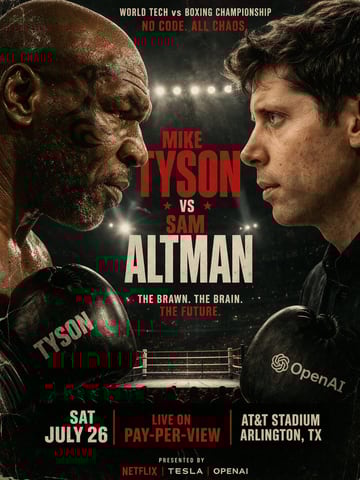
电影质感拳击比赛海报
A gritty, cinematic boxing promotional poster featuring a face-to-face staredown between {argument name="fighter 1" default="Mike Tyson"} on the left and {argument name="fighter 2" default="Sam Altman"} on the right. The left fighter is an older, bald man with a tribal facial tattoo, wearing a black boxing glove with "TYSON" printed on it. The right fighter is a younger man with dark wavy hair, wearing a black boxing glove featuring the OpenAI logo and text. Both men have intense, serious expressions, with highly detailed skin textures and sweat. The background is an out-of-focus boxing ring under bright stadium lights. The poster has a vintage, slightly scratched grunge texture. At the top, text reads "WORLD TECH vs BOXING CHAMPIONSHIP" in white and "{argument name="top tagline" default="NO CODE. ALL CHAOS."}" in red. In the center, large bold typography reads "MIKE TYSON" in red, "★ VS ★" in red, and "SAM ALTMAN" in large cream-white letters. Below this, text reads "{argument name="middle tagline" default="THE BRAWN. THE BRAIN. THE FUTURE."}". At the bottom, 3 columns of text display "{argument name="event date" default="SAT JULY 26"}", "LIVE ON PAY-PER-VIEW" in red, and "AT&T STADIUM ARLINGTON, TX". The very bottom footer reads "PRESENTED BY NETFLIX | TESLA | OPENAI".