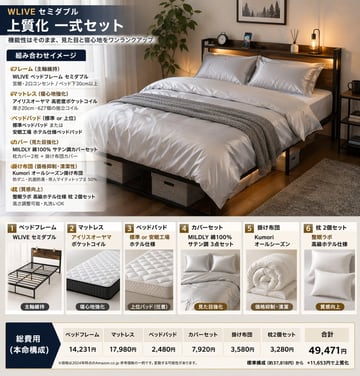
床上用品套装信息图
{ "type": "product bundle infographic", "header": { "brand_and_size": "{argument name=\"brand and size\" default=\"WLIVE セミダブル\"}", "title": "{argument name=\"main title\" default=\"上質化 一式セット\"}", "subtitle": "機能性はそのまま、見た目と寝心地をワンランクアップ" }, "layout": { "top_section": { "left_panel": { "title": "組み合わせイメージ", "bullet_points_count": 6, "bullet_categories": ["フレーム", "マットレス", "ベッドパッド", "カバー", "掛け布団", "枕"] }, "right_panel": { "image_description": "{argument name=\"main image description\" default=\"a neatly made semi-double bed with dark wood frame, headboard shelf with lights, white satin bedding, grey throw blanket, under-bed storage boxes, potted plant, and rug in a cozy bedroom\"}" } }, "middle_section": { "type": "product cards", "count": 6, "cards": [ { "number": 1, "title": "ベッドフレーム", "brand": "WLIVE セミダブル", "image_subject": "empty dark wood bed frame", "tag": "主軸維持" }, { "number": 2, "title": "マットレス", "brand": "アイリスオーヤマ ポケットコイル", "image_subject": "white quilted mattress", "tag": "寝心地強化" }, { "number": 3, "title": "ベッドパッド", "brand": "標準 or 安眠工場 ホテル仕様", "image_subject": "white quilted bed pad", "tag": "上位パッド(任意)" }, { "number": 4, "title": "カバーセット", "brand": "MILDLY 綿100% サテン調 3点セット", "image_subject": "folded white satin covers and pillows", "tag": "見た目強化" }, { "number": 5, "title": "掛け布団", "brand": "Kumori オールシーズン", "image_subject": "rolled white comforter", "tag": "価格抑制・清潔" }, { "number": 6, "title": "枕 2個セット", "brand": "整眠ラボ 高級ホテル仕様", "image_subject": "two white pillows", "tag": "質感向上" } ] }, "bottom_section": { "type": "pricing table", "label": "総費用 (本命構成)", "columns_count": 7, "columns": ["ベッドフレーム", "マットレス", "ベッドパッド", "カバーセット", "掛け布団", "枕 2個セット", "合計"], "total_price": "{argument name=\"total price\" default=\"49,471円\"}", "footer_note": "{argument name=\"footer note\" default=\"※価格は2024年時点のAmazon.co.jp 参考価格の一例です。変動する可能性があります。\"}" } } }