Prompt structure
Dish or drink, Plating, Props, Light direction, Menu context are the core details to include. A strong prompt tells GPT Image 2 what the image is for, what should be visible, and how the output should be composed.
Prompt use case
Prompt examples for restaurant menu images, drink features, recipe cards, food posters, and editorial dining visuals.
Dish or drink, Plating, Props, Light direction, Menu context are the core details to include. A strong prompt tells GPT Image 2 what the image is for, what should be visible, and how the output should be composed.
This page targets users looking for food menu prompt and restaurant image prompt. It pairs examples with copyable prompt text and a direct route into the Image2Studio workbench.
Prompt examples
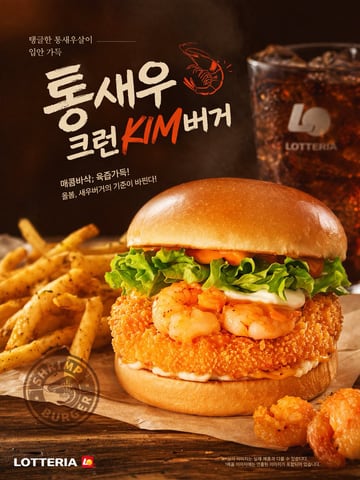
A commercial food photography poster for a {argument name="burger type" default="shrimp burger"}. The central burger features a glossy brioche bun, lettuce, white sauce, spicy orange mayo, two grilled shrimp, and a thick crispy breaded patty. It rests on parchment paper on a wooden table, flanked by seasoned french fries on the left and two fried shrimp pieces on the bottom right. A blurred glass of iced cola and a faint {argument name="brand name" default="LOTTERIA"} logo appear in the dark background. The parchment bears a circular "SHRIMP BURGER" stamp. Top left Korean text reads {argument name="top left text" default="탱글한 통새우살이 입안 가득"}. The large central headline is {argument name="main headline" default="통새우 크런KIM버거"} with a small orange shrimp illustration. Below it is the subtitle {argument name="subtitle text" default="매콤바삭, 육즙가득! 올봄, 새우버거의 기준이 바뀐다!"}. The bottom left corner shows the {argument name="brand name" default="LOTTERIA"} logo. Warm, professional studio lighting.
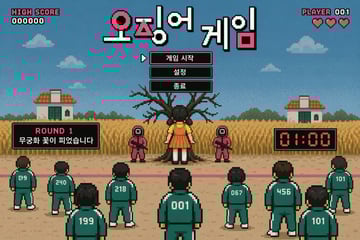
{ "type": "retro pixel art video game mockup", "theme": "survival death game", "hud": { "top_left": ["HIGH SCORE", "000000"], "top_center_title": "{argument name=\"game title\" default=\"오징어 게임\"}", "top_right": ["PLAYER 001", "3 red hearts"] }, "menu": { "style": "centered under title, black boxes, white pixel font, cursor pointing to first item", "items": [ "{argument name=\"menu item 1\" default=\"게임 시작\"}", "{argument name=\"menu item 2\" default=\"설정\"}", "{argument name=\"menu item 3\" default=\"종료\"}" ] }, "gameplay_ui": { "mid_left_panel": ["ROUND 1", "{argument name=\"round description\" default=\"무궁화 꽃이 피었습니다\"}"], "mid_right_panel": ["01:00 digital red timer"] }, "scene": { "background": "blue sky, pixel clouds, 2 small houses, tall yellow grass field", "midground": "large bare tree, 1 giant doll in yellow shirt and orange dress facing the tree, 2 guards in pink jumpsuits with square masks holding rifles", "foreground": "pink starting line on dirt ground, 9 players in green tracksuits facing away from the viewer", "player_numbers": ["019", "240", "199", "218", "001", "067", "456", "101", "101"] } }
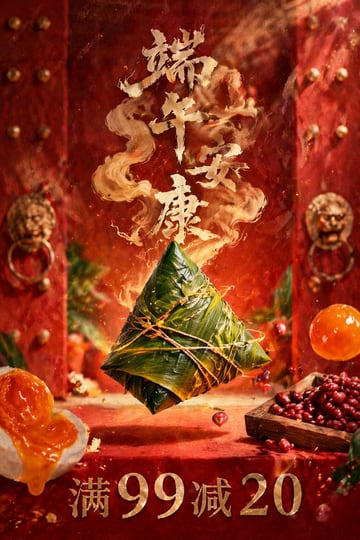
A highly detailed, photorealistic commercial poster. In the center, 1 large {argument name="central food item" default="Zongzi (sticky rice dumpling wrapped in glossy green bamboo leaves and tied securely with twine)"} floating magically in mid-air. The background features traditional Chinese red wooden double doors with rows of golden studs and 2 ornate golden lion-head door knockers, slightly out of focus. Floating around the center are various ingredients: on the bottom left, 1 halved salted duck egg with a rich, oozing orange yolk; on the bottom right, 1 small square wooden tray overflowing with dark red beans, and 1 whole, translucent orange salted egg yolk floating nearby. Several small red beans and glowing embers are suspended in the air. Above the central item, large, stylized golden calligraphy text reading "{argument name="top greeting text" default="端午安康"}" formed from magical, swirling golden smoke rising upward. At the very bottom, bold, metallic golden serif text reading "{argument name="bottom promotional text" default="满99减20"}". Cinematic lighting, rich red and gold color palette, festive and magical atmosphere, high-end food photography style.
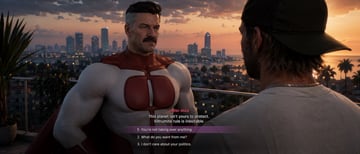
{ "type": "video game screenshot", "style": "{argument name=\"art style\" default=\"Grand Theft Auto VI aesthetic, realistic 3D graphics\"}", "setting": "balcony overlooking a coastal city at sunset, palm trees, skyscrapers, warm lighting", "characters": [ { "role": "NPC", "description": "{argument name=\"npc description\" default=\"Omni-Man, muscular older man with a mustache and grey temples, wearing a red and white superhero suit\"}", "position": "center-left, facing camera" }, { "role": "Player", "description": "man wearing a backwards dark baseball cap and light grey t-shirt", "position": "right foreground, back to camera" } ], "ui_elements": { "type": "dialogue menu", "position": "bottom center", "speaker_name": "{argument name=\"speaker name\" default=\"OMNI-MAN\"}", "dialogue_text": "{argument name=\"npc dialogue\" default=\"This planet isn't yours to protect. Viltrumite rule is inevitable.\"}", "choices_count": 3, "choices": [ "1. {argument name=\"choice 1\" default=\"You're not taking over anything.\"}", "2. What do you want from me?", "3. I don't care about your politics." ], "highlight": "Choice 1 has a translucent purple background bar" } }
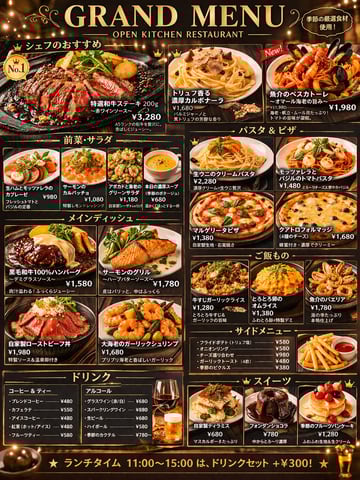
{ "type": "restaurant menu design", "style": { "background": "dark wood texture", "accents": "{argument name=\"theme color\" default=\"gold\"}", "typography": "elegant serif and sans-serif mix", "photography": "high-resolution, appetizing food shots with warm lighting" }, "header": { "main_title": "{argument name=\"main title\" default=\"GRAND MENU\"}", "subtitle": "{argument name=\"restaurant type\" default=\"OPEN KITCHEN RESTAURANT\"}", "top_right_badge": "季節の厳選食材使用!" }, "layout": { "sections": [ { "title": "シェフのおすすめ", "position": "top", "count": 3, "featured_item": "{argument name=\"featured item name\" default=\"特選和牛ステーキ 200g\"}", "labels": ["特選和牛ステーキ 200g", "トリュフ香る濃厚カルボナーラ", "魚介のペスカトーレ"] }, { "title": "前菜・サラダ", "position": "mid-left top", "count": 4, "labels": ["生ハムとモッツァレラのカプレーゼ", "サーモンのカルパッチョ", "アボカドと海老のグリーンサラダ", "本日の濃厚スープ"] }, { "title": "パスタ & ピザ", "position": "mid-right top", "count": 4, "labels": ["生ウニのクリームパスタ", "モッツァレラとバジルのトマトパスタ", "マルゲリータピザ", "クアトロフォルマッジ"] }, { "title": "メインディッシュ", "position": "mid-left bottom", "count": 4, "labels": ["黒毛和牛100%ハンバーグ", "サーモンのグリル", "自家製ローストビーフ丼", "大海老のガーリックシュリンプ"] }, { "title": "ご飯もの", "position": "mid-right middle", "count": 3, "labels": ["牛すじガーリックライス", "とろとろ卵のオムライス", "魚介のパエリア"] }, { "title": "サイドメニュー", "position": "mid-right bottom", "count": 5, "format": "text list with 1 photo of french fries", "labels": ["フライドポテト", "オニオンリング", "チーズ盛り合わせ", "ガーリックトースト", "季節のピクルス"] }, { "title": "ドリンク", "position": "bottom left", "count": 10, "format": "2 text columns with 2 photos of drinks", "labels": ["コーヒー & ティー", "アルコール"] }, { "title": "スイーツ", "position": "bottom right", "count": 3, "labels": ["自家製ティラミス", "フォンダンショコラ", "季節のフルーツパンケーキ"] } ] }, "footer": { "banner_text": "{argument name=\"footer text\" default=\"★ ランチタイム 11:00〜15:00 は、ドリンクセット +¥300! ★\"}" } }
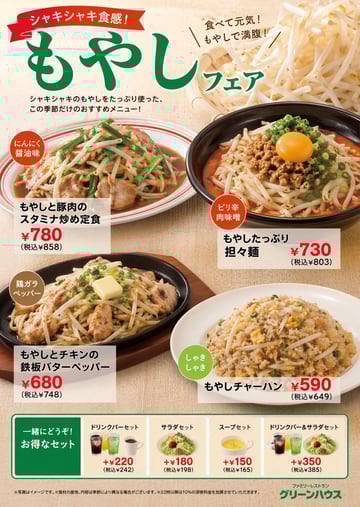
{ "type": "restaurant promotional menu poster", "theme": "{argument name=\"main ingredient\" default=\"もやし\"} fair", "header": { "ribbon_text": "{argument name=\"catchphrase\" default=\"シャキシャキ食感!\"}", "main_title": "{argument name=\"fair title\" default=\"もやしフェア\"}", "sub_text": "食べて元気!もやしで満腹!", "description": "シャキシャキのもやしをたっぷり使った、この季節だけのおすすめメニュー!", "background_image": "bamboo basket overflowing with fresh raw bean sprouts" }, "main_dishes": [ { "image": "stir-fry with pork, bean sprouts, and garlic chives on a white plate with red stripes", "badge": "にんにく醤油味", "name": "{argument name=\"dish 1 name\" default=\"もやしと豚肉のスタミナ炒め定食\"}", "price": "¥780 (税込¥858)" }, { "image": "spicy noodle soup with minced meat, bean sprouts, green onions, and raw egg yolk in a black bowl", "badge": "ピリ辛肉味噌", "name": "もやしたっぷり担々麺", "price": "¥730 (税込¥803)" }, { "image": "chicken and bean sprouts on a hot iron plate with melting butter", "badge": "鶏ガラペッパー", "name": "もやしとチキンの鉄板バターペッパー", "price": "¥680 (税込¥748)" }, { "image": "fried rice with bean sprouts on a white plate", "badge": "しゃきしゃき", "name": "もやしチャーハン", "price": "¥590 (税込¥649)" } ], "bottom_section": { "title": "一緒にどうぞ!お得なセット", "set_options_count": 4, "options": [ { "name": "ドリンクバーセット", "image": "three assorted drinks", "price": "+¥220" }, { "name": "サラダセット", "image": "small green salad", "price": "+¥180" }, { "name": "スープセット", "image": "yellow soup in a white cup", "price": "+¥150" }, { "name": "ドリンクバー&サラダセット", "image": "drinks and salad", "price": "+¥350" } ] }, "footer": { "fine_print": "※写真はイメージです。※食材の産地、内容は季節により異なる場合がございます。※22時以降は10%の深夜料金を加算させていただきます。", "restaurant_logo": "ファミリーレストラン {argument name=\"restaurant name\" default=\"グリーンハウス\"}" } }
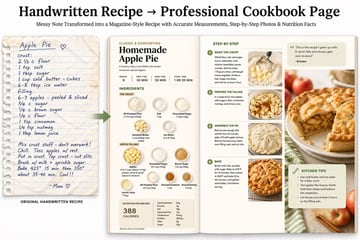
Handwritten Recipe → {argument name="output format" default="Professional Cookbook Page"} Upload a messy handwritten {argument name="recipe source" default="family recipe"}; the model searches for accurate modern measurements/nutrition, then generates a {argument name="visual style" default="polished, magazine-style"} double-page spread with step-by-step flat lays, perfect ingredient labels, and calorie breakdowns.
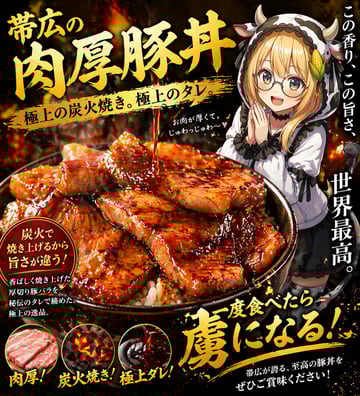
A dramatic Japanese food advertisement poster for a premium pork rice bowl, vertical composition, black and fiery orange background with glowing embers, smoke, and a high-contrast gourmet marketing look. The main focus is an oversized bowl of butadon in the lower center, filled with white rice and topped with many thick slices of glossy grilled pork belly, richly lacquered with dark sweet soy glaze, visible char marks, caramelized edges, and a stream of sauce pouring down from above onto the meat. Make the food look hyper-appetizing, juicy, rich, and slightly exaggerated like a restaurant flyer. Large bold brushed gold Japanese headline text dominates the upper left: {argument name="headline text" default="帯広の肉厚豚丼"}. Across the middle, a gold paint-stroke banner contains black Japanese text: {argument name="subheadline text" default="極上の炭火焼き。極上のタレ。"}. On the right side, add a cute anime girl mascot standing behind the bowl, about half-body visible, wearing a black-and-white cow-themed hoodie with small horns, long blonde hair, frilly sleeves, and a shy delighted pose with one hand near her mouth; keep her face intentionally obscured by a plain beige rectangle censor block. Add vertical white Japanese copy along the right edge in 2 separate text groups: 1 at the upper right, 1 larger at the mid-to-lower right. Add a small handwritten-style white note near the girl with a tiny heart. In the lower left, include a dark circular callout badge with gold rim and white/yellow Japanese text about charcoal grilling and flavor. Along the very bottom, place 3 circular ingredient-feature icons with exact labels beneath them: raw pork slices labeled {argument name="feature label 1" default="肉厚!"}, glowing charcoal embers labeled {argument name="feature label 2" default="炭火焼き!"}, and glossy dark sauce labeled {argument name="feature label 3" default="極上ダレ!"}. At the bottom right, add a huge energetic gold brush-calligraphy slogan with splattered paint effects, plus a smaller white sentence beneath it. Use intense lighting, glossy highlights, premium yakiniku flyer aesthetics, dense Japanese typography, bold brush fonts, and a mouthwatering late-night food terror vibe.
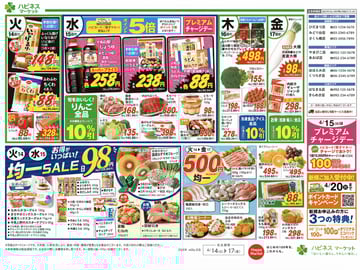
{ "type": "Japanese supermarket promotional flyer", "header": { "store_name": "{argument name=\"store name\" default=\"ハピネス マーケット\"}", "store_directory": "List of 12 store locations and phone numbers grouped by region" }, "style": "Highly dense, colorful, bold red and yellow price tags, realistic food photography, traditional Japanese retail aesthetic", "layout": { "sections": [ { "title": "Tuesday Specials", "position": "top-left", "count": 3, "labels": ["Inari sushi pack", "Chikuwa", "Tomatoes"] }, { "title": "Wednesday Specials", "position": "top-middle", "promotion": "{argument name=\"point multiplier\" default=\"5倍\"}", "count": 6, "labels": ["Soy sauce bottles", "Japanese sweets variety pack", "Udon noodles", "Sliced pork", "Tuna sashimi block", "Pudding"] }, { "title": "Thursday & Friday Specials", "position": "top-right", "count": 5, "labels": ["Coffee bags", "Broccoli", "Daikon radish", "Pork slices", "Jumbo Gyoza"] }, { "title": "Middle Row Discounts", "position": "center-horizontal", "count": 7, "labels": ["Apples 10% off", "Lettuce", "Yogurt", "Sushi platter", "Yogurt multi-pack", "Frozen foods 10% off", "Rice 10% off"] }, { "title": "Uniform Sale Low Price", "position": "bottom-left", "price": "{argument name=\"low uniform price\" default=\"98\"}", "count": 6, "labels": ["Assorted fruits", "Yogurt and dairy", "Natto and Tofu", "Ice cream", "Fried chicken", "Salmon fillets"] }, { "title": "Uniform Sale High Price", "position": "bottom-middle", "price": "{argument name=\"high uniform price\" default=\"500\"}", "count": 4, "labels": ["Pork belly slices", "Mikan and grapes", "Seafood mix", "Grilled eel"] }, { "title": "Right Sidebar Promotions", "position": "bottom-right", "count": 3, "labels": ["Premium Charge Day", "Point Card Campaign", "Fried deli foods"] } ] }, "footer": { "sale_period": "{argument name=\"sale period\" default=\"4/14(火) ▶ 17(金)\"}", "disclaimers": "Standard fine print text and secondary logo" } }
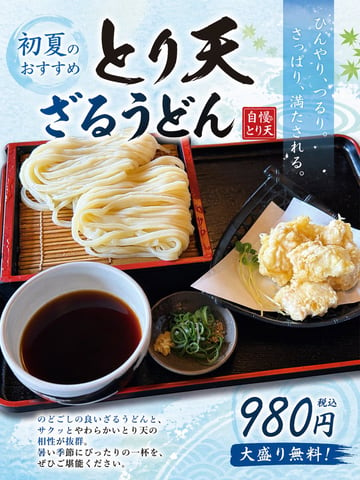
Using the provided reference image of the udon meal, turn it into a clean, print-ready Japanese restaurant promotional poster while keeping the food photo itself as the main hero image. Expand the composition vertically into a portrait flyer layout, add a light icy-blue seasonal background with subtle watercolor texture and faint wave motifs, and overlay decorative green maple leaves for an early-summer feel. Add 5 text elements in Japanese: a blue circular badge at the upper left reading "初夏のおすすめ", a large bold brush-calligraphy headline across the top in 2 lines reading "とり天" and "ざるうどん", a small red vertical seal near the headline reading "自慢のとり天", a tall translucent blue vertical copy block at the upper right reading "ひんやり、つるり。さっぱり、満たされる。", and a price block at the lower right reading "980円 税込" with a blue brushstroke banner below that says "大盛り無料!". Add a short 4-line Japanese body copy paragraph at the lower left describing the dish in a menu-poster style. Preserve the original meal arrangement and realistic photography, but enhance it slightly for advertising: brighter, more appetizing, crisp, and high contrast. Make the overall design look like a polished restaurant poster created from a casual food photo.
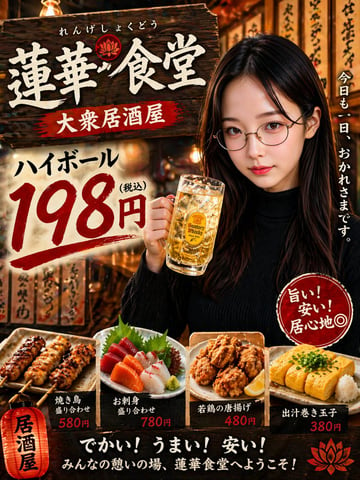
A photorealistic Japanese izakaya advertisement poster in a warm, cinematic night-time mood, designed like a street-front restaurant flyer. The composition is vertical and densely layered. On the right side, a young Japanese woman with long straight dark brown to black hair, wearing a fitted black ribbed turtleneck sweater, stands from the waist up and holds a large frosty glass mug of golden highball with visible ice cubes in her right hand near chest level. Her pose is relaxed and inviting, looking toward the camera, with a soft nightlife ambiance. The background is a narrow traditional izakaya exterior or interior alley scene filled with warm orange lantern light, shallow depth of field, hanging wooden menu plaques with handwritten Japanese calligraphy, and a nostalgic bustling-after-work atmosphere. In the upper left, a large weathered dark wooden signboard dominates the design, with bold white brushstroke kanji reading 蓮華食堂, small hiragana above it reading れんげしょくどう, and a red brush-painted banner beneath reading 大衆居酒屋. Below that on the left-center, place a large cream-colored paper or painted panel featuring the drink special in oversized calligraphic typography: ハイボール above a huge red 198円, with small black(税込) beside the price, the numerals painted in energetic brush style. Along the far right edge, add vertical white Japanese text reading 今日も一日、おかれさまです。 Near the lower right over the woman’s torso, place a red circular stamp-like badge with white handwritten text arranged diagonally and vertically: 旨い!安い!居心地◎. Across the bottom foreground, show exactly 4 plated menu items lined up side by side on rustic ceramic dishes: 1) two glazed grilled chicken skewers with char marks, labeled 焼き鳥 盛り合わせ and priced 580円; 2) a sashimi assortment with slices of tuna, salmon, white fish, shiso leaves and wasabi, labeled お刺身 盛り合わせ and priced 780円; 3) a plate of fried chicken karaage pieces with a lemon wedge, labeled 若鶏の唐揚げ and priced 480円; 4) sliced rolled dashi omelet topped with chopped green onion and served with grated daikon, labeled 出汁巻き玉子 and priced 380円. At the bottom left, include a glowing red paper lantern graphic with black vertical text 居酒屋. Across the bottom center on a dark band, add large bold white brush lettering reading でかい!うまい!安い! and below it smaller white text reading みんなの憩いの場、蓮華食堂へようこそ! Add a decorative red lotus-like emblem near the top sign and another matching emblem in the bottom right corner. Use rich amber highlights, strong contrast, glossy food styling, realistic skin and drink textures, commercial poster polish, and a nostalgic Showa-inspired izakaya promotion aesthetic.
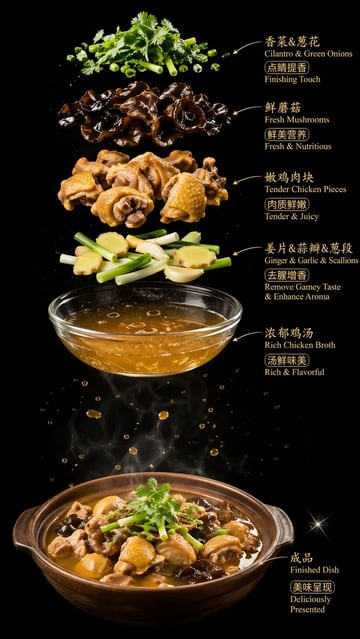
{"type":"food ingredient infographic poster","style":"luxury commercial food photography, high contrast, clean studio composite, dramatic vertical layout","background":{"color":"pure black","finish":"deep matte black with subtle floating droplets and soft steam"},"canvas":{"orientation":"portrait"},"subject":{"dish":"Chinese chicken and mushroom clay pot soup","final presentation":"a brown ceramic clay pot filled with glossy rich brown chicken broth, chopped bone-in chicken pieces, black wood ear mushrooms, light yellow ginger slices, pale green scallion segments, and a cilantro garnish on top"},"layout":{"composition":"exploded ingredients stacked vertically above the finished dish, each ingredient layer floating separately with bilingual callouts on the right side and thin golden arrows pointing left toward the ingredient","sections":[{"title":"香菜&葱花","position":"top","count":1,"labels":["Cilantro & Green Onions","点睛提香","Finishing Touch"]},{"title":"鲜蘑菇","position":"upper middle","count":1,"labels":["Fresh Mushrooms","鲜美营养","Fresh & Nutritious"]},{"title":"嫩鸡肉块","position":"middle","count":1,"labels":["Tender Chicken Pieces","肉质鲜嫩","Tender & Juicy"]},{"title":"姜片&蒜瓣&葱段","position":"lower middle","count":1,"labels":["Ginger & Garlic & Scallions","去腥增香","Remove Gamey Taste & Enhance Aroma"]},{"title":"浓郁鸡汤","position":"below ingredients","count":1,"labels":["Rich Chicken Broth","汤鲜味美","Rich & Flavorful"]},{"title":"成品","position":"bottom right","count":1,"labels":["Finished Dish","美味呈现","Deliciously Presented"]}],"centerpiece":"a transparent glass bowl of golden chicken broth floating above the clay pot, with droplets suspended around it and visible white steam rising from the finished dish below"},"ingredients":{"count":6,"items":["chopped cilantro and sliced green onions","black wood ear mushrooms","bone-in chicken chunks with yellow skin","ginger slices, whole garlic cloves, and scallion segments","clear golden chicken broth in a glass bowl","finished clay pot dish"]},"text":{"language":"bilingual Chinese and English","font":"elegant serif-like display font in warm gold","placement":"all text aligned on the right side of the image"},"lighting":{"setup":"dramatic top and side studio lighting","effects":["glossy highlights on broth and mushrooms","sharp texture on chicken skin","soft steam plumes","tiny golden soup splashes","small star-like sparkle near the lower right"]},"color_palette":{"count":5,"colors":["black background","golden brown broth","dark brown black mushrooms","warm tan chicken","fresh green herbs"]}}
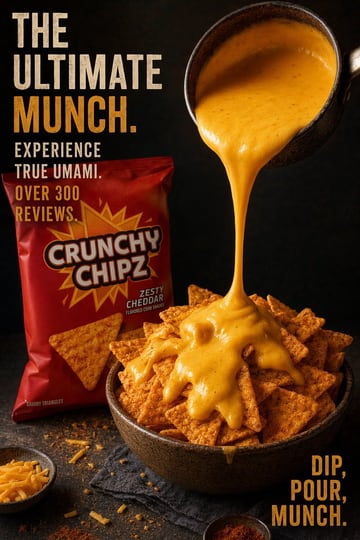
Create a dramatic studio food advertisement poster on a dark black textured background with moody, high-contrast lighting and rich warm orange tones. The composition is vertical and split visually: bold stacked ad copy on the left, hero food action on the right. Show a deep rustic bowl overflowing with triangular cheddar corn chips in the lower center-right, with thick glossy cheese sauce being poured in a continuous stream from a tilted dark metal saucepan entering from the upper right. The cheese lands heavily on top of the chips and drapes over them in thick molten folds. Behind the bowl on the left, place 1 upright red snack bag with a large yellow-orange starburst graphic and the brand text {argument name="brand name" default="CRUNCHY CHIPZ"} in big white outlined letters, plus smaller flavor text {argument name="flavor text" default="ZESTY CHEDDAR"} and tiny subtitle "FLAVORED CORN SNACKS". Print tiny text near the lower left of the bag: "SAVORY TRIANGLES". Add 2 small condiment bowls on the dark tabletop: 1 shallow bowl of shredded cheddar in the bottom left corner and 1 tiny bowl of reddish seasoning near the bottom center-right. Scatter a few crumbs and cheese shreds across the table, with a dark napkin tucked under the main bowl. Include bold distressed condensed uppercase typography in a vintage poster style. On the upper left, stack the headline in 5 lines reading: {argument name="headline text" default="THE ULTIMATE MUNCH."} with "THE" on line 1, "ULTIMATE" on line 2, and "MUNCH." on line 3 in large type, followed by line 4 "EXPERIENCE" and line 5 "TRUE UMAMI." in smaller white text. Beneath that, add 2 promotional lines in orange: {argument name="review text" default="OVER 300 REVIEWS."}. In the bottom right, place a 3-line orange callout reading {argument name="tagline text" default="DIP, POUR, MUNCH."}. Use cinematic food photography styling, sharp focus on chips and cheese stream, appetizing glossy textures, commercial packaging realism, premium snack-brand ad aesthetic.
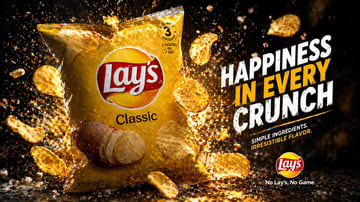
Create a high-impact commercial snack advertisement in a dramatic studio setting. Show a large glossy bag of {argument name="brand name" default="Lay's"} {argument name="product flavor" default="Classic"} potato chips standing upright slightly left of center, photographed at a three-quarter front angle. The bag is bright golden yellow with a realistic crinkled plastic texture, a large red-and-white logo centered near the top, the flavor name printed below, a photo of whole potatoes and several stacked potato chips near the lower front, and small package details including a circular badge near the top right that reads "MADE WITH 3 INGREDIENTS" with tiny lines under it reading "POTATOES", "OIL", "SALT", plus small text near the bottom left reading "POTATO CHIPS". Surround the bag with exactly 11 visible potato chips flying through the air at different depths and angles, some curled and some flat, with crisp texture and golden highlights. Fill the scene with explosive golden crumbs, seasoning dust, and sparkling particles bursting around the package, especially behind it and across the floor. Use a deep black background with warm amber rim lighting, strong contrast, glowing highlights, and cinematic backlit particles. On the right side, add a bold stacked headline in large distressed uppercase sans-serif text reading {argument name="headline text" default="HAPPINESS IN EVERY CRUNCH"}, with "HAPPINESS" and "CRUNCH" in white and "IN EVERY" in vivid golden yellow. Beneath the headline, place a two-line subheading in smaller uppercase text reading {argument name="subheading text" default="SIMPLE INGREDIENTS. IRRESISTIBLE FLAVOR."}, with the first line in white and the second line in yellow. At the bottom right, place a small round brand logo above the tagline {argument name="tagline" default="No Lay's, No Game."}. The composition should feel energetic, premium, messy in a controlled way, and optimized for e-commerce or promotional ad creative, with ultra-sharp product focus, dramatic lighting, floating debris, glossy reflections on the ground, and a polished photorealistic food photography look.
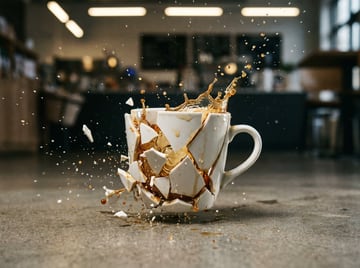
A detailed high-speed macro photograph of a {argument name="mug material and color" default="white ceramic"} coffee mug shattering on impact on a {argument name="floor surface" default="concrete cafe floor"}, shot at {argument name="shutter speed" default="1/8000 second"}. The mug is centered low in the frame with the handle visible on the right side, broken into many large jagged pieces that still loosely hold the cup shape while smaller shards fly outward. A splash of {argument name="drink type and color" default="dark coffee"} erupts upward and outward from the fractured mug, with suspended droplets and tiny specks frozen crisply in mid-air. Ground-level perspective, extreme shallow depth of field, ultra-sharp focus on the mug, fragments, and liquid splash, with a softly blurred modern cafe interior in the background. Warm indoor lighting with elongated ceiling lights rendered as bokeh, subtle reflections and wet splashes on the floor around the base, realistic textures, cinematic contrast, photorealistic product-ad style, dramatic moment of impact.
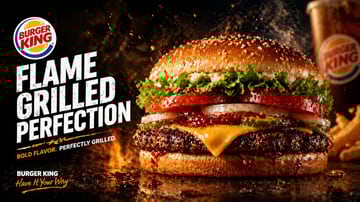
Create a dramatic fast-food advertising poster in a cinematic studio style for {argument name="brand name" default="BURGER KING"}. Use a wide landscape composition with the hero burger dominating the right half of the frame and bold promotional typography stacked on the left. The background should be nearly black with fiery orange flames, glowing embers, smoke, and flying grease droplets to emphasize heat and flame-grilling. The burger should be an extreme close-up, shot at table level on a glossy dark reflective surface with sauce drips and scattered droplets. Show exactly 8 visible burger components from top to bottom: 1 sesame seed top bun, 1 layer of curly green leaf lettuce, 2 thick red tomato slices, 2 white onion rings, 3 pickle slices, 1 slice of melted yellow American cheese, 1 thick charred flame-grilled beef patty, and 1 glossy bottom bun with barbecue sauce dripping over the edge. Make the patty heavily textured with blackened grill-char detail and juicy highlights. Add sparks and steam rising around the burger. On the left side, place a circular fast-food logo near the upper-left corner, then huge distressed bold white block text in three stacked lines reading {argument name="headline text" default="FLAME GRILLED PERFECTION"}. Beneath it, add a short tagline in smaller uppercase text with an orange accent slash or underline, reading {argument name="tagline text" default="BOLD FLAVOR. PERFECTLY GRILLED."}. In the bottom-left corner, add the brand name again in white plus a handwritten script slogan in orange reading {argument name="slogan text" default="Have It Your Way"}. In the blurred background on the far right, include exactly 2 secondary food elements: 1 branded soda cup and 1 portion of fries, both out of focus. High contrast, rich warm tones, glossy food photography, ultra-detailed textures, realistic commercial lighting, shallow depth of field, premium restaurant poster aesthetic, print-ready ad composition.
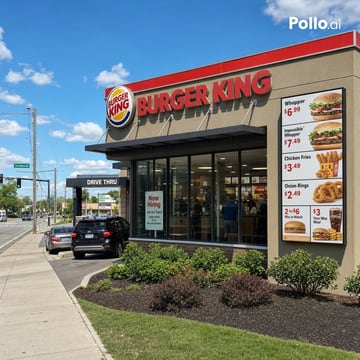
A photorealistic daytime street-corner exterior of a modern {argument name="restaurant brand" default="BURGER KING"} fast-food restaurant, viewed from a front-left angle under a bright blue sky with scattered white clouds. The building has a beige stucco facade with a bold red trim band along the roofline, a large round brand logo near the upper left of the front wall, and oversized red channel letters spelling {argument name="main sign text" default="BURGER KING"} across the top. On the right side of the facade, show one tall vertical menu billboard with 6 visible product panels and prices: Whopper $6.99, Impossible Whopper $7.49, Chicken Fries $3.49, Onion Rings $2.49, a 2 for $6 Mix or Match panel, and a $3 Your Way Meal panel with fries and drink. Include a black drive-thru canopy on the left side with the text {argument name="drive thru sign" default="DRIVE THRU"}, and 2 cars in the lane, one dark SUV closer to camera and one silver sedan ahead. The front corner should have floor-to-ceiling glass windows revealing a lit interior with a few customers and menu boards faintly visible. Place 1 hiring poster in the front window reading {argument name="window poster text" default="Now Hiring"}. Add neatly maintained landscaping with 5 shrubs in dark mulch beds along the building edge, a concrete sidewalk in the foreground, a grassy strip, utility poles, traffic lights, and a suburban roadside intersection extending into the left background. Natural midday lighting, crisp shadows, commercial real-estate photography look, ultra-clean signage, highly legible text, realistic reflections on glass, sharp architectural details, and a subtle white {argument name="watermark text" default="Pollo.ai"} watermark in the top-right corner.
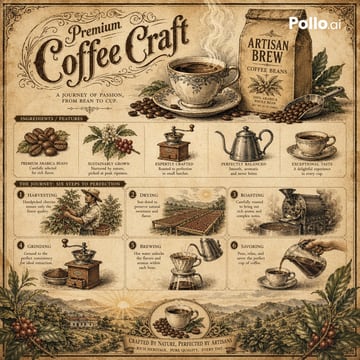
Vintage botanical-style infographic for “{argument name="product" default="Artisan Brew Coffee Beans"}.” 19th-century lithograph look, aged parchment tones (brown, beige, muted green). Center: steaming coffee cup + labeled bag, elegant title “{argument name="title" default="Premium Coffee Craft"}.” Surrounding small illustrations: beans, plant, grinder, kettle, cup. Simple process grid: harvest → dry → roast → grind → brew → pour. Scenic coffee farm footer. Fine ink lines, soft watercolor, rustic, artisanal feel. Style Keywords: Victorian ephemera, botanical illustration, aged parchment, hand-drawn ink, watercolor Negative Prompt: modern, neon, 3D, photorealistic, clutter, watermark, low detail
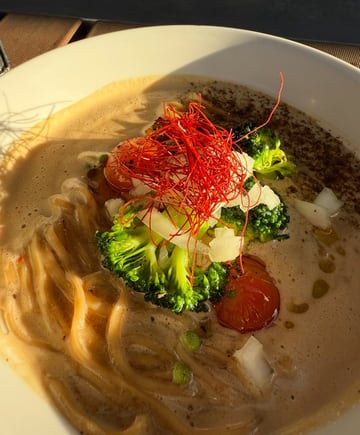
Turn this {argument name="food item" default="ramen"} into a cute recipe page with illustrations in the style of a {argument name="art style" default="vintage cookbook that was hand-drawn"}. A carefully drawn ingredients with labels, measures, and implements like bowls, whisks, or spoons should surround the composition's focal point. To create a {argument name="mood" default="homey, nostalgic"} vibe, use textured shading, warm pastel colors, and fine, ink-like outlines. Add recipe writing in the handwritten manner, including the ingredients and directions organically into the layout. Make sure the page has an artistic and educational tone, combining the beauty of colorful illustrations with a cookbook aesthetic.
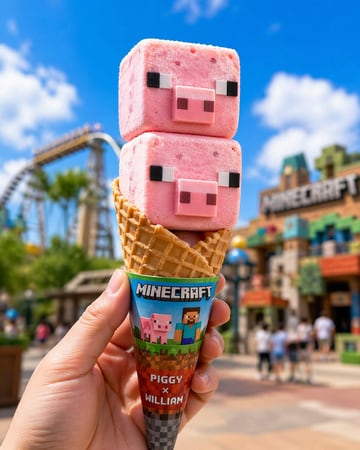
William and Piggy shaped ice cream, pink square ice cream with pixel eyes and pig noses, strawberry flavor, served on a cone, cute food design. Egg Cone: A standard waffle cone, golden and crispy in color, with a “Minecraft” co-branded paper sleeve. The background is an outdoor theme park scene with a blue sky, white clouds, and brightly colored rides and buildings blurring into the background. The hand of the person holding the ice cream is clear, enhancing the realism of the “hands-on experience”. The overall style is bright, fun and playful, making it an eye-catching IP co-branded summer ice cream.
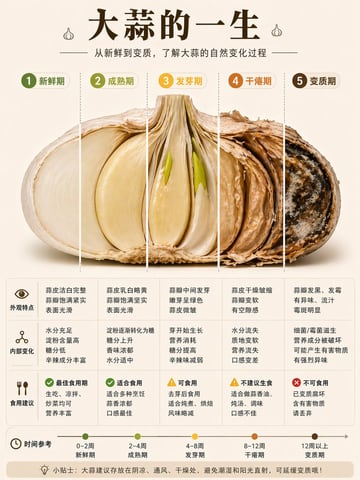
{"type":"Chinese infographic poster","topic":"the life cycle of garlic from fresh to spoiled","style":"clean editorial food infographic, high information density, premium social-media educational poster, warm neutral palette, realistic cutaway food photography combined with flat vector labels","background":{"color":"light warm beige","texture":"smooth paper-like minimal backdrop"},"header":{"title":"大蒜的一生","subtitle":"从新鲜到变质,了解大蒜的自然变化过程","decorations":{"count":2,"items":["small garlic icon left of title","small garlic icon right of title"]}},"centerpiece":{"subject":"one horizontally sliced garlic bulb shown front-facing as a cross-section","rendering":"ultra-detailed realistic macro food photo","position":"center","lighting":"soft studio lighting with gentle shadow below","segmentation":{"count":5,"divider_style":"vertical dashed guide lines","segments":[{"index":1,"label":"新鲜期","badge_color":"olive green","visual_state":"leftmost section bright white flesh, smooth juicy clove surface, intact outer skin"},{"index":2,"label":"成熟期","badge_color":"yellow green","visual_state":"slightly cream-yellow clove, full dense texture, still glossy"},{"index":3,"label":"发芽期","badge_color":"golden yellow","visual_state":"center clove with 2 visible green sprouts emerging upward from inside, flesh slightly wrinkled"},{"index":4,"label":"干瘪期","badge_color":"orange","visual_state":"papery skin, dehydrated and shriveled clove layers, hollow dry feel"},{"index":5,"label":"变质期","badge_color":"dark brown","visual_state":"rightmost section dark rotten interior with black-brown mold spots and white fungal patches"}]}} ,"information_grid":{"position":"below centerpiece","columns":5,"rows":3,"row_headers":["外观特点","内部变化","食用建议"],"column_titles":["新鲜期","成熟期","发芽期","干瘪期","变质期"],"cells":[{"row":"外观特点","column":"新鲜期","text":"蒜皮洁白完整 蒜瓣饱满紧实 表面光滑"},{"row":"外观特点","column":"成熟期","text":"蒜皮乳白略黄 蒜瓣饱满坚实 表面光滑"},{"row":"外观特点","column":"发芽期","text":"蒜瓣中间发芽 嫩芽呈绿色 蒜皮微皱"},{"row":"外观特点","column":"干瘪期","text":"蒜皮干燥皱缩 蒜瓣变软 有空隙感"},{"row":"外观特点","column":"变质期","text":"蒜瓣发黑、发霉 有异味、流汁 霉斑明显"},{"row":"内部变化","column":"新鲜期","text":"水分充足 淀粉含量高 糖分低 辛辣成分丰富"},{"row":"内部变化","column":"成熟期","text":"淀粉逐渐转化为糖 糖分上升 香味浓郁 水分适中"},{"row":"内部变化","column":"发芽期","text":"芽开始生长 营养消耗 糖分提高 辛辣味减弱"},{"row":"内部变化","column":"干瘪期","text":"水分流失 质地变软 营养流失 口感变差"},{"row":"内部变化","column":"变质期","text":"细菌/霉菌滋生 营养成分被破坏 可能产生有害物质 有强烈异味"},{"row":"食用建议","column":"新鲜期","text":"最佳食用期 生吃、凉拌、炒菜均可 营养丰富","icon":"green check"},{"row":"食用建议","column":"成熟期","text":"适合食用 适合多种烹饪 蒜香浓郁 口感最佳","icon":"green check"},{"row":"食用建议","column":"发芽期","text":"可食用 去芽后食用 适合炖煮、烘焙 风味略减","icon":"yellow warning"},{"row":"食用建议","column":"干瘪期","text":"不建议生食 适合做蒜香油、炖汤、调味 口感不佳","icon":"yellow warning"},{"row":"食用建议","column":"变质期","text":"不可食用 已变质腐坏 含有害物质 请丢弃","icon":"red cross"}]},"timeline":{"position":"bottom","title":"时间参考","count":5,"items":[{"label":"新鲜期","range":"0–2周","color":"olive green"},{"label":"成熟期","range":"2–4周","color":"yellow green"},{"label":"发芽期","range":"4–8周","color":"golden yellow"},{"label":"干瘪期","range":"8–12周","color":"orange"},{"label":"变质期","range":"12周以上","color":"dark brown"}],"design":"horizontal arrow timeline with 5 colored circular nodes"},"footer":{"tip_label":"小贴士:","tip_text":"大蒜建议存放在阴凉、通风、干燥处,避免潮湿和阳光直射,可延缓变质哦!","style":"rounded beige banner"},"layout":{"format":"vertical poster 3:4","sections":[{"title":"header","position":"top"},{"title":"5-stage garlic cross-section","position":"upper middle"},{"title":"3-row by 5-column information table","position":"lower middle"},{"title":"时间参考 timeline","position":"bottom"},{"title":"tip banner","position":"bottom edge"}]},"quality":"high-resolution, crisp typography, polished infographic composition, visually balanced, suitable for Xiaohongshu educational post"}
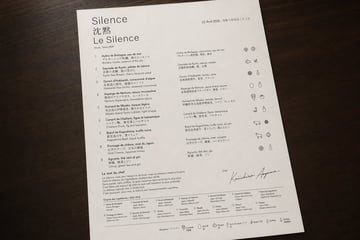
A photorealistic top-down product-style photograph of a single luxury tasting menu printed on bright white textured paper and placed on a dark walnut wooden tabletop, with soft warm ambient lighting and gentle natural shadows. The sheet is portrait orientation, slightly rotated clockwise, occupying most of the frame with clean margins around it. The design is an ultra-minimal fine-dining menu with elegant editorial typography, lots of negative space, precise alignment, and a refined black-and-dark-gray ink palette. At the upper left, the restaurant identity appears in 3 stacked lines: a large serif word {argument name="restaurant name" default="Silence"}, below it 2 Chinese characters "沈默", and below that a large serif French line "Le Silence". Under the title is a small location line reading "Ginza, Tokyo B3F". At the upper right is a small date line in French followed by Japanese date text: {argument name="date text" default="22 Avril 2026 • 令和八年四月二十二日"}. The main body is organized into 3 vertical content zones: a left numbered course list, a middle translated course list, and a far-right icon column. The left list contains exactly 9 numbered courses labeled 1 through 9, each with French title and Japanese subtitle and an English ingredient line beneath; the 9 visible course titles are: "Huître de Bretagne, eau de mer", "Daurade de Kyoto, pétale de sakura", "Oursin d’Hokkaidō, consommé d’algue", "Asperge de Nemuro, sauce mousseline", "Homard de Miyako, bisque légère", "Canard de Challans, figue et balsamique", "Boeuf de Kagoshima, truffe noire", "Fromage de chèvre, miel du Japon", and "Agrume, thé vert et gin". The middle list repeats the 9 dishes in a second compact column with French titles and Japanese descriptions. The far-right column contains exactly 9 horizontal icon rows aligned to the courses, each row showing small monochrome hand-drawn ingredient or allergen pictograms; some rows have 2 icons and some 3, for a total of 19 icons overall. Near the lower left is a section titled "Le mot du chef" followed by a short French paragraph in small serif text. Below that is a section titled "Origine des ingrédients / 食材の産地" with a dense 2-row ingredient-origin grid listing exactly 15 numbered origin entries in tiny text. In the lower right quadrant, include a small label "Chef" above a large sweeping handwritten signature reading {argument name="chef name" default="Keiichiro Aoyama"}. Along the very bottom edge is a thin horizontal rule and a centered allergen legend line with exactly 7 small outline icons and labels: shellfish, crustaceans, egg, fish, milk, gluten, sulfites, each labeled in French with Japanese beneath. The overall impression should be high-end Michelin-style menu design, editorial restraint, immaculate spacing, subtle paper grain, sharply legible text hierarchy, and realistic photography rather than a flat scan.
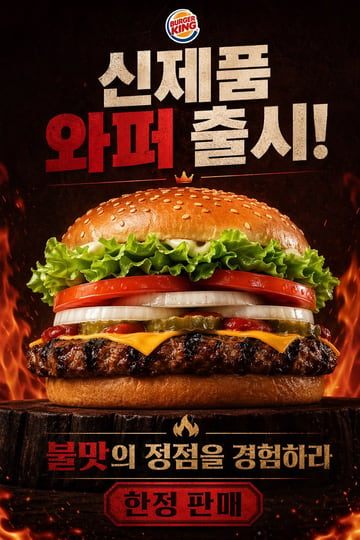
A dramatic fast-food poster advertisement for Burger King, vertical composition, photorealistic studio food photography mixed with bold Korean promotional graphic design. Place the official Burger King logo centered at the very top. Below it, add huge distressed block Korean headline text in a stacked layout reading "신제품 와퍼 출시!" with "와퍼" in vivid deep red and the other words in textured off-white, all on a dark smoky black background. In the center, show one massive hero burger shot from a slightly low front angle, perfectly centered and filling most of the frame. The burger has 8 clearly visible layers and elements: a glossy sesame seed top bun, curly green leaf lettuce, thick red tomato slices, thick white onion rings, sliced pickles, streaks of ketchup, melted American cheese, a flame-grilled beef patty with heavy char marks, and a soft bottom bun. Add a tiny golden crown icon floating just above the top bun. The burger sits on a dark rustic wooden stump pedestal. Surround the lower half and side edges with dramatic orange flames, glowing embers, heat sparks, and smoky atmosphere to emphasize flame grilling. Near the bottom, place a secondary Korean slogan in bold text, centered, reading "불맛의 정점을 경험하라" with "불맛" in red and the remaining words in warm beige-gold, separated above by a small flame icon. At the very bottom, add a red badge-shaped label with a dark border containing the Korean text "한정 판매" in bold black. Use a high-contrast black, red, orange, and toasted brown color palette, intense cinematic lighting, glossy food highlights, crisp ingredient texture, premium commercial advertising finish, and a fiery indulgent mood.
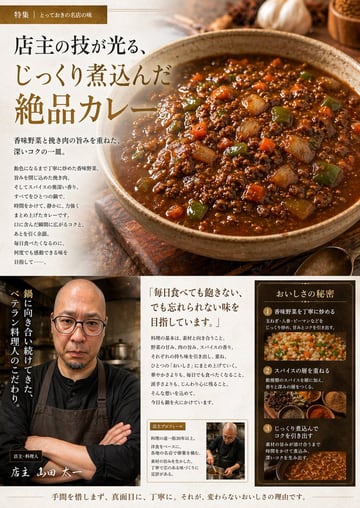
Using the provided reference image of the curry in the pan, transform it into a polished Japanese gourmet magazine advertisement page for {argument name="dish name" default="キーマカレー"}. Keep the curry recognizable as the same dish, but restyle it as a premium food photograph served in a rustic ceramic bowl on a wooden tabletop, with richer gloss, deeper color contrast, and more appetizing texture. Create a full editorial layout with 3 main content areas: 1) a large hero section at the top featuring the plated curry on the right and Japanese promotional copy on the left, including a small top banner label and a large headline; 2) a bottom-left chef profile area with 1 portrait of a chef in dark workwear and apron, arms crossed in a restaurant kitchen, plus vertical Japanese copy and a handwritten-style name caption; 3) a bottom-right information area containing 1 quote block and 1 framed “secret of deliciousness” panel with exactly 3 numbered steps, each paired with a food or cooking image. Add warm ambient lighting, shallow depth of field, spices and garlic props around the hero dish, and an upscale traditional restaurant branding feel. Include Japanese text throughout, with the main headline emphasizing slow-cooked, exquisite curry, and use elegant Mincho-style typography in brown, cream, and gold tones. The final composition should look like a high-end restaurant feature article or promotional brochure page.
FAQ
Start with Dish or drink, Plating, Props, then add style, lighting, output ratio, and where the image will be used.
Yes. Open any prompt in Image2Studio, adjust the text, choose ratio and resolution, then generate and save the result.
Copy an example, open the studio, then adjust product, scene, style, and frame details.