
Image2Studio
案例

gpt-image-2

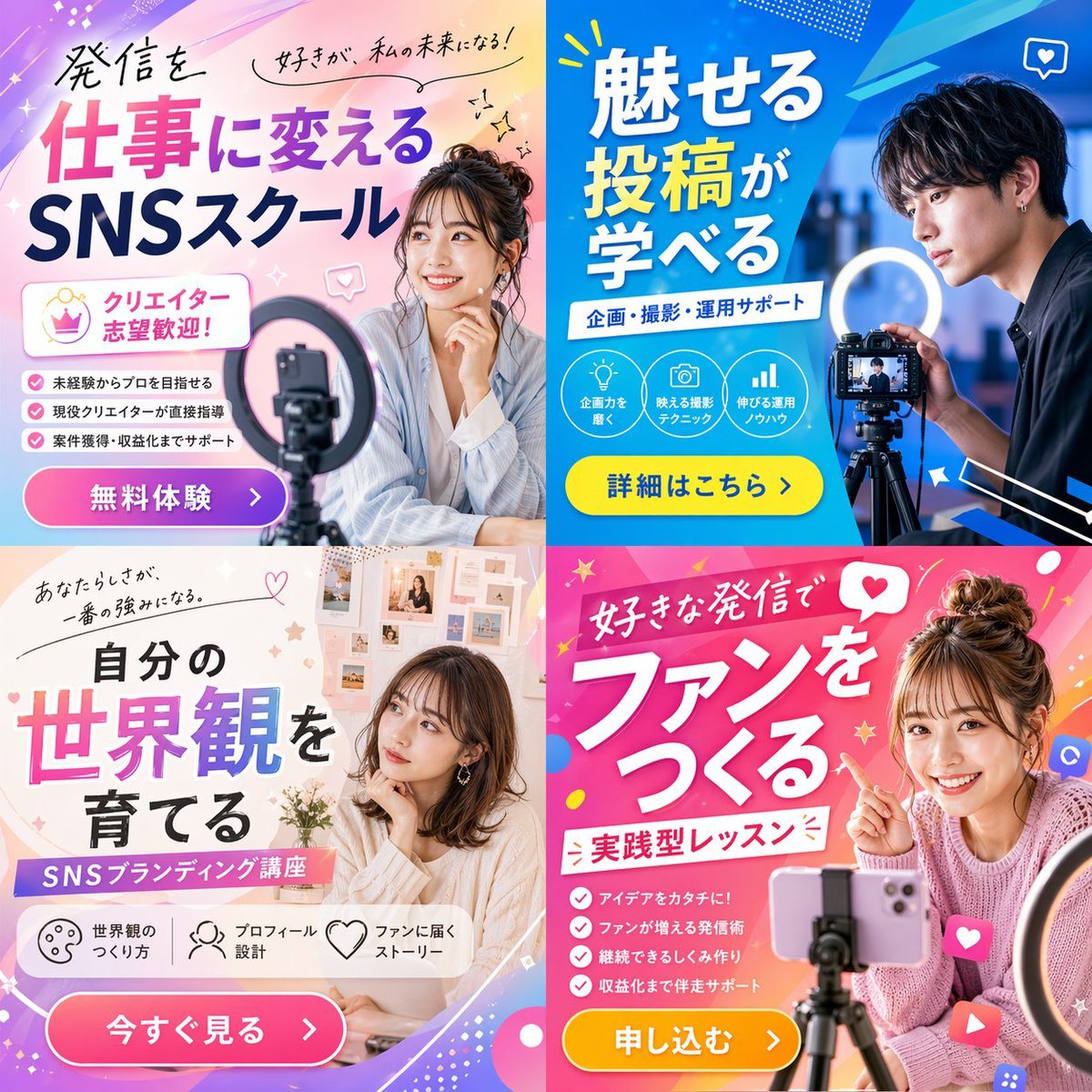
2x2 Social Media Course Banner Ads

Generates a 2x2 grid of promotional banner ads for a social media or content creation school, featuring diverse models, vibrant layouts, and customizable Japanese typography.

Generates a 2x2 grid of promotional banner ads for a social media or content creation school, featuring diverse models, vibrant layouts, and customizable Japanese typography.
提示词

{"type": "2x2 grid of promotional banner ads", "theme": "{argument name=\"course theme\" default=\"Social Media Content Creation School\"}", "panels": [{"position": "top-left", "color_palette": "light blue and pink pastel gradient", "subject": "young woman smiling, resting chin on hand, smartphone and ring light in foreground", "typography": {"headline": "{argument name=\"top left headline\" default=\"発信を仕事に変える SNSスクール\"}", "subheadings": ["好きが、私の未来になる!", "クリエイター志望歓迎!"]}, "layout_elements": {"bullet_points_count": 3, "call_to_action_button": "pink button labeled '無料体験 >'"}}, {"position": "top-right", "color_palette": "deep blue and cyan geometric", "subject": "young man looking intently at a professional camera on a tripod with a ring light", "typography": {"headline": "{argument name=\"top right headline\" default=\"魅せる投稿が学べる\"}", "subheadings": ["企画・撮影・運用サポート"]}, "layout_elements": {"circular_icons_count": 3, "icon_types": ["lightbulb", "camera", "bar chart"], "call_to_action_button": "yellow button labeled '詳細はこちら >'"}}, {"position": "bottom-left", "color_palette": "soft beige and white aesthetic", "subject": "young woman looking thoughtfully to the side, mood board background", "typography": {"headline": "{argument name=\"bottom left headline\" default=\"自分の世界観を育てる\"}", "subheadings": ["あなたらしさが、一番の強みになる。", "SNSブランディング講座"]}, "layout_elements": {"horizontal_icons_count": 3, "icon_types": ["palette", "person", "heart"], "call_to_action_button": "pink button labeled '今すぐ見る >'"}}, {"position": "bottom-right", "color_palette": "vibrant pink and magenta pop design", "subject": "young woman smiling brightly, pointing at text, messy bun, smartphone on tripod", "typography": {"headline": "{argument name=\"bottom right headline\" default=\"好きな発信でファンをつくる\"}", "subheadings": ["実践型レッスン"]}, "layout_elements": {"bullet_points_count": 4, "call_to_action_button": "yellow button labeled '申し込む >'"}}]}

提示词结构
  • 模型gpt-image-2
  • 用途social-media-post
  • 风格photorealistic
  • 画幅Flexible
适用场景
  • 用途social-media-post
  • 风格photorealistic
  • 推荐规格1:1, 4:5, 16:9, or 9:16
  • 模型GPT Image 2
如何修改

把这个 2x2 Social Media Course Banner Ads 提示词当作起点。替换主体、产品细节、场景、光线、品牌颜色和输出画幅,同时保留 social-media-post 的用途和 photorealistic 的视觉方向。

可替换变量
  • 主体替换成你的产品、人物、场景或界面对象。
  • 用途保留或改写为 social media post、广告图、封面、海报或电商主图。
  • 画幅按投放位置选择 1:1、4:5、16:9 或 9:16。
  • 品牌线索补充颜色、材质、道具、文案安全区和最终使用平台。
推荐规格

先按目标平台选择画幅,再根据用途选择 1K、2K 或 4K。产品图和海报通常适合更高清晰度。

生成前检查
  • 检查主体、光线、构图和画幅都足够明确。
  • 检查如果图片要承载标题或广告文案,已经预留文字安全区。
  • 检查生成前确认分辨率、额度成本和最终使用位置。
为什么有效

2x2 Social Media Course Banner Ads 的重点是先固定图片用途,再用主体、构图、光线、风格和画幅控制生成结果。它适合 social media post,并保留 photorealistic 的视觉方向。

常见问题
  • 能直接用吗?可以。先替换主体、品牌线索和画幅,再进入 Image2Studio 生成。
  • 适合什么比例?按平台选择 1:1、4:5、16:9 或 9:16。




