
Image2Studio
案例

gpt-image-2

Custom Building Block Set Photography

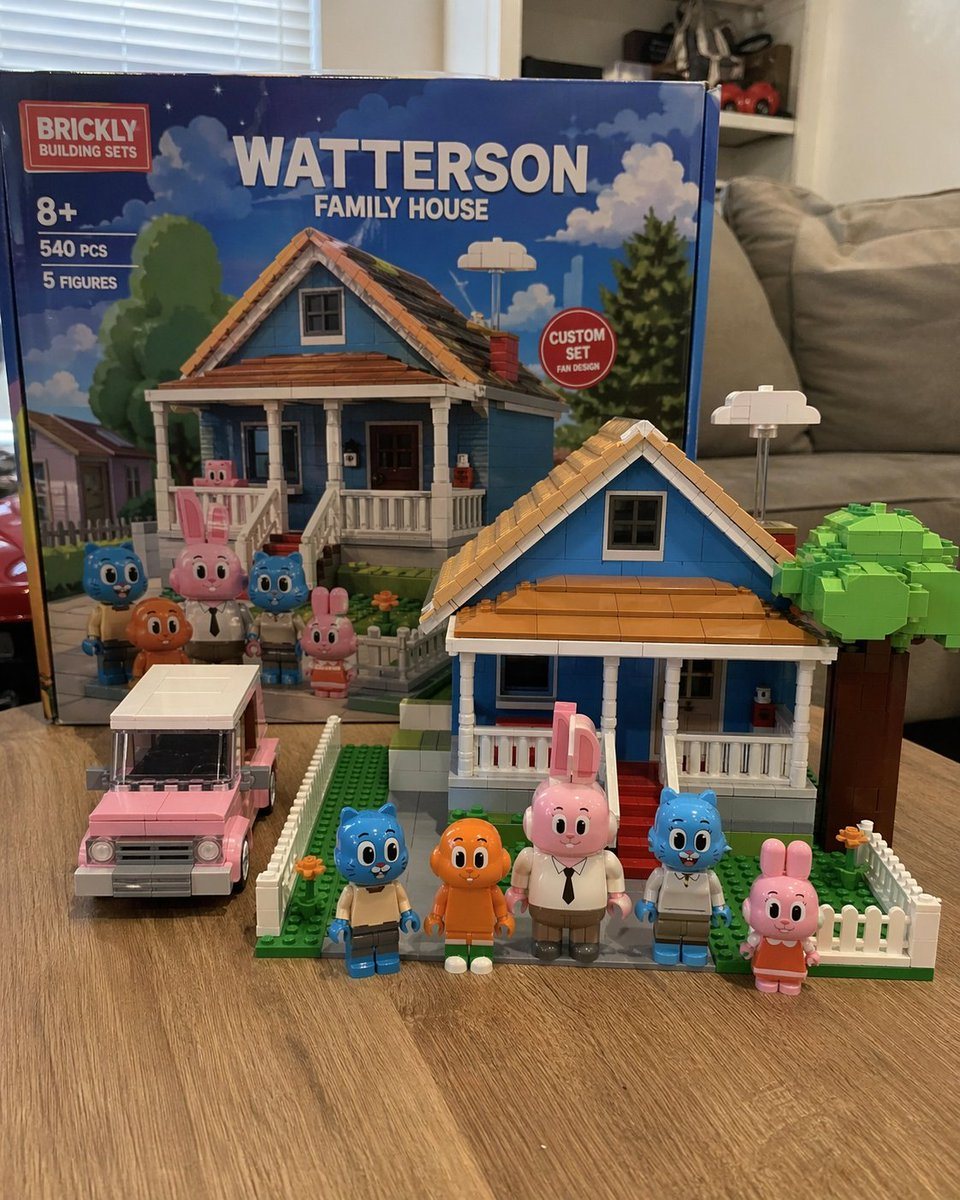
Generates a photorealistic image of a custom toy building set with its box, assembled house, vehicle, and minifigures on a table.

Generates a photorealistic image of a custom toy building set with its box, assembled house, vehicle, and minifigures on a table.
提示词

A photorealistic amateur photograph of a custom building block set resting on a light wood grain table in a living room. In the background stands a large product box with a red logo reading "{argument name="brand name" default="BRICKLY"} BUILDING SETS". The box features text reading "8+", "540 PCS", "5 FIGURES", and the main large title "{argument name="set title" default="WATTERSON FAMILY HOUSE"}". A red circular badge on the box reads "CUSTOM SET FAN DESIGN", and the box art depicts the house and characters under a blue sky. In the foreground sits the fully assembled block model of a {argument name="house color" default="blue"} two-story suburban house with a brown roof, white porch, red steps, a white picket fence, and a blocky green tree. To the left of the house is a built block model of a {argument name="car color" default="pink"} station wagon. Standing in a row in front of the house are exactly 5 custom block minifigures: a blue cat in tan pants, an orange fish with legs, a tall pink rabbit in a white shirt and tie, a blue cat in a white shirt, and a small pink rabbit in an orange dress. The background is a slightly blurred living room with a grey sofa and white blinds.

提示词结构
  • 模型gpt-image-2
  • 用途brand-identity
  • 风格photorealistic
  • 画幅Flexible
适用场景
  • 用途brand-identity
  • 风格photorealistic
  • 推荐规格1:1, 4:5, 16:9, or 9:16
  • 模型GPT Image 2
如何修改

把这个 Custom Building Block Set Photography 提示词当作起点。替换主体、产品细节、场景、光线、品牌颜色和输出画幅,同时保留 brand-identity 的用途和 photorealistic 的视觉方向。

可替换变量
  • 主体替换成你的产品、人物、场景或界面对象。
  • 用途保留或改写为 brand identity、广告图、封面、海报或电商主图。
  • 画幅按投放位置选择 1:1、4:5、16:9 或 9:16。
  • 品牌线索补充颜色、材质、道具、文案安全区和最终使用平台。
推荐规格

先按目标平台选择画幅,再根据用途选择 1K、2K 或 4K。产品图和海报通常适合更高清晰度。

生成前检查
  • 检查主体、光线、构图和画幅都足够明确。
  • 检查如果图片要承载标题或广告文案,已经预留文字安全区。
  • 检查生成前确认分辨率、额度成本和最终使用位置。
为什么有效

Custom Building Block Set Photography 的重点是先固定图片用途,再用主体、构图、光线、风格和画幅控制生成结果。它适合 brand identity,并保留 photorealistic 的视觉方向。

常见问题
  • 能直接用吗?可以。先替换主体、品牌线索和画幅,再进入 Image2Studio 生成。
  • 适合什么比例?按平台选择 1:1、4:5、16:9 或 9:16。




