
Image2Studio
案例

gpt-image-2

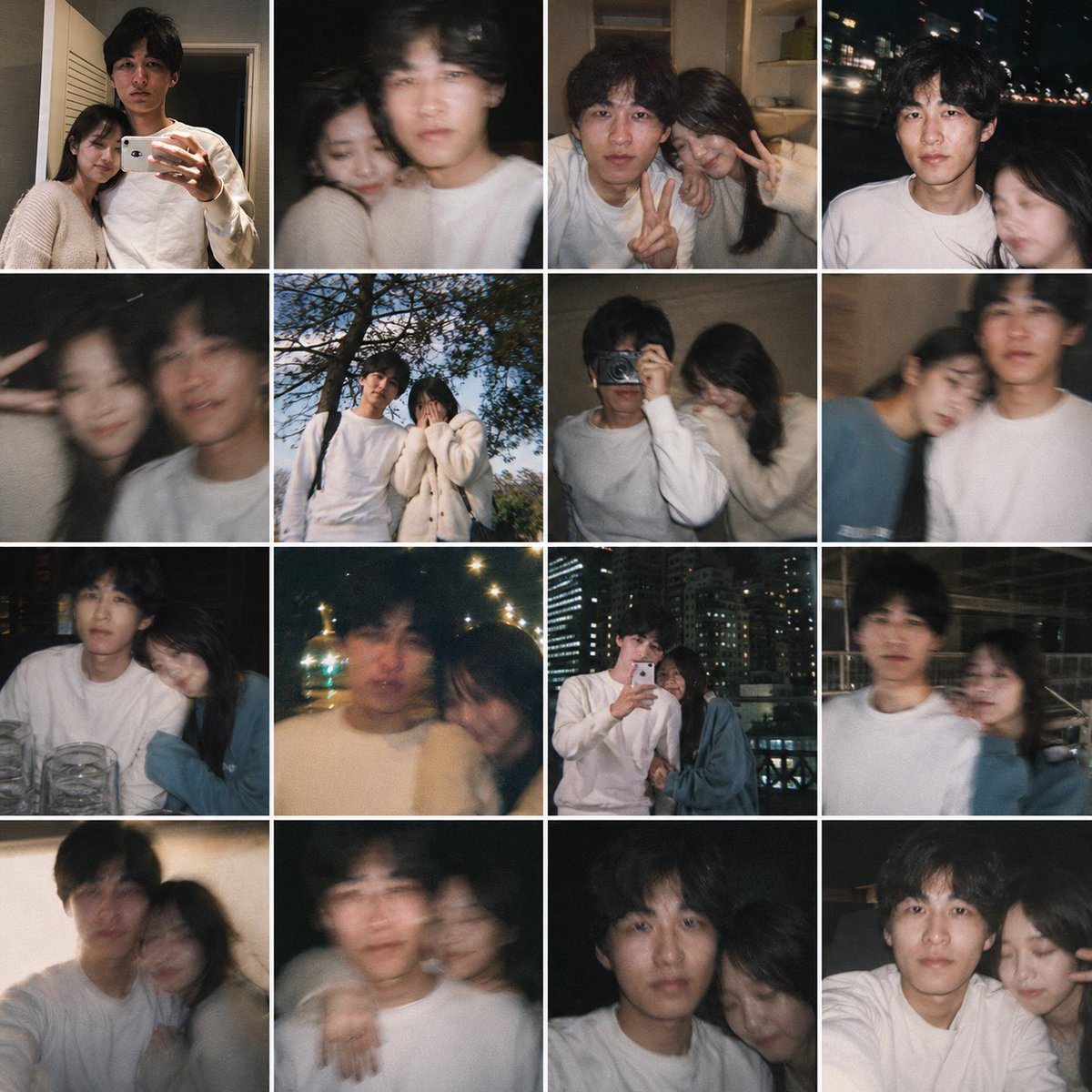
Fake Couple Photo Dump Collage

This prompt turns a single personal reference photo into a believable 16-image smartphone collage of candid couple memories, useful for 'what if' lifestyle edits and fake relationship photo dumps.

This prompt turns a single personal reference photo into a believable 16-image smartphone collage of candid couple memories, useful for 'what if' lifestyle edits and fake relationship photo dumps.
提示词

Using the provided reference image as the base for the man, transform it into a realistic casual smartphone photo collage showing him as if he has a girlfriend. Keep his identity, hairstyle, age, white sweatshirt, and candid non-model look consistent, but place him together with a young woman across 16 square snapshots arranged in a 4x4 grid with thin white borders. Add exactly 1 recurring female companion with long dark hair, styled like a real person rather than a glam model, and vary her outfits subtly across the collage, including a cream knit cardigan, a dark top, and a muted blue top. Make the photos feel like authentic couple memories shot on a phone: close mirror selfie together, dark blurry selfie, indoor peace-sign selfie, night street selfie, motion-blur closeup, outdoor daytime shot under a tree, indoor shoulder-leaning shot, another blurry affectionate shot, seated restaurant shot with glasses on the table, warm night bokeh shot, rooftop or balcony mirror selfie with city lights, nighttime urban walking shot, cozy leaning-together shot, shoulder-around pose, close side-by-side portrait, and another intimate close crop. Mix indoor home scenes, nighttime city scenes, one daytime outdoor scene, and one restaurant setting. Use imperfect framing, slight blur, flash, grain, and spontaneous candid composition so it feels like a real person's saved couple photo dump, not a polished campaign.

提示词结构
  • 模型gpt-image-2
  • 用途social-media-post
  • 风格photorealistic
  • 画幅Flexible
适用场景
  • 用途social-media-post
  • 风格photorealistic
  • 推荐规格1:1, 4:5, 16:9, or 9:16
  • 模型GPT Image 2
如何修改

把这个 Fake Couple Photo Dump Collage 提示词当作起点。替换主体、产品细节、场景、光线、品牌颜色和输出画幅,同时保留 social-media-post 的用途和 photorealistic 的视觉方向。

可替换变量
  • 主体替换成你的产品、人物、场景或界面对象。
  • 用途保留或改写为 social media post、广告图、封面、海报或电商主图。
  • 画幅按投放位置选择 1:1、4:5、16:9 或 9:16。
  • 品牌线索补充颜色、材质、道具、文案安全区和最终使用平台。
推荐规格

先按目标平台选择画幅,再根据用途选择 1K、2K 或 4K。产品图和海报通常适合更高清晰度。

生成前检查
  • 检查主体、光线、构图和画幅都足够明确。
  • 检查如果图片要承载标题或广告文案,已经预留文字安全区。
  • 检查生成前确认分辨率、额度成本和最终使用位置。
为什么有效

Fake Couple Photo Dump Collage 的重点是先固定图片用途,再用主体、构图、光线、风格和画幅控制生成结果。它适合 social media post,并保留 photorealistic 的视觉方向。

常见问题
  • 能直接用吗?可以。先替换主体、品牌线索和画幅,再进入 Image2Studio 生成。
  • 适合什么比例?按平台选择 1:1、4:5、16:9 或 9:16。




