
Image2Studio
案例

gpt-image-2

Fashion Editorial Outfit Breakdown

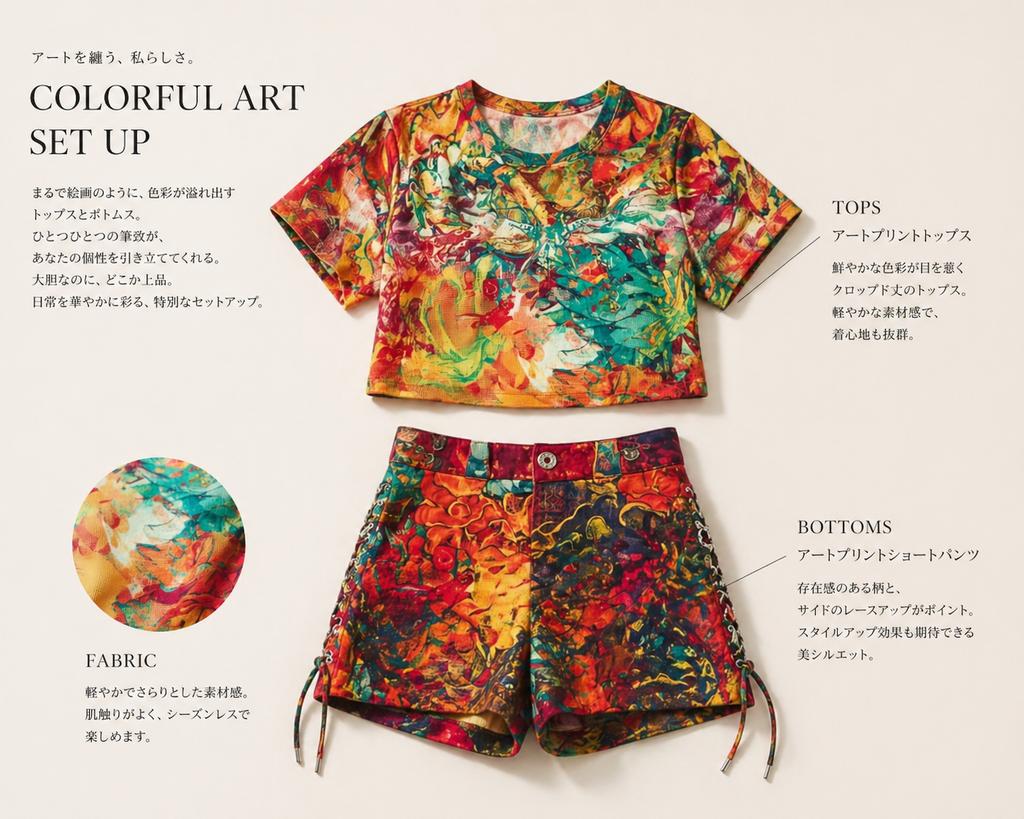
This prompt turns a reference outfit photo into a polished magazine-style apparel layout for product presentation and catalog mockups.

This prompt turns a reference outfit photo into a polished magazine-style apparel layout for product presentation and catalog mockups.
提示词

Using REFERENCE_0, extract only the outfit and turn it into a clean fashion magazine product showcase on a light warm-beige background. Remove the person entirely and display the clothing as separate laid-flat items: 1 cropped short-sleeve top centered near the top and 1 pair of shorts centered below it. Preserve the vivid multicolor art print from the reference, but present the garments neatly, as if for an editorial catalog page, with soft studio shadows. Add 1 circular fabric-detail inset at the lower left showing a close-up of the print. Add elegant editorial typography and thin callout lines, with 4 text blocks total: a large headline block at upper left reading “COLORFUL ART SET UP” with small Japanese copy above and below, 1 right-side block labeled “TOPS” with Japanese description, 1 lower-right block labeled “BOTTOMS” with Japanese description, and 1 lower-left block labeled “FABRIC” with short Japanese description. Keep the overall look refined, minimal, premium, and like a clothing introduction page in a magazine.

提示词结构
  • 模型gpt-image-2
  • 用途social-media-post
  • 风格editorial, photorealistic, minimal, luxury
  • 画幅Flexible
适用场景
  • 用途social-media-post
  • 风格editorial, photorealistic, minimal, luxury
  • 推荐规格1:1, 4:5, 16:9, or 9:16
  • 模型GPT Image 2
如何修改

把这个 Fashion Editorial Outfit Breakdown 提示词当作起点。替换主体、产品细节、场景、光线、品牌颜色和输出画幅,同时保留 social-media-post 的用途和 editorial, photorealistic, minimal, luxury 的视觉方向。

可替换变量
  • 主体替换成你的产品、人物、场景或界面对象。
  • 用途保留或改写为 social media post、广告图、封面、海报或电商主图。
  • 画幅按投放位置选择 1:1、4:5、16:9 或 9:16。
  • 品牌线索补充颜色、材质、道具、文案安全区和最终使用平台。
推荐规格

先按目标平台选择画幅,再根据用途选择 1K、2K 或 4K。产品图和海报通常适合更高清晰度。

生成前检查
  • 检查主体、光线、构图和画幅都足够明确。
  • 检查如果图片要承载标题或广告文案,已经预留文字安全区。
  • 检查生成前确认分辨率、额度成本和最终使用位置。
为什么有效

Fashion Editorial Outfit Breakdown 的重点是先固定图片用途,再用主体、构图、光线、风格和画幅控制生成结果。它适合 social media post,并保留 editorial, photorealistic, minimal, luxury 的视觉方向。

常见问题
  • 能直接用吗?可以。先替换主体、品牌线索和画幅,再进入 Image2Studio 生成。
  • 适合什么比例?按平台选择 1:1、4:5、16:9 或 9:16。




