提示词{
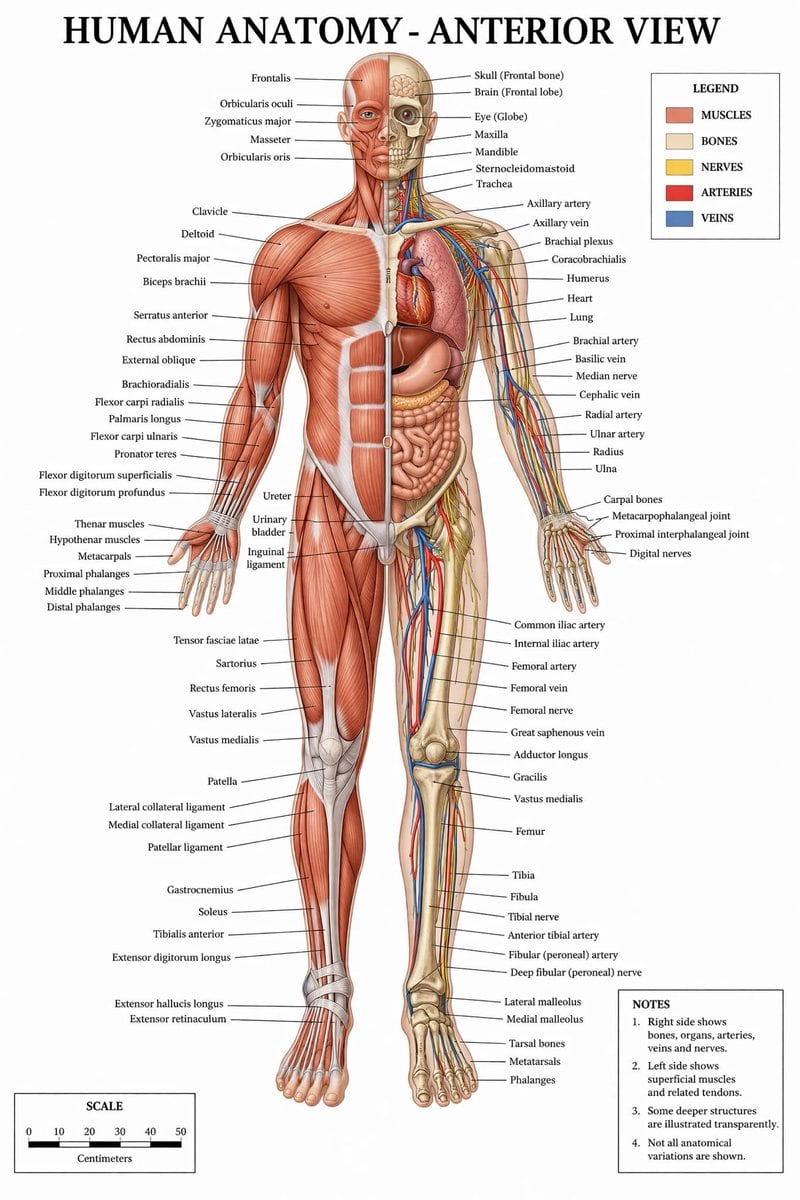
"type": "医学信息图海报",
"title": "{argument name=\"main title\" default=\"人体解剖学 - 正面视图\"}",
"subject": {
"description": "全身 {argument name=\"subject type\" default=\"男性人体模型\"},正面视图,沿中线垂直分割。",
"viewer_left_side": "{argument name=\"left side focus\" default=\"浅层肌肉\"}",
"viewer_right_side": "{argument name=\"right side focus\" default=\"骨骼、内脏、动脉、静脉和神经\"}",
"style": "{argument name=\"color palette\" default=\"临床医学教科书配色\"}"
},
"layout": {
"centerpiece": "解剖模型居中站立,双臂略微张开,手掌朝前。",
"labeling_system": "细黑色的引导线将解剖结构连接到左右两侧整齐排列的文字标签上。",
"label_counts": {
"head_and_neck": 12,
"torso_and_arms": 29,
"hands": 10,
"pelvis_and_legs": 34,
"feet": 5
},
"panels": [
{
"title": "图例",
"position": "右上角",
"count": 5,
"items": [
{"color": "红/棕色", "label": "肌肉"},
{"color": "米色", "label": "骨骼"},
{"color": "黄色", "label": "神经"},
{"color": "红色", "label": "动脉"},
{"color": "蓝色", "label": "静脉"}
]
},
{
"title": "备注",
"position": "右下角",
"count": 4,
"items": [
"1. 右侧显示骨骼、内脏、动脉、静脉和神经。",
"2. 左侧显示浅层肌肉及相关肌腱。",
"3. 部分深层结构以透明方式呈现。",
"4. 未展示所有解剖变异。"
]
},
{
"title": "比例尺",
"position": "左下角",
"count": 6,
"description": "一个水平条形比例尺,带有 6 个数字标记(0, 10, 20, 30, 40, 50),标注为“厘米”。"
}
]
}
}
提示词结构- 模型gpt-image-2
- 用途avatar
- 风格editorial
- 画幅Flexible
适用场景- 用途avatar
- 风格editorial
- 推荐规格1:1, 4:5, 16:9, or 9:16
- 模型GPT Image 2
如何修改把这个 详细医学解剖信息图 提示词当作起点。替换主体、产品细节、场景、光线、品牌颜色和输出画幅,同时保留 avatar 的用途和 editorial 的视觉方向。
可替换变量- 主体替换成你的产品、人物、场景或界面对象。
- 用途保留或改写为 avatar、广告图、封面、海报或电商主图。
- 画幅按投放位置选择 1:1、4:5、16:9 或 9:16。
- 品牌线索补充颜色、材质、道具、文案安全区和最终使用平台。
推荐规格先按目标平台选择画幅,再根据用途选择 1K、2K 或 4K。产品图和海报通常适合更高清晰度。
生成前检查- 检查主体、光线、构图和画幅都足够明确。
- 检查如果图片要承载标题或广告文案,已经预留文字安全区。
- 检查生成前确认分辨率、额度成本和最终使用位置。
为什么有效详细医学解剖信息图 的重点是先固定图片用途,再用主体、构图、光线、风格和画幅控制生成结果。它适合 avatar,并保留 editorial 的视觉方向。
常见问题- 能直接用吗?可以。先替换主体、品牌线索和画幅,再进入 Image2Studio 生成。
- 适合什么比例?按平台选择 1:1、4:5、16:9 或 9:16。