
Image2Studio
提示词

gpt-image-2

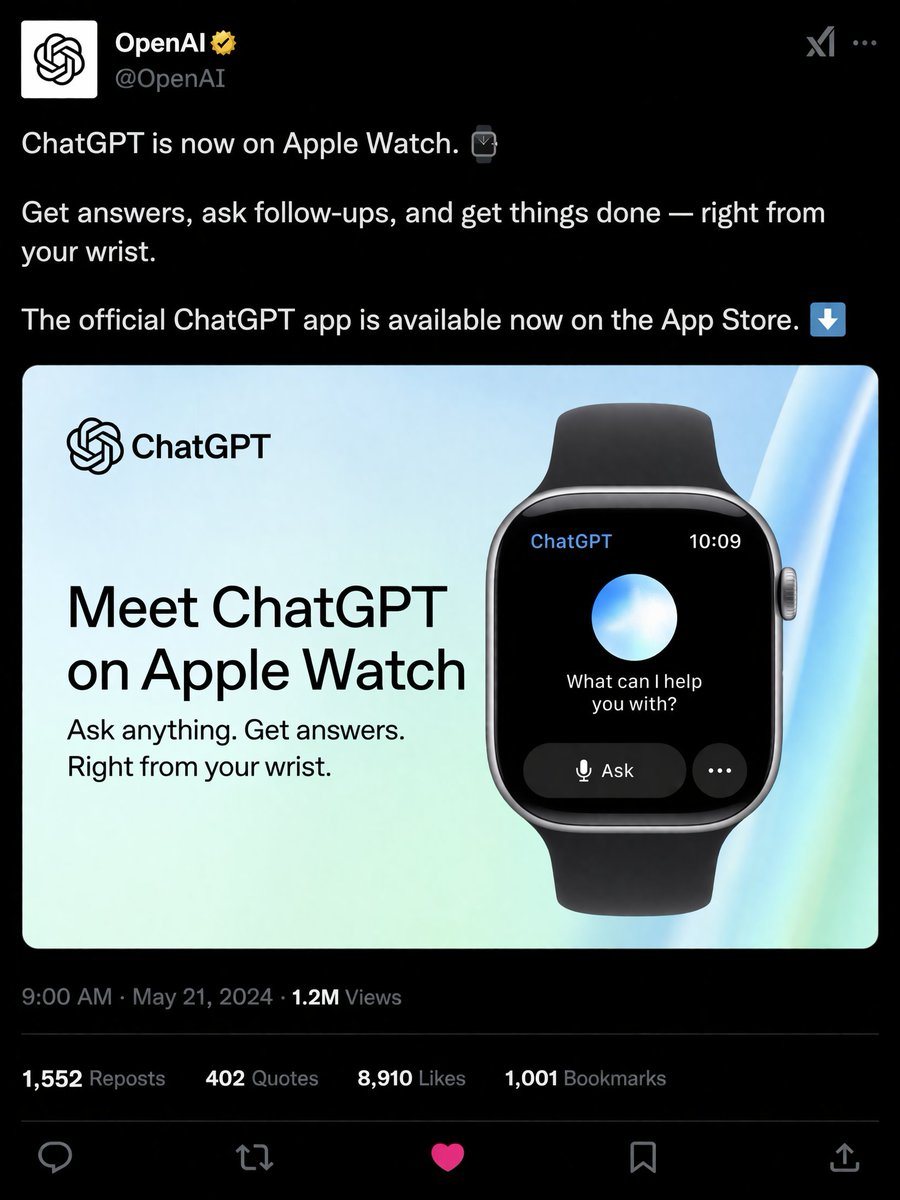
社交媒体产品发布模拟图

生成一张逼真的深色模式社交媒体帖子,展示智能手表应用的宣传图。

Copy this GPT Image 2 prompt for social media post and ui mockups with Luxury styling. Use it in Image2Studio to generate, edit, and save production-ready.
提示词

{ "type": "social media post mockup", "theme": "dark mode", "header": { "avatar": "OpenAI logo", "account_name": "{argument name=\"account name\" default=\"OpenAI\"}", "badge": "gold checkmark", "handle": "@OpenAI" }, "post_text": [ "{argument name=\"post text\" default=\"ChatGPT is now on Apple Watch.\"}", "Get answers, ask follow-ups, and get things done — right from your wrist.", "The official ChatGPT app is available now on the App Store." ], "embedded_card": { "background": "light blue and green gradient", "left_column": { "logo": "ChatGPT", "headline": "{argument name=\"card headline\" default=\"Meet ChatGPT on Apple Watch\"}", "subheadline": "Ask anything. Get answers. Right from your wrist." }, "right_column": { "device": "smartwatch with black band", "screen_elements": { "top_bar": 2, "top_bar_labels": ["ChatGPT", "10:09"], "center": "glowing blue and white orb", "text": "{argument name=\"watch screen text\" default=\"What can I help you with?\"}", "buttons": 2, "button_labels": ["Ask", "..."] } } }, "footer": { "metadata": "9:00 AM · May 21, 2024 · 1.2M Views", "engagement_stats": { "count": 4, "labels": ["1,552 Reposts", "402 Quotes", "{argument name=\"likes count\" default=\"8,910\"} Likes", "1,001 Bookmarks"] }, "action_icons": { "count": 5, "types": ["reply", "repost", "like", "bookmark", "share"] } } }

提示词结构
  • 模型gpt-image-2
  • 用途social-media-post
  • 风格luxury
  • 画幅Flexible
适用场景
  • 用途social-media-post
  • 风格luxury
  • 推荐规格1:1, 4:5, 16:9, or 9:16
  • 模型GPT Image 2
如何修改

把这个 社交媒体产品发布模拟图 提示词当作起点。替换主体、产品细节、场景、光线、品牌颜色和输出画幅,同时保留 social-media-post 的用途和 luxury 的视觉方向。

可替换变量
  • 主体替换成你的产品、人物、场景或界面对象。
  • 用途保留或改写为 social media post、广告图、封面、海报或电商主图。
  • 画幅按投放位置选择 1:1、4:5、16:9 或 9:16。
  • 品牌线索补充颜色、材质、道具、文案安全区和最终使用平台。
推荐规格

先按目标平台选择画幅,再根据用途选择 1K、2K 或 4K。产品图和海报通常适合更高清晰度。

生成前检查
  • 检查主体、光线、构图和画幅都足够明确。
  • 检查如果图片要承载标题或广告文案,已经预留文字安全区。
  • 检查生成前确认分辨率、额度成本和最终使用位置。
为什么有效

社交媒体产品发布模拟图 的重点是先固定图片用途,再用主体、构图、光线、风格和画幅控制生成结果。它适合 social media post,并保留 luxury 的视觉方向。

常见问题
  • 能直接用吗?可以。先替换主体、品牌线索和画幅,再进入 Image2Studio 生成。
  • 适合什么比例?按平台选择 1:1、4:5、16:9 或 9:16。