
Image2Studio
提示词

gpt-image-2

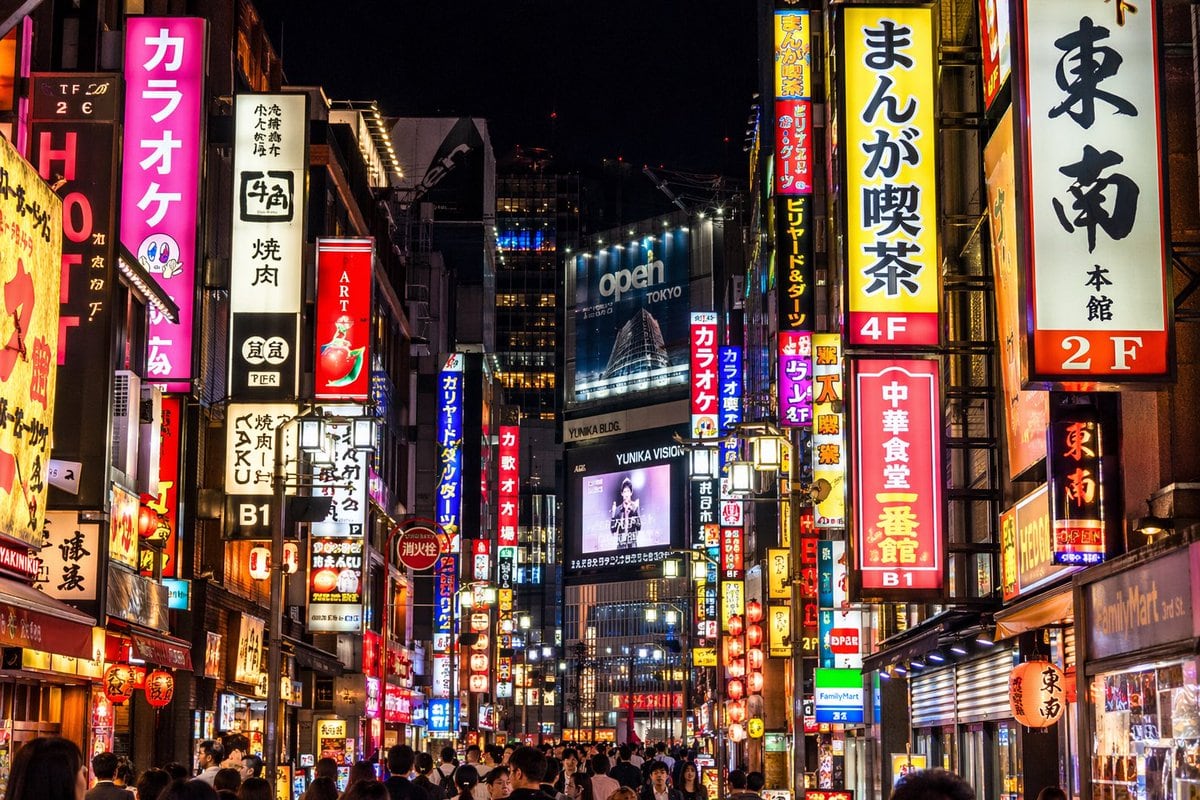
照片级写实风格霓虹东京街景

生成一张高度细节化、照片级写实的日本繁华城市街道夜景,并支持自定义霓虹灯牌和广告牌。

Copy this GPT Image 2 prompt for social media post and social ads with Photorealistic, Cyberpunk styling. Use it in Image2Studio to generate, edit, and.
提示词

A photorealistic night street photography shot of a bustling {argument name="city location" default="Tokyo"} street, heavily illuminated by densely packed vertical neon signs and billboards. On the left, a bright pink sign prominently reads "{argument name="pink sign text" default="カラオケ"}" next to a white sign reading "牛角 焼肉". On the right, prominent signs include a yellow one reading "{argument name="yellow sign text" default="まんが喫茶 4F"}", a white one reading "東南 本館 2F", and a red one reading "{argument name="red sign text" default="中華食堂 一番館 B1"}". In the center distance, a large blue billboard displays "{argument name="billboard text" default="open TOKYO"}" above a digital screen showing a person with the text "YUNIKA VISION". The street level is crowded with the backs of pedestrians' heads walking through the vibrant, glowing urban canyon. The lighting is high contrast with rich neon colors reflecting off the surroundings.

提示词结构
  • 模型gpt-image-2
  • 用途social-media-post
  • 风格photorealistic, cyberpunk
  • 画幅Flexible
适用场景
  • 用途social-media-post
  • 风格photorealistic, cyberpunk
  • 推荐规格1:1, 4:5, 16:9, or 9:16
  • 模型GPT Image 2
如何修改

把这个 照片级写实风格霓虹东京街景 提示词当作起点。替换主体、产品细节、场景、光线、品牌颜色和输出画幅,同时保留 social-media-post 的用途和 photorealistic, cyberpunk 的视觉方向。

可替换变量
  • 主体替换成你的产品、人物、场景或界面对象。
  • 用途保留或改写为 social media post、广告图、封面、海报或电商主图。
  • 画幅按投放位置选择 1:1、4:5、16:9 或 9:16。
  • 品牌线索补充颜色、材质、道具、文案安全区和最终使用平台。
推荐规格

先按目标平台选择画幅,再根据用途选择 1K、2K 或 4K。产品图和海报通常适合更高清晰度。

生成前检查
  • 检查主体、光线、构图和画幅都足够明确。
  • 检查如果图片要承载标题或广告文案,已经预留文字安全区。
  • 检查生成前确认分辨率、额度成本和最终使用位置。
为什么有效

照片级写实风格霓虹东京街景 的重点是先固定图片用途,再用主体、构图、光线、风格和画幅控制生成结果。它适合 social media post,并保留 photorealistic, cyberpunk 的视觉方向。

常见问题
  • 能直接用吗?可以。先替换主体、品牌线索和画幅,再进入 Image2Studio 生成。
  • 适合什么比例?按平台选择 1:1、4:5、16:9 或 9:16。




