
Image2Studio
提示词

gpt-image-2

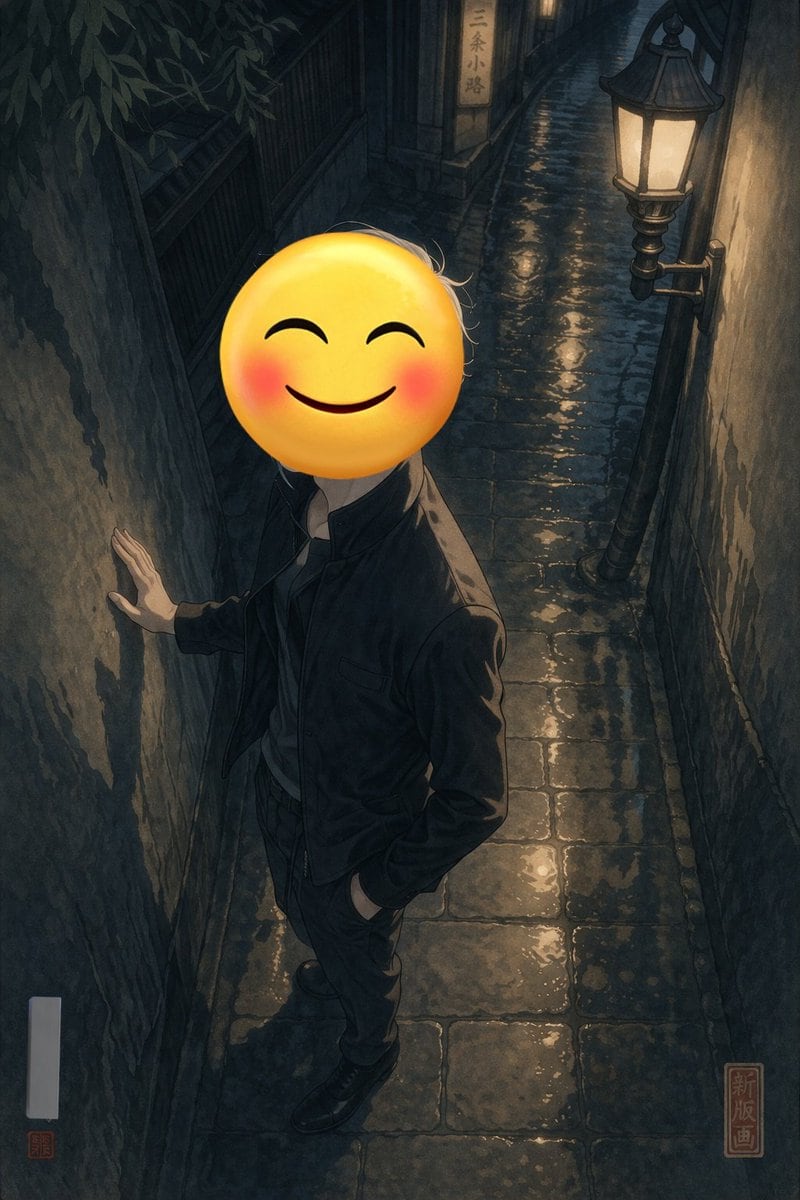
雨夜巷弄中的表情包人物

生成一张充满情绪感、高对比度的插画,描绘一个面部为表情包的人物站在潮湿且灯火通明的巷弄中。

Copy this GPT Image 2 prompt for social media post and social ads with Watercolor styling. Use it in Image2Studio to generate, edit, and save.
提示词

A full-body portrait of a person standing in a {argument name="setting" default="narrow wet cobblestone alleyway at night"}. The person is wearing a {argument name="clothing" default="dark jacket and dark trousers"}, with one hand resting against the rough, textured wall on the left and the other hand casually tucked into their pocket. Their face is completely obscured by a {argument name="face replacement" default="large yellow smiling emoji with blushing cheeks"}. The scene is illuminated by a single vintage street lamp mounted on the right wall, casting warm yellow light that reflects beautifully off the wet paving stones, creating deep, moody shadows. In the background, a small illuminated sign reads "{argument name="background sign text" default="三条小路"}". The artwork is a {argument name="art style" default="modern digital illustration with high contrast lighting and subtle shin-hanga influences"}, featuring a red square seal in the bottom right corner with the text "新版画" and a blank white vertical signature box with a tiny red seal in the bottom left.

提示词结构
  • 模型gpt-image-2
  • 用途social-media-post
  • 风格watercolor
  • 画幅Flexible
适用场景
  • 用途social-media-post
  • 风格watercolor
  • 推荐规格1:1, 4:5, 16:9, or 9:16
  • 模型GPT Image 2
如何修改

把这个 雨夜巷弄中的表情包人物 提示词当作起点。替换主体、产品细节、场景、光线、品牌颜色和输出画幅,同时保留 social-media-post 的用途和 watercolor 的视觉方向。

可替换变量
  • 主体替换成你的产品、人物、场景或界面对象。
  • 用途保留或改写为 social media post、广告图、封面、海报或电商主图。
  • 画幅按投放位置选择 1:1、4:5、16:9 或 9:16。
  • 品牌线索补充颜色、材质、道具、文案安全区和最终使用平台。
推荐规格

先按目标平台选择画幅,再根据用途选择 1K、2K 或 4K。产品图和海报通常适合更高清晰度。

生成前检查
  • 检查主体、光线、构图和画幅都足够明确。
  • 检查如果图片要承载标题或广告文案,已经预留文字安全区。
  • 检查生成前确认分辨率、额度成本和最终使用位置。
为什么有效

雨夜巷弄中的表情包人物 的重点是先固定图片用途,再用主体、构图、光线、风格和画幅控制生成结果。它适合 social media post,并保留 watercolor 的视觉方向。

常见问题
  • 能直接用吗?可以。先替换主体、品牌线索和画幅,再进入 Image2Studio 生成。
  • 适合什么比例?按平台选择 1:1、4:5、16:9 或 9:16。