
Image2Studio
提示词

gpt-image-2

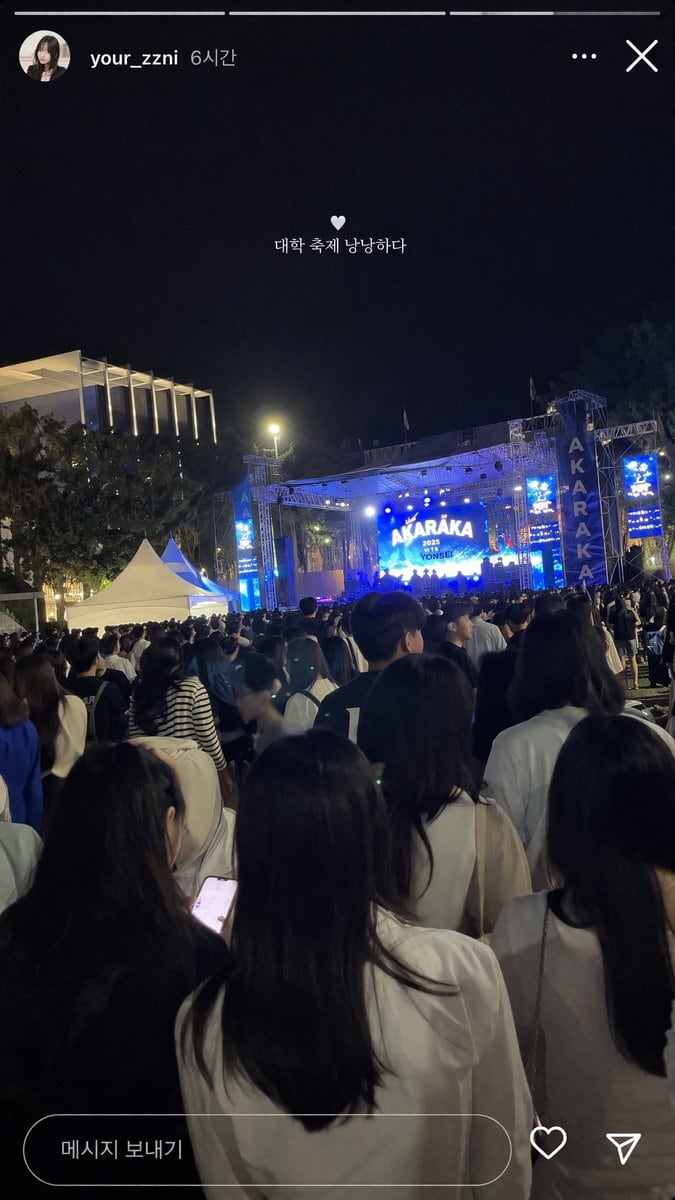
社交媒体演唱会 Story 样机

生成一张逼真的 Instagram 风格夜间大学音乐节 Story 截图,支持自定义 UI 文字和舞台图形。

Copy this GPT Image 2 prompt for social media post and social ads with Photorealistic styling. Use it in Image2Studio to generate, edit, and save.
提示词

{ "type": "social media story screenshot", "background_photo": { "setting": "nighttime outdoor college festival", "perspective": "first-person view from the back of a dense crowd looking toward a brightly lit stage", "crowd": "dense gathering of young adults seen from behind, wearing casual clothing", "stage": "large outdoor concert stage emitting bright blue light, main LED screen displaying '{argument name=\"stage main text\" default=\"AKARAKA\"}' and '{argument name=\"stage sub text\" default=\"2025 YONSEI\"}', flanked by vertical banners reading 'AKARAKA'", "environment": "dark night sky, trees, a modern building with vertical illuminated slats on the left, two white event tents on the mid-left" }, "ui_overlay": { "top_header": "circular profile picture of a young woman, username '{argument name=\"username\" default=\"your_zzni\"}', timestamp '6시간', with standard three-dot menu and 'X' close icons on the right", "center_text": "small white heart icon followed by the text '{argument name=\"overlay text\" default=\"대학 축제 낭낭하다\"}' floating in the middle of the screen", "bottom_bar": "pill-shaped message input box containing the text '메시지 보내기', accompanied by a heart outline icon and a paper airplane icon on the right" } }

提示词结构
  • 模型gpt-image-2
  • 用途social-media-post
  • 风格photorealistic
  • 画幅Flexible
适用场景
  • 用途social-media-post
  • 风格photorealistic
  • 推荐规格1:1, 4:5, 16:9, or 9:16
  • 模型GPT Image 2
如何修改

把这个 社交媒体演唱会 Story 样机 提示词当作起点。替换主体、产品细节、场景、光线、品牌颜色和输出画幅,同时保留 social-media-post 的用途和 photorealistic 的视觉方向。

可替换变量
  • 主体替换成你的产品、人物、场景或界面对象。
  • 用途保留或改写为 social media post、广告图、封面、海报或电商主图。
  • 画幅按投放位置选择 1:1、4:5、16:9 或 9:16。
  • 品牌线索补充颜色、材质、道具、文案安全区和最终使用平台。
推荐规格

先按目标平台选择画幅,再根据用途选择 1K、2K 或 4K。产品图和海报通常适合更高清晰度。

生成前检查
  • 检查主体、光线、构图和画幅都足够明确。
  • 检查如果图片要承载标题或广告文案,已经预留文字安全区。
  • 检查生成前确认分辨率、额度成本和最终使用位置。
为什么有效

社交媒体演唱会 Story 样机 的重点是先固定图片用途,再用主体、构图、光线、风格和画幅控制生成结果。它适合 social media post,并保留 photorealistic 的视觉方向。

常见问题
  • 能直接用吗?可以。先替换主体、品牌线索和画幅,再进入 Image2Studio 生成。
  • 适合什么比例?按平台选择 1:1、4:5、16:9 或 9:16。




