可复用模板
提示词模板
创建一张用于[最终用途]的小红书封面提示词,主体是[产品/人物/场景],包含[构图]、[光线]、[材质]、[品牌线索]和[输出比例]。
使用场景
小红书封面提示词页面,适合按实际图片任务快速改写并生成。
可复用模板
创建一张用于[最终用途]的小红书封面提示词,主体是[产品/人物/场景],包含[构图]、[光线]、[材质]、[品牌线索]和[输出比例]。
这个页面不是普通图片瀑布流,而是围绕「小红书封面提示词」这个搜索意图整理的提示词写法。用户来到这里时,通常已经知道自己要生成哪类图片,只是不确定怎么把主体、场景、光线、画幅和最终用途写清楚。
为Lifestyle covers创建一张清晰的 小红书封面提示词,主体是高级护肤精华瓶,冷白石材台面,柔和侧光,产品边缘清晰,背景留出标题安全区,4:5 画幅。
它先说明用途,再指定主体、台面、光线和安全区,生成结果更容易用于真实投放。
生成一张适合Product notes的 小红书封面提示词,主体明确,前景和背景层次清楚,加入可替换的品牌色、道具、光线方向和最终投放平台。
它把可替换变量独立出来,后续可以按产品、平台和品牌方向快速迭代。
保留页面里的基础结构,然后替换主体、使用场景、平台比例和品牌线索。图片要用于转化时,优先保证主体清晰;图片要用于内容传播时,再加强情绪、风格和视觉钩子。
至少包含用途、主体、构图、光线、风格和输出比例。如果图片要承载标题,还要写明文字安全区。
可以。复制提示词或打开 Image2Studio 后,替换你的产品、人物、场景和画幅,再提交生成。
提示词示例
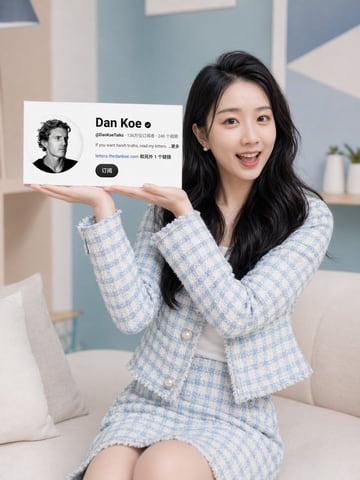
一张适用于社交媒体封面的干净生活方式肖像:一位留着黑色长波浪卷发的时尚东亚年轻女性坐在明亮柔和色调客厅的浅米色沙发上,身穿浅蓝色和白色粗花呢外套,搭配带有珍珠纽扣的同款半身裙,内搭白色上衣。她双手向上呈展示姿势,手掌平摊向上,仿佛在托举一张悬浮的矩形资料卡。卡片是一块位于她双手上方画面左侧的大型白色创作者资料面板,包含 1 个圆形黑白头像、1 行显示名称(内容为 {argument name="profile name" default="Dan Koe"})、1 行账号名(内容为 {argument name="profile handle" default="@DanKoeTalks"})、1 行显示订阅者和视频数量的中文数据统计、1 行简短个人简介(内容为 {argument name="bio text" default="If you want harsh truths, read my letters... 更多"})、1 行网站链接(内容为 {argument name="website text" default="letters.thedankoe.com"})及一行显示还有一个链接的中文文本,以及 1 个深色圆角订阅按钮(标签为 {argument name="button text" default="订阅"})。女性面向镜头,展现出精致的网红审美,表情中性而友好。构图为竖版,以她的坐姿为中心,资料卡清晰易读,在双手上方视觉平衡。背景经过柔焦处理,优雅大方,墙面呈淡蓝色,配有几何墙面装饰和摆放小型植物的搁板,自然光柔和。高端摄影风格,明亮通透的色调,小红书封面设计,极简、高级,皮肤和织物纹理真实,浅景深效果。

一张充满颗粒感、电影质感的拳击宣传海报,展示了左侧的 {argument name="fighter 1" default="Mike Tyson"} 与右侧的 {argument name="fighter 2" default="Sam Altman"} 面对面较量的场景。左侧拳手是一位年长的光头男子,面部带有部落纹身,戴着印有 "TYSON" 字样的黑色拳击手套。右侧拳手是一位年轻男子,留着深色波浪卷发,戴着印有 OpenAI 标志和文字的黑色拳击手套。两人表情严肃且充满张力,皮肤纹理和汗水细节极其逼真。背景是明亮体育场灯光下虚化的拳击台。海报带有复古且略显磨损的垃圾摇滚质感。顶部文字为白色的 "WORLD TECH vs BOXING CHAMPIONSHIP" 以及红色的 "{argument name="top tagline" default="NO CODE. ALL CHAOS."}"。海报中央以醒目的粗体排版显示红色的 "MIKE TYSON"、红色的 "★ VS ★" 以及巨大的乳白色 "SAM ALTMAN" 字样。下方文字为 "{argument name="middle tagline" default="THE BRAWN. THE BRAIN. THE FUTURE."}"。底部通过 3 列文字展示 "{argument name="event date" default="SAT JULY 26"}"、红色的 "LIVE ON PAY-PER-VIEW" 以及 "AT&T STADIUM ARLINGTON, TX"。最底部的页脚文字为 "PRESENTED BY NETFLIX | TESLA | OPENAI"。
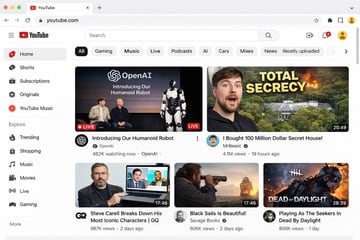
{ "type": "网页浏览器 UI 模型", "platform": "{argument name=\"platform name\" default=\"YouTube\"}", "browser_window": { "style": "macOS 浅色模式", "tab": "YouTube", "url_bar": "youtube.com" }, "layout": { "header": { "components": ["汉堡菜单", "平台 Logo", "搜索栏", "创建视频图标", "通知铃铛", "用户头像"] }, "sidebar": { "position": "左侧", "item_count": 11, "sections": [ { "name": "主要", "items": ["首页", "Shorts", "订阅", "原创内容", "YouTube Music"] }, { "name": "探索", "items": ["热门", "购物", "音乐", "电影", "直播", "游戏"] } ] }, "main_content": { "category_tags": { "count": 10, "labels": ["全部", "游戏", "音乐", "直播", "播客", "AI", "汽车", "合辑", "新闻", "最近上传"] }, "video_grid": { "card_count": 5, "cards": [ { "position": "左上", "size": "大", "thumbnail_description": "Sam Altman 和 Greg Brockman 坐在舞台上,旁边是一个站立的人形机器人,文字覆盖 'OpenAI Introducing Our Humanoid Robot',带有 LIVE 徽章", "video_title": "{argument name=\"featured live stream title\" default=\"Introducing Our Humanoid Robot\"}", "channel_name": "{argument name=\"featured live stream channel\" default=\"OpenAI\"}", "metadata": "48.2 万人正在观看" }, { "position": "右上", "size": "大", "thumbnail_description": "左侧是惊讶的男人脸,右侧是隐藏在森林中的巨大豪宅并伴有爆炸效果,粗体黄色文字覆盖 '{argument name=\"top right thumbnail text\" default=\"TOTAL SECRECY\"}'", "video_title": "{argument name=\"top right video title\" default=\"I Bought 100 Million Dollar Secret House!\"}", "channel_name": "MrBeast", "metadata": "410 万次观看,19 小时前,时长 20:49" }, { "position": "左下", "size": "小", "thumbnail_description": "Steve Carell 手持一台显示《办公室》场景的笔记本电脑", "video_title": "Steve Carell 深度解析他最标志性的角色 | GQ", "channel_name": "GQ", "metadata": "98.7 万次观看,2 天前,时长 17:46" }, { "position": "中下", "size": "小", "thumbnail_description": "男人在日落时分透过望远镜观察海面上的帆船", "video_title": "Black Sails Is Beautiful!", "channel_name": "Savage Books", "metadata": "60.6 万次观看,2 天前,时长 17:46" }, { "position": "右下", "size": "小", "thumbnail_description": "来自电子游戏的恐怖面具杀手角色,文字覆盖 'DEAD OF DAYLIGHT'", "video_title": "Playing As The Seekers In Dead By Daylight", "channel_name": "Unknown", "metadata": "80.6 万次观看,1 天前,时长 28:39" } ] } } } }
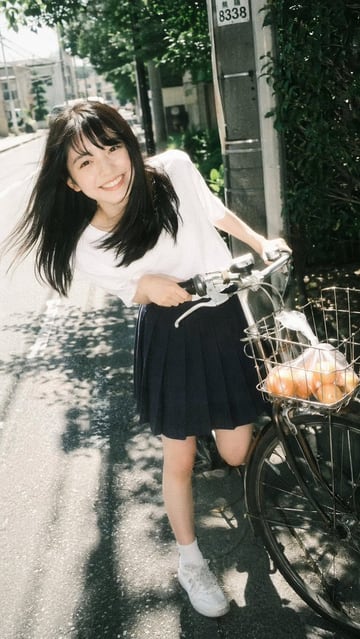
一张 {argument name="photography style" default="复古胶片摄影"} 风格的肖像,主角是一位 {argument name="subject description" default="年轻的亚洲女性"},正对着镜头灿烂微笑。她俏皮地向前倾身,双手扶着自行车把手,背景是阳光明媚的街区街道。她穿着一件 {argument name="top clothing" default="白色短袖 T 恤"}、一条 {argument name="bottom clothing" default="深蓝色百褶裙"},搭配白袜和白色运动鞋。她乌黑的长发在微风中轻轻飘动。自行车的前车筐里放着 {argument name="basket contents" default="一袋透明塑料袋装的橙子"}。背景是铺设好的道路、透过树叶洒下的斑驳阳光以及一根电线杆,捕捉到了怀旧而明亮的夏日氛围。
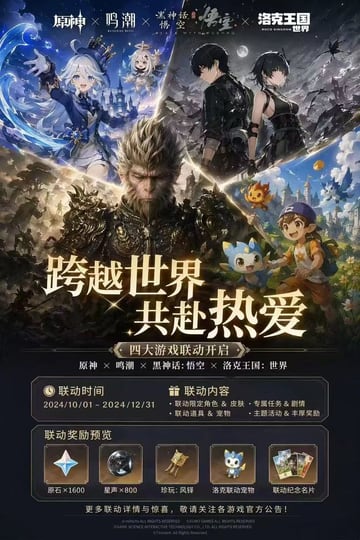
{ "type": "电子游戏联动宣传海报", "layout": { "header": { "description": "4 个不同的游戏 Logo,中间以“X”符号分隔", "logos": ["原神", "鸣潮", "黑神话:悟空", "洛克王国:世界"] }, "character_collage": { "description": "融合 4 种不同游戏艺术风格的动态 V 型拼贴", "sections": [ { "position": "左上", "style": "动画赛璐珞风格", "content": "戴着蓝色高礼帽的白发少女,小型漂浮白发同伴,水系魔法特效,奇幻城堡背景" }, { "position": "右上", "style": "动画赛璐珞风格", "content": "身着黑色战术服装的男女主角,满月下的暗夜星空,废墟景观" }, { "position": "中心", "style": "超写实 3D", "content": "身穿华丽暗色铠甲的孙悟空,表情坚毅,史诗级战场背景" }, { "position": "右下", "style": "明亮动画风格", "content": "戴着蓝色鸭舌帽、手持木杖的少年,陪伴着 3 只可爱的小型元素吉祥物怪物,充满活力的奇幻小镇" } ] }, "center_typography": { "main_headline": "{argument name=\"main headline\" default=\"跨越世界 共赴热爱\"}", "subtitle": "{argument name=\"subtitle\" default=\"四大游戏联动开启\"}", "game_list": "原神 × 鸣潮 × 黑神话:悟空 × 洛克王国:世界" }, "information_panels": { "event_details_panel": { "columns": 2, "left_column": { "title": "联动时间", "value": "{argument name=\"event dates\" default=\"2024/10/01 - 2024/12/31\"}" }, "right_column": { "title": "联动内容", "bullet_points_count": 4, "details": ["联动限定角色 & 皮肤", "专属任务 & 剧情", "联动道具 & 宠物", "主题活动 & 丰厚奖励"] } }, "rewards_preview_panel": { "title": "联动奖励预览", "count": 5, "items": [ { "icon": "four-pointed star gem", "label": "原石×1600" }, { "icon": "dark metallic sphere", "label": "星声×800" }, { "icon": "golden bell relic", "label": "珍玩:风铎" }, { "icon": "blue mascot pet", "label": "洛克联动宠物" }, { "icon": "set of 3 cards", "label": "联动纪念名片" } ] } }, "footer": "版权声明及官方公告免责声明(小字)" } }
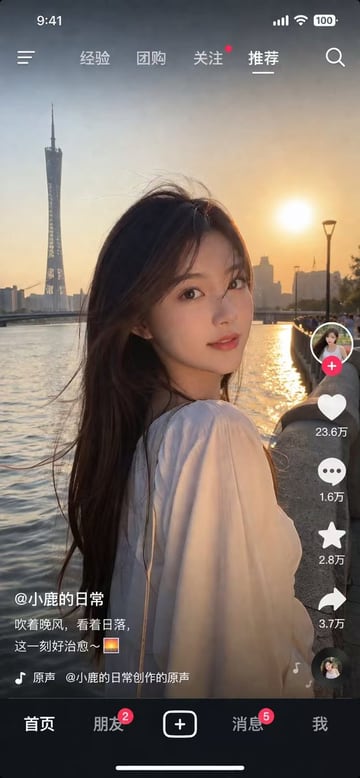
{ "type": "社交媒体视频应用界面截图", "main_visual": { "subject": "年轻亚洲女性,长黑发在风中飘动,身穿白色上衣,回眸看向镜头", "setting": "{argument name=\"background location\" default=\"广州塔江边日落时分\"}", "lighting": "黄金时刻,温暖的夕阳余晖" }, "ui_layout": { "top_status_bar": { "elements": 4, "labels": ["9:41", "信号", "Wi-Fi", "100% 电量"] }, "top_navigation": { "elements": 6, "labels": ["菜单图标", "经验", "团购", "关注", "{argument name=\"active tab\" default=\"推荐\"}", "搜索图标"] }, "right_interaction_bar": { "elements": 6, "labels": ["带红色加号的头像", "带 {argument name=\"like count\" default=\"23.6万\"} 的点赞图标", "带 1.6万 的评论图标", "带 2.8万 的收藏图标", "带 3.7万 的分享图标", "旋转的音乐唱片"] }, "bottom_left_text": { "elements": 3, "labels": ["{argument name=\"username\" default=\"@小鹿的日常\"}", "{argument name=\"caption\" default=\"吹着晚风,看着日落,这一刻好治愈~ 🌅\"}", "带音乐符号的图标 原声 @小鹿的日常创作的原声"] }, "bottom_navigation": { "elements": 5, "labels": ["首页", "朋友(带红色角标 2)", "方形加号按钮", "消息(带红色角标 5)", "我"] } } }
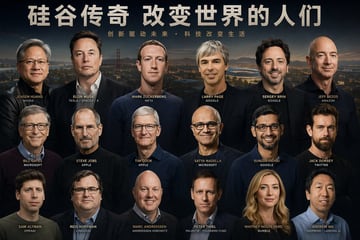
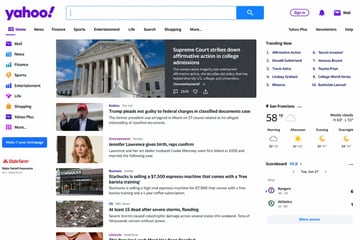
帮我生成一张{argument name="主题" default="硅谷大佬"}大合照的一张海报,你要仔细专注于人物的面部 他们的面部要有足够的辨识度 不要有重复人物
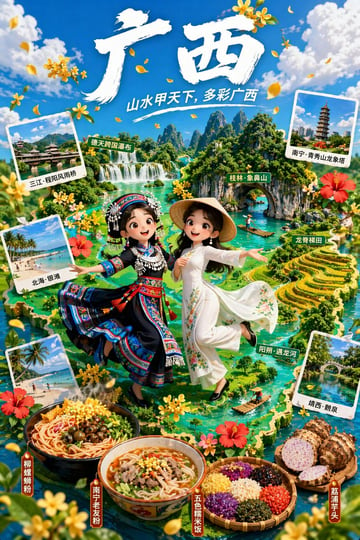
{ "type": "3D 动画风格旅游宣传海报", "typography": { "main_title": "{argument name=\"main title\" default=\"广西\"}", "subtitle": "{argument name=\"subtitle\" default=\"山水甲天下,多彩广西\"}" }, "characters": [ { "position": "左侧中心", "description": "3D 动画女孩,表情愉悦", "outfit": "{argument name=\"left character outfit\" default=\"带有银饰头饰的传统少数民族服饰\"}" }, { "position": "右侧中心", "description": "3D 动画女孩,表情愉悦", "outfit": "{argument name=\"right character outfit\" default=\"带有斗笠的白色传统服饰\"}" } ], "background": { "theme": "{argument name=\"region theme\" default=\"广西喀斯特地貌与河流\"}", "style": "郁郁葱葱的 3D 等距地图", "map_labels": [ "德天跨国瀑布", "桂林·象鼻山", "龙脊梯田", "阳朔·遇龙河" ] }, "layout": { "polaroid_photos": { "count": 4, "items": [ { "position": "左上", "label": "三江·程阳风雨桥", "scene": "传统风雨桥" }, { "position": "左中", "label": "北海·银滩", "scene": "热带海滩" }, { "position": "左下", "label": "北海·银滩", "scene": "热带海滩" }, { "position": "右下", "label": "靖西·鹅泉", "scene": "水上石拱桥" } ] }, "food_showcase": { "position": "底部前景", "count": 4, "items": [ { "label": "柳州螺蛳粉", "description": "一碗香辣螺蛳粉" }, { "label": "南宁老友粉", "description": "一碗肉片汤底米粉" }, { "label": "五色糯米饭", "description": "装在竹篮里的五色糯米饭" }, { "label": "荔浦芋头", "description": "完整及切开的芋头" } ] }, "decorations": "散落的黄色桂花和红色木槿花" } }
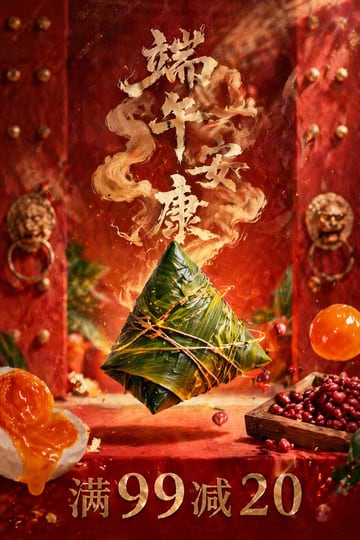
一张细节丰富、照片级的商业海报。画面中央,1 个巨大的 {argument name="central food item" default="粽子(用油亮的绿竹叶包裹并用麻绳紧紧捆扎)"} 在半空中魔幻地悬浮。背景是传统的中国红色木质双开门,门上排列着金色门钉,还有 2 个装饰华丽的金色狮头门环,背景略微虚焦。中央周围悬浮着各种食材:左下角是 1 个切开的咸鸭蛋,露出浓郁流油的橙色蛋黄;右下角是 1 个装满深红色红豆的小方木托盘,旁边悬浮着 1 个完整的半透明橙色咸蛋黄。几颗小红豆和发光的余烬悬浮在空中。在中央主体上方,是由魔幻、缭绕的金色烟雾形成的巨大、风格化的金色书法文字“{argument name="top greeting text" default="端午安康"}”。最底部是醒目的金属质感金色衬线文字“{argument name="bottom promotional text" default="满 99 减 20"}”。电影级布光,浓郁的红金配色,节日且魔幻的氛围,高端食品摄影风格。
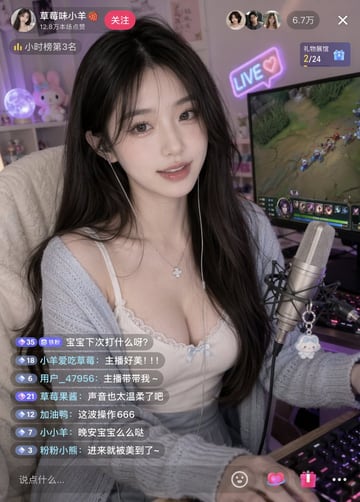
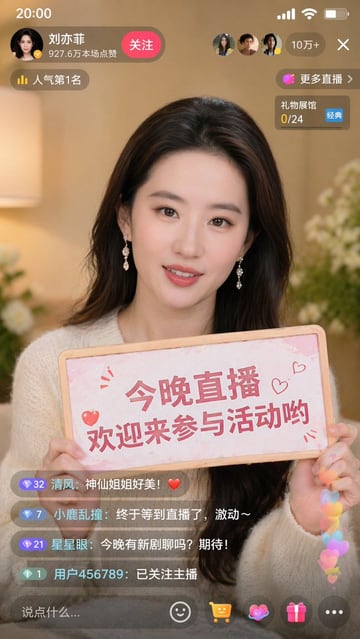
{ "type": "移动端直播界面模型", "subject": { "description": "年轻迷人的亚洲女性,留着黑色长卷发,面带温柔微笑,佩戴有线耳机和银色四叶草项链", "outfit": "{argument name=\"outfit\" default=\"白色蕾丝边吊带背心和浅蓝色开衫\"}", "action": "直视镜头,坐在书桌前,桌上放着键盘" }, "environment": { "setting": "温馨的游戏房", "equipment": [ "悬臂支架上的专业电容麦克风,挂着一个小巧的白色毛绒吉祥物挂件", "电脑显示器,屏幕上显示着 {argument name=\"game on monitor\" default=\"类似《英雄联盟》的 MOBA 游戏\"}", "RGB 机械键盘" ], "background_decor": [ "霓虹灯牌,写着 '{argument name=\"neon sign text\" default=\"LIVE ♡\"}'", "放着发光球形月球灯的架子", "粉色毛绒兔子玩具" ] }, "ui_overlay": { "top_left": { "profile": { "avatar": "主播缩略头像", "name": "{argument name=\"streamer name\" default=\"草莓味小羊 🍓\"}", "subtext": "12.8万本场点赞", "button": "红色的“关注”按钮" }, "tag": "黄色标签,写着“小时榜第 3 名”" }, "top_right": { "viewers": { "avatars_count": 3, "total_count": "{argument name=\"viewer count\" default=\"6.7万\"}", "close_button": "X 图标" }, "gift_gallery": "礼物盒图标,文字显示“礼物展馆 2/24”" }, "bottom_left_chat": { "message_count": 7, "messages": [ "等级 35,铁粉图标,“宝宝下次打什么呀?”", "等级 18,“小羊爱吃草莓: 主播好美!!!”", "等级 6,“用户_47956: 主播带带我~”", "等级 21,“草莓果酱: 声音也太温柔了吧”", "等级 12,“加油鸭: 这波操作 666”", "等级 7,“小小羊: 晚安宝宝么么哒”", "等级 3,“粉粉小熊: 进来就被美到了~”" ] }, "bottom_bar": { "input_placeholder": "说点什么...", "icons": ["笑脸", "爱心", "粉色礼物盒", "三个点"] } } }
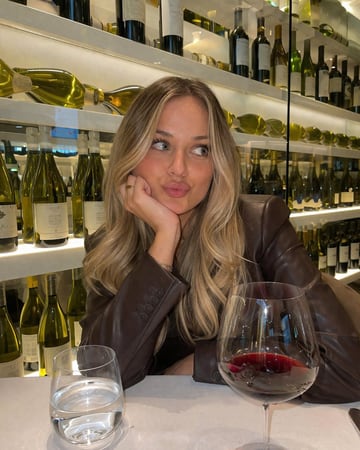
一张写实风格的休闲手机摄影照片,展示了一位留着 {argument name="hair style and color" default="金色挑染长发"} 的年轻女性,正坐在 {argument name="setting" default="葡萄酒吧"} 的桌前。她身穿一件 {argument name="outfit" default="深棕色皮质西装外套"}。她用右手托着下巴,手上戴着一枚简约的金戒指,并做出一个 {argument name="expression" default="俏皮地嘟起嘴看向一侧"} 的表情。前景的白色桌布上放着一个水杯和一杯 {argument name="drink" default="盛有红酒的大号高脚杯"}。背景是灯光璀璨的现代货架,上面摆满了各种葡萄酒。室内光线温暖宜人。
FAQ
至少包含用途、主体、构图、光线、风格和输出比例。如果图片要承载标题,还要写明文字安全区。
可以。复制提示词或打开 Image2Studio 后,替换你的产品、人物、场景和画幅,再提交生成。
复制一个示例,带入工作台,继续修改产品、场景、风格和画幅。