
Image2Studio
提示词

gpt-image-2

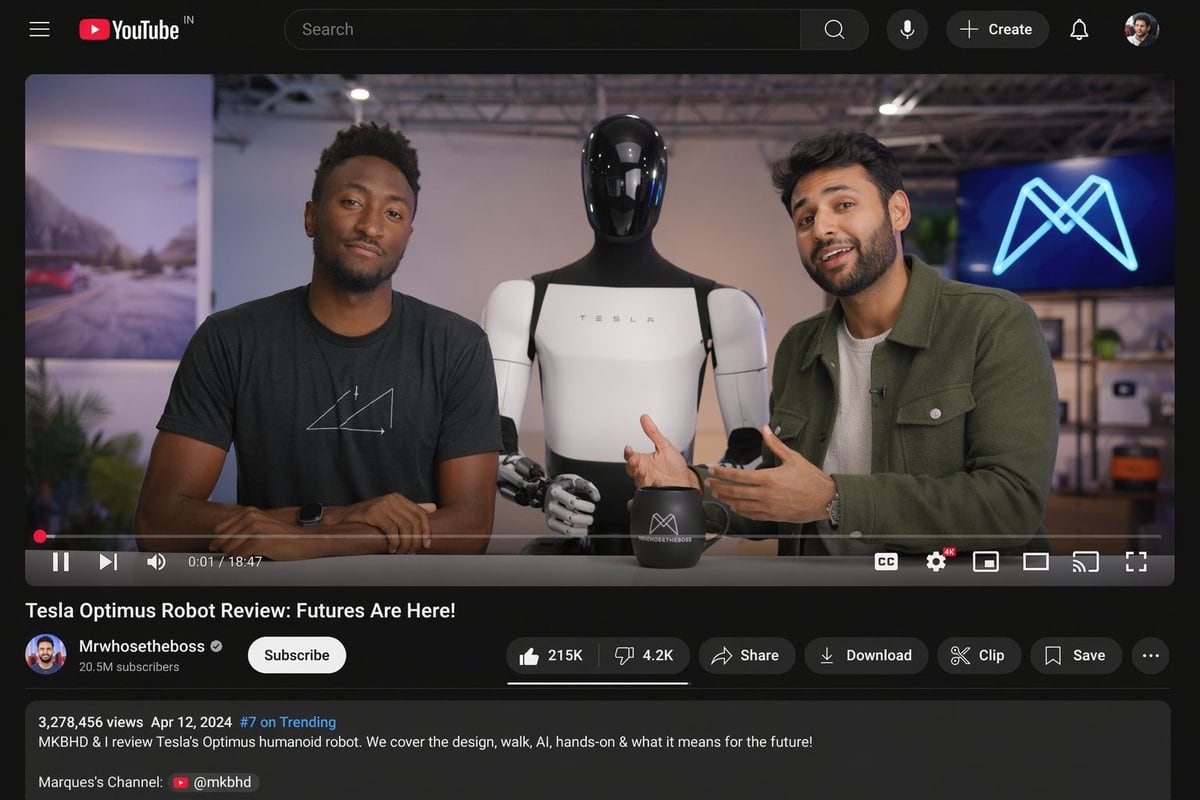
YouTube 视频界面模型

生成逼真的桌面版 YouTube 界面,包含科技评测视频,支持自定义主持人、机器人主体及视频元数据。

Copy this GPT Image 2 prompt for social media post and youtube thumbnails with Photorealistic, Cyberpunk styling. Use it in Image2Studio to generate,.
提示词

{ "type": "desktop video platform UI mockup", "theme": "dark mode", "header": { "logo": "YouTube IN", "search_bar": "centered, with magnifying glass icon", "right_icons": { "count": 4, "items": ["microphone", "+ Create button", "notifications bell", "user profile picture"] } }, "video_player": { "scene": "Studio setting with two tech reviewers at a desk.", "subjects": [ "{argument name=\"left person\" default=\"Marques Brownlee (MKBHD)\"} in black t-shirt", "{argument name=\"right person\" default=\"Arun Maini (Mrwhosetheboss)\"} in green overshirt", "{argument name=\"robot model\" default=\"Tesla Optimus humanoid robot\"} standing between them" ], "props": ["black mug with logo", "background screen with glowing blue neon M logo"], "controls_bar": { "progress_bar": "red, near the beginning", "timestamp": "0:01 / 18:47", "left_icons": { "count": 3, "items": ["play/pause", "next track", "volume"] }, "right_icons": { "count": 6, "items": ["CC", "settings with 4K badge", "miniplayer", "theater mode", "cast", "fullscreen"] } } }, "video_details": { "title": "{argument name=\"video title\" default=\"Tesla Optimus Robot Review: Futures Are Here!\"}", "channel_info": { "name": "{argument name=\"channel name\" default=\"Mrwhosetheboss\"}", "badges": ["verified checkmark"], "subscribers": "20.5M subscribers", "button": "white Subscribe button" }, "action_buttons": { "count": 6, "items": ["Like (215K) / Dislike (4.2K) pill", "Share", "Download", "Clip", "Save", "More (...)"] } }, "description_box": { "metadata": "3,278,456 views Apr 12, 2024 #7 on Trending", "text": "MKBHD & I review Tesla's Optimus humanoid robot. We cover the design, walk, AI, hands-on & what it means for the future!", "links": ["Marques's Channel: @mkbhd"] } }

提示词结构
  • 模型gpt-image-2
  • 用途social-media-post
  • 风格photorealistic, cyberpunk
  • 画幅Flexible
适用场景
  • 用途social-media-post
  • 风格photorealistic, cyberpunk
  • 推荐规格1:1, 4:5, 16:9, or 9:16
  • 模型GPT Image 2
如何修改

把这个 YouTube 视频界面模型 提示词当作起点。替换主体、产品细节、场景、光线、品牌颜色和输出画幅,同时保留 social-media-post 的用途和 photorealistic, cyberpunk 的视觉方向。

可替换变量
  • 主体替换成你的产品、人物、场景或界面对象。
  • 用途保留或改写为 social media post、广告图、封面、海报或电商主图。
  • 画幅按投放位置选择 1:1、4:5、16:9 或 9:16。
  • 品牌线索补充颜色、材质、道具、文案安全区和最终使用平台。
推荐规格

先按目标平台选择画幅,再根据用途选择 1K、2K 或 4K。产品图和海报通常适合更高清晰度。

生成前检查
  • 检查主体、光线、构图和画幅都足够明确。
  • 检查如果图片要承载标题或广告文案,已经预留文字安全区。
  • 检查生成前确认分辨率、额度成本和最终使用位置。
为什么有效

YouTube 视频界面模型 的重点是先固定图片用途,再用主体、构图、光线、风格和画幅控制生成结果。它适合 social media post,并保留 photorealistic, cyberpunk 的视觉方向。

常见问题
  • 能直接用吗?可以。先替换主体、品牌线索和画幅,再进入 Image2Studio 生成。
  • 适合什么比例?按平台选择 1:1、4:5、16:9 或 9:16。




