
Image2Studio
Examples

gpt-image-2

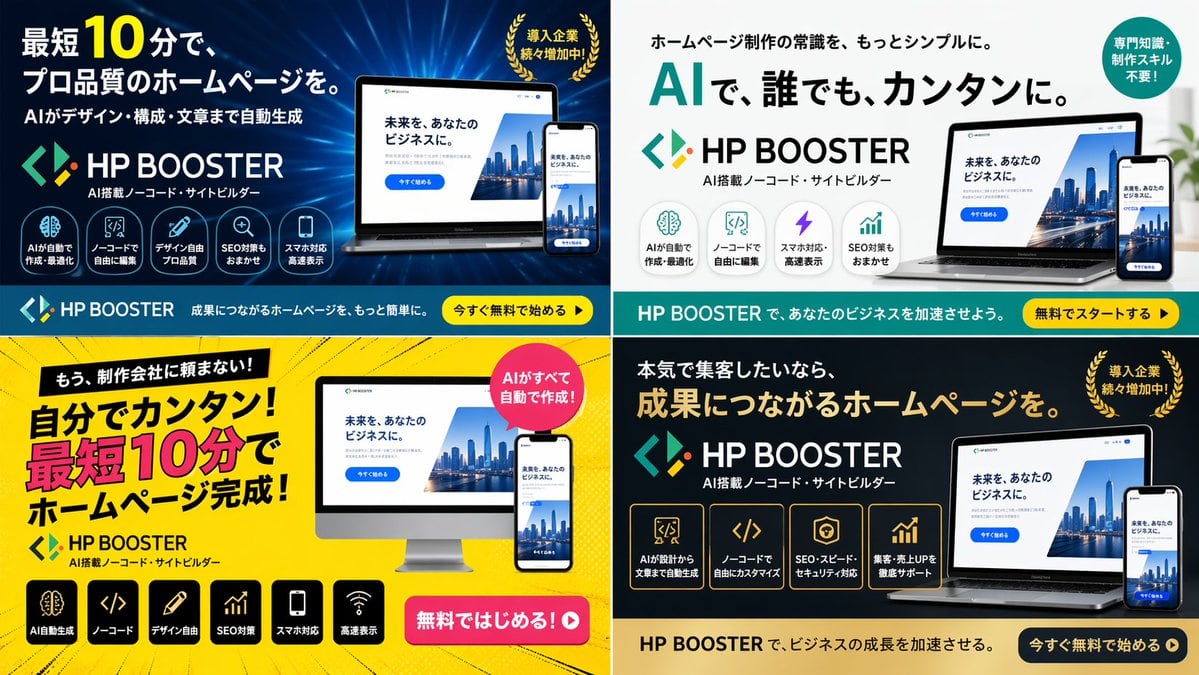
4-Panel SaaS Ad Banner Variations

Generates a 2x2 grid of digital advertising banners for a software product, featuring different color themes, layouts, and marketing copy variations.

Generates a 2x2 grid of digital advertising banners for a software product, featuring different color themes, layouts, and marketing copy variations.
Prompt

{ "type": "4-panel ad banner variation grid", "product": { "name": "{argument name=\"product name\" default=\"HP BOOSTER\"}", "subtitle": "AI搭載ノーコード・サイトビルダー", "logo": "blue and green angle brackets with a diamond" }, "common_elements": { "device_mockups": "laptop and smartphone (desktop monitor in bottom-left panel) displaying a website with a city skyline, text '未来を、あなたのビジネスに。', and a blue '今すぐ始める' button" }, "layout": { "grid": "2x2", "panels": [ { "position": "top-left", "theme": "dark blue gradient with tech lines", "headline": "{argument name=\"main headline 1\" default=\"最短10分で、プロ品質のホームページを。\"}", "sub_headline": "AIがデザイン・構成・文章まで自動生成", "badge": "gold laurel wreath with text '導入企業続々増加中!'", "icon_count": 5, "icon_labels": ["AIが自動で作成・最適化", "ノーコードで自由に編集", "デザイン自由プロ品質", "SEO対策もおまかせ", "スマホ対応高速表示"], "bottom_bar": "teal background, yellow button '今すぐ無料で始める ▶'" }, { "position": "top-right", "theme": "white and light gray", "headline": "{argument name=\"main headline 2\" default=\"AIで、誰でも、カンタンに。\"}", "pre_headline": "ホームページ制作の常識を、もっとシンプルに。", "badge": "teal circle with text '専門知識・制作スキル不要!'", "icon_count": 4, "icon_labels": ["AIが自動で作成・最適化", "ノーコードで自由に編集", "スマホ対応・高速表示", "SEO対策もおまかせ"], "bottom_bar": "teal background, yellow button '無料でスタートする ▶'" }, { "position": "bottom-left", "theme": "bright yellow with comic-book action lines", "headline": "{argument name=\"main headline 3\" default=\"自分でカンタン!最短10分でホームページ完成!\"}", "pre_headline": "もう、制作会社に頼まない!", "badge": "pink circle with text 'AIがすべて自動で作成!'", "icon_count": 6, "icon_labels": ["AI自動生成", "ノーコード", "デザイン自由", "SEO対策", "スマホ対応", "高速表示"], "call_to_action": "pink pill button '無料ではじめる!▶'" }, { "position": "bottom-right", "theme": "dark gray and black", "headline": "{argument name=\"main headline 4\" default=\"成果につながるホームページを。\"}", "pre_headline": "本気で集客したいなら、", "badge": "gold laurel wreath with text '導入企業続々増加中!'", "icon_count": 4, "icon_labels": ["AIが設計から文章まで自動生成", "ノーコードで自由にカスタマイズ", "SEO・スピード・セキュリティ対応", "集客・売上UPを徹底サポート"], "bottom_bar": "gold background, dark blue button '今すぐ無料で始める ▶'" } ] } }

Prompt structure
  • Modelgpt-image-2
  • Use casebrand-identity
  • Styleluxury, editorial
  • Aspect ratioFlexible
Best used for
  • Use casebrand-identity
  • Styleluxury, editorial
  • Recommended specs1:1, 4:5, 16:9, or 9:16
  • ModelGPT Image 2
How to customize

Use this 4-Panel SaaS Ad Banner Variations prompt as a base. Replace the subject, product details, environment, lighting, brand colors, and output ratio while keeping the brand-identity intent and luxury, editorial direction stable.

Editable variables
  • SubjectReplace the product, person, scene, interface, or object being generated.
  • Use caseKeep or rewrite the destination as brand identity, ad creative, cover image, poster, or ecommerce hero.
  • FrameChoose 1:1, 4:5, 16:9, or 9:16 based on the final placement.
  • Brand cuesAdd colors, materials, props, text-safe space, and the platform where the image will be used.
Recommended specs

Choose the frame for the destination first, then use 1K, 2K, or 4K based on output quality needs. Product images and posters usually benefit from higher resolution.

Pre-generation checklist
  • CheckSubject, lighting, composition, and frame are specific enough to review.
  • CheckText-safe space is included when the image will carry a headline or ad copy.
  • CheckResolution, credit cost, and final destination are checked before generation.
Why this prompt works

4-Panel SaaS Ad Banner Variations works because it starts from the image job, then controls subject, composition, lighting, style, and frame. It is best for brand identity while keeping the luxury, editorial direction stable.

Common questions
  • Can I use it directly?Yes. Replace the subject, brand cues, and frame, then generate in Image2Studio.
  • Which ratio should I use?Choose 1:1, 4:5, 16:9, or 9:16 based on the destination.




