
Image2Studio
Examples

gpt-image-2

Commercial Food Photography Poster

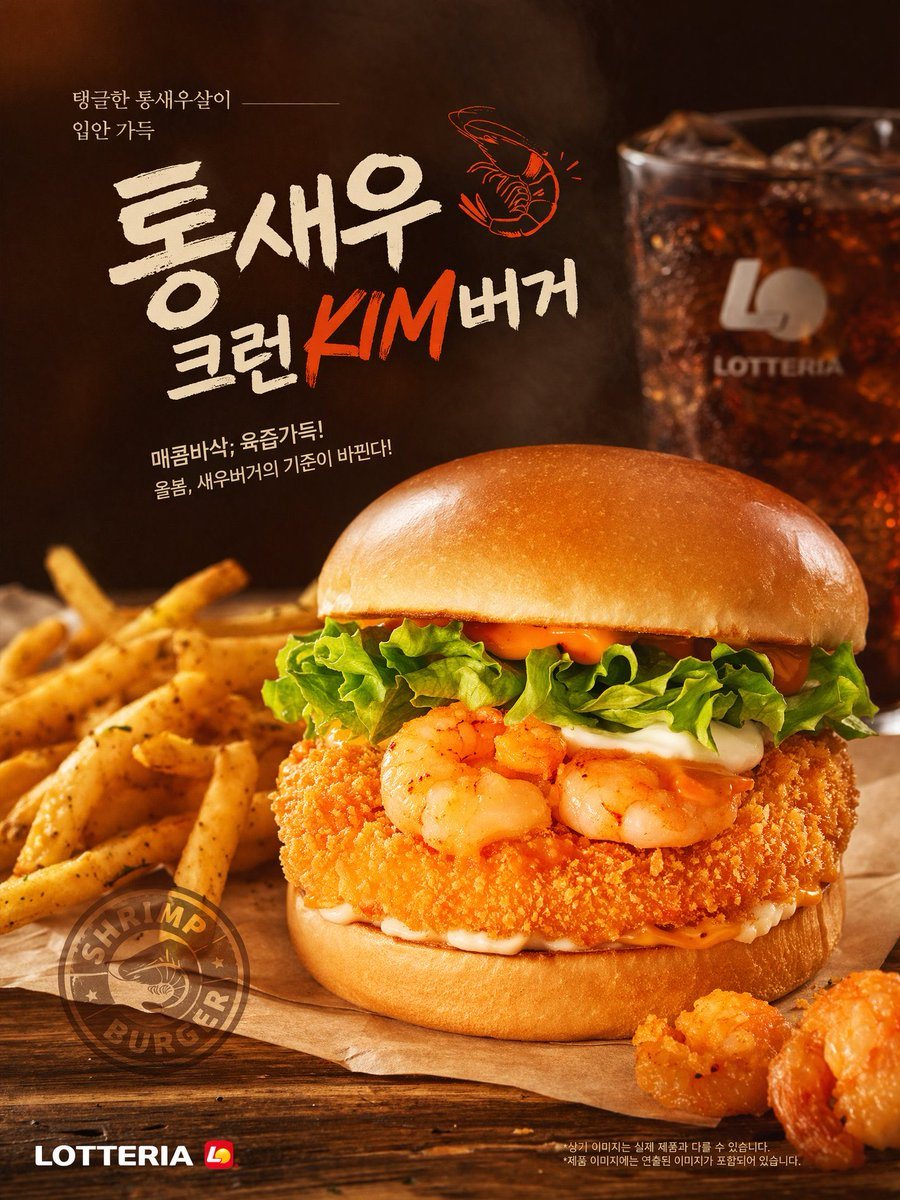
A commercial food photography poster for a shrimp burger. The central burger features a glossy brioche bun, lettuce, white sauce, spicy orange mayo, two grilled shrimp, and a thick crispy...

A commercial food photography poster for a shrimp burger. The central burger features a glossy brioche bun, lettuce, white sauce, spicy orange mayo, two grilled shrimp, and a thick crispy...
Prompt

A commercial food photography poster for a {argument name="burger type" default="shrimp burger"}. The central burger features a glossy brioche bun, lettuce, white sauce, spicy orange mayo, two grilled shrimp, and a thick crispy breaded patty. It rests on parchment paper on a wooden table, flanked by seasoned french fries on the left and two fried shrimp pieces on the bottom right. A blurred glass of iced cola and a faint {argument name="brand name" default="LOTTERIA"} logo appear in the dark background. The parchment bears a circular "SHRIMP BURGER" stamp. Top left Korean text reads {argument name="top left text" default="탱글한 통새우살이 입안 가득"}. The large central headline is {argument name="main headline" default="통새우 크런KIM버거"} with a small orange shrimp illustration. Below it is the subtitle {argument name="subtitle text" default="매콤바삭, 육즙가득! 올봄, 새우버거의 기준이 바뀐다!"}. The bottom left corner shows the {argument name="brand name" default="LOTTERIA"} logo. Warm, professional studio lighting.

Prompt structure
  • Modelgpt-image-2
  • Use casefood-menu-visual
  • Stylephotorealistic, watercolor
  • Aspect ratioFlexible
Best used for
  • Use casefood-menu-visual
  • Stylephotorealistic, watercolor
  • Recommended specs1:1, 4:5, 16:9, or 9:16
  • ModelGPT Image 2
How to customize

Use this Commercial Food Photography Poster prompt as a base. Replace the subject, product details, environment, lighting, brand colors, and output ratio while keeping the food-menu-visual intent and photorealistic, watercolor direction stable.

Editable variables
  • SubjectReplace the product, person, scene, interface, or object being generated.
  • Use caseKeep or rewrite the destination as food menu visual, ad creative, cover image, poster, or ecommerce hero.
  • FrameChoose 1:1, 4:5, 16:9, or 9:16 based on the final placement.
  • Brand cuesAdd colors, materials, props, text-safe space, and the platform where the image will be used.
Recommended specs

Choose the frame for the destination first, then use 1K, 2K, or 4K based on output quality needs. Product images and posters usually benefit from higher resolution.

Pre-generation checklist
  • CheckSubject, lighting, composition, and frame are specific enough to review.
  • CheckText-safe space is included when the image will carry a headline or ad copy.
  • CheckResolution, credit cost, and final destination are checked before generation.
Why this prompt works

Commercial Food Photography Poster works because it starts from the image job, then controls subject, composition, lighting, style, and frame. It is best for food menu visual while keeping the photorealistic, watercolor direction stable.

Common questions
  • Can I use it directly?Yes. Replace the subject, brand cues, and frame, then generate in Image2Studio.
  • Which ratio should I use?Choose 1:1, 4:5, 16:9, or 9:16 based on the destination.