
Image2Studio
Examples

gpt-image-2

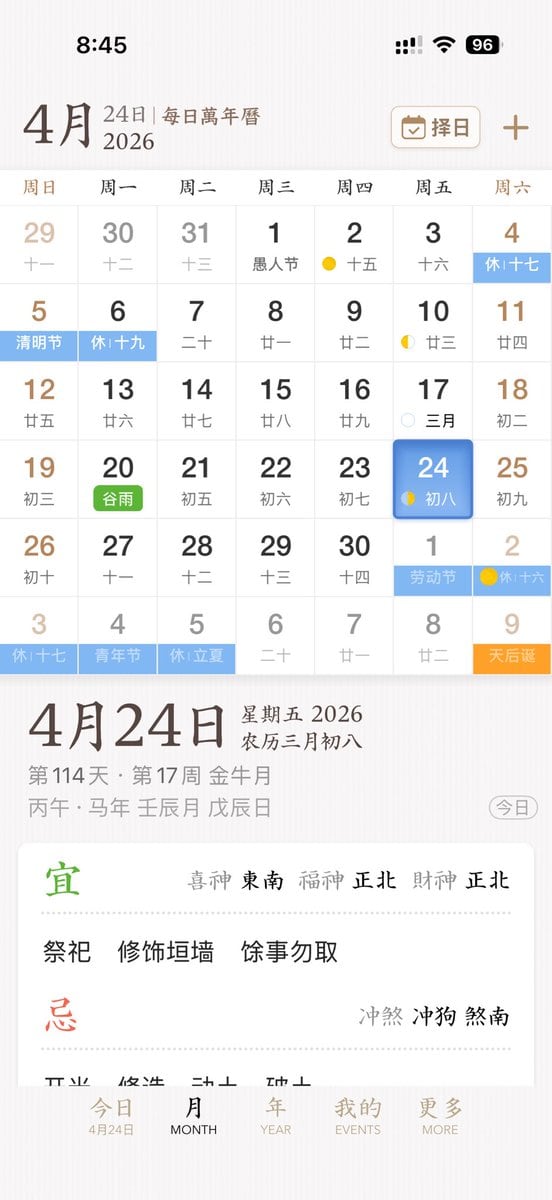
Clean Elegant IPhone App UI Mockup

A clean, elegant iPhone app UI mockup for a Chinese perpetual calendar and almanac app, shown as a full-screen mobile screenshot on a soft warm white background with subtle paper-like tex...

A clean, elegant iPhone app UI mockup for a Chinese perpetual calendar and almanac app, shown as a full-screen mobile screenshot on a soft warm white background with subtle paper-like tex...
Prompt

A clean, elegant iPhone app UI mockup for a Chinese perpetual calendar and almanac app, shown as a full-screen mobile screenshot on a soft warm white background with subtle paper-like texture and refined East Asian editorial aesthetics. The interface uses a minimalist serif-and-sans mix, muted brown, gray, black, pale blue, green, and gold accents, with spacious layout and delicate dividers. Show the iOS status bar at the top with the time 8:45, cellular signal, Wi‑Fi icon, and a battery indicator reading 96. Below it, a header for {argument name="month" default="4月"} with secondary text “24日 | 每日万年历” and, on the right, a rounded rectangular date-picker button labeled “择日” with a calendar icon plus a separate plus symbol. The main section is a monthly calendar grid for {argument name="year" default="2026"}, with 7 weekday columns labeled Sunday through Saturday in Chinese: 周日, 周一, 周二, 周三, 周四, 周五, 周六. Render a 6-row month view with exactly 42 date cells including adjacent-month dates. The visible dates should be: first row 29, 30, 31, 1, 2, 3, 4; second row 5, 6, 7, 8, 9, 10, 11; third row 12, 13, 14, 15, 16, 17, 18; fourth row 19, 20, 21, 22, 23, 24, 25; fifth row 26, 27, 28, 29, 30, 1, 2; sixth row 3, 4, 5, 6, 7, 8, 9. Each day cell includes a large Gregorian date and a smaller Chinese lunar date or note underneath. Include colored holiday and solar-term tags across specific cells, with exactly 10 highlighted labels visible: “休十七” on the 4th, “清明节” on the 5th, “休十九” on the 6th, “谷雨” on the 20th in green, “劳动节” on the next-month 1st, “休十六” on the next-month 2nd, “休十七” on the last-row 3rd, “青年节” on the last-row 4th, “休立夏” on the last-row 5th, and “天后诞” on the last-row 9th in orange. Add small lunar phase markers on a few days, including yellow crescent or dot icons around the 2nd, 10th, 17th, 24th, and next-month 2nd. Make the {argument name="selected date" default="24"} cell in the Friday column stand out with a rounded blue gradient tile and soft shadow, with smaller text “初八” inside. Beneath the calendar, show a detailed daily information panel separated by whitespace. The left side features a very large date title “4月24日”; the right side stacks “星期五 2026” and “农历三月初八”. Below that, include smaller gray metadata lines such as “第114天 · 第17周 金尊月” and a traditional sexagenary/date string like “丙午 · 马年 壬辰月 戊辰日”. At the far right of this metadata area, place a rounded outline pill button labeled “今日”. Underneath, present a large white rounded card with almanac guidance. The card contains two major sections with exactly 2 headings: a green “宜” section and a red “忌” section, separated by fine dotted dividers. In the “宜” section, include the directional fortune line “喜神 东南 福神 正北 财神 正北” and three activity items: “祭祀”, “修饰垣墙”, “余事勿取”. In the “忌” section, include the conflict line “冲煞 冲狗 煞南”. At the bottom, show a 5-item iOS-style tab bar with labels exactly “今日”, “MONTH”, “YEAR”, “EVENTS”, “MORE”; the first tab is active and includes the small sublabel “4月24日”. Overall style: premium app design concept, calm scholarly Chinese calendar aesthetic, high-fidelity mobile product shot, realistic yet idealized interface, perfectly aligned typography, subtle shadows, soft contrast, and polished startup-quality UI.

Prompt structure
  • Modelgpt-image-2
  • Use caseapp-ui-mockup
  • Styleminimal, luxury, editorial, photorealistic
  • Aspect ratioFlexible
Best used for
  • Use caseapp-ui-mockup
  • Styleminimal, luxury, editorial, photorealistic
  • Recommended specs1:1, 4:5, 16:9, or 9:16
  • ModelGPT Image 2
How to customize

Use this Clean Elegant IPhone App UI Mockup prompt as a base. Replace the subject, product details, environment, lighting, brand colors, and output ratio while keeping the app-ui-mockup intent and minimal, luxury, editorial, photorealistic direction stable.

Editable variables
  • SubjectReplace the product, person, scene, interface, or object being generated.
  • Use caseKeep or rewrite the destination as app ui mockup, ad creative, cover image, poster, or ecommerce hero.
  • FrameChoose 1:1, 4:5, 16:9, or 9:16 based on the final placement.
  • Brand cuesAdd colors, materials, props, text-safe space, and the platform where the image will be used.
Recommended specs

Choose the frame for the destination first, then use 1K, 2K, or 4K based on output quality needs. Product images and posters usually benefit from higher resolution.

Pre-generation checklist
  • CheckSubject, lighting, composition, and frame are specific enough to review.
  • CheckText-safe space is included when the image will carry a headline or ad copy.
  • CheckResolution, credit cost, and final destination are checked before generation.
Why this prompt works

Clean Elegant IPhone App UI Mockup works because it starts from the image job, then controls subject, composition, lighting, style, and frame. It is best for app ui mockup while keeping the minimal, luxury, editorial, photorealistic direction stable.

Common questions
  • Can I use it directly?Yes. Replace the subject, brand cues, and frame, then generate in Image2Studio.
  • Which ratio should I use?Choose 1:1, 4:5, 16:9, or 9:16 based on the destination.




