Image2Studio
Examples

gpt-image-2

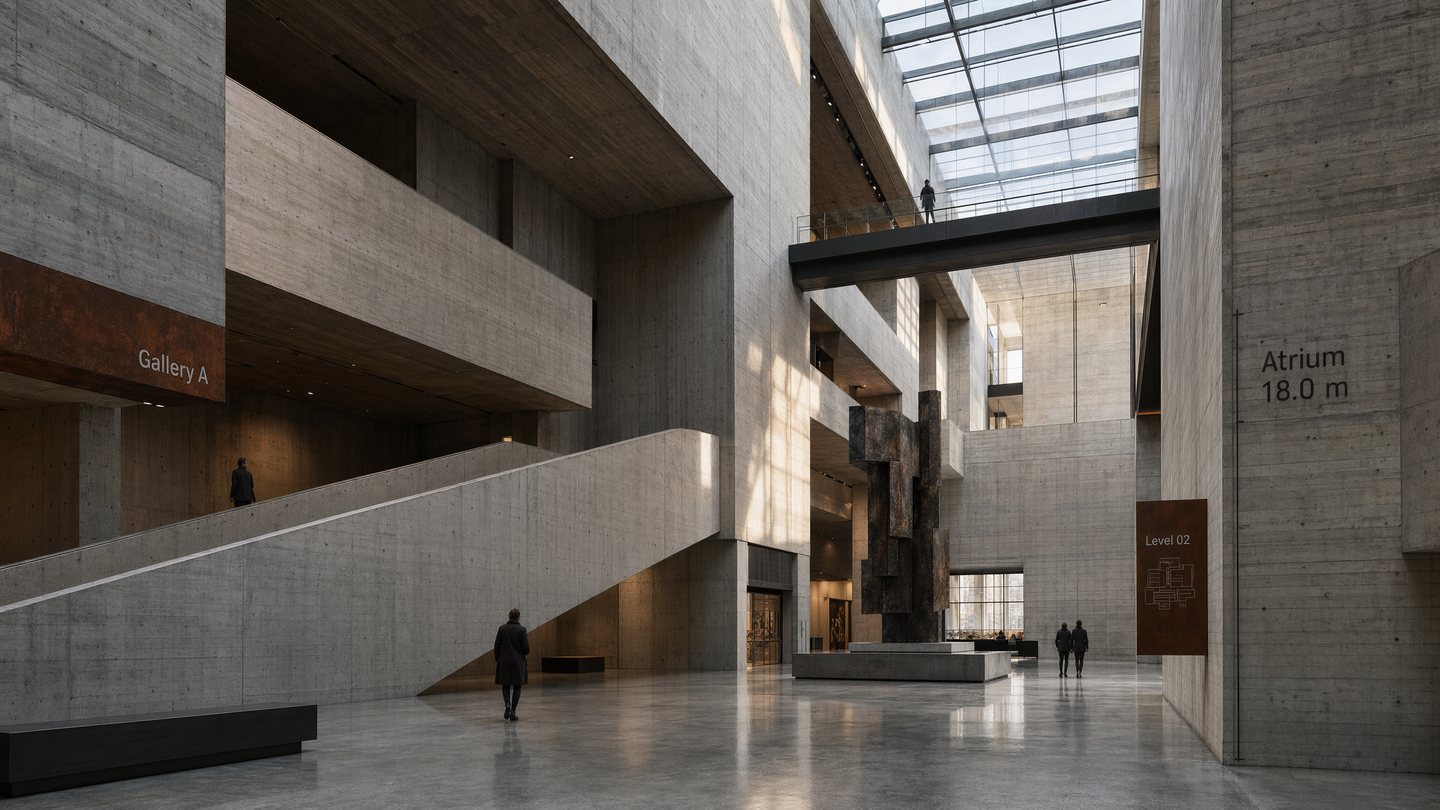
Brutalist Concrete Museum Atrium

Social Media Post prompt for social ads, ready to edit and generate in Image2Studio.

Social Media Post prompt for social ads, ready to edit and generate in Image2Studio.
Prompt

Create a photorealistic interior render of a monumental brutalist museum atrium with exposed board-formed concrete, dramatic skylights, long ramps, and massive geometric voids. Viewpoint is slightly low and wide, emphasizing vertical scale and shadow. Use a palette of cool gray concrete, black steel, muted sandstone, pale daylight, and a few rust-colored wayfinding accents. Include sparse signage with crisp in-image text: "Gallery A", "Level 02", and "Atrium 18.0 m". Add a few small human figures for scale, but keep the architecture dominant. The space should include suspended walkways, a central sculpture plinth, and reflected light from polished concrete floors. Composition must feel cinematic yet architecturally precise, with realistic material textures, accurate lighting, controlled contrast, and gallery-quality rendering. Prioritize believable spatial depth, clean geometry, subtle atmospheric perspective, and sharp signage.

Prompt structure
  • Modelgpt-image-2
  • Use casesocial-media-post
  • Stylecinematic, photorealistic, 3d-render, minimal
  • Aspect ratiowide
Best used for
  • Use casesocial-media-post
  • Stylecinematic, photorealistic, 3d-render, minimal
  • Recommended specswide
  • ModelGPT Image 2
How to customize

Use this Brutalist Concrete Museum Atrium prompt as a base. Replace the subject, product details, environment, lighting, brand colors, and output ratio while keeping the social-media-post intent and cinematic, photorealistic, 3d-render, minimal direction stable.

Editable variables
  • SubjectReplace the product, person, scene, interface, or object being generated.
  • Use caseKeep or rewrite the destination as social media post, ad creative, cover image, poster, or ecommerce hero.
  • Framewide
  • Brand cuesAdd colors, materials, props, text-safe space, and the platform where the image will be used.
Recommended specs

Choose the frame for the destination first, then use 1K, 2K, or 4K based on output quality needs. Product images and posters usually benefit from higher resolution.

Pre-generation checklist
  • CheckSubject, lighting, composition, and frame are specific enough to review.
  • CheckText-safe space is included when the image will carry a headline or ad copy.
  • CheckResolution, credit cost, and final destination are checked before generation.
Why this prompt works

Brutalist Concrete Museum Atrium works because it starts from the image job, then controls subject, composition, lighting, style, and frame. It is best for social media post while keeping the cinematic, photorealistic, 3d-render, minimal direction stable.

Common questions
  • Can I use it directly?Yes. Replace the subject, brand cues, and frame, then generate in Image2Studio.
  • Which ratio should I use?wide