Reusable template
Prompt template
Create a social media post prompts image for [final destination]. Include [subject], [composition], [lighting], [materials], [brand cues], and [output ratio].
Prompt use case
Prompt examples for social media post workflows with editable variables, copy-ready templates, and Image2Studio handoff.
Reusable template
Create a social media post prompts image for [final destination]. Include [subject], [composition], [lighting], [materials], [brand cues], and [output ratio].
This page is organized around the search intent behind social media post prompts. A visitor here usually knows the image job they need, but needs a reusable prompt structure that turns the subject, lighting, composition, platform crop, and commercial goal into controllable instructions.
Create a social media post prompts for Instagram posts. Show a premium skincare serum bottle on cool stone, soft side light, crisp product edges, title-safe negative space, 4:5 frame.
It names the destination first, then controls subject, surface, light, crop, and safe space so the result can be reviewed as a real production image.
Generate a social media post prompts for Xiaohongshu covers with a clear subject, layered foreground/background, replaceable brand color, props, lighting direction, and final placement.
It separates reusable variables from the core visual direction, which makes the prompt easier to adapt across products, channels, and brand systems.
Keep the structure stable, then replace the subject, platform, ratio, lighting, and brand cues. If the image has to sell a product, protect clarity first. If the image has to earn attention in a feed, add stronger contrast, emotion, and a single visual hook.
Start with the image destination, subject, composition, lighting, style, and output ratio. Add text-safe space when the image will carry a headline or ad copy.
Yes. Copy a prompt or open it in Image2Studio, replace the subject and platform details, choose ratio and resolution, then generate.
Prompt examples

9:16 的图片比例,生成一张抖音直播的截图,里面是 {argument name="人物" default="刘亦菲"} 在直播,{argument name="人物" default="刘亦菲"} 手里拿着牌子,牌子里写着 {argument name="牌子文字" default="今晚直播,欢迎来参亦菲畅聊!"}
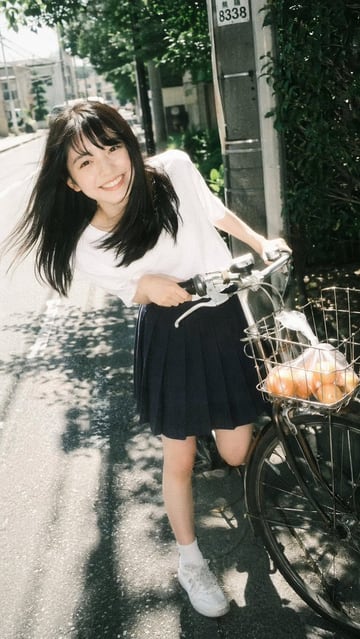
A {argument name="photography style" default="vintage film photography"} portrait of a {argument name="subject description" default="young Asian woman"} smiling broadly at the camera. She is leaning forward playfully while holding the handlebars of a bicycle on a sunny neighborhood street. She wears a {argument name="top clothing" default="white short-sleeved t-shirt"}, a {argument name="bottom clothing" default="dark blue pleated skirt"}, white socks, and white sneakers. Her long dark hair blows slightly in the breeze. The bicycle has a front wire basket containing a {argument name="basket contents" default="clear plastic bag of oranges"}. The background features a paved road, dappled sunlight through trees, and a utility pole, capturing a nostalgic, bright summer day aesthetic.
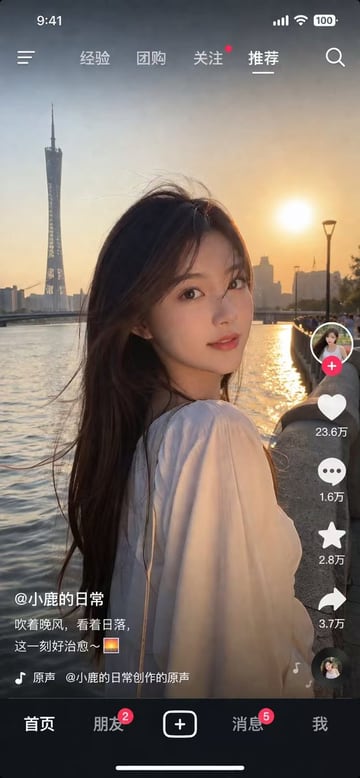
{ "type": "social media video app interface screenshot", "main_visual": { "subject": "young Asian woman, long dark hair blowing in wind, white top, looking over shoulder at camera", "setting": "{argument name=\"background location\" default=\"Guangzhou Canton Tower by the river at sunset\"}", "lighting": "golden hour, warm sunset glow" }, "ui_layout": { "top_status_bar": { "elements": 4, "labels": ["9:41", "signal", "wifi", "100 battery"] }, "top_navigation": { "elements": 6, "labels": ["menu icon", "经验", "团购", "关注", "{argument name=\"active tab\" default=\"推荐\"}", "search icon"] }, "right_interaction_bar": { "elements": 6, "labels": ["profile photo with red plus", "heart icon with {argument name=\"like count\" default=\"23.6万\"}", "comment icon with 1.6万", "star icon with 2.8万", "share icon with 3.7万", "spinning music record"] }, "bottom_left_text": { "elements": 3, "labels": ["{argument name=\"username\" default=\"@小鹿的日常\"}", "{argument name=\"caption\" default=\"吹着晚风,看着日落,这一刻好治愈~ 🌅\"}", "music note icon with 原声 @小鹿的日常创作的原声"] }, "bottom_navigation": { "elements": 5, "labels": ["首页", "朋友 with red badge 2", "square plus button", "消息 with red badge 5", "我"] } } }
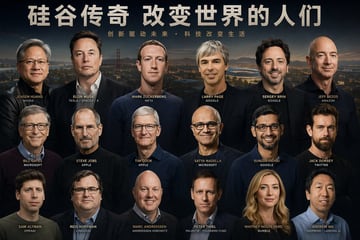
帮我生成一张{argument name="主题" default="硅谷大佬"}大合照的一张海报,你要仔细专注于人物的面部 他们的面部要有足够的辨识度 不要有重复人物
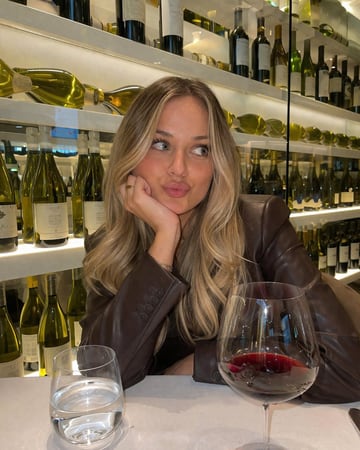
A photorealistic, casual smartphone photo of a young woman with {argument name="hair style and color" default="long blonde balayage hair"} sitting at a table in a {argument name="setting" default="wine bar"}. She is wearing a {argument name="outfit" default="dark brown leather blazer"}. She is resting her chin on her right hand, which has a simple gold ring, and making a {argument name="expression" default="playful pursed-lip expression while looking off to the side"}. In the foreground on the white tablecloth, there is a water glass and a {argument name="drink" default="large wine glass containing red wine"}. The background features brightly illuminated modern shelving fully stocked with various wine bottles. Warm, inviting indoor lighting.

{ "type": "social media short video app interface mockup", "main_image": { "subject": "{argument name=\"subject description\" default=\"young Asian woman with long dark hair wearing a white off-the-shoulder top\"}", "pose": "looking back over her shoulder at the camera, gentle smile, hair blowing slightly in the wind", "setting": "{argument name=\"background location\" default=\"riverside promenade at sunset with a tall modern tower and city skyline\"}", "lighting": "golden hour, warm sunlight reflecting on the river" }, "ui_layout": { "top_bar": { "status_icons": ["time 9:41", "cellular signal", "wifi", "battery 100"], "navigation": { "left": "menu icon", "center_tabs": ["经验", "团购", "关注", "{argument name=\"active top tab\" default=\"推荐\"}"], "right": "search icon" } }, "right_sidebar": { "count": 6, "elements": [ "profile picture with pink plus button", "heart icon with text '23.6万'", "chat bubble icon with text '1.6万'", "star icon with text '2.8万'", "share arrow icon with text '3.7万'", "spinning music record icon" ] }, "bottom_left_overlay": { "username": "{argument name=\"username\" default=\"@小鹿的日常\"}", "caption": "{argument name=\"caption text\" default=\"吹着晚风,看着日落,这一刻好治愈~ 🌅\"}", "audio_track": "🎵 原声 @小鹿的日常创作的原声" }, "bottom_navigation_bar": { "count": 5, "tabs": [ "首页", "朋友 (with red badge '2')", "central plus button in rounded square", "消息 (with red badge '5')", "我" ] } } }

Using REFERENCE_0, transform the older couple so they are both looking directly at the camera and smiling. For the man on the left, add a {argument name="man's facial hair" default="full white beard"}, remove his glasses, and dress him in a {argument name="man's clothing" default="green fleece jacket"}. For the woman on the right, add glasses, change her hair to straight with bangs, and dress her in a {argument name="woman's clothing" default="denim jacket and white scarf"}. Have both subjects holding glasses of beer. On the wooden table, add 1 bowl of potato chips and 1 small lit lantern. Replace the background with a {argument name="background setting" default="warm, blurred pub interior with 2 background patrons"}.
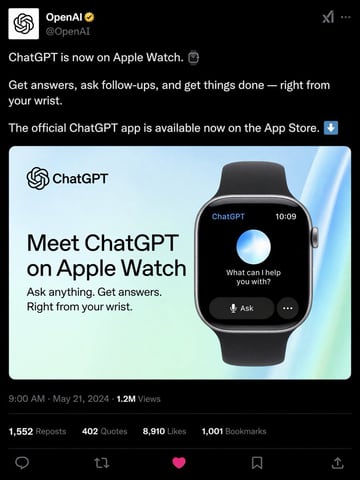
{ "type": "social media post mockup", "theme": "dark mode", "header": { "avatar": "OpenAI logo", "account_name": "{argument name=\"account name\" default=\"OpenAI\"}", "badge": "gold checkmark", "handle": "@OpenAI" }, "post_text": [ "{argument name=\"post text\" default=\"ChatGPT is now on Apple Watch.\"}", "Get answers, ask follow-ups, and get things done — right from your wrist.", "The official ChatGPT app is available now on the App Store." ], "embedded_card": { "background": "light blue and green gradient", "left_column": { "logo": "ChatGPT", "headline": "{argument name=\"card headline\" default=\"Meet ChatGPT on Apple Watch\"}", "subheadline": "Ask anything. Get answers. Right from your wrist." }, "right_column": { "device": "smartwatch with black band", "screen_elements": { "top_bar": 2, "top_bar_labels": ["ChatGPT", "10:09"], "center": "glowing blue and white orb", "text": "{argument name=\"watch screen text\" default=\"What can I help you with?\"}", "buttons": 2, "button_labels": ["Ask", "..."] } } }, "footer": { "metadata": "9:00 AM · May 21, 2024 · 1.2M Views", "engagement_stats": { "count": 4, "labels": ["1,552 Reposts", "402 Quotes", "{argument name=\"likes count\" default=\"8,910\"} Likes", "1,001 Bookmarks"] }, "action_icons": { "count": 5, "types": ["reply", "repost", "like", "bookmark", "share"] } } }
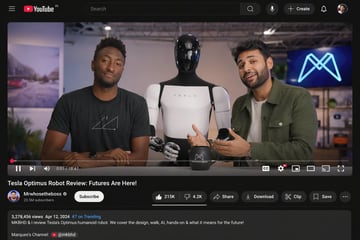
{ "type": "desktop video platform UI mockup", "theme": "dark mode", "header": { "logo": "YouTube IN", "search_bar": "centered, with magnifying glass icon", "right_icons": { "count": 4, "items": ["microphone", "+ Create button", "notifications bell", "user profile picture"] } }, "video_player": { "scene": "Studio setting with two tech reviewers at a desk.", "subjects": [ "{argument name=\"left person\" default=\"Marques Brownlee (MKBHD)\"} in black t-shirt", "{argument name=\"right person\" default=\"Arun Maini (Mrwhosetheboss)\"} in green overshirt", "{argument name=\"robot model\" default=\"Tesla Optimus humanoid robot\"} standing between them" ], "props": ["black mug with logo", "background screen with glowing blue neon M logo"], "controls_bar": { "progress_bar": "red, near the beginning", "timestamp": "0:01 / 18:47", "left_icons": { "count": 3, "items": ["play/pause", "next track", "volume"] }, "right_icons": { "count": 6, "items": ["CC", "settings with 4K badge", "miniplayer", "theater mode", "cast", "fullscreen"] } } }, "video_details": { "title": "{argument name=\"video title\" default=\"Tesla Optimus Robot Review: Futures Are Here!\"}", "channel_info": { "name": "{argument name=\"channel name\" default=\"Mrwhosetheboss\"}", "badges": ["verified checkmark"], "subscribers": "20.5M subscribers", "button": "white Subscribe button" }, "action_buttons": { "count": 6, "items": ["Like (215K) / Dislike (4.2K) pill", "Share", "Download", "Clip", "Save", "More (...)"] } }, "description_box": { "metadata": "3,278,456 views Apr 12, 2024 #7 on Trending", "text": "MKBHD & I review Tesla's Optimus humanoid robot. We cover the design, walk, AI, hands-on & what it means for the future!", "links": ["Marques's Channel: @mkbhd"] } }
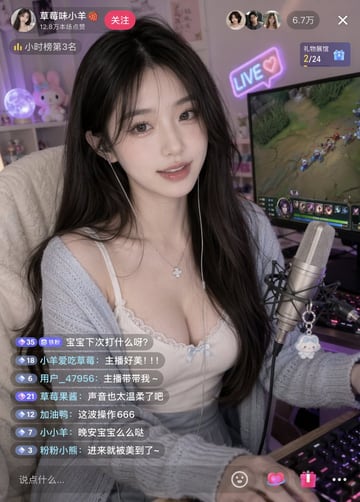
{argument name="subject" default="A beautiful internet celebrity"} is live-streaming a {argument name="activity" default="game"}.
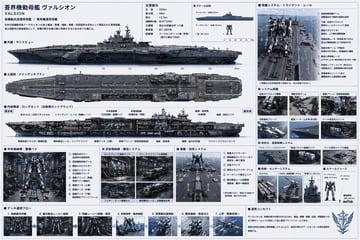
{ "type": "sci-fi military ship specification sheet", "subject": { "name": "{argument name=\"ship name\" default=\"蒼界機動母艦 ヴァルシオン\"}", "english_name": "{argument name=\"english name\" default=\"VALSION\"}", "subtitle": "{argument name=\"ship type\" default=\"高機動兵装運用母艦 / 専用機運用母艦\"}", "design": "massive futuristic aircraft carrier designed for mecha deployment, {argument name=\"primary color\" default=\"dark naval gray\"} hull, flat flight deck with catapult rails, bridge tower on the starboard side" }, "layout": { "style": "dense technical infographic, blueprint aesthetic with realistic renders, light blue grid background, dark blue headers", "sections": [ { "title": "主要諸元", "position": "top-center", "content": "List of 6 technical specifications including length, width, draft, displacement, main engine, and crew capacity." }, { "title": "スケール比較", "position": "top-center right", "count": 3, "labels": ["ヴァルシオン (全長330m)", "{argument name=\"mecha name\" default=\"アークセリオン\"} (全高18.5m)", "人員 (約1.8m)"] }, { "title": "外観:サイドビュー", "position": "upper-left", "content": "Detailed side profile render of the ship with a scale bar underneath." }, { "title": "上面図:メインデッキプラン", "position": "mid-left", "content": "Detailed top-down render of the ship's flight deck." }, { "title": "内部構造:ロングカット (左舷側カットアウェイ)", "position": "center-left", "content": "Cross-section render showing internal hangars, VLS, and launch rails with 10 text callouts." }, { "title": "発艦システム:トライデント・レール", "position": "top-right", "count": 8, "labels": ["① 前傾姿勢制御アーム", "② 下腿・足部ガイドロック", "③ 腰部スタビライザー", "④ 電磁加速レール", "⑤ 補助支持アーム", "⑥ 艦首上昇制御ノーズ", "⑦ 終端セーフティエリア", "⑧ 背面推進ユニット点火"] }, { "title": "システム詳細", "position": "mid-right", "count": 6, "labels": ["足部ガイドロック機構", "補助支持アーム", "搭乗ブリッジ", "対風偏向ブレード", "艦首ノーズ", "デッキ安定化ユニット"] }, { "title": "安定化・姿勢制御システム", "position": "mid-lower-right", "count": 3, "labels": ["アクティブフィンスタビライザー", "高速バラスト制御タンク", "デッキ局所ジャイロ基盤"] }, { "title": "防御・センサーシステム", "position": "lower-right", "count": 3, "labels": ["VLSセル", "CIWS/近接防御システム", "電子戦マスト/EWシステム"] }, { "title": "中央格納庫・整備ベイ", "position": "bottom-left", "count": 8, "labels": ["① 背面支持タワー", "② 肩部補助拘束アーム", "③ 腰部スタビライザー", "④ 足部ロックベース", "⑤ 搭乗ブリッジ", "⑥ 整備デッキ(上層)", "⑦ 整備デッキ(中層)", "⑧ 整備デッキ(下層)"] }, { "title": "武装格納庫・搬送システム", "position": "bottom-mid-left", "count": 4, "labels": ["セレスブレード格納ラック", "ヴァーテクスライフル格納庫", "フェザー・ビット整備セル", "磁気搬送レール/自動搬送台車"] }, { "title": "着艦・回収システム", "position": "bottom-center", "count": 6, "labels": ["① 着艦ガイドマーカー", "② 瞬時磁気ロックフィールド", "③ 足首クランプ", "④ 背面スタビライザーアーム", "⑤ データリンク整合エリア", "⑥ 艦内搬送レール接続部"] }, { "title": "デッキ運用フロー", "position": "bottom-strip", "count": 7, "labels": ["1. 格納庫内待機", "2. 艦内搬送レールへ接続", "3. 発艦レーンへ移動・固定", "4. 前傾姿勢・最終確認", "5. 超電磁加速開始", "6. 艦首離脱・推進点火", "7. 上昇・戦闘空域へ"] }, { "title": "運用コンセプト", "position": "bottom-right corner", "content": "Text paragraph describing the operational concept, accompanied by a stylized wing-and-sword emblem." } ] } }
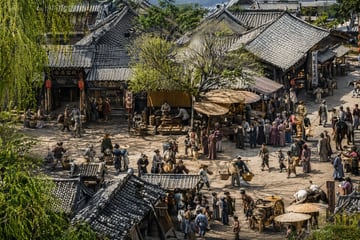
A highly detailed, {argument name="art style" default="hyper-realistic cinematic 3D render"} of an {argument name="historical setting" default="ancient Chinese street scene inspired by Along the River During the Qingming Festival"}. The elevated, wide-angle perspective looks down upon a bustling dirt crossroad surrounded by traditional wooden buildings with intricate grey tiled roofs. On the left, a building features a sign reading "安居客栈" with red lanterns hanging outside. The scene is densely populated with dozens of villagers, merchants, and travelers in traditional period clothing. People are engaged in various activities: carrying woven baskets on shoulder poles, tending to market stalls under large wooden parasols, riding horses, and pulling a wooden cart with large spoked wheels in the lower right. A large, leafy green tree stands centrally among the shops, and weeping willow branches frame the extreme left foreground. The atmosphere is lively and dusty, illuminated by {argument name="lighting" default="warm afternoon sunlight"} that casts sharp, intricate shadows across the highly textured, hyper-detailed environment.
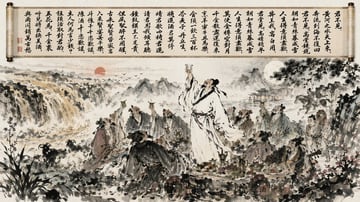
A highly detailed {argument name="art style" default="traditional Chinese ink wash painting"} of an outdoor banquet. Across the top, an unrolled scroll displays Chinese calligraphy reading {argument name="scroll text" default="君不見,黃河之水天上來"}. Below, a landscape features a waterfall and red sun on the left, and a full moon over a water pavilion on the right. In the foreground, 10 figures gather around a stone table. The central bearded man in white robes is {argument name="central figure action" default="standing and raising a wine cup to the sky"}. He is surrounded by 8 seated scholars drinking and 1 servant boy carrying a wine jar. The table holds fruit and metal pitchers. Large ceramic wine jars sit on the ground. On the left, 3 goats rest among rocks. In the background right, 1 figure rides a horse near pine trees.
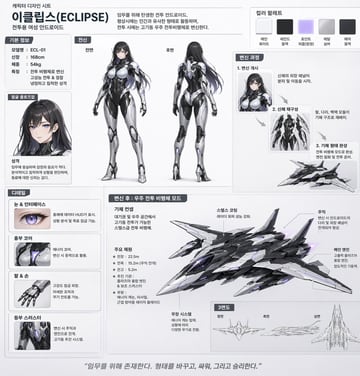
날렵한 {argument name="기체 종류" default="우주 전투비행체"}로 변신이 가능한, {argument name="성별" default="여성"} {argument name="캐릭터 유형" default="안드로이드"} 캐릭터에 대한 캐릭터 디자인 시트. 한국어로.
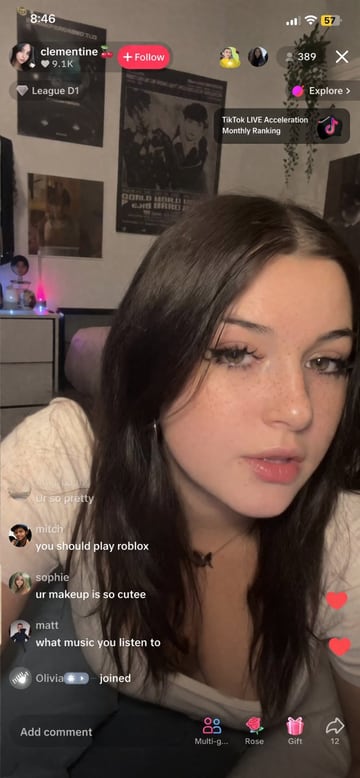
UGC style, random {argument name="subject" default="young female streamer"} doing a live on {argument name="platform" default="TikTok"}
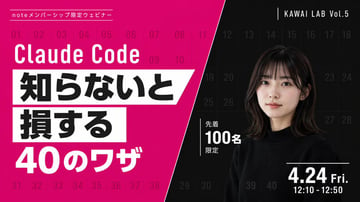
{ "type": "webinar promotional banner", "style": "modern, bold typography, high contrast, diagonal split layout", "background": { "pattern": "faint grid of 40 sequential numbers from 01 to 40 spanning the entire canvas", "left_color": "vibrant magenta", "right_color": "black", "split_style": "sharp diagonal line from top center to bottom left" }, "left_section": { "top_label": "{argument name=\"top label\" default=\"noteメンバーシップ限定ウェビナー\"}", "title": "{argument name=\"main title\" default=\"Claude Code\"}", "highlight_box_1": { "text": "{argument name=\"highlight text 1\" default=\"知らないと\"}", "style": "black text on white skewed rectangular background" }, "highlight_box_2": { "text": "{argument name=\"highlight text 2\" default=\"損する\"}", "style": "black text on white skewed rectangular background" }, "bottom_text": "40のワザ" }, "right_section": { "top_right_label": "KAWAI LAB Vol.5", "subject": "portrait of a young Japanese woman, shoulder-length dark hair with bangs, wearing a black crew neck sweater, neutral expression, looking at camera", "middle_badge": { "text": "先着 100名 限定", "style": "white text with vertical line accent" }, "bottom_right_date": "{argument name=\"date and time\" default=\"4.24 Fri. 12:10 - 12:50\"}" } }

A candid, warm-toned photograph of two men sitting at a table in a {argument name="setting" default="dimly lit upscale restaurant at night"}. On the left is a {argument name="left person description" default="man with dark hair wearing a dark grey crewneck sweater"}. On the right is a {argument name="right person description" default="man with glasses and receding curly dark hair wearing a dark blue sweater over a collared shirt"}. They are {argument name="emotion and action" default="celebrating enthusiastically, mouths wide open cheering, clasping one hand together while raising their other fists in triumph"}. The table is covered with a white tablecloth and features two menus with the text "THE GREENE", water glasses, a glass of red wine, and a small lit candle in a ribbed glass holder. The background shows blurred restaurant interiors and dark windows with distant city lights, creating an intimate and joyful atmosphere.
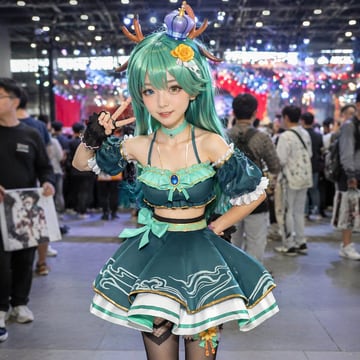
Photorealistic portrait of a female cosplayer at a {argument name="setting" default="crowded anime convention hall"}. She has long {argument name="hair color" default="teal"} hair, {argument name="eye color" default="heterochromia, one blue and one amber"} eyes, and wears {argument name="headwear" default="deer antlers and a small purple crown"} with a yellow rose clip. Her outfit is a {argument name="outfit style" default="teal two-piece idol costume with ruffled skirt"}, gold trim, wave patterns, gem choker, black fingerless gloves, and fishnet tights. She poses with a peace sign and one hand on her hip against a blurred background of convention attendees and bokeh lighting.

生成一个{argument name="平台" default="抖音"}直播的截图,一个{argument name="人物" default="中国美女"}正在直播,美女手里拿着牌子,上面写着:{argument name="感谢语" default="感谢水木易大哥的大游艇"}!图片比例9:16
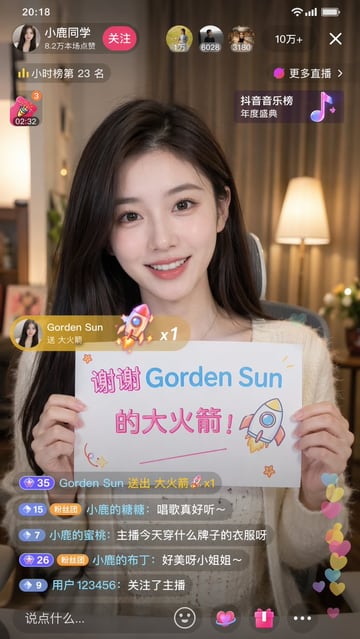
9:16的图片比例,生成一个{argument name="平台" default="抖音"}直播的截图 里面是一个{argument name="主体" default="美女"}在直播,美女手里拿着牌子,上面写着:{argument name="文字" default="谢谢Gorden Sun的大火箭!"}
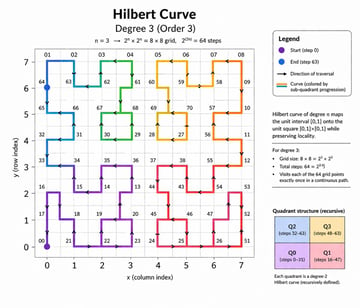
{ "type": "educational mathematical infographic", "header": { "title": "{argument name=\"main title\" default=\"Hilbert Curve\"}", "subtitle": "{argument name=\"degree subtitle\" default=\"Degree 3 (Order 3)\"}", "equation": "n = 3 -> 2^n x 2^n = 8 x 8 grid, 2^(2n) = 64 steps" }, "layout": { "left_panel": "large 2D line plot", "right_sidebar": "stacked informational panels and text blocks" }, "main_graph": { "axes": { "x_axis": "labeled 'x (column index)' with ticks 0 to 7", "y_axis": "labeled 'y (row index)' with ticks 0 to 7" }, "grid": "{argument name=\"grid size\" default=\"8x8\"} dashed light gray lines", "curve": { "description": "continuous non-intersecting path filling the grid", "style": "thick line with directional arrows", "colors": "{argument name=\"curve colors\" default=\"gradient transitioning through purple, blue, green, yellow, orange, and red\"}", "markers": [ "purple dot at bottom left labeled '00'", "blue dot at top left labeled '64'" ], "labels": "various two-digit numbers scattered along the path vertices, such as 01, 02, 32, 65, 70" } }, "sidebar": { "sections": [ { "title": "Legend", "type": "box with rounded corners", "count": 4, "items": [ "purple dot: 'Start (step 0)'", "blue dot: 'End (step 63)'", "black arrow: 'Direction of traversal'", "colored lines: 'Curve (colored by sub-quadrant progression)'" ] }, { "title": "Definition", "type": "text block", "text": "Hilbert curve of degree n maps the unit interval [0,1] onto the unit square [0,1]x[0,1] while preserving locality." }, { "title": "Properties", "type": "bulleted list", "heading": "For degree 3:", "count": 3, "items": [ "Grid size: 8 x 8 = 2^3 x 2^3", "Total steps: 64 = 2^{2*3}", "Visits each of the 64 grid points exactly once in a continuous path." ] }, { "title": "Quadrant structure (recursive)", "type": "2x2 colored grid", "count": 4, "boxes": [ "Top-left blue: 'Q2 (steps 32-63)'", "Top-right yellow: 'Q3 (steps 48-63)'", "Bottom-left purple: 'Q0 (steps 0-31)'", "Bottom-right pink: 'Q1 (steps 16-47)'" ], "footer_text": "Each quadrant is a degree-2 Hilbert curve (recursively defined)." } ] } }
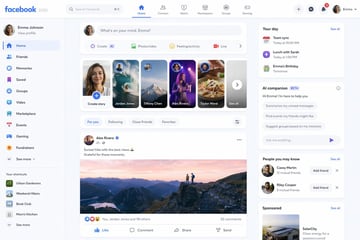
What will {argument name="platform" default="Facebook"} look like in {argument name="year" default="2030"}? Show me a screenshot.

{ "type": "educational infographic", "header": { "title": "{argument name=\"main title\" default=\"最新AI (ChatGPT / Claude) の仕組み\"}", "badge": "{argument name=\"target audience badge\" default=\"高校生でもわかる!\"}", "subtitle": "{argument name=\"subtitle\" default=\"文章・画像・音声も理解し、考えて動けるAIのしくみを1枚で解説!\"}" }, "layout": { "style": "clean, flat design, structured grid, Japanese text", "sections": [ { "title": "AIが答えを出すまで(基本の流れ)", "position": "left column", "count": 6, "labels": ["入力", "トークン化 (Token)", "ベクトル化 (Embedding)", "Transformer (AIの頭脳)", "次のトークンを予測 (生成)", "出力"], "visuals": "vertical flow with arrows, boy using laptop, token splitting diagram, vector number arrays, self-attention tree, robot icon" }, { "title": "ここがコア! 3つの重要ポイント", "position": "top right", "count": 3, "labels": ["Token (トークン)", "Transformer (トランスフォーマー)", "次トークン予測"], "visuals": "tokenization blocks, self-attention node network, word prediction sequence" }, { "title": "最近のブレイクスルー (2024-2025)", "position": "middle right", "count": 4, "labels": ["マルチモーダル", "エージェント化", "長文・推論能力の向上", "効率化・高速化"], "visuals": "image/audio/text icons, robot agent flowchart, lightbulb and book, speedometer with 3 expert nodes" }, { "title": "全体まとめ", "position": "bottom full width", "elements": [ "horizontal 6-step flowchart", "yellow summary box with text: {argument name=\"summary text\" default=\"「AIは、情報を細かく分けて数字に変換し、関係性を計算して、次に来るものを予測する巨大な数学マシン」です!\"}", "{argument name=\"character style\" default=\"anime-style female student pointing and smiling\"}" ] } ] } }
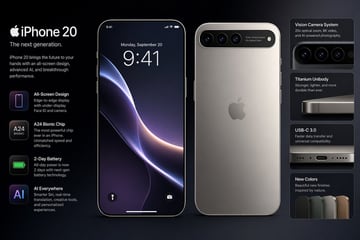
What will the {argument name="device" default="iPhone 20"} look like?
FAQ
Start with the image destination, subject, composition, lighting, style, and output ratio. Add text-safe space when the image will carry a headline or ad copy.
Yes. Copy a prompt or open it in Image2Studio, replace the subject and platform details, choose ratio and resolution, then generate.
Copy an example, open the studio, then adjust product, scene, style, and frame details.