Reusable template
Prompt template
Create a ChatGPT image prompt for [image type]. Show [primary subject] in [scene context], with [visual constraints], [style or material notes], and [output destination].
Model prompt library
Copy ChatGPT image prompt examples for product shots, portraits, posters, UI concepts, social posts, and practical image workflows.
Reusable template
Create a ChatGPT image prompt for [image type]. Show [primary subject] in [scene context], with [visual constraints], [style or material notes], and [output destination].
ChatGPT image prompts are plain-language image briefs that describe what the model should create and how the result will be used. Strong prompts read less like keywords and more like a compact creative direction.
Use this page when you need examples before choosing a narrower prompt category. The examples show how to turn a vague idea into subject, composition, lighting, style, and output constraints that can move into Image2Studio.
Create a ChatGPT image prompt for a clean ecommerce product photo. Show a white ceramic diffuser on pale wood, centered three-quarter angle, soft window light, no extra props, crisp product edges, and 1:1 marketplace crop.
It converts a broad request into a product photography brief with crop and prop limits.
Generate a ChatGPT image prompt for a social launch post. Show one oversized phone screen with an AI-generated poster preview, orange CTA sticker, paper desk background, strong top headline-safe area, and 4:5 mobile feed crop.
It keeps the hook readable at mobile thumbnail size.
Create a ChatGPT image prompt for a professional founder portrait. Show a person in a charcoal jacket near a large window, natural skin texture, soft catchlights, quiet office background, shoulders-up composition, 1:1 profile crop.
It controls the lighting, crop, and background instead of asking for a generic professional portrait.
Swap one variable at a time: image type, subject, setting, crop, lighting, or style. Keep the destination explicit so the generated image still fits the page, ad, profile, or post.
A useful image prompt includes visual constraints such as subject, camera, light, crop, material, background, and final placement, not just a task instruction.
Yes. The same structure works for GPT Image 2-oriented workflows in Image2Studio.
Only when text rendering is essential. For marketing images, it is usually safer to reserve text-safe space and add final copy in a design tool.
Prompt examples
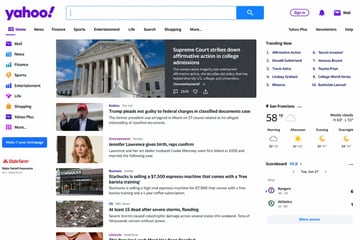
Screenshot of the {argument name="website" default="Yahoo"} homepage.

A gritty, cinematic boxing promotional poster featuring a face-to-face staredown between {argument name="fighter 1" default="Mike Tyson"} on the left and {argument name="fighter 2" default="Sam Altman"} on the right. The left fighter is an older, bald man with a tribal facial tattoo, wearing a black boxing glove with "TYSON" printed on it. The right fighter is a younger man with dark wavy hair, wearing a black boxing glove featuring the OpenAI logo and text. Both men have intense, serious expressions, with highly detailed skin textures and sweat. The background is an out-of-focus boxing ring under bright stadium lights. The poster has a vintage, slightly scratched grunge texture. At the top, text reads "WORLD TECH vs BOXING CHAMPIONSHIP" in white and "{argument name="top tagline" default="NO CODE. ALL CHAOS."}" in red. In the center, large bold typography reads "MIKE TYSON" in red, "★ VS ★" in red, and "SAM ALTMAN" in large cream-white letters. Below this, text reads "{argument name="middle tagline" default="THE BRAWN. THE BRAIN. THE FUTURE."}". At the bottom, 3 columns of text display "{argument name="event date" default="SAT JULY 26"}", "LIVE ON PAY-PER-VIEW" in red, and "AT&T STADIUM ARLINGTON, TX". The very bottom footer reads "PRESENTED BY NETFLIX | TESLA | OPENAI".
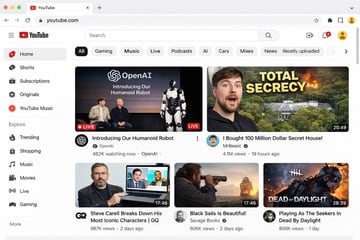
{ "type": "web browser UI mockup", "platform": "{argument name=\"platform name\" default=\"YouTube\"}", "browser_window": { "style": "macOS light mode", "tab": "YouTube", "url_bar": "youtube.com" }, "layout": { "header": { "components": ["hamburger menu", "platform logo", "search bar", "create video icon", "notifications bell", "user profile avatar"] }, "sidebar": { "position": "left", "item_count": 11, "sections": [ { "name": "Main", "items": ["Home", "Shorts", "Subscriptions", "Originals", "YouTube Music"] }, { "name": "Explore", "items": ["Trending", "Shopping", "Music", "Movies", "Live", "Gaming"] } ] }, "main_content": { "category_tags": { "count": 10, "labels": ["All", "Gaming", "Music", "Live", "Podcasts", "AI", "Cars", "Mixes", "News", "Recently uploaded"] }, "video_grid": { "card_count": 5, "cards": [ { "position": "top left", "size": "large", "thumbnail_description": "Sam Altman and Greg Brockman sitting on a stage next to a standing humanoid robot, text overlay 'OpenAI Introducing Our Humanoid Robot', LIVE badge", "video_title": "{argument name=\"featured live stream title\" default=\"Introducing Our Humanoid Robot\"}", "channel_name": "{argument name=\"featured live stream channel\" default=\"OpenAI\"}", "metadata": "482K watching now" }, { "position": "top right", "size": "large", "thumbnail_description": "surprised man's face on the left, a large mansion hidden in a forest with an explosion on the right, bold yellow text overlay '{argument name=\"top right thumbnail text\" default=\"TOTAL SECRECY\"}'", "video_title": "{argument name=\"top right video title\" default=\"I Bought 100 Million Dollar Secret House!\"}", "channel_name": "MrBeast", "metadata": "4.1M views, 19 hours ago, 20:49 duration" }, { "position": "bottom left", "size": "small", "thumbnail_description": "Steve Carell holding a laptop showing a scene from The Office", "video_title": "Steve Carell Breaks Down His Most Iconic Characters | GQ", "channel_name": "GQ", "metadata": "987K views, 2 days ago, 17:46 duration" }, { "position": "bottom middle", "size": "small", "thumbnail_description": "man looking through a spyglass at a sailing ship on the ocean at sunset", "video_title": "Black Sails Is Beautiful!", "channel_name": "Savage Books", "metadata": "606K views, 2 days ago, 17:46 duration" }, { "position": "bottom right", "size": "small", "thumbnail_description": "creepy masked killer character from a video game with text overlay 'DEAD OF DAYLIGHT'", "video_title": "Playing As The Seekers In Dead By Daylight", "channel_name": "Unknown", "metadata": "806K views, 1 day ago, 28:39 duration" } ] } } } }
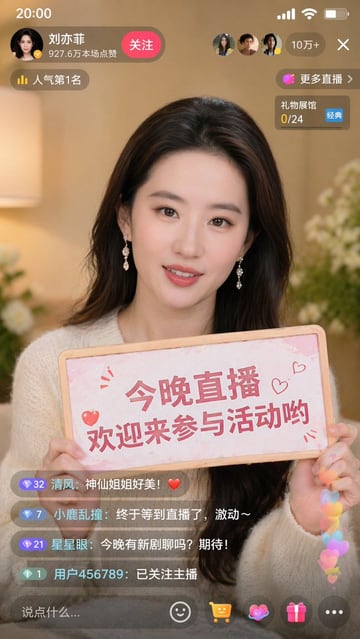
9:16 的图片比例,生成一张抖音直播的截图,里面是 {argument name="人物" default="刘亦菲"} 在直播,{argument name="人物" default="刘亦菲"} 手里拿着牌子,牌子里写着 {argument name="牌子文字" default="今晚直播,欢迎来参亦菲畅聊!"}
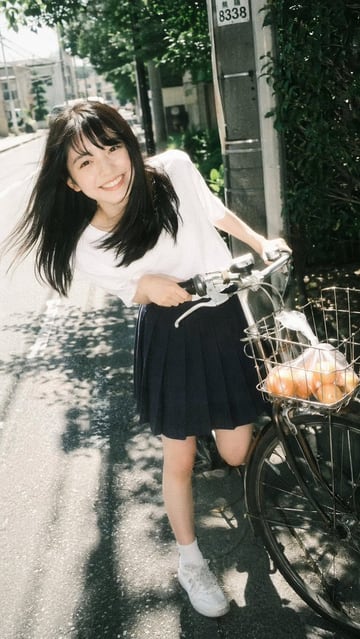
A {argument name="photography style" default="vintage film photography"} portrait of a {argument name="subject description" default="young Asian woman"} smiling broadly at the camera. She is leaning forward playfully while holding the handlebars of a bicycle on a sunny neighborhood street. She wears a {argument name="top clothing" default="white short-sleeved t-shirt"}, a {argument name="bottom clothing" default="dark blue pleated skirt"}, white socks, and white sneakers. Her long dark hair blows slightly in the breeze. The bicycle has a front wire basket containing a {argument name="basket contents" default="clear plastic bag of oranges"}. The background features a paved road, dappled sunlight through trees, and a utility pole, capturing a nostalgic, bright summer day aesthetic.
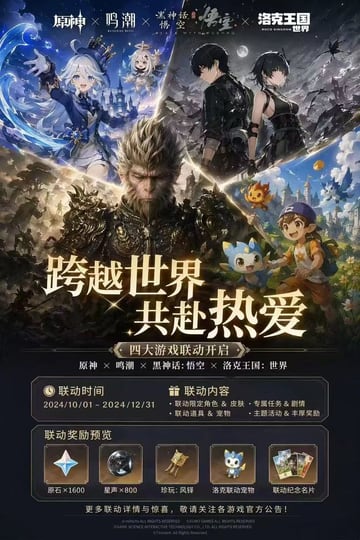
{ "type": "video game crossover promotional poster", "layout": { "header": { "description": "4 distinct game logos separated by 'X' marks", "logos": ["原神", "鸣潮", "黑神话:悟空", "洛克王国:世界"] }, "character_collage": { "description": "A dynamic V-shaped collage merging 4 distinct game art styles", "sections": [ { "position": "top-left", "style": "anime cel-shaded", "content": "girl with white hair and blue top hat, small floating white-haired companion, water magic effects, fantasy castle background" }, { "position": "top-right", "style": "anime cel-shaded", "content": "male and female protagonists in black tactical outfits, dark night sky with full moon, ruined landscape" }, { "position": "center", "style": "hyper-realistic 3D", "content": "monkey king in ornate dark armor, intense expression, epic battlefield background" }, { "position": "bottom-right", "style": "bright anime", "content": "young boy in blue cap holding a wooden staff, accompanied by 3 small cute elemental mascot monsters, vibrant fantasy town" } ] }, "center_typography": { "main_headline": "{argument name=\"main headline\" default=\"跨越世界 共赴热爱\"}", "subtitle": "{argument name=\"subtitle\" default=\"四大游戏联动开启\"}", "game_list": "原神 × 鸣潮 × 黑神话:悟空 × 洛克王国:世界" }, "information_panels": { "event_details_panel": { "columns": 2, "left_column": { "title": "联动时间", "value": "{argument name=\"event dates\" default=\"2024/10/01 - 2024/12/31\"}" }, "right_column": { "title": "联动内容", "bullet_points_count": 4, "details": ["联动限定角色 & 皮肤", "专属任务 & 剧情", "联动道具 & 宠物", "主题活动 & 丰厚奖励"] } }, "rewards_preview_panel": { "title": "联动奖励预览", "count": 5, "items": [ { "icon": "four-pointed star gem", "label": "原石×1600" }, { "icon": "dark metallic sphere", "label": "星声×800" }, { "icon": "golden bell relic", "label": "珍玩:风铎" }, { "icon": "blue mascot pet", "label": "洛克联动宠物" }, { "icon": "set of 3 cards", "label": "联动纪念名片" } ] } }, "footer": "copyright text and official announcement disclaimer in small print" } }
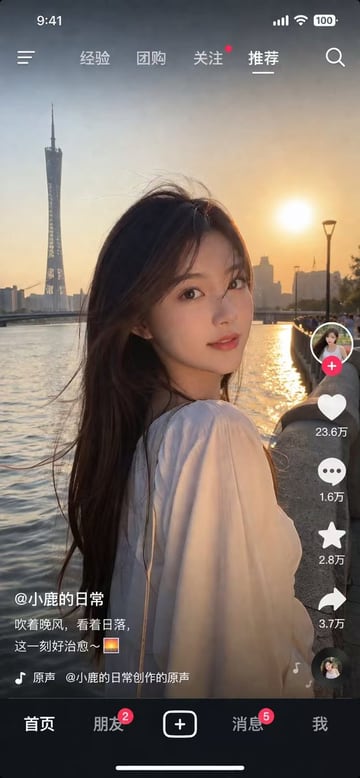
{ "type": "social media video app interface screenshot", "main_visual": { "subject": "young Asian woman, long dark hair blowing in wind, white top, looking over shoulder at camera", "setting": "{argument name=\"background location\" default=\"Guangzhou Canton Tower by the river at sunset\"}", "lighting": "golden hour, warm sunset glow" }, "ui_layout": { "top_status_bar": { "elements": 4, "labels": ["9:41", "signal", "wifi", "100 battery"] }, "top_navigation": { "elements": 6, "labels": ["menu icon", "经验", "团购", "关注", "{argument name=\"active tab\" default=\"推荐\"}", "search icon"] }, "right_interaction_bar": { "elements": 6, "labels": ["profile photo with red plus", "heart icon with {argument name=\"like count\" default=\"23.6万\"}", "comment icon with 1.6万", "star icon with 2.8万", "share icon with 3.7万", "spinning music record"] }, "bottom_left_text": { "elements": 3, "labels": ["{argument name=\"username\" default=\"@小鹿的日常\"}", "{argument name=\"caption\" default=\"吹着晚风,看着日落,这一刻好治愈~ 🌅\"}", "music note icon with 原声 @小鹿的日常创作的原声"] }, "bottom_navigation": { "elements": 5, "labels": ["首页", "朋友 with red badge 2", "square plus button", "消息 with red badge 5", "我"] } } }
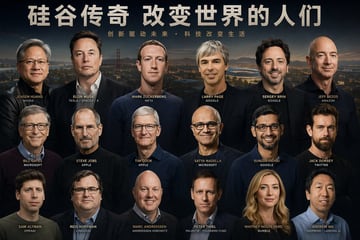
帮我生成一张{argument name="主题" default="硅谷大佬"}大合照的一张海报,你要仔细专注于人物的面部 他们的面部要有足够的辨识度 不要有重复人物
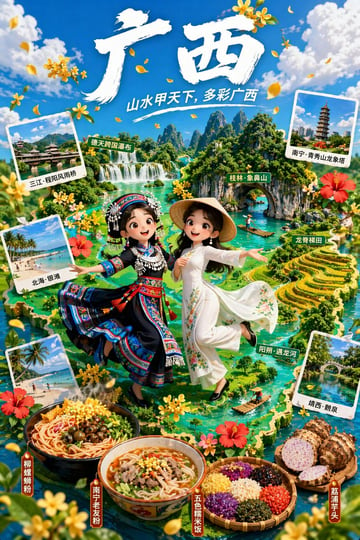
{ "type": "3D animated style tourism promotional poster", "typography": { "main_title": "{argument name=\"main title\" default=\"广西\"}", "subtitle": "{argument name=\"subtitle\" default=\"山水甲天下, 多彩广西\"}" }, "characters": [ { "position": "center left", "description": "3D animated girl, joyful expression", "outfit": "{argument name=\"left character outfit\" default=\"traditional ethnic minority dress with silver headdress\"}" }, { "position": "center right", "description": "3D animated girl, joyful expression", "outfit": "{argument name=\"right character outfit\" default=\"white traditional dress with conical hat\"}" } ], "background": { "theme": "{argument name=\"region theme\" default=\"Guangxi karst landscapes and rivers\"}", "style": "lush green 3D isometric map", "map_labels": [ "德天跨国瀑布", "桂林·象鼻山", "龙脊梯田", "阳朔·遇龙河" ] }, "layout": { "polaroid_photos": { "count": 4, "items": [ { "position": "top left", "label": "三江·程阳风雨桥", "scene": "traditional covered bridge" }, { "position": "middle left", "label": "北海·银滩", "scene": "tropical beach" }, { "position": "bottom left", "label": "北海·银滩", "scene": "tropical beach" }, { "position": "bottom right", "label": "靖西·鹅泉", "scene": "stone arch bridge over water" } ] }, "food_showcase": { "position": "bottom foreground", "count": 4, "items": [ { "label": "柳州螺蛳粉", "description": "bowl of spicy snail rice noodles" }, { "label": "南宁老友粉", "description": "bowl of meat and rice noodles in broth" }, { "label": "五色糯米饭", "description": "bamboo basket with five colors of sticky rice" }, { "label": "荔浦芋头", "description": "whole and halved taro roots" } ] }, "decorations": "scattered yellow osmanthus flowers and red hibiscus flowers" } }
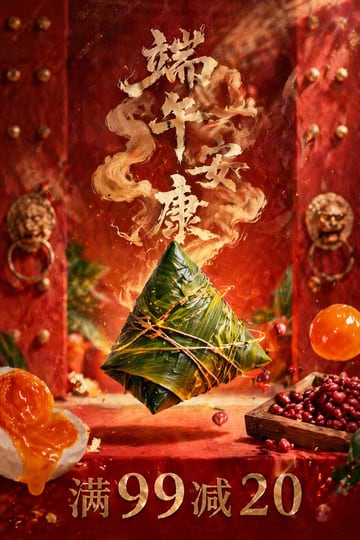
A highly detailed, photorealistic commercial poster. In the center, 1 large {argument name="central food item" default="Zongzi (sticky rice dumpling wrapped in glossy green bamboo leaves and tied securely with twine)"} floating magically in mid-air. The background features traditional Chinese red wooden double doors with rows of golden studs and 2 ornate golden lion-head door knockers, slightly out of focus. Floating around the center are various ingredients: on the bottom left, 1 halved salted duck egg with a rich, oozing orange yolk; on the bottom right, 1 small square wooden tray overflowing with dark red beans, and 1 whole, translucent orange salted egg yolk floating nearby. Several small red beans and glowing embers are suspended in the air. Above the central item, large, stylized golden calligraphy text reading "{argument name="top greeting text" default="端午安康"}" formed from magical, swirling golden smoke rising upward. At the very bottom, bold, metallic golden serif text reading "{argument name="bottom promotional text" default="满99减20"}". Cinematic lighting, rich red and gold color palette, festive and magical atmosphere, high-end food photography style.
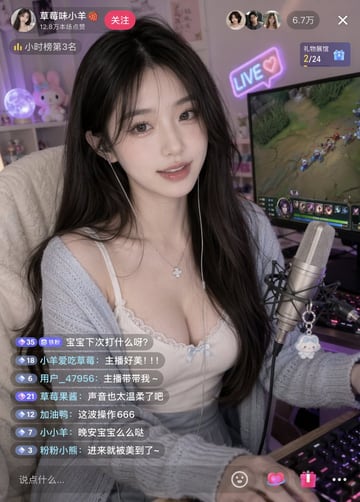
{ "type": "live stream interface mockup", "subject": { "description": "young East Asian woman, long dark wavy hair, gentle smile, silver clover necklace, wired earphones", "clothing": "{argument name=\"clothing\" default=\"white lace-trimmed camisole with a small blue bow, light blue cardigan, grey pleated skirt\"}", "pose": "sitting at a desk, looking directly at the camera, one hand on an RGB mechanical keyboard" }, "environment": { "foreground": "professional condenser microphone on a boom arm with a small white plush keychain attached", "background": "gaming room setup, large computer monitor displaying a {argument name=\"game on monitor\" default=\"MOBA game\"}, shelf with a glowing moon lamp and a pink bunny plushie", "lighting": "soft indoor lighting with purple and blue ambient glow from the monitor and a neon '{argument name=\"neon sign text\" default=\"LIVE ♡\"}' sign on the wall" }, "layout": { "sections": [ { "title": "Top Left Profile", "position": "top-left", "count": 4, "labels": ["{argument name=\"username\" default=\"草莓味小羊 🍓\"}", "12.8万本场点赞", "关注", "小时榜第3名"] }, { "title": "Top Right Stats", "position": "top-right", "count": 4, "labels": ["3 viewer avatars", "6.7万", "X", "礼物展馆 2/24"] }, { "title": "Chat Overlay", "position": "bottom-left", "count": 7, "labels": [ "{argument name=\"chat message 1\" default=\"宝宝下次打什么呀?\"}", "主播好美!!!", "主播带带我~", "声音也太温柔了吧", "这波操作666", "晚安宝宝么么哒", "进来就被美到了~" ] }, { "title": "Input Bar", "position": "bottom", "count": 5, "labels": ["说点什么...", "smiley icon", "heart icon", "gift icon", "three dots icon"] } ] } }
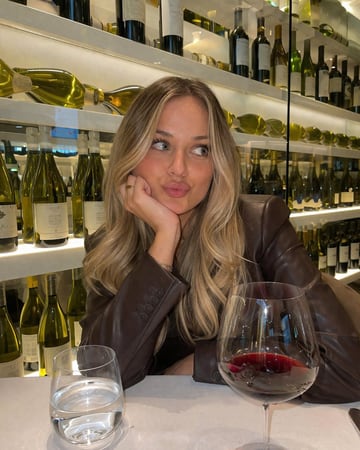
A photorealistic, casual smartphone photo of a young woman with {argument name="hair style and color" default="long blonde balayage hair"} sitting at a table in a {argument name="setting" default="wine bar"}. She is wearing a {argument name="outfit" default="dark brown leather blazer"}. She is resting her chin on her right hand, which has a simple gold ring, and making a {argument name="expression" default="playful pursed-lip expression while looking off to the side"}. In the foreground on the white tablecloth, there is a water glass and a {argument name="drink" default="large wine glass containing red wine"}. The background features brightly illuminated modern shelving fully stocked with various wine bottles. Warm, inviting indoor lighting.
FAQ
A useful image prompt includes visual constraints such as subject, camera, light, crop, material, background, and final placement, not just a task instruction.
Yes. The same structure works for GPT Image 2-oriented workflows in Image2Studio.
Only when text rendering is essential. For marketing images, it is usually safer to reserve text-safe space and add final copy in a design tool.
Copy an example, open the studio, then adjust product, scene, style, and frame details.