
Image2Studio
Prompts

gpt-image-2

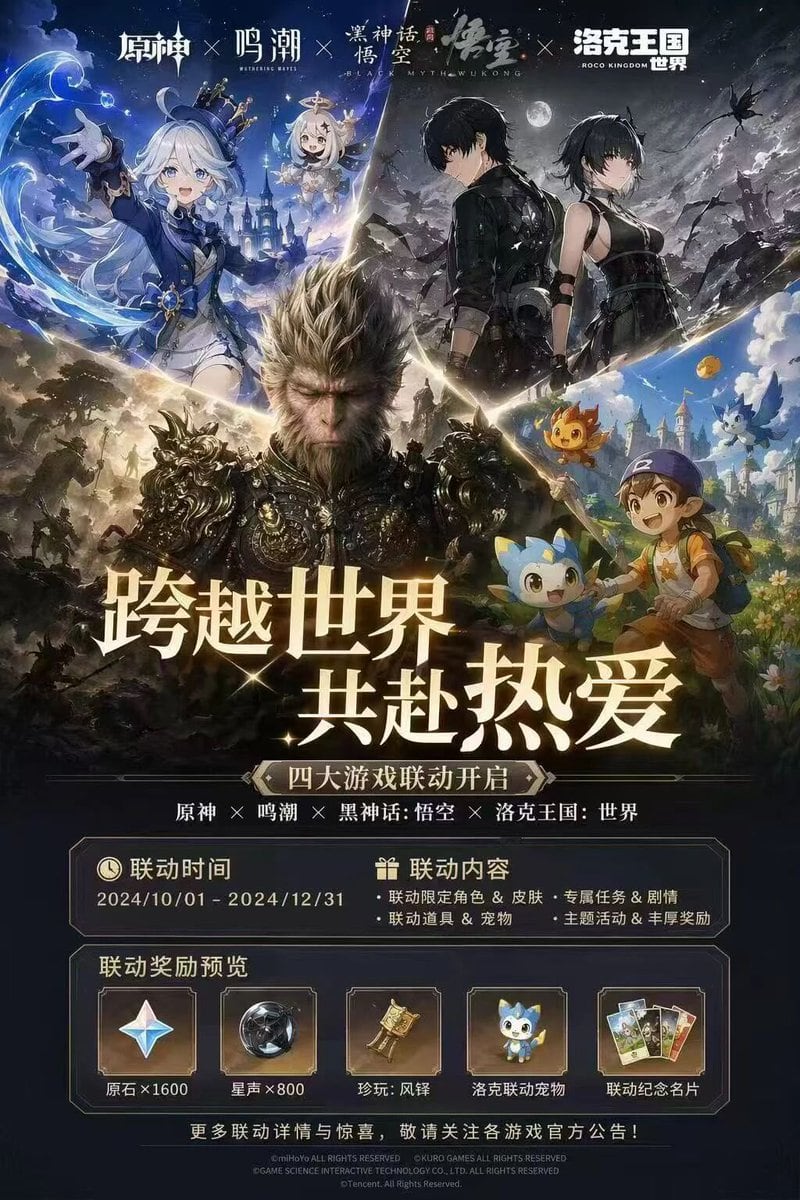
四款游戏联动活动宣传海报

生成一张高度精细的多游戏联动活动宣传海报,包含角色拼贴、活动日期以及奖励预览面板。

Copy this GPT Image 2 prompt for avatar and anime with Anime, Editorial, Photorealistic, 3D Render styling. Use it in Image2Studio to generate, edit, and.
Prompt

{ "type": "video game crossover promotional poster", "layout": { "header": { "description": "4 distinct game logos separated by 'X' marks", "logos": ["原神", "鸣潮", "黑神话:悟空", "洛克王国:世界"] }, "character_collage": { "description": "A dynamic V-shaped collage merging 4 distinct game art styles", "sections": [ { "position": "top-left", "style": "anime cel-shaded", "content": "girl with white hair and blue top hat, small floating white-haired companion, water magic effects, fantasy castle background" }, { "position": "top-right", "style": "anime cel-shaded", "content": "male and female protagonists in black tactical outfits, dark night sky with full moon, ruined landscape" }, { "position": "center", "style": "hyper-realistic 3D", "content": "monkey king in ornate dark armor, intense expression, epic battlefield background" }, { "position": "bottom-right", "style": "bright anime", "content": "young boy in blue cap holding a wooden staff, accompanied by 3 small cute elemental mascot monsters, vibrant fantasy town" } ] }, "center_typography": { "main_headline": "{argument name=\"main headline\" default=\"跨越世界 共赴热爱\"}", "subtitle": "{argument name=\"subtitle\" default=\"四大游戏联动开启\"}", "game_list": "原神 × 鸣潮 × 黑神话:悟空 × 洛克王国:世界" }, "information_panels": { "event_details_panel": { "columns": 2, "left_column": { "title": "联动时间", "value": "{argument name=\"event dates\" default=\"2024/10/01 - 2024/12/31\"}" }, "right_column": { "title": "联动内容", "bullet_points_count": 4, "details": ["联动限定角色 & 皮肤", "专属任务 & 剧情", "联动道具 & 宠物", "主题活动 & 丰厚奖励"] } }, "rewards_preview_panel": { "title": "联动奖励预览", "count": 5, "items": [ { "icon": "four-pointed star gem", "label": "原石×1600" }, { "icon": "dark metallic sphere", "label": "星声×800" }, { "icon": "golden bell relic", "label": "珍玩:风铎" }, { "icon": "blue mascot pet", "label": "洛克联动宠物" }, { "icon": "set of 3 cards", "label": "联动纪念名片" } ] } }, "footer": "copyright text and official announcement disclaimer in small print" } }

Prompt structure
  • Modelgpt-image-2
  • Use caseavatar
  • Styleanime, editorial, photorealistic, 3d-render
  • Aspect ratioFlexible
Best used for
  • Use caseavatar
  • Styleanime, editorial, photorealistic, 3d-render
  • Recommended specs1:1, 4:5, 16:9, or 9:16
  • ModelGPT Image 2
How to customize

Use this 四款游戏联动活动宣传海报 prompt as a base. Replace the subject, product details, environment, lighting, brand colors, and output ratio while keeping the avatar intent and anime, editorial, photorealistic, 3d-render direction stable.

Editable variables
  • SubjectReplace the product, person, scene, interface, or object being generated.
  • Use caseKeep or rewrite the destination as avatar, ad creative, cover image, poster, or ecommerce hero.
  • FrameChoose 1:1, 4:5, 16:9, or 9:16 based on the final placement.
  • Brand cuesAdd colors, materials, props, text-safe space, and the platform where the image will be used.
Recommended specs

Choose the frame for the destination first, then use 1K, 2K, or 4K based on output quality needs. Product images and posters usually benefit from higher resolution.

Pre-generation checklist
  • CheckSubject, lighting, composition, and frame are specific enough to review.
  • CheckText-safe space is included when the image will carry a headline or ad copy.
  • CheckResolution, credit cost, and final destination are checked before generation.
Why this prompt works

四款游戏联动活动宣传海报 works because it starts from the image job, then controls subject, composition, lighting, style, and frame. It is best for avatar while keeping the anime, editorial, photorealistic, 3d-render direction stable.

Common questions
  • Can I use it directly?Yes. Replace the subject, brand cues, and frame, then generate in Image2Studio.
  • Which ratio should I use?Choose 1:1, 4:5, 16:9, or 9:16 based on the destination.




