
Image2Studio
Examples

gpt-image-2

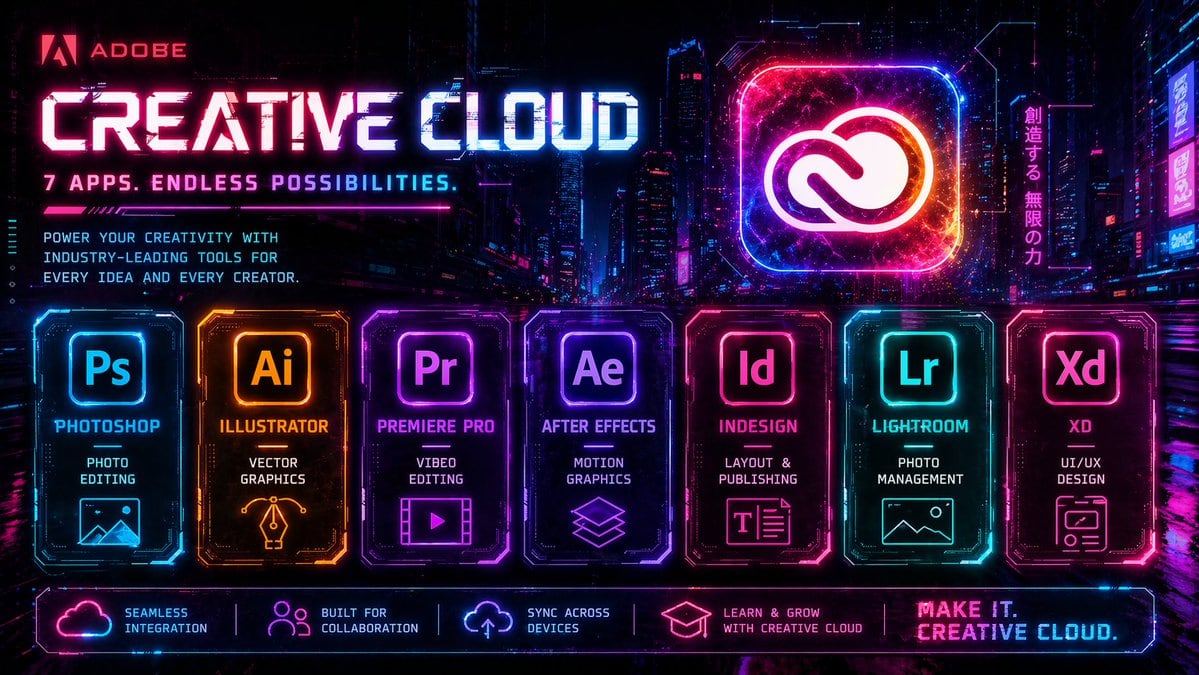
Create A High-energy Futuristic Cyberpunk Advertising Poster

Create a high-energy futuristic cyberpunk advertising poster for Adobe Creative Cloud, in a wide 16:9 format, set against a dense neon-lit nighttime megacity with glowing skyscrapers, hol...

Create a high-energy futuristic cyberpunk advertising poster for Adobe Creative Cloud, in a wide 16:9 format, set against a dense neon-lit nighttime megacity with glowing skyscrapers, hol...
Prompt

Create a high-energy futuristic cyberpunk advertising poster for {argument name="brand name" default="Adobe"} {argument name="product name" default="Creative Cloud"}, in a wide 16:9 format, set against a dense neon-lit nighttime megacity with glowing skyscrapers, holographic billboards, wet reflective streets, and a dark purple-blue-black atmosphere. Use an intense synthwave palette of electric magenta, cyan, violet, hot pink, and blue, with glowing edges, digital glitches, scanlines, light streaks, particle sparks, and HUD-style interface accents. At the upper left, place the Adobe logo and the word {argument name="brand name" default="Adobe"} in red, followed by a huge bold techno headline reading {argument name="product name" default="Creative Cloud"} in luminous white and cyan with magenta glow, and beneath it a smaller tagline in all caps: {argument name="tagline" default="7 APPS. ENDLESS POSSIBILITIES."}. Below that, add a short marketing paragraph in compact futuristic type: “POWER YOUR CREATIVITY WITH INDUSTRY-LEADING TOOLS FOR EVERY IDEA AND EVERY CREATOR.” On the upper right, feature a giant glowing rounded-square app icon containing the Adobe Creative Cloud symbol, rendered like a radiant neon hologram with cosmic texture and orange-pink-blue energy inside. Next to it, add a vertical Japanese neon sign reading “創造する、無限の力”. Across the lower middle, display exactly 7 illuminated app cards in a single horizontal row, each as a distinct glowing panel with beveled sci-fi borders, internal circuitry details, and matching neon color accents. Card 1: “Ps”, label “PHOTOSHOP”, subtitle “PHOTO EDITING”, with a simple landscape/image icon, in cyan-blue. Card 2: “Ai”, label “ILLUSTRATOR”, subtitle “VECTOR GRAPHICS”, with a pen-nib/vector icon, in orange-gold. Card 3: “Pr”, label “PREMIERE PRO”, subtitle “VIDEO EDITING”, with a film frame and play button icon, in purple-magenta. Card 4: “Ae”, label “AFTER EFFECTS”, subtitle “MOTION GRAPHICS”, with stacked layered-shapes icon, in violet. Card 5: “Id”, label “INDESIGN”, subtitle “LAYOUT & PUBLISHING”, with a text-layout icon, in pink-red. Card 6: “Lr”, label “LIGHTROOM”, subtitle “PHOTO MANAGEMENT”, with a landscape/photo icon, in cyan-teal. Card 7: “Xd”, label “XD”, subtitle “UI/UX DESIGN”, with a wireframe/app-window icon, in hot pink. Along the very bottom, add a glowing horizontal footer bar with exactly 5 feature blocks separated by thin neon dividers: 1) cloud icon with “SEAMLESS INTEGRATION”, 2) people icon with “BUILT FOR COLLABORATION”, 3) sync/cloud-arrow icon with “SYNC ACROSS DEVICES”, 4) graduation cap icon with “LEARN & GROW WITH CREATIVE CLOUD”, 5) a bold closing slogan at the far right reading {argument name="closing slogan" default="MAKE IT. CREATIVE CLOUD."}. Overall style: premium cinematic tech ad, ultra-detailed, razor-sharp, symmetrical promotional layout, glossy reflections, dramatic contrast, retro-futurist game UI aesthetics, polished commercial poster design.

Prompt structure
  • Modelgpt-image-2
  • Use caseapp-ui-mockup
  • Stylecyberpunk, cinematic, photorealistic, editorial
  • Aspect ratioFlexible
Best used for
  • Use caseapp-ui-mockup
  • Stylecyberpunk, cinematic, photorealistic, editorial
  • Recommended specs1:1, 4:5, 16:9, or 9:16
  • ModelGPT Image 2
How to customize

Use this Create A High-energy Futuristic Cyberpunk Advertising Poster prompt as a base. Replace the subject, product details, environment, lighting, brand colors, and output ratio while keeping the app-ui-mockup intent and cyberpunk, cinematic, photorealistic, editorial direction stable.

Editable variables
  • SubjectReplace the product, person, scene, interface, or object being generated.
  • Use caseKeep or rewrite the destination as app ui mockup, ad creative, cover image, poster, or ecommerce hero.
  • FrameChoose 1:1, 4:5, 16:9, or 9:16 based on the final placement.
  • Brand cuesAdd colors, materials, props, text-safe space, and the platform where the image will be used.
Recommended specs

Choose the frame for the destination first, then use 1K, 2K, or 4K based on output quality needs. Product images and posters usually benefit from higher resolution.

Pre-generation checklist
  • CheckSubject, lighting, composition, and frame are specific enough to review.
  • CheckText-safe space is included when the image will carry a headline or ad copy.
  • CheckResolution, credit cost, and final destination are checked before generation.
Why this prompt works

Create A High-energy Futuristic Cyberpunk Advertising Poster works because it starts from the image job, then controls subject, composition, lighting, style, and frame. It is best for app ui mockup while keeping the cyberpunk, cinematic, photorealistic, editorial direction stable.

Common questions
  • Can I use it directly?Yes. Replace the subject, brand cues, and frame, then generate in Image2Studio.
  • Which ratio should I use?Choose 1:1, 4:5, 16:9, or 9:16 based on the destination.




