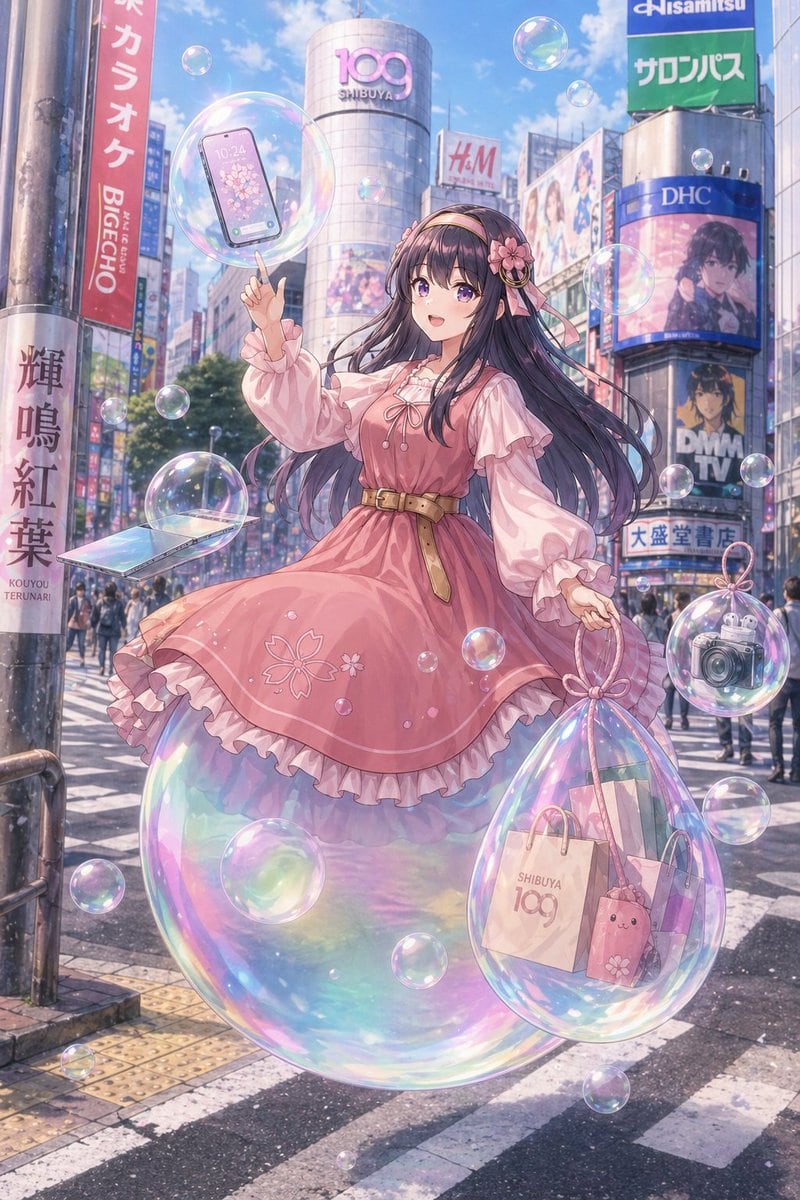
PromptA dreamy anime-style full-body illustration of a fashionable young woman standing in the middle of the Shibuya scramble crossing in Tokyo on a bright clear day, with the iconic cylindrical SHIBUYA 109 building centered in the background and recognizable commercial billboards surrounding it, including signs resembling H&M, DHC, DMM TV, Big Echo, and other dense Japanese city advertisements. She is the single main subject, posed gracefully as if floating or weightless, standing on top of one giant iridescent translucent soap bubble beneath her skirt. Her face is softly obscured and de-emphasized, while her long dark violet-black hair flows dramatically in the wind, with soft bangs and a pink floral headband accessory with ribbon on one side. She wears a sweet feminine spring outfit in pastel pink: a long-sleeved frilled blouse under a sleeveless pink dress with a ribbon tie at the chest, a tan belt at the waist, layered ruffles at the hem, and subtle sakura flower embroidery near the lower skirt. Her expression and body language should feel gentle, elegant, whimsical, and slightly magical. One hand is raised with her index finger pointing upward toward a floating bubble that contains 1 smartphone; her other hand holds a loop handle attached to a large transparent iridescent shopping-bag-like bubble containing 3 visible items: 1 SHIBUYA 109 paper shopping bag, 1 pink shopping bag or package, and 1 small pink bunny-faced pouch. Also include 1 separate floating smartphone/tablet-like device outside the bubbles near the lower left side, and 1 floating bubble on the lower right containing 1 compact camera. Surround her with many soap bubbles of different sizes, all highly reflective with rainbow highlights and delicate transparency, creating a soft sparkling atmosphere. The city scene should be busy but slightly softened, with pedestrians in the far background, crosswalk stripes in the foreground, and warm sunlight filtering through the urban canyon. Use polished high-detail anime illustration rendering, luminous pastel colors, glossy reflections, soft bloom, a romantic spring palette, and a magical everyday Tokyo aesthetic.
Prompt structure- Modelgpt-image-2
- Use caseecommerce-product-image
- Stylewatercolor, anime, photorealistic, luxury
- Aspect ratioFlexible
Best used for- Use caseecommerce-product-image
- Stylewatercolor, anime, photorealistic, luxury
- Recommended specs1:1, 4:5, 16:9, or 9:16
- ModelGPT Image 2
How to customizeUse this Dreamy Shibuya Bubble Girl prompt as a base. Replace the subject, product details, environment, lighting, brand colors, and output ratio while keeping the ecommerce-product-image intent and watercolor, anime, photorealistic, luxury direction stable.
Editable variables- SubjectReplace the product, person, scene, interface, or object being generated.
- Use caseKeep or rewrite the destination as ecommerce product image, ad creative, cover image, poster, or ecommerce hero.
- FrameChoose 1:1, 4:5, 16:9, or 9:16 based on the final placement.
- Brand cuesAdd colors, materials, props, text-safe space, and the platform where the image will be used.
Recommended specsChoose the frame for the destination first, then use 1K, 2K, or 4K based on output quality needs. Product images and posters usually benefit from higher resolution.
Pre-generation checklist- CheckSubject, lighting, composition, and frame are specific enough to review.
- CheckText-safe space is included when the image will carry a headline or ad copy.
- CheckResolution, credit cost, and final destination are checked before generation.
Why this prompt worksDreamy Shibuya Bubble Girl works because it starts from the image job, then controls subject, composition, lighting, style, and frame. It is best for ecommerce product image while keeping the watercolor, anime, photorealistic, luxury direction stable.
Common questions- Can I use it directly?Yes. Replace the subject, brand cues, and frame, then generate in Image2Studio.
- Which ratio should I use?Choose 1:1, 4:5, 16:9, or 9:16 based on the destination.