Image2Studio
Examples

gpt-image-2

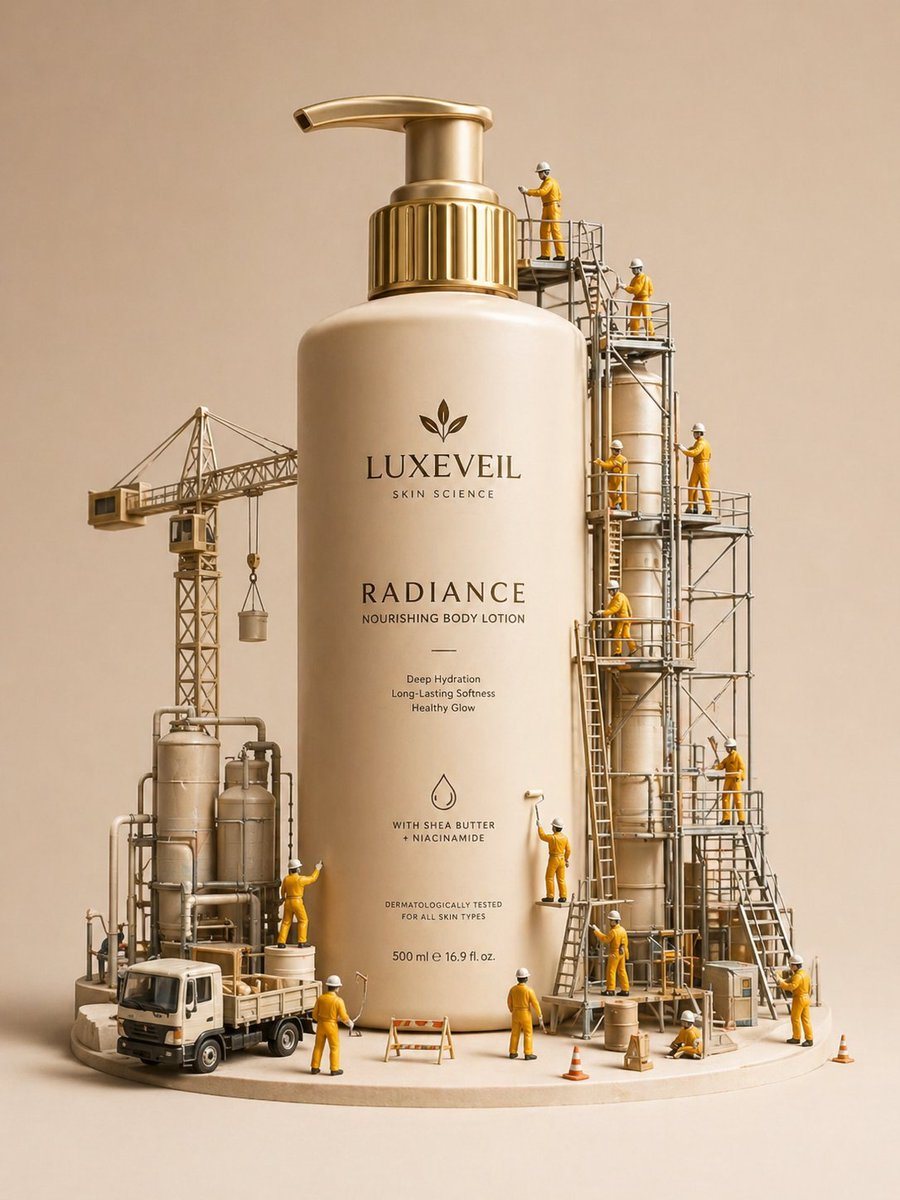
E-commerce Main Image - Miniature Diorama Skincare Advertisement

Product Hero Shot prompt for product photography, ready to edit and generate in Image2Studio.

Product Hero Shot prompt for product photography, ready to edit and generate in Image2Studio.
Prompt

A hyper-realistic miniature diorama product advertisement featuring an oversized luxury skincare pump bottle labeled "LUXEVEIL Skin Science – Radiance Nourishing Body Lotion" in cream/beige with a polished gold pump top, placed on a circular platform. Tiny figurine construction workers dressed in yellow coveralls and white hard hats swarm around the bottle climbing scaffolding, painting the bottle with rollers, operating a tower crane, working near industrial tanks and pipework, and unloading a miniature flatbed truck. The scene includes metal scaffolding structures, industrial silos, orange traffic cones, wooden barricades, and storage barrels. The overall color palette is warm beige, cream, gold, and mustard yellow. Studio photography style with soft diffused lighting, no shadows, clean beige background. The concept metaphorically shows workers "crafting" or "building" the perfect lotion. Tilt-shift miniature aesthetic, ultra-detailed, commercial product photography, 8K resolution, photorealistic CGI render.

Prompt structure
  • Modelgpt-image-2
  • Use caseproduct-hero-shot
  • Stylephotorealistic, isometric, luxury, 3d-render
  • Aspect ratioFlexible
Best used for
  • Use caseproduct-hero-shot
  • Stylephotorealistic, isometric, luxury, 3d-render
  • Recommended specs1:1, 4:5, 16:9, or 9:16
  • ModelGPT Image 2
How to customize

Use this E-commerce Main Image - Miniature Diorama Skincare Advertisement prompt as a base. Replace the subject, product details, environment, lighting, brand colors, and output ratio while keeping the product-hero-shot intent and photorealistic, isometric, luxury, 3d-render direction stable.

Editable variables
  • SubjectReplace the product, person, scene, interface, or object being generated.
  • Use caseKeep or rewrite the destination as product hero shot, ad creative, cover image, poster, or ecommerce hero.
  • FrameChoose 1:1, 4:5, 16:9, or 9:16 based on the final placement.
  • Brand cuesAdd colors, materials, props, text-safe space, and the platform where the image will be used.
Recommended specs

Choose the frame for the destination first, then use 1K, 2K, or 4K based on output quality needs. Product images and posters usually benefit from higher resolution.

Pre-generation checklist
  • CheckSubject, lighting, composition, and frame are specific enough to review.
  • CheckText-safe space is included when the image will carry a headline or ad copy.
  • CheckResolution, credit cost, and final destination are checked before generation.
Why this prompt works

E-commerce Main Image - Miniature Diorama Skincare Advertisement works because it starts from the image job, then controls subject, composition, lighting, style, and frame. It is best for product hero shot while keeping the photorealistic, isometric, luxury, 3d-render direction stable.

Common questions
  • Can I use it directly?Yes. Replace the subject, brand cues, and frame, then generate in Image2Studio.
  • Which ratio should I use?Choose 1:1, 4:5, 16:9, or 9:16 based on the destination.