
Image2Studio
Examples

gpt-image-2

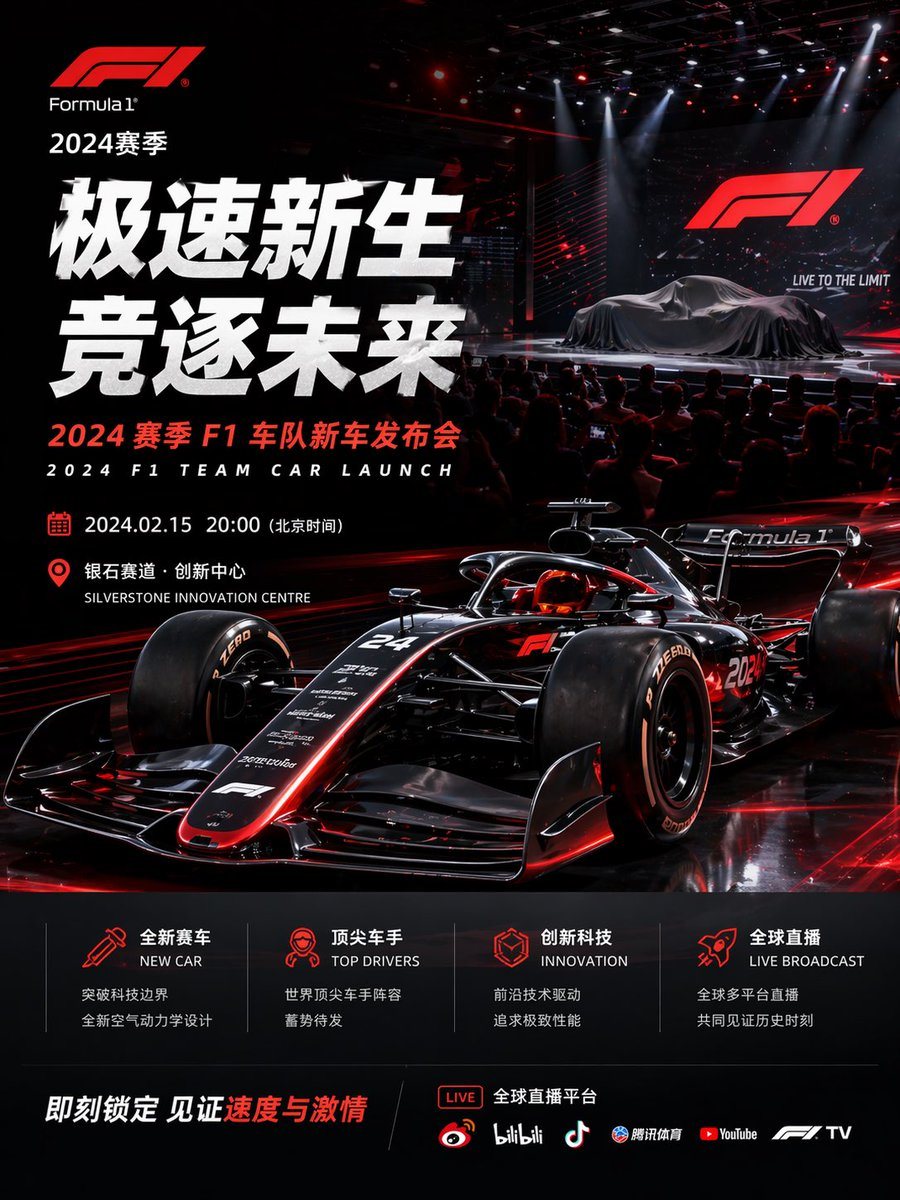
Formula 1 Event Poster

Ready-to-edit Formula 1 event poster image prompt.

Ready-to-edit Formula 1 event poster image prompt.
Prompt

{"type":"Formula 1 event poster","style":"ultra-polished cinematic sports marketing key visual, high-end launch event advertising, photorealistic 3D render look, glossy black and crimson red color scheme, dramatic contrast, premium motorsport branding","brand":{"logo":"Formula 1","season":"2024赛季"},"headline":{"primary":"极速新生","secondary":"竞逐未来","subheadline_cn":"2024 赛季 F1 车队新车发布会","subheadline_en":"2024 F1 TEAM CAR LAUNCH"},"scene":{"environment":"dark indoor presentation arena with a live audience in silhouette, concert-style stage lighting, red laser accents, overhead spotlights, reflective black floor, giant LED screen on the right showing the F1 logo and the slogan LIVE TO THE LIMIT","stage":{"count":2,"elements":["covered Formula 1 car on the stage under a dark silk drape","large presentation screen behind it"]},"foreground":{"main_subject":"a futuristic black Formula 1 race car with glowing red trim, low front three-quarter angle, aggressive aerodynamic bodywork, exposed suspension, halo cockpit, slick tires, reflective carbon-fiber surfaces, subtle white sponsor decals, car number 24 visible on the nose and 2024 on the side"}},"layout":{"composition":"portrait poster, dense left-aligned typography block, hero race car dominating the lower center and right, launch-stage vignette in the upper right, informational footer panels across the bottom","sections":[{"title":"event details","position":"left-middle","count":2,"labels":["2024.02.15 20:00(北京时间)","银石赛道·创新中心 / SILVERSTONE INNOVATION CENTRE"]},{"title":"feature icons","position":"bottom-center","count":4,"labels":["全新赛车 / NEW CAR","顶尖车手 / TOP DRIVERS","创新科技 / INNOVATION","全球直播 / LIVE BROADCAST"]},{"title":"streaming platforms","position":"bottom-right","count":6,"labels":["LIVE","微博","bilibili","抖音","腾讯体育","YouTube","F1 TV"]}],"footer":{"cta":"即刻锁定 见证速度与激情","accent_text":"速度与激情"}},"text_treatment":"oversized bold white Chinese headline on the left, compact red and white supporting text, bilingual Chinese-English labels, modern sans-serif typography, glowing red iconography, premium commercial poster spacing","lighting":"high-contrast red rim lighting on the car, glossy reflections, theatrical white spotlights from above, subtle haze and particles in the stage area","palette":{"count":4,"colors":["deep black","crimson red","bright white","dark charcoal gray"]}}

Prompt structure
  • Modelgpt-image-2
  • Use casecampaign-poster
  • Styleluxury, cinematic, 3d-render, photorealistic
  • Aspect ratioFlexible
Best used for
  • Use casecampaign-poster
  • Styleluxury, cinematic, 3d-render, photorealistic
  • Recommended specs1:1, 4:5, 16:9, or 9:16
  • ModelGPT Image 2
How to customize

Use this Formula 1 Event Poster prompt as a base. Replace the subject, product details, environment, lighting, brand colors, and output ratio while keeping the campaign-poster intent and luxury, cinematic, 3d-render, photorealistic direction stable.

Editable variables
  • SubjectReplace the product, person, scene, interface, or object being generated.
  • Use caseKeep or rewrite the destination as campaign poster, ad creative, cover image, poster, or ecommerce hero.
  • FrameChoose 1:1, 4:5, 16:9, or 9:16 based on the final placement.
  • Brand cuesAdd colors, materials, props, text-safe space, and the platform where the image will be used.
Recommended specs

Choose the frame for the destination first, then use 1K, 2K, or 4K based on output quality needs. Product images and posters usually benefit from higher resolution.

Pre-generation checklist
  • CheckSubject, lighting, composition, and frame are specific enough to review.
  • CheckText-safe space is included when the image will carry a headline or ad copy.
  • CheckResolution, credit cost, and final destination are checked before generation.
Why this prompt works

Formula 1 Event Poster works because it starts from the image job, then controls subject, composition, lighting, style, and frame. It is best for campaign poster while keeping the luxury, cinematic, 3d-render, photorealistic direction stable.

Common questions
  • Can I use it directly?Yes. Replace the subject, brand cues, and frame, then generate in Image2Studio.
  • Which ratio should I use?Choose 1:1, 4:5, 16:9, or 9:16 based on the destination.




