
Image2Studio
Examples

gpt-image-2

Vintage Hand-drawn Chinese Infographic On Textured Off-white Paper

A vintage hand-drawn Chinese infographic on textured off-white paper with torn deckled edges, printed in a limited two-ink palette of deep purple and bright cyan accents, with halftone sh...

A vintage hand-drawn Chinese infographic on textured off-white paper with torn deckled edges, printed in a limited two-ink palette of deep purple and bright cyan accents, with halftone sh...
Prompt

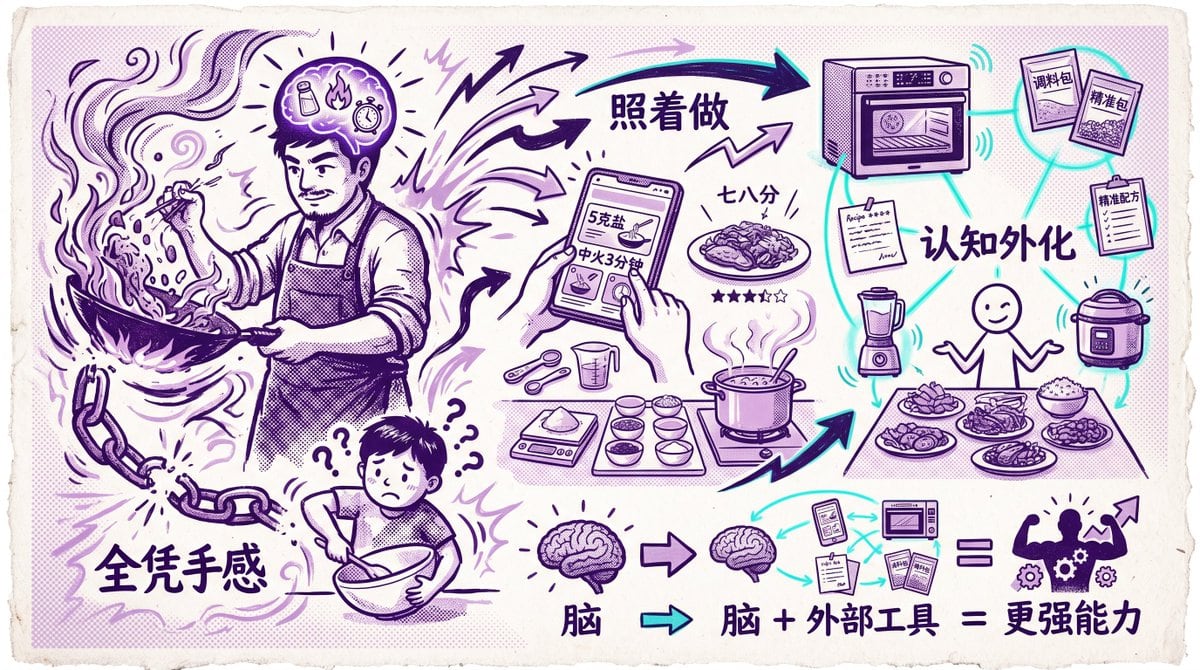
A vintage hand-drawn Chinese infographic on textured off-white paper with torn deckled edges, printed in a limited two-ink palette of deep purple and bright cyan accents, with halftone shading and poster-like comic line art. The composition compares intuitive manual cooking versus tool-assisted cooking and externalized cognition. On the left, a large adult cook in an apron is dramatically stir-frying in a wok with flames, flying ingredients, smoke swirls, and energetic motion lines; the cook’s face is obscured by a rectangular blur block. Above the head is a glowing brain-like thought bubble containing 3 small icons: a seasoning bottle, a flame, and a timer/clock, with rays radiating outward. At the lower left, a broken chain hangs beside large bold Chinese text reading “全凭手感”. Below the cook, a smaller confused person mixing in a bowl looks worried, surrounded by exactly 4 question marks. In the center, multiple thick arrows point from the cook’s intuition toward a structured cooking workflow. At upper center is large Chinese text “照着做”. Beneath it, a hand holds a smartphone recipe screen showing visible Chinese text including “5克盐” and “中火3分钟”, with a finger tapping the screen. Around the phone are measured cooking tools and ingredients: 2 measuring spoons, 1 measuring cup, 1 digital scale, and 6 small bowls arranged neatly, plus a pot on a stove with steam rising and a finished plated dish nearby. Near the plated dish is Chinese text “七八分” and a 5-star rating row with exactly 4 filled stars and 1 empty star. On the right, show a concept map of externalized cognition around a simple smiling stick-figure cook standing behind a table of food. The node network is connected with cyan lines and includes exactly 6 tool/info nodes: a smart oven at the top, 2 seasoning packets labeled “调料包” and “榨酱包”, 1 clipboard labeled “精准配方”, 1 blender, 1 rice cooker, and 1 recipe note sheet. Centered in this network is large Chinese text “认知外化”. The table in front of the figure holds exactly 5 dishes/bowls/plates of prepared food. Along the bottom is a simplified cognition equation: a large brain icon, then an arrow to a smaller brain icon, then a cluster of external tools/documents including a phone screen, a microwave-like appliance, and 3 paper/manual items, then an equals sign, then a muscular human silhouette with gears inside the torso and an upward arrow near the shoulder. Beneath or beside this equation is bold Chinese text “脑 + 外部工具 = 更强能力”, with the first “脑” also shown separately under the left brain icon. Use expressive sketched arrows, doodle lightning bolts, comic emphasis marks, and a balanced left-to-right flow that visually communicates the transition from pure instinct to repeatable systems and augmented ability.

Prompt structure
  • Modelgpt-image-2
  • Use caseapp-ui-mockup
  • Style3d-render, minimal
  • Aspect ratioFlexible
Best used for
  • Use caseapp-ui-mockup
  • Style3d-render, minimal
  • Recommended specs1:1, 4:5, 16:9, or 9:16
  • ModelGPT Image 2
How to customize

Use this Vintage Hand-drawn Chinese Infographic On Textured Off-white Paper prompt as a base. Replace the subject, product details, environment, lighting, brand colors, and output ratio while keeping the app-ui-mockup intent and 3d-render, minimal direction stable.

Editable variables
  • SubjectReplace the product, person, scene, interface, or object being generated.
  • Use caseKeep or rewrite the destination as app ui mockup, ad creative, cover image, poster, or ecommerce hero.
  • FrameChoose 1:1, 4:5, 16:9, or 9:16 based on the final placement.
  • Brand cuesAdd colors, materials, props, text-safe space, and the platform where the image will be used.
Recommended specs

Choose the frame for the destination first, then use 1K, 2K, or 4K based on output quality needs. Product images and posters usually benefit from higher resolution.

Pre-generation checklist
  • CheckSubject, lighting, composition, and frame are specific enough to review.
  • CheckText-safe space is included when the image will carry a headline or ad copy.
  • CheckResolution, credit cost, and final destination are checked before generation.
Why this prompt works

Vintage Hand-drawn Chinese Infographic On Textured Off-white Paper works because it starts from the image job, then controls subject, composition, lighting, style, and frame. It is best for app ui mockup while keeping the 3d-render, minimal direction stable.

Common questions
  • Can I use it directly?Yes. Replace the subject, brand cues, and frame, then generate in Image2Studio.
  • Which ratio should I use?Choose 1:1, 4:5, 16:9, or 9:16 based on the destination.




