Image2Studio
Prompts

gpt-image-2

Create A Square Infographic-style Illustration

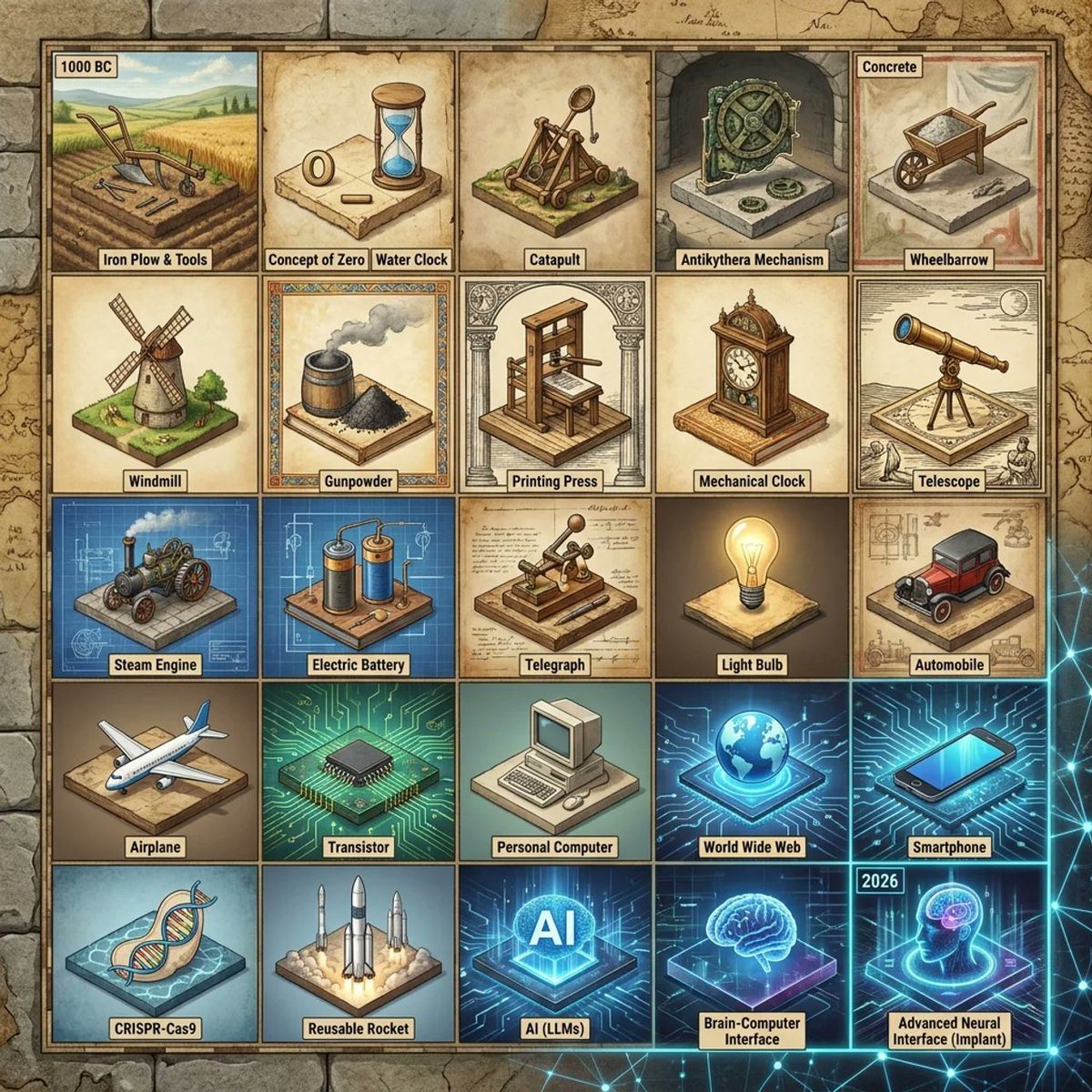
Create a square infographic-style illustration showing a 15×15 invention timeline grid rendered as a collection of miniature isometric dioramas on aged parchment tiles. The image should l...

Create a square infographic-style illustration showing a 15×15 invention timeline grid rendered as a collection of miniature isometric dioramas on aged parchment tiles. The image should l...
Prompt

Create a square infographic-style illustration showing a {argument name="grid size" default="15×15"} invention timeline grid rendered as a collection of miniature isometric dioramas on aged parchment tiles. The image should look like a curated historical poster that spans from {argument name="starting year" default="1000 BC"} to {argument name="ending year" default="2026"}, with one invention per tile and no repeats. Show the visible portion as a 5 by 5 section of the larger grid, for a total of 25 labeled tiles, arranged in neat rows and columns with thin dark borders. Every tile contains a unique world-changing invention depicted as a small handcrafted diorama with era-appropriate materials, colors, and background details. Use a warm antiquarian palette for ancient and medieval inventions, sepia technical-document tones for early modern inventions, and cooler neon-blue futuristic lighting for modern digital and biotech inventions. Surround the grid with an old-map border and subtle historical cartography textures, blending into faint modern network graphics near the bottom right. Label each visible tile with a small beige caption tag in bold black text. Include exactly these 25 visible inventions in reading order from top left to bottom right: 1) {argument name="first tile label" default="1000 BC"} tile showing an iron plow and simple hand tools in a farm field, captioned "Iron Plow & Tools"; 2) "Concept of Zero" shown as a parchment-like tile with a carved zero symbol and a blue hourglass; 3) "Water Clock" shown as a wooden water-timing device; 4) "Catapult" shown as a wooden siege engine; 5) "Antikythera Mechanism" shown as an intricate bronze gear device in a stone niche; 6) "Concrete" shown as a wheelbarrow filled with wet cement or mortar; 7) "Wheelbarrow" shown as a simple wooden one-wheel cart; 8) "Windmill" shown as a traditional mill on grassy ground; 9) "Gunpowder" shown as a barrel and a mound of black powder with smoke; 10) "Printing Press" shown as a wooden press framed by classical columns; 11) "Mechanical Clock" shown as an ornate standing clock; 12) "Telescope" shown as an early brass telescope on a tripod with sketch-like scientific notes; 13) "Steam Engine" shown on a blue blueprint-style tile with an early locomotive engine; 14) "Electric Battery" shown on a blueprint-like tile with two cylindrical battery cells and wiring; 15) "Telegraph" shown as a Morse telegraph key on technical paper; 16) "Light Bulb" shown glowing warmly on a neutral pedestal; 17) "Automobile" shown as an early red motorcar on a workshop-plan background; 18) "Airplane" shown as a commercial jet aircraft in miniature; 19) "Transistor" shown as a black microchip on a luminous circuit-board tile; 20) "Personal Computer" shown as a beige desktop computer with CRT monitor and keyboard; 21) "World Wide Web" shown as a glowing blue globe over digital circuitry; 22) "Smartphone" shown as a sleek modern phone on a neon-tech background; 23) "CRISPR-Cas9" shown as a DNA double helix in a biotech-blue display tile; 24) "Reusable Rocket" shown as several upright rockets launching with exhaust clouds; 25) "AI (LLMs)" shown as glowing large letters AI in a holographic tech cube; 26) "Brain-Computer Interface" shown as a glowing brain hologram on a blue platform; 27) "Advanced Neural Interface (Implant)" shown as a transparent human head profile with a glowing brain implant, with a small top label reading "2026". Keep the composition highly organized, poster-like, and visually dense, with each tile readable at a glance. Use slight isometric perspective, crisp linework, painterly shading, and polished editorial illustration quality. The overall feeling should combine museum poster, educational timeline, and imaginative historical-tech diorama art.

Prompt structure
  • Modelgpt-image-2
  • Use caseapp-ui-mockup
  • Stylecyberpunk, isometric, 3d-render, minimal
  • Aspect ratioFlexible
Best used for
  • Use caseapp-ui-mockup
  • Stylecyberpunk, isometric, 3d-render, minimal
  • Recommended specs1:1, 4:5, 16:9, or 9:16
  • ModelGPT Image 2
How to customize

Use this Create A Square Infographic-style Illustration prompt as a base. Replace the subject, product details, environment, lighting, brand colors, and output ratio while keeping the app-ui-mockup intent and cyberpunk, isometric, 3d-render, minimal direction stable.

Editable variables
  • SubjectReplace the product, person, scene, interface, or object being generated.
  • Use caseKeep or rewrite the destination as app ui mockup, ad creative, cover image, poster, or ecommerce hero.
  • FrameChoose 1:1, 4:5, 16:9, or 9:16 based on the final placement.
  • Brand cuesAdd colors, materials, props, text-safe space, and the platform where the image will be used.
Recommended specs

Choose the frame for the destination first, then use 1K, 2K, or 4K based on output quality needs. Product images and posters usually benefit from higher resolution.

Pre-generation checklist
  • CheckSubject, lighting, composition, and frame are specific enough to review.
  • CheckText-safe space is included when the image will carry a headline or ad copy.
  • CheckResolution, credit cost, and final destination are checked before generation.
Why this prompt works

Create A Square Infographic-style Illustration works because it starts from the image job, then controls subject, composition, lighting, style, and frame. It is best for app ui mockup while keeping the cyberpunk, isometric, 3d-render, minimal direction stable.

Common questions
  • Can I use it directly?Yes. Replace the subject, brand cues, and frame, then generate in Image2Studio.
  • Which ratio should I use?Choose 1:1, 4:5, 16:9, or 9:16 based on the destination.