
Image2Studio
Examples

gpt-image-2

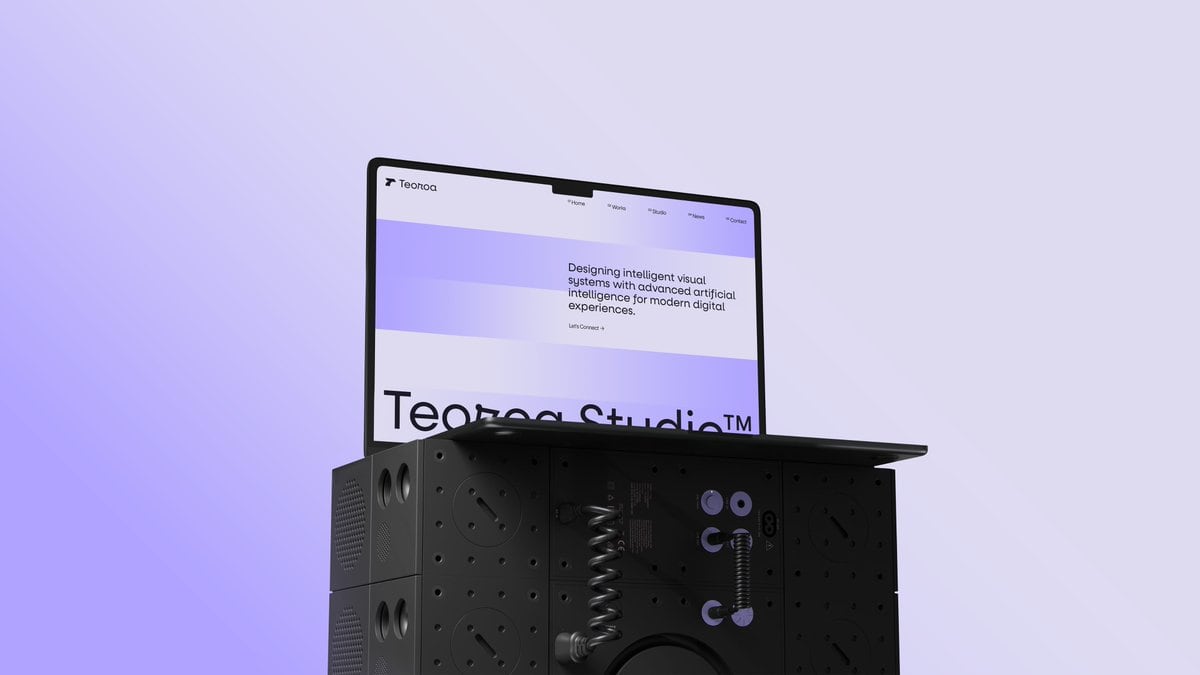
Minimalist 3D Studio Product Render Of An Open Laptop Resting On Top Of

A minimalist 3D studio product render of an open laptop resting on top of a modular matte-black industrial cube pedestal, centered slightly left against a clean pale lavender background w...

A minimalist 3D studio product render of an open laptop resting on top of a modular matte-black industrial cube pedestal, centered slightly left against a clean pale lavender background w...
Prompt

A minimalist 3D studio product render of an open laptop resting on top of a modular matte-black industrial cube pedestal, centered slightly left against a clean pale lavender background with a soft purple glow blooming from the lower left. The laptop is shown at a three-quarter angle facing right, with a thin black bezel and slim dark chassis, opened roughly 100 degrees. On the screen, display a minimalist web design portfolio homepage for {argument name="brand name" default="Teoroa"}, with a white interface and wide horizontal lavender gradient bands across the hero area. In the top left is a small abstract bird-like logo followed by the brand name, and across the top navigation are exactly 4 menu items: Home, Works, Studio, News, plus a separate Contact link at the far right. In the hero section, place the headline {argument name="headline text" default="Designing intelligent visual systems with advanced artificial intelligence for modern digital experiences."} in clean modern sans-serif black type on the upper right, with a tiny link beneath reading {argument name="cta text" default="Let's Connect →"}. Along the lower visible portion of the screen, show oversized cropped black typography reading {argument name="large title" default="Teoroo Studio™"}. The pedestal beneath the laptop is a stack of modular speaker-like metal cubes with perforations, circular ports, screws, recessed panels, and grille textures; the front center section is partially transparent glossy black, revealing internal mechanical details including 2 coiled spring elements, 3 lavender circular connector accents, and 2 small dangling cable-like hooks. Add subtle reflections, realistic studio lighting, soft shadows, and a premium futuristic industrial design aesthetic. Composition is sparse and elegant, with lots of negative space, high contrast between the black object and pastel background, and a polished art-directed tech campaign feel.

Prompt structure
  • Modelgpt-image-2
  • Use caseapp-ui-mockup
  • Styleminimal, 3d-render, luxury, photorealistic
  • Aspect ratioFlexible
Best used for
  • Use caseapp-ui-mockup
  • Styleminimal, 3d-render, luxury, photorealistic
  • Recommended specs1:1, 4:5, 16:9, or 9:16
  • ModelGPT Image 2
How to customize

Use this Minimalist 3D Studio Product Render Of An Open Laptop Resting On Top Of prompt as a base. Replace the subject, product details, environment, lighting, brand colors, and output ratio while keeping the app-ui-mockup intent and minimal, 3d-render, luxury, photorealistic direction stable.

Editable variables
  • SubjectReplace the product, person, scene, interface, or object being generated.
  • Use caseKeep or rewrite the destination as app ui mockup, ad creative, cover image, poster, or ecommerce hero.
  • FrameChoose 1:1, 4:5, 16:9, or 9:16 based on the final placement.
  • Brand cuesAdd colors, materials, props, text-safe space, and the platform where the image will be used.
Recommended specs

Choose the frame for the destination first, then use 1K, 2K, or 4K based on output quality needs. Product images and posters usually benefit from higher resolution.

Pre-generation checklist
  • CheckSubject, lighting, composition, and frame are specific enough to review.
  • CheckText-safe space is included when the image will carry a headline or ad copy.
  • CheckResolution, credit cost, and final destination are checked before generation.
Why this prompt works

Minimalist 3D Studio Product Render Of An Open Laptop Resting On Top Of works because it starts from the image job, then controls subject, composition, lighting, style, and frame. It is best for app ui mockup while keeping the minimal, 3d-render, luxury, photorealistic direction stable.

Common questions
  • Can I use it directly?Yes. Replace the subject, brand cues, and frame, then generate in Image2Studio.
  • Which ratio should I use?Choose 1:1, 4:5, 16:9, or 9:16 based on the destination.




