
Image2Studio
Examples

gpt-image-2

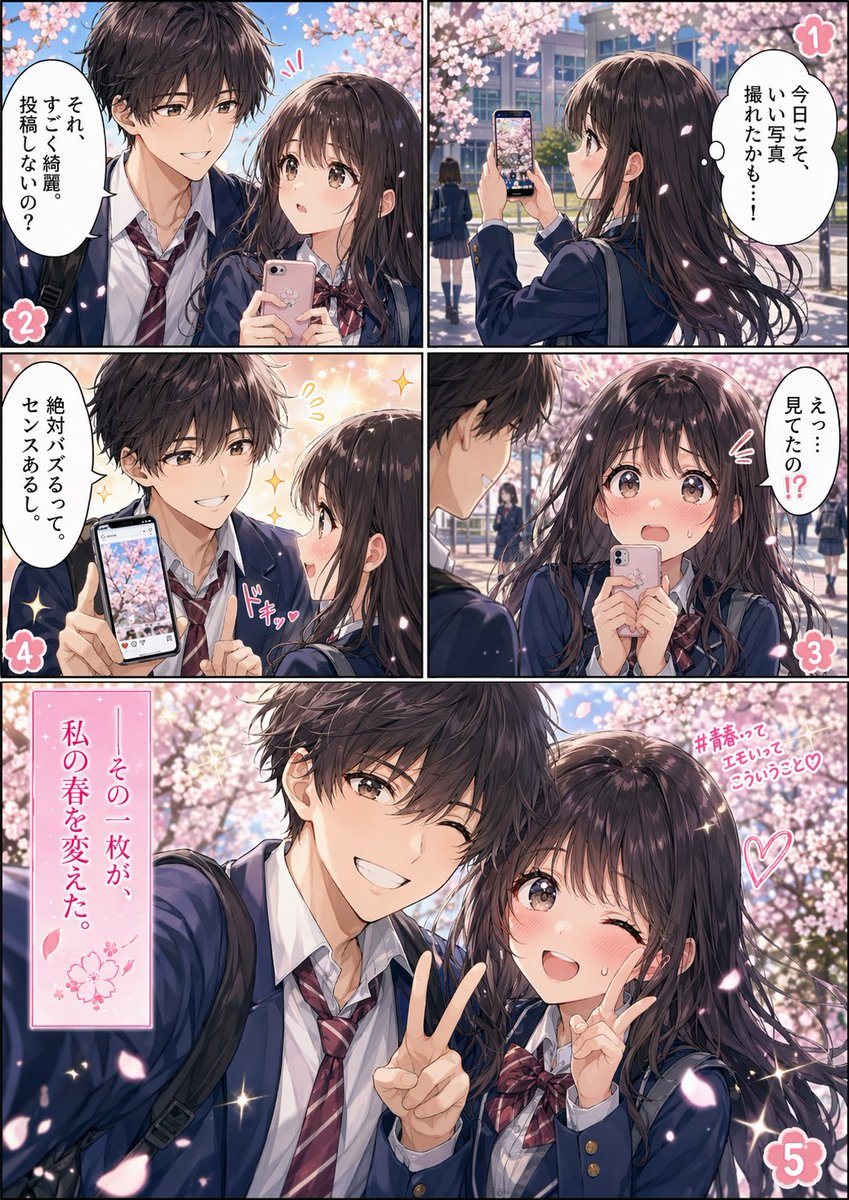
Full-color Shoujo Manga Page

Ready-to-edit full-color shoujo manga page image prompt.

Ready-to-edit full-color shoujo manga page image prompt.
Prompt

{"type":"full-color shoujo manga page","style":"romantic anime illustration, glossy polished coloring, soft spring light, sparkling highlights, delicate linework, cinematic school-romance mood","format":"single page comic with 5 numbered panels","setting":{"location":"Japanese high school campus walkway lined with cherry blossom trees","season":"spring sakura season","time":"daytime","atmosphere":"dreamy, youthful, sentimental, petals drifting through the air"},"characters":[{"role":"schoolgirl","appearance":"long dark brown hair with soft shine, large expressive eyes, slim build, navy school blazer, white shirt, red plaid ribbon bow, carrying a smartphone"},{"role":"schoolboy","appearance":"messy dark brown hair, slim build, navy school blazer, white shirt, loosened red striped tie, school bag over shoulder"}],"layout":{"sections":[{"title":"1","position":"top-right","count":1,"labels":["girl notices a photo opportunity under the cherry blossoms and holds up her phone to take a picture"]},{"title":"2","position":"top-left","count":1,"labels":["close two-shot selfie setup, the girl holds a pink smartphone while the boy praises how beautiful she looks and suggests posting it"]},{"title":"3","position":"middle-right","count":1,"labels":["the girl reacts in surprise and embarrassment, holding her phone close to her face while asking if he saw it"]},{"title":"4","position":"middle-left","count":1,"labels":["the boy confidently shows the phone screen with the cherry blossom photo and says it will definitely go viral because it has a strong sense of style"]},{"title":"5","position":"bottom full-width","count":1,"labels":["large romantic payoff shot of the two students posing together for a selfie beneath blooming sakura trees"]}],"centerpiece":"panel 5 is the largest panel spanning the full bottom width"},"props":{"count":4,"items":["pink smartphone in the girl's hand","smartphone screen displaying a cherry blossom photo","school bags","falling sakura petals"]},"text":{"speech_bubbles":["それ、すごく綺麗。投稿しないの?","今日こそ、いい写真、撮れたかも…!","えっ…見てたの!?","絶対バズるって。その、センスあるし。"],"caption_boxes":["その一枚が、私の春を変えた。"],"side_text":["#青春ってエモいってこういうこと♡"],"panel_numbers":["1","2","3","4","5"]},"composition":"Use black comic panel borders, 2 small panels across the top, 2 small panels across the middle, and 1 large wide panel at the bottom. Emphasize blush, shy romantic tension, fluttering petals, and sparkling shoujo effects. The final panel shows the boy extending his arm for a selfie while making a peace sign, and the girl standing close beside him also posing with a peace sign. Keep the background filled with soft-focus cherry blossoms and a school building in the distance.","color_palette":"pastel pink blossoms, navy uniforms, warm skin tones, bright spring blue sky, soft white sparkles","quality":"highly detailed, social-media-ready manga cover quality"}

Prompt structure
  • Modelgpt-image-2
  • Use caseapp-ui-mockup
  • Stylephotorealistic, anime, cinematic, editorial
  • Aspect ratioFlexible
Best used for
  • Use caseapp-ui-mockup
  • Stylephotorealistic, anime, cinematic, editorial
  • Recommended specs1:1, 4:5, 16:9, or 9:16
  • ModelGPT Image 2
How to customize

Use this Full-color Shoujo Manga Page prompt as a base. Replace the subject, product details, environment, lighting, brand colors, and output ratio while keeping the app-ui-mockup intent and photorealistic, anime, cinematic, editorial direction stable.

Editable variables
  • SubjectReplace the product, person, scene, interface, or object being generated.
  • Use caseKeep or rewrite the destination as app ui mockup, ad creative, cover image, poster, or ecommerce hero.
  • FrameChoose 1:1, 4:5, 16:9, or 9:16 based on the final placement.
  • Brand cuesAdd colors, materials, props, text-safe space, and the platform where the image will be used.
Recommended specs

Choose the frame for the destination first, then use 1K, 2K, or 4K based on output quality needs. Product images and posters usually benefit from higher resolution.

Pre-generation checklist
  • CheckSubject, lighting, composition, and frame are specific enough to review.
  • CheckText-safe space is included when the image will carry a headline or ad copy.
  • CheckResolution, credit cost, and final destination are checked before generation.
Why this prompt works

Full-color Shoujo Manga Page works because it starts from the image job, then controls subject, composition, lighting, style, and frame. It is best for app ui mockup while keeping the photorealistic, anime, cinematic, editorial direction stable.

Common questions
  • Can I use it directly?Yes. Replace the subject, brand cues, and frame, then generate in Image2Studio.
  • Which ratio should I use?Choose 1:1, 4:5, 16:9, or 9:16 based on the destination.




